1
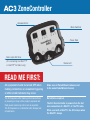
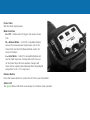
Power Dials
Sets the flash output power.
Mode Switches
0/ = OFF - flashes will not trigger. Set unused zones
to 0/.
M = Manual Mode - ControlTL compatible flashes
will use the manual power output value set on the
Power Dial. See the AC3 Manual Mode section for
more information.
A = Auto Mode - ControlTL compatible flashes will
use the Flash Exposure Compensation (FEC) as set
on the Power Dial. ISO and aperture changes will
track and be adjusted automatically. Nikon Speedlights
will perform CLS / i-TTL exposures.
Release Button
Press the release button to remove the AC3 from your transmitter.
Status LED
The green Status LED blinks occasionally to indicate normal operation.