1
Profiler
User Manual
4.5 Custom settings
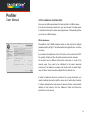
One of the key improvements of SpectraView Profiler 4 is the option
to save and load custom calibration settings. Such a set of calibration parameters contains the settings for „Color temperature“, „Tonal
response curve“ and „Luminance/contrast ratio“. By selecting a
complete set under Settings/Pre- sets, there is no need to select these
parameters separately. The ease of use of SpectraView Profiler has
been enhanced considerably.
There are several sets of „Calibration settings“ that come with SpectraView Profiler. They cover the most important workflow conditions and
have been compiled with the most care.
In case you should not find suitable settings for your needs, change the
parameters in the „Settings“ tab and save your custom settings under
„File -> Save calibration settings...“.
Here is an in depth explanation of the parameters:
47