1
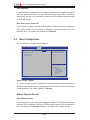
Chapter 4: AMI BIOS Power Technology Use the features below to select system power management settings. Select Energy Efficient to minimize power use. Select Custom to customize power use settings. The options are Disabled, Energy Efficient and Custom. When this item is set to Custom, the following items will display: EIST EIST (Enhanced Intel SpeedStep Technology) allows the system to automatically adjust processor voltage and core frequency in an effort to reduce power consumption and heat dissipation. Please refer to Intel’s web site for detailed information. The options are Disabled and Enabled. P-STATE Coordination This feature selects the type of coordination for the P-State of the processor. P-State is a processor operational state that reduces the processor's voltage and frequency. This makes the processor more energy efficient, resulting in further energy gains. The options are HW_ALL, SW_ALL and SW-ANY. CPU C3 Report Select Enabled for the CPU to report C3 (ACPI C2) state to the operating system. The options are Disabled and Enabled. CPU C6 Report Select Enabled for the CPU to report C6 (ACPI C3) state to the operating system. The options are Disabled and Enabled. Package C-State limit Select Auto for the AMI BIOS to automatically set the limit on the C-State package register. The options are C0, C1, C6, C7 and No Limit. Turbo Boost Technology TurboMode Select Enabled to allow processor cores to run faster than the frequency marked in the manufacture specifications. The options are Disabled and Enabled. Factory Long-Duration Power Limit This feature displays the power limit set by the manufacturer for long-term power use. Long-Duration Power Limit This feature displays the current limit setting for long-term power use. 4-7