1
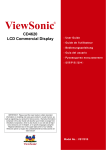
ViewSonic
™
CD4636
LCD Commercial Display
- User Guide
- Guide de l’utilisateur
- Guía del usuario
- Bedienungsanleitung
- Pyководство пользователя
- 使用手冊
Model No. : VS13512
Compliance Information
For U.S.A.
This device complies with part 15 of FCC Rules. Operation is subject to the following two
conditions: (1) this device may not cause harmful interference, and (2) this device must accept
any interference received, including interference that may cause undesired operation.
This equipment has been tested and found to comply with the limits for a Class B digital
device, pursuant to part 15 of the FCC Rules. These limits are designed to provide reasonable
protection against harmful interference in a residential installation.
This equipment generates, uses, and can radiate radio frequency energy, and if not installed
and used in accordance with the instructions, may cause harmful interference to radio
communications. However, there is no guarantee that interference will not occur in a particular
installation. If this equipment does cause harmful interference to radio or television reception,
which can be determined by turning the equipment off and on, the user is encouraged to try to
correct the interference by one or more of the following measures:
• Reorient or relocate the receiving antenna.
• Increase the separation between the equipment and receiver.
• Connect the equipment into an outlet on a circuit different from that to which the receiver is
connected.
• Consult the dealer or an experienced radio/TV technician for help.
Warning: You are cautioned that changes or modifications not expressly approved by the party
responsible for compliance could void your authority to operate the equipment.
For Canada
This Class B digital apparatus complies with Canadian ICES-003.
Cet appareil numérique de la classe B est conforme à la norme NMB-003 du Canada.
CE Conformity for European Countries
The device complies with the EMC Directive 2004/108/EC and Low Voltage Directive
2006/95/EC.
Following information is only for EU-member states:
The mark shown to the right is in compliance with the Waste Electrical and Electronic
Equipment Directive 2002/96/EC (WEEE).
The mark indicates the requirement NOT to dispose the equipment as unsorted
municipal waste, but use the return and collection systems according to local law.
If the batteries, accumulators and button cells included with this equipment, display
the chemical symbol Hg, Cd, or Pb, then it means that the battery has a heavy metal
content of more than 0.0005% Mercury or more than, 0.002% Cadmium, or more than
0.004% Lead.
ViewSonic CD4636
i
Important Safety Instructions
1. Read these instructions completely before using the equipment.
2. Keep these instructions in a safe place.
3. Heed all warnings.
4. Follow all instructions.
5. Do not use this equipment near water. Warning: To reduce the risk of fire or electric shock,
do not expose this apparatus to rain or moisture.
6. Do not block any ventilation openings. Install the equipment in accordance with the
manufacturer’s instructions.
7. Do not install near any heat sources such as radiators, heat registers, stoves, or other
devices (including amplifiers) that produce heat.
8. Do not attempt to circumvent the safety provisions of the polarized or grounding-type plug.
A polarized plug has two blades with one wider than the other. A grounding type plug has
two blades and a third grounding prong. The wide blade and the third prong are provided for
your safety. If the plug does not fit into your outlet, consult an electrician for replacement of
the outlet.
9. Protect the power cord from being tread upon or pinched, particularly at the plug, and the
point where if emerges from the equipment. Be sure that the power outlet is located near the
equipment so that it is easily accessible.
10.Only use attachments/accessories specified by the manufacturer.
11.Use only with the cart, stand, tripod, bracket, or table specified by the
manufacturer, or sold with the equipment. When a cart is used, use caution
when moving the cart/equipment combination to avoid injury from tipping over.
12.Unplug this equipment when it will be unused for long periods of time.
13.Refer all servicing to qualified service personnel. Service is required when the unit has been
damaged in any way, such as: if the power-supply cord or plug is damaged, if liquid is spilled
onto or objects fall into the unit, if the unit is exposed to rain or moisture, or if the unit does
not operate normally or has been dropped.
ViewSonic CD4636
ii
Declaration of RoHS Compliance
This product has been designed and manufactured in compliance with Directive 2002/95/
EC of the European Parliament and the Council on restriction of the use of certain hazardous
substances in electrical and electronic equipment (RoHS Directive) and is deemed to comply
with the maximum concentration values issued by the European Technical Adaptation
Committee (TAC) as shown below:
Substance
Proposed Maximum Concentration
Actual Concentration
Lead (Pb)
0,1%
< 0,1%
Mercury (Hg)
0,1%
< 0,1%
Cadmium (Cd)
0,01%
< 0,01%
Hexavalent Chromium (Cr6+)
0,1%
< 0,1%
Polybrominated biphenyls (PBB)
0,1%
< 0,1%
Polybrominated diphenyl ethers (PBDE)
0,1%
< 0,1%
Certain components of products as stated above are exempted under the Annex of the RoHS
Directives as noted below:
Examples of exempted components are:
1. Mercury in compact fluorescent lamps not exceeding 5 mg per lamp and in other lamps not
specifically mentioned in the Annex of RoHS Directive.
2. Lead in glass of cathode ray tubes, electronic components, fluorescent tubes, and electronic
ceramic parts (e.g. piezoelectronic devices).
3. Lead in high temperature type solders (i.e. lead-based alloys containing 85% by weight or
more lead).
4. Lead as an allotting element in steel containing up to 0.35% lead by weight, aluminium
containing up to 0.4% lead by weight and as a cooper alloy containing up to 4% lead by
weight.
ViewSonic CD4636
iii
Copyright Information
Copyright © ViewSonic® Corporation, 2010. All rights reserved.
ViewSonic®, the three birds logo, OnView®, ViewMatch™, and ViewMeter® are registered
trademarks of ViewSonic® Corporation.
Disclaimer: ViewSonic® Corporation shall not be liable for technical or editorial errors or
omissions contained herein; nor for incidental or consequential damages resulting from
furnishing this material, or the performance or use of this product.
In the interest of continuing product improvement, ViewSonic® Corporation reserves the right to
change product specifications without notice. Information in this document may change without
notice.
No part of this document may be copied, reproduced, or transmitted by any means, for any
purpose without prior written permission from ViewSonic® Corporation.
Product Registration
To meet your future needs, and to receive any additional product information as it becomes
available, please register your product on the Internet at: www.viewsonic.com.
For Your Records
Product Name:
Model Number:
Document Number:
Serial Number:
Purchase Date:
CD4636
ViewSonic LCD Commercial Display
VS13512
CD4636_UG_ENG Rev. 1A 08-24-10
Product disposal at end of product life
The lamp in this product contains mercury which can be dangerous to you and the environment.
Please use care and dispose of in accordance with local, state or federal laws.
ViewSonic respects the environment and is committed to working and living green.
Thank you for being part of Smarter, Greener Computing.
Please visit ViewSonic website to learn more.
1. USA: www.viewsonic.com/company/green/
2. Europe: www.viewsoniceurope.com/uk/support/recycling-information/
3. Taiwan: recycle.epa.gov.tw/recycle/index2.aspx
ViewSonic CD4636
iv
CONTENTS
———————————————————————————————————————————————
Package Contents ..........................................................................................................................1
Parts Name and Functions............................................................................................................2
Control Panel .............................................................................................................................................................2
Terminal Panel ...........................................................................................................................................................3
Remote Control .........................................................................................................................................................4
Operating Range for the Remote Control..................................................................................................................5
Handling the remote control ......................................................................................................................................5
Setup Procedure ............................................................................................................................6
Video wall design Guide................................................................................................................8
How to Mount and Attach Stand to the LCD Monitor ..................................................................9
Connectivity .................................................................................................................................12
Connectivity Diagram ..............................................................................................................................................12
Connecting to a Personal Computer .......................................................................................................................13
Connecting to a Digital Interface Equipment ...........................................................................................................14
Connecting to a DVD Player....................................................................................................................................15
Connecting to a Stereo Amplifier .............................................................................................................................16
Connecting to a display mounted PC ......................................................................................................................16
Basic Operation ...........................................................................................................................17
Power ON and OFF Modes .....................................................................................................................................17
Power Indicator........................................................................................................................................................18
Using Power Management ......................................................................................................................................18
Display Signal of Video Source Setting to [VIDEO].................................................................................................18
Picture Size..............................................................................................................................................................18
Smart Picture Mode.................................................................................................................................................19
Audio Source Switching...........................................................................................................................................19
Control Lock Mode ..................................................................................................................................................19
OSD Information......................................................................................................................................................19
OSD (On-Screen-Display) Controls ............................................................................................20
PICTURE .................................................................................................................................................................21
SCREEN..................................................................................................................................................................23
AUDIO .....................................................................................................................................................................25
PIP (PICTURE IN PICTURE) ..................................................................................................................................26
CONFIGURATION 1 ................................................................................................................................................27
CONFIGURATION 2 ................................................................................................................................................29
ADVANCED OPTION ..............................................................................................................................................30
NOTE.......................................................................................................................................................................33
Features ........................................................................................................................................35
Troubleshooting ...........................................................................................................................36
Specifications...............................................................................................................................38
ViewSonic CD4636
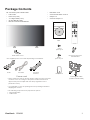
Package Contents
The LCD monitor pack* should include:
• LCD monitor
• Power cord (1.8 m)
•
•
•
•
•
•
•
VGA Signal Cable (1.8 m)
CD User Manual & QSG
Remote Control and AAA Batteries
Main switch cover
Screw for Main Switch cover x2
Clamper x 2
Screw for Clamper x 2
Xxxxxxxxxxxxx
x
xxxxxxxxxxxxx
xxxxxxxxxxxxx
xxxxxxx
CD User Manual &
QSG
Screw
(M3 x 5) x 2
Main switch cover
* The supplied power cord varies depending on destination.
For EU
For China
For North
America
Power cord
* Please make sure that for all other regions, apply a power cord that
conforms to the AC voltage of the power socket and has been
approved by and complies with the safety regulations of the
particular country.
Screw
(M4 x 10) x 2
Remote Control and
AAA Batteries
Clamper x 2
Video Signal Cable
(D-SUB to D-SUB Cable)
* You might like to save the package box and packing material for
shipping the monitor.
* The following components are prepared as options.
• External Speakers
• Table stand
ViewSonic CD4636
1
Parts Name and Functions
Control Panel
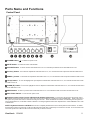
POWER button ( ) : To switch the power on/off.
MUTE button : To switch the audio mute ON/OFF.
SOURCE button : To set the function while OSD menu is on or to activate input selection menu while OSD menu is off.
off.
off.
PLUS (+) button : To increase the adjustment while OSD menu is on, or to increase the audio output level while the OSD menu is
MINUS (-) button : To decrease the adjustment while OSD menu is on, or to decrease the audio output level while the OSD menu is
UP (S) button : To move the highlight bar up to adjust the selected item while OSD menu is on, or to activate the OSD menu when
the OSD menu is off.
DOWN (T) button :To move the highlight bar down to adjust the selected item while OSD menu is on, or to activate the OSD menu
when the OSD menu is off.
MENU button : To return to previous menu while OSD menu is on or to activate the OSD menu when the OSD menu is off.
Main Power Switch : To turn the main power on/off.
Remote control sensor, Power indicator and ambient light sensor : To receive the IR signal from the remote control.
The indicator would show green when the LCD monitor is active and would turn red when the LCD is POWER OFF. While in the case of
the system is in power save mode, it would show both green and red. When SCHEDULE is enabled, it would blink green and glow red.
If the indicator blinks red , it tells that a failure is detected. The image brightness will be auto adjusted when “LIGHT SENSOR” set to “ON”
on OSD menu.
NOTE: Keyboard Control Lock Mode This function completely disables the access to all Keyboard Control functions. To enable
the keyboard control lock, press both of “S” and “T” buttons and hold down continuously for more than 3 seconds. To recover back to the
user mode, press both of “S” and “T” and hold continuously for three 3 seconds.
ViewSonic CD4636
2
Terminal Panel
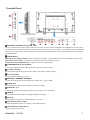
EXTERNAL CONTROL (mini D-Sub 9 pin)
This is for serial connection when multiple monitors are connected. To achieve remote management through RS232C commands (refer to
the RS232C remote control user manual), connect the RS232C OUT connector from a computer or from a different monitor to the RS232C
IN connector from your monitor. The same RS232C commands can be looped through by connecting the RS232C OUT of this monitor to
the next RS232C IN.
VIDEO IN/OUT
VIDEO IN connector (BNC and RCA): To input a composite video signal. Note that BNC and RCA are not available at the same time.
VIDEO OUT connector (BNC): To output the composite video signal from VIDEO IN connector.
S-VIDEO IN connector (MINI DIN 4 pin): To input the S-video (Y/C separate signal).
COMPONENT IN [Y, Pb, Pr] (BNC)
To connect an equipment such as a DVD player, HDTV device, or Laser disc player.
AC OUT connector
Bypass AC power output from AC IN connector. (Rating : 100~240Vac, 50-60Hz, 3A Max.)
AC IN connector
To connect with the supplied power cord.
EXTERNAL SPEAKER TERMINAL
To output the audio signal to external speakers from AUDIO IN 1, 2, 3 jack or HDMI.
AUDIO OUT
To output the audio signal from the AUDIO IN 1,2 and 3 jack or HDMI.
AUDIO IN 1, 2, 3
To input audio signal from external equipment such as a computer, VCR or DVD player.
HDMI IN
To input digital video/audio signals from a digital equipment or computer.
DVI-D IN
To input digital video signals from a digital equipment or computer.
VGA IN (mini D-Sub 15 pin)
To input analog RGB signals from a computer or other RGB equipment.
VGA OUT (mini D-Sub 15 pin)
To output the signal from VGA IN.
ViewSonic CD4636
3
Remote Control
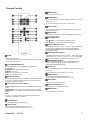
MENU button
To turn the OSD menu on/off.
DOWN button
To move the highlight bar down to adjust the selected item when
OSD menu is on.
To move the sub-picture down when in “PIP” mode.
INFO. button
To turn on/off the setting information displayed on the right-up
corner of the screen.
SIZE button
To select the picture size from [FULL], [NORMAL], [CUSTOM] ,
[DYNAM IC] and [REAL].
VOLUME button
VOL+ button: To increase the audio output level.
VOL- button;To decrease the audio output level
VIDEO SOURCE button
To activate input selection menu, and push “S” or “T” to select
input source from [HDMI], [DVI-D], [VGA],[COMPONENT],
[S-VIDEO] and [VIDEO], and then push “ENTER” to switch to
selected input source.
AUDIO SOURCE button
POWER button
To turn the power on/off.
If LED Power Indicator on the monitor is not lightening, then the
remote control will not work.
PICTURE MODE button
To select picture mode from [STANDARD], [CINEMA],
[VIVID], [SOFT]
STANDARD: for images (Factory setting)
CINEMA: for movies.
VIVID: for moving image such as Video
SOFT: for text based images
MONTION button
To start the MOTION setting in SCREEN SAVER OSD function.
If not OFF ,to expanded image slightly and moves 4 directions
(up,down,right,left) periodically
PIP (Picture In Picture) button
ON/OFF button: To turn PIP mode ON/OFF,and select different
mode.
SOURCE button: To select the input signal for the sub-picture.
SWEP button: To exchange between the main picture and subpicture.
Note:
The “PIP” and “POP” modes do not work if the screen size is
“CUSTOM” , “DYNAMIC” or “REAL”.
To activate audio selection menu, and push “S” or “T” to select
audio source from [AUDIO1], [AUDIO2], [AUDIO3] and [HDMI],
and then push “ENTER” to switch to selected audio source.
BRIGHTNESS button
To start the BRIGHTNESS setting in SCREEN SAVER OSD
function, and then push "▶" or "◀" button to adjust the
value[OFF][LOW][MIDDLE] [HIGH].
UP button
To move the highlight bar up to adjust the selected item when OSD
menu is on.
To move the sub-picture up when in “PIP” mode.
RIGHT button
To increase the adjustment with OSD menu.
To move the sub-picture right when in “PIP” mode.
EXIT button
To turn to the previous OSD menu.
AUTO SETUP button
To execute the AUTO ADJUST function.
MUTE button
To turn the mute function on/off.
ENTER button
To activate the setting with OSD menu.
LEFT button
To decrease the adjustment with OSD menu.
To move the sub-picture left when in “PIP” mode.
ViewSonic CD4636
4
Operating Range for the Remote
Control
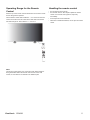
Point the top of the remote control towards the LCD monitor's remote
sensor during button operation.
Use the remote control within a distance ≤ 2 m/ 6.6 ft from the front
of the LCD monitor's remote control sensor and within a horizontal
and vertical angle 30° with a distance ≤ 2 m/ 6.6 ft.
Handling the remote control
*
*
*
*
Do not subject to strong shock.
Do not allow water or other liquid to splash the remote
control. If the remote control gets wet, wipe it dry
immediately.
Avoid exposure to heat and steam.
Other than to install the batteries, do not open the remote
control.
NOTE:
The remote control system may not function when direct sunlight or
strong illumination strikes the remote control sensor of the LCD
monitor, or when there is an obstacle in the radiation path.
ViewSonic CD4636
5
Setup Procedure
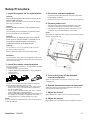
1. Install the system on the right location
CAUTION:
THE LCD MONITOR MUST BE MOVED OR INSTALLED BY
TWO OR MORE PERSONS.
Failure to follow this caution may result in injury and damage
when the LCD monitor falls.
CAUTION:
DO NOT ATTEMPT TO INSTALL THE LCD MONITOR BY
YOURSELF.
The LCD display must be installed by a qualified technician.
Contact your dealer for more information.
CAUTION:
DO NOT MOUNT OR OPERATE THE DISPLAY UPSIDE
DOWN, FACE UP OR FACE DOWN.IT’S POSSIBILITY TO
CLOCKWISE 90 DEGREES MOUNT. BUT DO NOT
COUNTERCLOCKWISE 90 DEGREES MOUNT.
3. Connect to external equipment
•
•
To protect the connected equipment, turn off the main power
before making connections.
Please refer to section “Connectivity” P.18~P.22 for operations.
4. Connect power cord
•
•
The power outlet socket should be installed as near to the
equipment as possible, and should be easily accessible.
Fully insert the prongs into the power outlet socket. A loose
connection may cause malfunctioning of the device.
NOTE:
Please refer to “Safety Operation” section of this manual for proper
selection of AC power cord.
CAUTION:
DO NOT INSTALL THE LCD MONITOR WHERE IT WILL BE
EXPOSED TO DIRECT SUNLIGHT.
Failure to follow this caution will result in display defects.
IMPORTANT:
Lay the protective sheet, which was wrapped around the LCD
monitor when it was packaged, beneath the LCD monitor so as
not to scratch the panel.
2. Install the remote control batteries
The remote control is powered by 1.5V AAA batteries. To install
or replace batteries:
1. Press and slide to open the cover.
2. Align the batteries according to the (+) and (–) indications
inside the case.
3. Replace the cover.
5. Turn on the power of the attached
external equipment
CAUTION:
Incorrect use of batteries can result in leaks or bursting. Be
careful especially about the following points.
• Place “AAA” batteries matching the + and - signs on each
battery to the + and - signs of the battery compartment.
• Do not mix battery types.
• Do not combine new batteries with used ones. It causes
shorter battery life or leakage of batteries.
• Remove dead batteries immediately to prevent battery liquid
from leaking into the battery compartment. Don't touch
exposed battery acid, it cause damage to your skin.
NOTE:
If you do not intend to use the Remote Control for a long period,
remove the batteries.
ViewSonic CD4636
When connected with a computer, turn on the power of the
computer first.
6. Operate the attached external equipment
Display the signal from the external equipment by selecting the
correct video and audio sources first.
7. Adjust the sound
Make adjustments to lower or to rise the volume as required.
8. Adjust the screen
Make adjustments to the display position or settings if required.
6
9. Adjust the image
Make adjustments to brightness or contrast if required.
10. Recommended Adjustment
To reduce the risk of “image persistence”, please adjust the following items based on the application being used.
“POWER SAVE”, “SCREEN SAVER“, “DATE AND TIME”.
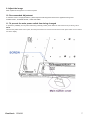
11. To prevent the main power switch from being changed
To prevent the possibility of main power switch being carelessly pushed, please attach the main switch cover (accessory) onto it.
NOTE:
With the main power switch cover in place, the main power switch can not be turned off. Remove main power switch cover in order to
turn off the display.
ViewSonic CD4636
7
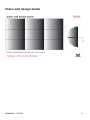
Video wall design Guide
ViewSonic CD4636
8
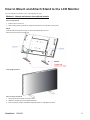
How to Mount and Attach Stand to the LCD Monitor
You can install the LCD monitor in one of the following two ways:
Method 1: Attach and remove the optional stands
How to install stands
1. Please turn the monitor off.
2. After inserting stand in guide block, fasten the thumbscrews on both sides of the monitor.
NOTE:
Install the table stand with the longer end of the stand directing to the front.
Stand is optional accessory (STND-014)
In the upright position
How to remove the stands
1. Spread the protective sheet on the flat surface.
2. Make the monitor lying on the protective sheet.
3. Remove screws using a screwdriver and place them in a safe place for reuse.
ViewSonic CD4636
9
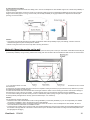
To avoid monitor from falling
Take measures to prevent the monitor from falling over in case of an earthquake or other disaster might occur to lessen the probability of
injury and damage.
As shown in the figure below, secure the monitor to a solid wall or pillar using rope (commercially available) strong enough to bear the
weight of the monitor( approx. 47.5 kg). Screw hooks (commercially available), of ring type rather than C-shaped screw hooks (with
opening), are recommended.
Caution:
y Though the recommended prevention from falling is intended to lessen the probability of injury and damage, it doesn’t assure its
effectiveness against any kind of earthquake or disaster.
y Before moving the monitor, remove the rope that is securing the monitor.
Method II: Mount the monitor on the wall
Before mounting the monitor to the wall, make sure that the system has been power-off and you have obtain a standard wall-mounting kit
(commercially available). Using mounting interface that comply with TÜV-GS and/or UL1678 standard in North America is recommended.
1. Lay a protective sheet on a table, which was wrapped around the monitor when it was packaged, beneath the surface as not to scratch
the screen face.
2. This device cannot be installed without the correct and complete mounting accessories (not provided in the box). Make sure you have
all related parts available for wall mounting.
3. Follow the instructions that come with the base mounting kit. Failure to follow correct mounting procedures could result in damage to
the equipment or injury to the user or installer. Product warranty does not cover damage caused by improper installation.
4. For the wall-mounting kit, use M6 mounting screws for 400x200 mm pattern (having a length 10 mm longer than the thickness of the
mounting bracket) and tighten them securely. (Recommended torque: 470 - 635N•cm).
Caution:
For preventing the monitor from falling.
y Install the monitor with metal brackets for wall or ceiling installation (commercially available) on your own responsibility. For detailed
procedures of installation, refer to the instructions of the metal brackets.
y To lessen the probability of injury and damage resulting from fall of the monitor in case of earthquake or other disaster, be sure to
consult the bracket manufacturer for installation location.
y To lessen the risk of falling of the monitor, thread commercially available rope (having a load capacity at least 1960N (200kgf)) through
the handles at the right and left of the monitor and secure the rope to the wall mount brackets or ceiling mount brackets.(Refer to the
first paragraph of this page.)
ViewSonic CD4636
10
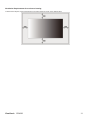
Ventilation Requirements for enclosure locating
To allow heat to disperse, leave space between surrounding objects as shown in the diagram below.
ViewSonic CD4636
11
Connectivity
Before making connections:
*
*
First turn off the power of all the attached equipments before make connections.
Refer to the user manual included in each separate piece of equipment.
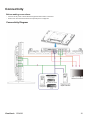
Connectivity Diagram
ViewSonic CD4636
12
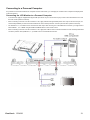
Connecting to a Personal Computer
As you finish the connection between the computer and the LCD monitor, you could play the contents in the computer and display them
on the LCD monitor.
Connecting the LCD Monitor to a Personal Computer
•
To achieve this, apply the supplied VGA signal cable (mini D-sub 15 pin to mini D-sub 15 pin) to make connection between a PC and
the LCD monitor (VGA IN connector).
•
When connecting more than one LCD monitors to a PC, apply another VGA signal cable (mini D-sub 15 pin to mini D-sub 15 pin; it’s
commercially available) to make connection between the LCD monitor(VGA OUT connector) and the other (VGA IN connector).
•
The AUDIO IN 1, 2, 3 or HDMI can be connected for audio input. After choosing one of the AUDIO IN connectors, you might need to
select AUDIO 1, 2, 3 or HDMI using the AUDIO SOURCE button on the remote control.
•
When connecting more than one LCD monitors to a PC, apply RCA cable to make connection between the LCD monitor(AUDIO OUT
connector) and the other (AUDIO IN 1, 2, 3). HDMI source is not suitable for this case.
ViewSonic CD4636
13
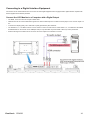
Connecting to a Digital Interface Equipment
Connections can be made between the LCD monitor and other digital equipment that is equipped with a digital interface compliant with
the DVI (Digital Visual Interface) standard.
Connect the LCD Monitor to a Computer with a Digital Output
•
The HDMI , DVI-D IN connector accepts a HDMI cable.
•
HDMI and DVI-D can receive HDMI video signals from either a HDMI output of for instance a DVD player or from a DVI-D output of a
PC.
•
To ensure the display quality, use a cable with a quality prescribed by DVI standards.
•
The AUDIO IN 1, 2, 3 or HDMI connector can be chosen to receive an audio source. Select AUDIO 1, 2, 3 or HDMI from the AUDIO
SOURCE button on the remote control. HDMI(for audio) is only selectable only when HDMI or DVI-D (for video) is selected.
•
Note that the signal of a HDMI / DVI-D connector cannot be output to the VGA OUT connector.
ViewSonic CD4636
14
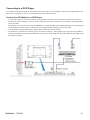
Connecting to a DVD Player
As you finish the connection between the DVD player and the LCD monitor, you could display the contents from the played DVD on the
LCD monitor. You might like to refer to your DVD player’s manual for further information.
Connect the LCD Monitor to a DVD Player
•
To achieve this, apply a 3x components cable (Y, Pb, Pr) with BNC connectors at one end and RCA connectors at the other end
between DVD player and display. In case you can only obtain RCA connectors on both ends you can use the in box available BNCto-RCA converters.
DVD player(Y, Pb, Pr Out) and LCD monitor (COMPONENT). You might need BNC-to-RCA adapters(including in the accessories) to
convert the BNC connectors to RCA connectors if you are using the separated signaling(Y, Pb, Pr) RCA cable.
•
If your DVD player supports HDMI signaling, apply a HDMI to HDMI cable for the connection.
•
The AUDIO IN 2 , 3 (both of RCA connector type) can be used for audio input. Select [AUDIO 1] (for 3.5φ phone jack), [AUDIO 2],
[AUDIO 3] Or [HDMI] from the AUDIO SOURCE button on the remote control. HDMI (for audio) is selectable only when HDMI or DVID (for video) is selected.
ViewSonic CD4636
15
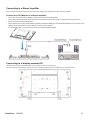
Connecting to a Stereo Amplifier
You can connect your stereo amplifier to your LCD monitor. Refer to your amplifier's manual for further information.
Connect the LCD Monitor to a Stereo Amplifier
•
Turn on the LCD monitor and the amplifier only after all connections have been finished.
•
Apply 2 RCA cables (audio left and right) to make connection between the amplifier (audio in) and the LCD monitor (audio out).
•
Do not reverse the audio left and right jacks.
•
For the preferred audio signal, select [AUIDO1], [AUDIO2], [AUDIO3] or [HDMI] from the AUDIO SOURCE button on the remote control.
HDMI(for audio) is selectable only when HDMI or DVI-D (for video) is selected.
•
The AUDIO OUT RCA connectors output sound from the selected AUDIO SOURCE.
Connecting to a display mounted PC
This monitor has an area in the backcover to mount a small form fact PC or set-top box.
You can connect your mounted PC to your LCD monitor. Use M4 mounting screws for 100x200 mm to fix your mount PC.
ViewSonic CD4636
16
Basic Operation
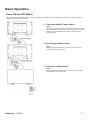
Power ON and OFF Modes
The LCD monitor power indicator will turn green while powered on and will turn red while powered off. The monitor can be powered on
or off using the following three options:
1. Pressing the Main Power Switch.
NOTE:
When the Main Power Switch is used to power off the LCD monitor,
the remote control, the power button and the indicator will not work.
Make sure to turn the Main Power Switch on before using the
other two options.
2. Pressing the power button.
NOTE:
Before pressing the power button, be sure to turn on the Main
Power button on the LCD monitor.
3. Using the remote control.
NOTE:
Before operating the remote control, be sure to turn on the Main
Power Switch on the LCD monitor.
ViewSonic CD4636
17
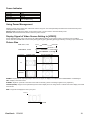
Power Indicator
Status
Green
Red
LED Off
Red Blinking
* See troubleshooting
Power ON
Power Standby
Power OFF
Diagnosis
(Detecting failure)
Using Power Management
Please turn off the LCD monitor when it will not be used for long time. This could potentially increase the life and decrease the power
consumption of the LCD monitor.
Standby mode: Push the power button on the remote control or on the monitor to enter the standby mode.
Power Off: Push the Main Power Switch to enter the power off mode.
Display Signal of Video Source Setting to [VIDEO]
Use the SOURCE button on the front panel or the VIDEO SOURCE button on the remote control to set video source to [VIDEO].
Use the COLOR SYSTEM OSD menu to select [AUTO], [NTSC], [PAL], [SECAM], [PAL60], [4.43NTSC], according to your video format.
Picture Size
HDMI, DVI-D, VGA
FULL
NORMAL
COMPONENT, VIDEO
FULL
NORMAL
CUSTOM
REAL
REAL
Signal Type
NORMAL SIZE
4:3
DYNAMIC
CUSTOM
Recommended Size
NORMAL
DYNAMIC
FULL
Squeeze
NORMAL: Display with the input signal aspect ratio from PC signal, or display in 4:3 aspect ratio at COMPONENT or VIDEO signal.
FULL: Display in the entire screen.
DYNAMIC: Expand 4:3 pictures to the entire screen with non-linearity. (Some round image might be cut by expansion.)
CUSTOM (ZOOM): Images can be expanded beyond the active display area. The image which is outside of the active display area would
not be shown.
REAL: Image will be displayed for one by one pixel.
ZOOM
ZOOM
ViewSonic CD4636
18
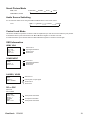
Smart Picture Mode
HDMI, VGA
STANDARD
CINEMA
VIVID
SOFT
COMPONENT, VIDEO
Audio Source Switching
You can select the audio source using the AUDIO SOURCE button on the remote control.
HDMI
HDMI
AUDIO1
AUDIO2
AUDIO3
Control Lock Mode
This function disables the operation o buttons so that the adjustments you make are not active when they are pressed.
To disable the buttons, press and hold down the S and T buttons together for at least 3 seconds.
To enable the buttons, press and hold down the S and T buttons together for at least 3 seconds again.
OSD Information
HDMI, VGA
VGA
1024 x 768
48kHz 60Hz
AUDIO : 1
SIZE : FULL
Video Source
Input signal Information
Audio Source
Picture Size
COMPONENT
COMPONENT
1080P
AUDIO : 2
SIZE : FULL
Video Source
Input signal Information
Audio Source
Picture Size
S-VIDEO, VIDEO
S-VIDEO
NTSC
AUDIO :3
SIZE : NORMAL
Video Source
Color System of Input Signal
Audio Source
Picture Size
PIP or POP
Main:VGA
Sub:S-VIDEO
VGA
1024 x 768
48kHz 60Hz
AUDIO : 1
S-VIDEO
NTSC
SIZE : FULL
ViewSonic CD4636
Main picture Information
Sub picture Information
Main picture Information
19
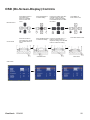
OSD (On-Screen-Display) Controls
Remote Control
Control Panel
Press MENU button to
open Main menu.
Press UP or DOWN
button to select submenu.
Press EXIT button to
open Main menu. Press
UP or DOWN button to
select.
UP or DOWN button
Press ENTER button
to enable setting.
Press UP or DOWN, and LEFT
or RIGHT button to select
function, or adjust the setting.
Press ENTER button to enable
the setting.
Press SOURCE button Press UP or DOWN, and + or to enable the setting.
button to select function, or
adjust the setting. Press ENTER
button to enable the setting.
SOURCE button
“+” “-” button
Press MENU or
EXIT button to exit.
Press EXIT button to exit.
EXIT button
OSD screen
ViewSonic CD4636
20
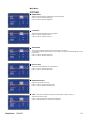
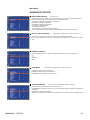
Main-Menu
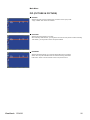
PICTURE
BRIGHTNESS
Adjusts the overall image and background screen brightness.
Press ▶ button to increase brightness.
Press ◀ button to decrease brightness.
CONTRAST
Adjusts the image brightness for the input signal.
Press ▶ button to increase contrast.
Press ◀ button to decrease contrast.
SHARPNESS
This function is digitally capable to keep crisp images at any timing.
It is adjustable to get a distinct image or a soft one as you prefer and set independently for each
picture mode.
Press ▶ button to increase sharpness.
Press ◀ button to decrease sharpness.
BLACK LEVEL
Adjusts the image brightness for the background.
Press ▶ button to increase black level.
Press ◀ button to decrease black level.
NOISE REDUCTION
Adjusts the noise reduction level.
Press ▶ button to increase reduction level.
Press ◀ button to decrease reduction level.
TINT* : INPUT HDMI , (HDMI INPUT MODE-HD), COMPONENT, S-VIDEO, VIDEO only
Adjusts the tint of the screen.
Press ▶ button the flesh tone color becomes greenish.
Press ◀ button the flesh tone color becomes purplish.
ViewSonic CD4636
21
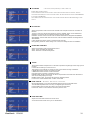
COLOR
* : INPUT HDMI , DVI-D(INPUT MODE-HD), COMPONENT, S-VIDEO, VIDEO only
Adjusts the color of the screen.
Press ▶ button to increase color depth.
Press ◀ button to decrease color depth.
COLOR TEMPERATURE
Is used to adjust the color temperature.
The image becomes reddish as the color temperature decreases, and becomes bluish as the color
temperature increases.
COLOR CONTROL
The color levels of red, green, and blue are adjusted by the color bars.
R: Red, G: Green, B: Blue
LIGHT SENSOR
Select “ON” to enable the ambient light sensor. The image brightness will be auto adjusted
when ambient light changed.
DYNAMIC CONTRAST
Select “ON” to enable the dynamic conctrast mode. Can enhancement the image of high
contrast ratio.
PICTURE RESET
Selecting Picture reset allows you to reset all OSD settings about PICTURE setting.
Select “Yes” and press “ENTER” button to restore to factory preset data.
Press “EXIT” button to cancel and then return to the previous menu.
ViewSonic CD4636
22
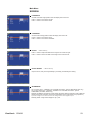
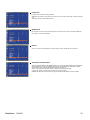
Main-Menu
SCREEN
H POSITION
Controls Horizontal Image position within the display area of the LCD.
Press ▶ button to move screen to right.
Press ◀ button to move screen to left.
V POSITION
Controls Vertical Image position within the display area of the LCD.
Press ▶ button to move screen to UP.
Press ◀ button to move screen to DOWN.
CLOCK
* : INPUT VGA only
Press ▶ button to expand the width of the image on the screen the right.
Press ◀ button to narrow the width of the image on the screen the left.
CLOCK PHASE
* : INPUT VGA only
Improves focus, clarity and image stability by increasing or decreasing this setting.
ZOOM MODE
You can select “FULL”, “NORMAL” and “CUSTOM” and “REAL”. (INPUT HDMI,DVI-D,VGA only)
You can also select “FULL”,“NORMAL” “DYNAMIC” and “CUSTOM” and “REAL”. (INPUT
COMPONENT, S-VIDEO, VIDEO only)
Selecting “DYNAMIC” will make the screen display panoramic with the expansion of the middle and
outside of the screen changed. (The upper and the bottom of the image will be cut by expansion.)
Dynamic image is the same as FULL size image when HDTV signal is input.
Selecting “REAL” image will be displayed 1 by 1 pixel.
ViewSonic CD4636
23
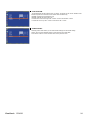
CUSTOM ZOOM
“CUSTOM ZOOM” will be selected when you select “CUSTOM” on the screen “ZOOM” mode.
ZOOM: expands the horizontal and the vertical size simultaneously.
HZOOM: expands the horizontal size only.
VZOOM: expands the vertical size only.
H POSITION: moves to the right with + button. moves to the left with – button.
V POSITION: moves up with + button. moves down with – button.
SCREEN RESET
Selecting Screen reset allows you to reset all OSD settings from PICTURE setting.
Select “Yes” and press “ENTER” button to restore the factory preset data.
Press “EXIT” button to cancel and then return to the previous menu.
ViewSonic CD4636
24
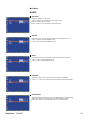
Main-Menu
AUDIO
BALANCE
Adjusts the balance of L/R volume.
Press ▶ button to move the stereo sound image to right.
Sound of the left side will be small.
Press ◀ button to move the stereo sound image to left.
TREBLE
This feature helps you to accentuate or reduce the high frequency sound.
Press ▶ button to increase TREBLE sound.
Press ◀ button to decrease TREBLE sound.
BASS
This feature helps you to accentuate or reduce the low frequency sound.
Press ▶ button to increase BASS sound.
Press ◀ button to decrease BASS sound.
SPEAKER
This feature helps you to cut the internal or the external loudspeaker.
Press ▶ or ◀ button to exchanges the internal and the external loudspeaker.
AUDIO RESET
Selecting Audio reset allows you to reset all OSD settings from AUDIO setting.
Select “YES” and press “ENTER” button to restore the factory preset.
Press “EXIT” button to cancel and then return to the previous menu.
ViewSonic CD4636
25
Main-Menu
PIP (PICTURE IN PICTURE)
PIP SIZE
Selecting the size of picture inserted at the “Picture-in-Picture” (PIP) mode.
“Large”, “Middle” and “Small” are available.
PIP AUDIO
Selecting the sound source in PIP mode.
When selecting “MAIN AUDIO”, you will get the sound for the main picture and when selecting
“PIP AUDIO”, you will get the sound for the picture instead.
PIP RESET
Selecting PIP Reset allows you to reset all OSD settings from PIP setting.
Select “Yes” and press “ENTER” button to restore the factory preset data.
Press “EXIT” button to cancel and then return to the previous menu.
ViewSonic CD4636
26
Main-Menu
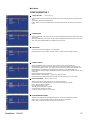
CONFIGURATION 1
AUTO ADJUST
* : INPUT VGA only
Press "ENTER" button to automatically adjust screen size, horizontal position, vertical position,
clock,
clock phase, white level and black level.
Press " EXIT " button to cancel execution AUTO ADJUST and then will return to the previous
menu.
POWER SAVE
Selecting RGB "ON", the monitor will go to power management mode when HDMI, DVI-D,VGA,
sync is lost.
Selecting VIDEO "ON", the monitor will go to power management mode after about 10 minutes
delay from when COMPONENT and VIDEO input signal is lost.
LANGUAGE
OSD control menus are available in nine languages.
(English, German, French, Italian, Spanish, Polish, Turkish, Russian, Simple Chinese)
SCREEN SAVER
Select "SCREEN SAVER" functions to reduce the risk of the "image persistence".
COOLING FAN: The cooling fan will be auto-turned on and off according to temperature of
monitor when selected “AUTO”. The cooling fan will be turned on always when selected “ON”.
BRIGHTNESS: The brightness is decreased when selected " High, Middel and Low ".
PIXEL MOTION: Image is slightly expanded and moves 4 directions (UP, DOWN, RIGHT, LEFT)
periodically
(Need setting the time for movement).
Movement area is approximately +/- 5pixel from original position;
Please locate the important information such as text within 90% area of screen image.
COLOR SYSTEM
* : INPUT S-VIDEO, AV only
Selecting the Color System depends on your input video format.
AUTO: NTSC, PAL, SECAM, PAL60 or 4.43 NTSC is automatically selected.
NTSC: Specific selection of NTSC.
PAL: Specific selection of PAL.
SECAM: Specific selection of SECAM.
PAL-60: Specific selection of PAL60.
4.43NTSC: Specific selection of 4.43 NTSC.
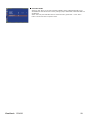
CONFIGURATION RESET
Selecting the CONFIGURATION RESET allows you to reset all configuration settings.
Select "Yes" and press "ENTER" button to restore the factory preset data.
Press " EXIT " button to cancel and return the previous menu.
ViewSonic CD4636
27
FACTORY RESET
Selecting "YES" allows you to reset PICTURE, SCREEN, AUDIO, CONFIGURATION1,2 and
ADVANCED OPTION will be back to factory settings (except LANGUAGE, DATE AND TIME and
SCHEDULE).
Select "YES" and press "ENTER" button to restore the factory preset data. Press " EXIT "
button to cancel and return the previous menu.
ViewSonic CD4636
28
Main-Menu
CONFIGURATION 2
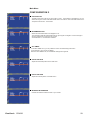
OSD TURN OFF
The OSD control menu will stay on as long as it is used. In the OSD Turn Off submenu, you can
select how long the monitor waits after the last touch of a button to shut off the OSD control menu.
The preset choices are 5 -120 seconds.
INFORMATION OSD
Selects the information OSD to be displayed or not.
The information OSD will be displayed when the input signal is changed or a source change or
warning message like no-signal or out-of range.
A time between 1 to 10 seconds is available.
OFF TIMER
In the OFF TIMER menu, you can preset the monitor to automatically power down.
A time between 1 to 24 hours is available.
When the OFF TIMER is set, the SCHEDULE settings will be ignored.
OSD H POSITION
Adjusts the horizontal position of the OSD menu.
OSD V POSITION
Adjusts the vertical position of the OSD menu.
MONITOR INFORMATION
Indicates the model and serial number of your monitor.
ViewSonic CD4636
29
Main-Menu
ADVANCED OPTION
INPUT RESOLUTION
* : INPUT VGA only
This feature makes the display controlling the source in order to match display capabilities by
choice or automatically. You can select one of the following timings:
(1)1024x768, 1280x768, 1360x768 and 1366x768.
(2) 640x480, 720x480 and 852x480
(3) 800x600, 1064x600 and 720x576
(4) 1400x1050 and 1864x1050
(5) 720x400 and 640x400
AUTO: Determines the resolution automatically.
The setting you select becomes effective when POWER is turned OFF and ON again.
BLACK LEVEL EXPANSION
* : INPUT HDMI, DVI-D(MODE-HD), S-VIDEO, VIDEO only
Selects a level of black expansion from “OFF”,”LOW”, “MIDDLE” and “HIGH”.
In case of go under the black cut-off level, please adjust the “Black level” in moderation on OSD
menu.
GAMMA SELECTION
Selects a display gamma. It refers to the brightness performance curve of signal input.
2.2
2.4
S gamma
Native
SCAN MODE
* : INPUT HDMI, DVI-D(MODE-HD), S-VIDEO, VIDEO only
Changes the display area of the image.
OVERSCAN: Set to display area about 95%
UNDERSCAN: Set to display area about 100%
SCAN CONVERSION
* : INPUT HDMI, DVI-D(MODE-HD), S-VIDEO, VIDEO only
Selects IP (Interlace to Progressive) converter function.
PROGRESSIVE: Enable the IP function, to convert interlace signal to progressive. Normally use
this setting.
INTERLACE*: Disable the IP function.
*NOTE: This mode is better suited for motion pictures, but it increases chance of image retention.
ViewSonic CD4636
30
FILM MODE
* : INPUT HDMI, DVI-D(MODE-HD), S-VIDEO, VIDEO only
Selects Film mode function.
AUTO: Enable the Film mode function. This mode is better suited for movies, which is
converted 24 Frames/sec source to DVD Video. We recommend to select “PROGRESSIVE”
in “SCAN CONVERSION”.
OFF: Disable the Film mode function. This mode is better suited for Broadcasting or VCR
source.
IR CONTROL
Selects the operation mode of the remote controller when multiple monitors are connected via
RS232C.
The item in this menu will become effective by pressing “ENTER” button on the selected item.
NORMAL: The monitor will be controlled normally by remote controller.
PRIMARY: The first monitor of those multi-connected via RS232C is designated as PRIMARY.
SECONDARY: monitors other than the first one multi-connected via RS232C are designated as
SECONDARY.
LOCK: Disable the monitor control by infrared remote controller.
Keep pressing “DISPLAY” button during 5 sec or more, this setting will return to “NORMAL”.
KEYBOARD CONTROL
Selects the operation mode of the keyboard control.
Select “LOCK” to disable the keyboard.
Select “UNLOCK” to enable the keyboard.
TILING
TILING demonstrates multiple screens. This feature provides a single large screen using up to 25
monitors.
It will be able to divide up to 5 each H and V.
This requires you to feed the PC output into each of the monitors through a distributor.
H MONITORS: Select number of horizontal monitors.
V MONITORS: Select number of vertical monitors.
POSITION: Select a position to expand the screen.
FRAME COMP: Works in tandem with TILING to compensate for the width of the tile bezels in
order to accurately display the image.
ENABLE: Select “YES”, the monitor will expand the selected position.
PIP and STILL will be disabled when “TILING” is activated.
HEAT STATUS * : D i s c l a m e r :
Heat sensor is indicative.
HEAT STATUS allows you to watch the thermal status at any time via the OSD menu.
The indicated temperature has a accuracy of 3 degrees (plus and minus).
Press “ENTER” button to enter the submenu to monitor the heat status.
Press “EXIT” button to cancel and then return the previous menu.
DATE AND TIME
Adjusts the current date and time for internal clock.
You should set this function when you use “SCHEDULE”.
ViewSonic CD4636
31
SCHEDULE
Programs the monitor's working schedule.
Schedules the power on and power off by using hour and a day of the week. Also sets the input
port.
This OSD can't be removed except EXIT.
MONITOR ID
ID numbers for remote control are assigned to monitors that are multi-connected via RS232C.
ID numbers 1 to 26 are selectable.
DDC/CI
Use to turn ON or OFF the DDC/CI communication function. Select ON for normal use.
ADVANCED OPTION RESET
Selecting ADVANCED OPTION RESET allows you to reset all OSD settings from ADVANCED
OPTION settings, except for GAMMA SELECTION, DATE AND TIME, SCHEDULE, HDMI
INPUT MODE, DVI-D INPUT MODE,MONITOR ID, and DDC/CI.
Select “YES” and press “ENTER” button to restore the factory preset data.
Press “EXIT” button to cancel and then return the previous menu.
GAMMA SELECTION is reset when carrying out the PICTURE RESET in the PICTURE.
ViewSonic CD4636
32
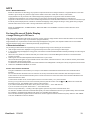
NOTE
NOTE 1: IMAGE PERSISTENCE
Please be aware that LCD Technology may experience a phenomena known as Image Persistence. Image Persistence occurs when
residual or “ghost” image of a previous image remains visible on the screen. Unlike CRT monitors, LCD monitors’
image persistence is not permanent, but constant images being displayed for a long period of time should be avoided.
To alleviate image persistence, turn off the monitor for as long as the previous image was displayed. For example, if an
image was on the monitor for one hour and a residual image remains, the monitor should be turned off for one hour to erase the image.
As with all personal display devices, ViewSnoic recommends displaying moving images and using a moving panel saving at regular
intervals whenever the screen is idle or turning off the monitor when not in use.
Please set “POWER SAVE”, “SCREEN SAVER”, “DATE AND TIME” and “SCHEDULE” functions to further reduce the risk of
Image persistence.
For long life use of Public Display
< Image Sticking of LCD Panel >
When LCD panel is operated continuously for long hours, a trace of electric charge remains near the electrode inside LCD, and residual
or “ghost” image of previous image may be observed. (Image Persistence)
Image Persistence is not permanent, but when fixed image is displayed for long period, ionic impurities inside LCD are accumulated
along the displayed image, and it is observed permanently. (Image Sticking)
< Recommendations >
For preventing the fast transition to Image Sticking, and for longer life usage of LCD, following are recommended.
1. Static images should not be displayed for long period. Always use a short cycle to change to other images.
2. In case a fixed image is displayed for a long period, it is advised to activate the MOTION feature that will periodically move the image in
four directions
3.
4.
5.
When not in use, please turn off the monitor with your remote control, or use Power Management Function or use the Schedule
Function of monitor.
Reducing the environmental temperature will increase the life of your monitor.
When Protection board (glass, acryl) is installed over the LCD surface, enclosed into the box / wall, or stack the monitor, please utilize
the temperature sensors inside monitor.
To reduce the environmental temperature, the monitor should be set Low Brightness or Cooling Fan “ON” by using Screen sever Function.
Please use "SCREEN SAVER Mode" of monitor.
NOTE 2: HOW TO SETUP SCHEDULE
Using the “SCHEDULE” function allows you to set up to seven different scheduled time intervals when the LCD Monitor will be
activated.
You can select the time the monitor turns on and turns off, the day of week the monitor is activated, and which input source the
monitor will use for each scheduled activation period. A check mark in the box next to the number of the schedule indicates that the
selected schedule is in effect.
To select which schedule to set, use the up/down arrows to move the number (1 to 7) of the schedule.
Use the (▶) and (◀) buttons to move the cursor horizontally within the particular schedule. Use the (
) and (
) buttons to increase time
and select input port. The “ENTER” button is used to make a selection.
If you create a schedule but do not want to use a power on time, select “--” in the “ON” time slot.
If you do not want to use a power off time select “--” in the OFF time slot.
If there is no input selected (“--” showing in the input spot) the input from the previous schedule will be used.
The selection of EVERY DAY within a schedule takes priority over other schedules that are set up to operate weekly. When schedules
are overlapping, scheduled Power ON time has priority over scheduled Power OFF time.
If there are two schedules programmed for the same time, then the highest numbered schedule has priority. When the “OFF TIMER”
is set, the “SCHEDULE” function is disabled.
ViewSonic CD4636
33
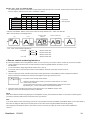
NOTE 3: “PIP”, “POP” and “SIDE BY SIDE”
The following table shows the combination of signal inputs under which the “PIP” and “POP” modes function. These modes do not
function, however, when the screen size is “CUSTOM” or “REAL”.
MAIN
SUB
HDMI
DVI-D
VGA
COMPONENT
S-VIDEO
VIDEO
HDMI
±
±
±
±
{
{
DVI-D
±
±
±
±
{
{
{: Supported
VGA
±
±
±
±
{
{
±: Not supported
COMPONENT
±
±
±
±
{
{
S-VIDEO
{
{
{
{
±
±
VIDEO
{
{
{
{
±
±
Press the “PIP ON/OFF” buttons on the remote control to change between “PIP”, “POP” and “SIDE BY
SIDE” mode as shown in the diagram below.
PIP
SIDE BY SIDE
ASPECT
POP
SIDE BY SIDE FULL
OFF
“PIP”, “POP” mode resolution (Reference)
PIP SIZE
POP SIZE
SMALL
: 450 dots X 338 dots
MIDDLE
: 675 dots X 450 dots
LARGE
: 900 dots X 675 dots
: 450 dots X 338 dots
< Remote control numbering function >
By connecting multiple monitors using RS232C cables, you can control any one monitor or all the monitors by one remote controller.
1. Assign arbitrary ID number to each of multi-connected monitors using MONITOR ID. ID numbers 1 to 26
are selectable.
It is recommended to assign sequential ID numbers from 1 and up.
2. The remote control mode of the first monitor is set to PRIMARY and those of the other monitors are set to
SECONDARY.
3. When you direct the remote controller at the remote control signal sensor of the PRIMARY monitor and press the DISPLAY
button on the remote controller, the ID selection OSD appears at the upper left of the screen.
ID number of the currently viewed monitor
Select the ID number of the monitor you want to control using the ▶/◀ button
on the remote controller.
The ID of the monitor you want to control is displayed at the upper left of its screen.
By selecting ALL, you can control all the multi-connected monitors.
4. Direct the remote controller at the remote control signal sensor of the PRIMARY monitor. OSD
appears on the monitor having the ID number you selected.
NOTE:
When the ID selection OSD is being displayed on the PRIMARY monitor, press the DISPLAY button on the remote controller again to
cancel the ID selection OSD and then control the monitor you selected.
HINT:
If you set the remote control mode wrongly and remote control operation becomes unavailable, press MENU button on the control panel of
the monitor to display the OSD screen and change the remote control mode using ADVANCED OPTION. By pressing
and holding down the DISPLAY button on the remote control for 5 seconds or longer, the remote control mode is initialized to
NORMAL.
ViewSonic CD4636
34
Features
Slim bezel
A slim bezel design adds a stylish look to a public display to nicely blend in most environments. Furthermore this design is ideal for
tiled matrix video walls.
Zoom function for tiled matrix
The internal zoom function enables easy implementation of a video wall matrix, without the need for expensive external equipment.
Capable of a vidiwall of 25 displays by dividing up to 5 displays each horizontally and vertically.
High brightness
Allows daylight viewing even in large public environments with high ambient light conditions due to its 450 nits high brightness
professional panel.
Network controllability: RS232C
Network controllability allows user to control and adjust monitors remotely through RS232C protocol.
Smart insert
Professional PC's are part of most public signage installations. Quite often they add additional depth to the public display and a lot
of cable clutter. This public display contains a Smart insert in the backcover that will fit many professional small form factor PC's. In
addition it offers provisions for efficient cable management.
SmartPower
The backlight intensity can be controlled and pre-set by the system to reduce the power consumption by up to 50%, which saves
substantially on energy costs.
Advanced anti image sticking
Static images left on-screen for extended periods of time may leave a "ghost image" or image sticking effect on LCD displays.
Although image sticking in LCD displays is not permanent, you want to prevent this to happen, especially in locations where
content is shown 24/7.
Compliant with RoHS standards
Viewsonic designs and produces display products in compliance with strict Restriction of Hazardous Substances (RoHS) standards
that restrict lead and other toxic substances that can harm the environment.
Automatic Long Cable Compensation:
Automatic long cable compensation prevents image quality degradation (color shift and dull signals) caused by long cable lengths.
ViewSonic CD4636
35
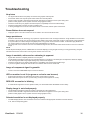
Troubleshooting
No picture
•
•
•
•
•
•
The signal cable should be completely connected to the graphics card/computer.
Front Power Switch and computer power switch should be in the ON position.
Check to make sure that a supported mode has been selected on the graphics card or system being used.
(Please consult graphics card or system manual to change graphics mode.)
Check the monitor and your graphics card with respect to compatibility and recommended settings.
Check the signal cable connector for bent or pushed-in pins.
If nothing is displayed on the screen when HDCP device is connected, reset the power of the device.
Power Button does not respond
•
Unplug the power cord of the monitor from the AC outlet to turn off and reset the monitor.
Image persistence
•
Please be aware that LCD Technology may experience a phenomenon known as Image Persistence. Image Persistence occurs when
a residual or “ghost” image of a previous image remains visible on the screen. Unlike CRT monitors, LCD monitors’ image persistence
is not permanent, but constant images being displayed for a long period of time should be avoided. To alleviate image persistence,
turn off the monitor for as long as the previous image was displayed. For example,
if an image was on the monitor for one hour and a residual image remains, the monitor should be turned off for one hour to erase the
image.
NOTE:
As with all personal display devices, VIEWSONIC recommends displaying moving images and using a moving panel saving at regular
intervals whenever the screen is idle or turning off the monitor when not in use.
Image is unstable, unfocused or swimming is apparent
•
•
•
•
Signal cable should be completely attached to the computer.
Use the OSD Image Adjust controls to focus and adjust display by increasing or decreasing the fine adjustment. When the display
mode is changed, the OSD Image Adjust settings may need to be re-adjusted.
Check the monitor and your graphics with respect to compatibility and recommended signal timings.
If your text is garbled, change the video mode to non-interlace and use 60 Hz refresh rate.
Image of component signal is greenish
•
Check to see if the COMPONENT input connector is selected.
LED on monitor is not lit (no green or red color can be seen)
•
•
Power Switch should be in the ON position and power cord should be connected.
Make certain the computer is not in a power-saving mode (touch the keyboard or mouse).
RED LED on monitor is blinking
•
A certain failure might have occurred, please contact your nearest authorized VIEWSONIC service facility.
Display image is not sized properly
•
•
Use the OSD Image Adjust controls to increase or decrease the coarse adjustment.
Check to make sure that a supported mode has been selected on the graphics card or system being used.
(Please consult graphics card or system manual to change graphics mode.)
Selected resolution is not displayed properly
•
Use OSD Display Mode to enter Information menu and confirm that the appropriate resolution has been selected.
If not, select corresponding option.
ViewSonic CD4636
36
No Sound
•
•
•
Check to see if speaker cable is properly connected.
Check to see if mute is activated.
Check to see if volume is set at minimum.
Remote Control does not work
•
•
•
Check the Remote Control’s batteries status.
Check if batteries are inserted correctly.
Check if the Remote Control is pointing at the monitor’s remote sensor.
“SCHEDULE” / “OFF TIMER” function is not working properly
•
•
The “SCHEDULE” function will be ignored when the “OFF TIMER” is set.
If the “OFF TIMER” function is enabled and the power to the LCD monitor is turned off if the power supply is interrupted unexpectedly,
then the “OFF TIMER” will be reset.
Stripe Noise
Either light vertical or horizontal stripes may appear, depending on the specific display pattern. This is no product fault or degradation.
“NO SIGNAL” is displayed on the screen
Image may not be displayed right after HDCP device is connected.
ViewSonic CD4636
37
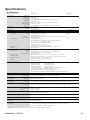
Specifications
Specifications
product Specifications
Analog Input
LCD Module
Diagonal:
Pixel Pitch:
Resolution:
Color:
Brightness:
Contrast Ratio:
Response time:
View Angle:
Frequency
Horizontal:
Vertical:
Pixel Clock
Viewable Size
Input Signal
PC-Input:
Digital Input
46" / 116.8 cm
0.7455 mm
1366 x 768 dots
16.7 million colors (depending on video card used)
450 cd/m2 (typ.)
4500:1 (typ.) , 3,000:1(min), 16000:1(Dynamic CR)
8 ms (typ. G to G)
Up and Down 178°, Left and Right 178° (typ.) @CR>10
31.0 – 92.0 kHz
50.0 - 85.0 Hz
13.5 -165.0 MHz
25.0 -165.0 MHz
1018.353 x 572.544mm / 40.1 x 22.5 inches
Video:
Sync:
Input-terminal:
VIDEO Input:
AUDIO Input:
RS232C:
Output Signal
PC-Output:
In:
VIDEO Output:
AUDIO Output:
Speaker Output:
RS232C:
Analog RGB Video: 0.7 Vp-p
TMDS
Input impedance 75 ohm
Separate HV sync: TTL level (Pos./Neg.),Input Impedance 2.2K ohm
15 Pin Mini D-sub
HDMI
Composite: 1.0 Vp-p
Input impedance 75ohm BNC and RCA-PINJACK-INPUT
Y/C Y: 1 Vp-p C: 0.286 Vp-p Input
Impedance 75 ohm S-TERMINAL-INPUT
Component: 1.0 / 0.7 Vp-p
Input Impedance 75 ohm BNC-INPUT
RCA PIN-JACK L/R INPUT x 2, STEREO Mini Jack INPUT x 1
9 Pin Mini D-sub
Video: Analog RGB Video: 0.7 Vp-p with 75 ohm terminated
Sync: Separate HV sync: TTL level (Pos./Neg.)
Output-terminal: 15 Pin Mini D-sub
BNC-OUTPUT x 1, Composite 1.0 Vp-p with 75 ohm terminated
RCA PIN-JACK L/R OUTPUT x 1, 0.15 Vrms with 47k ohm terminated
Internal Speaker
5 W + 5 W (8 ohm)
External Speaker Jack 7 W + 7 W (8 ohm)
Out: 9 Pin Mini D-sub
Resolutions Supported
640 x 480 at 60 Hz
800 x 600 at 60Hz
1024 x 768 at 60Hz
1280 x 720 at 60Hz
1280 x 768 at 60Hz
1360 x 768 at 60Hz
1600 x 1200 at 60 Hz
1366x768 at 60Hz *
1920x1080 at 60Hz**
1900x1200 (reduced Blanking only)
*recommand resolution for display individual
** recommand resolution for video wall application
NTSC,PAL,SECAM,4.43NTSC,PAL60 DVD:480i,480p, 576i,720p,1080i,1080p
Power Supply
Power Consumption
Power Save:
2~3.5 A @115 - 230 V AC, 50 / 60 Hz
Typically 232 W
Less than 1W (Power button off or main power switch off.)
Operational
Environment
Temperature:
Humidity:
Landscape: 0 - 40 °C / 41-104 °F, Portrait : 5 - 35 °C / 41 - 95 °F
85 % (non-condensation)
Storage
Environment
Temperature:
Humidity:
-20 - 60 °C / -4 - 140 °F
10 - 90% (Without condensation)/90%-3.5%x(Temp-40°C) regarding over 40°C
Dimension
Weight
Net without stand:
Net with stand::
1025.25 mm (W) x 579.84 mm (H) x 120.83mm (D) / 40.36" (W) x 22.83" (H) x 4.76" (D)
1025.25 mm (W) x634.97 mm (H) x 405 mm (D) / 40.36" (W) x 25" (H) x 15.95" (D)
Net without stand:
Net with stand:
Gross:
52.9lbs / 24 kg
56.8 lbs / 25.8 kg
70 lbs / 31.8kg
Wall mounting interface
12 Holes (100mm pitches)
Optional Multi-purpose Fix Mount
Complied Regulatory and Guidelines
CE,FCC,UL/cUL
Power Management
Support VESA DPMS convention
Plug & Play
VESA DDC2B, DDC/CI
Accessories
User's Manual, Power Cord, VGA Cable, Remote Controller, AAA Battery x 2,
Clamper x 2 (To prevent from falling), Screw for Main switch cover x2,
Screw for CLAMPER x 2, Main switch cover.
Note: Technical specifications are subject to change without notice.
ViewSonic CD4636
38
Customer Support
For technical support or product service, see the table below or contact your reseller.
NOTE: You will need the product serial number.
T = Telephone
F = FAX
Email
Australia/New Zealand www.viewsonic.com.au
AUS= 1800 880 818
NZ= 0800 008 822
[email protected]
Canada
www.viewsonic.com
T (Toll-Free)= 1-866-463-4775
T (Toll)= 1-424-233-2533
F= 1-909-468-3757
[email protected]
Europe
www.viewsoniceurope.com
www.viewsoniceurope.com/uk/Support/Calldesk.htm
Hong Kong
www.hk.viewsonic.com
T= 852 3102 2900
[email protected]
India
www.in.viewsonic.com
T= 1800 11 9999
[email protected]
Ireland (Eire)
www.viewsoniceurope.com/uk/
www.viewsoniceurope.com/uk/
support/call-desk/
[email protected]
Korea
www.kr.viewsonic.com
T= 080 333 2131
[email protected]
Latin America
(Argentina)
www.viewsonic.com/la/
T= 0800-4441185
[email protected]
Latin America (Chile)
www.viewsonic.com/la/
T= 1230-020-7975
[email protected]
Latin America
(Columbia)
www.viewsonic.com/la/
T= 01800-9-157235
[email protected]
Latin America (Mexico) www.viewsonic.com/la/
T= 001-8882328722
[email protected]
Country/Region
Website
Renta y Datos, 29 SUR 721, COL. LA PAZ, 72160 PUEBLA, PUE. Tel: 01.222.891.55.77 CON 10 LINEAS
Electroser, Av Reforma No. 403Gx39 y 41, 97000 Mérida, Yucatán. Tel: 01.999.925.19.16
Other places please refer to http://www.viewsonic.com/la/soporte/index.htm#Mexico
Latin America (Peru)
www.viewsonic.com/la/
T= 0800-54565
[email protected]
Macau
www.hk.viewsonic.com
T= 853 2870 0303
[email protected]
Middle East
ap.viewsonic.com/me/
Contact your reseller
[email protected]
Puerto Rico & Virgin
Islands
www.viewsonic.com
T= 1-800-688-6688 (English)
T= 1-866-379-1304 (Spanish)
F= 1-909-468-3757
[email protected]
[email protected]
Singapore/Malaysia/
Thailand
www.ap.viewsonic.com
T= 65 6461 6044
[email protected]
South Africa
ap.viewsonic.com/za/
Contact your reseller
[email protected]
United Kingdom
www.viewsoniceurope.com/uk/
www.viewsoniceurope.com/uk/
support/call-desk/
[email protected]
United States
www.viewsonic.com
T (Toll-Free)= 1-800-688-6688
T (Toll)= 1-424-233-2530
F= 1-909-468-3757
[email protected]
ViewSonic CD4636
39
Limited Warranty
VIEWSONIC® LCD Commercial Display
What the warranty covers:
ViewSonic warrants its products to be free from defects in material and workmanship, under normal
use, during the warranty period. If a product proves to be defective in material or workmanship during
the warranty period, ViewSonic will, at its sole option, repair or replace the product with a like product.
Replacement product or parts may include remanufactured or refurbished parts or components.
How long the warranty is effective:
ViewSonic LCD Commercial Displays are warranted for 3 years for all parts excluding the light source
and 3 years for labor from the date of the first customer purchase.
Who the warranty protects:
This warranty is valid only for the first consumer purchaser.
What the warranty does not cover:
1. Any product on which the serial number has been defaced, modified or removed.
2. Damage, deterioration or malfunction resulting from:
a.Accident, misuse, neglect, fire, water, lightning, or other acts of nature, unauthorized product
modification, or failure to follow instructions supplied with the product.
b. Any damage of the product due to shipment.
c. Removal or installation of the product.
d. Causes external to the product, such as electrical power fluctuations or failure.
e. Use of supplies or parts not meeting ViewSonic’s specifications.
f. Normal wear and tear.
g. Any other cause which does not relate to a product defect.
3. Any product exhibiting a condition commonly known as “image burn-in” which results when a static
image is displayed on the product for an extended period of time.
4. Removal, installation, one way transportation, insurance, and set-up service charges.
How to get service:
1. For information about receiving service under warranty, contact ViewSonic Customer Support (Please
refer to Customer Support page). You will need to provide your product’s serial number.
2. To obtain warranty service, you will be required to provide (a) the original dated sales slip, (b) your
name, (c) your address, (d) a description of the problem, and (e) the serial number of the product.
3. Take or ship the product freight prepaid in the original container to an authorized ViewSonic service
center or ViewSonic.
4. For additional information or the name of the nearest ViewSonic service center, contact ViewSonic.
Limitation of implied warranties:
There are no warranties, express or implied, which extend beyond the description contained herein
including the implied warranty of merchantability and fitness for a particular purpose.
ViewSonic CD4636
40
Exclusion of damages:
ViewSonic’s liability is limited to the cost of repair or replacement of the product. ViewSonic shall not be
liable for:
1. Damage to other property caused by any defects in the product, damages based upon inconvenience,
loss of use of the product, loss of time, loss of profits, loss of business opportunity, loss of goodwill,
interference with business relationships, or other commercial loss, even if advised of the possibility of
such damages.
2. Any other damages, whether incidental, consequential or otherwise.
3. Any claim against the customer by any other party.
4. Repair or attempted repair by anyone not authorized by ViewSonic.
Effect of state law:
This warranty gives you specific legal rights, and you may also have other rights which vary from state
to state. Some states do not allow limitations on implied warranties and/or do not allow the exclusion of
incidental or consequential damages, so the above limitations and exclusions may not apply to you.
Sales outside the U.S.A. and Canada:
For warranty information and service on ViewSonic products sold outside of the U.S.A. and Canada,
contact ViewSonic or your local ViewSonic dealer.
The warranty period for this product in mainland China (Hong Kong, Macao and Taiwan Excluded) is
subject to the terms and conditions of the Maintenance Guarantee Card.
For users in Europe and Russia, full details of warranty provided can be found in www.viewsoniceurope.
com under Support/Warranty Information.
4.3: ViewSonic LCD Commercial Display
ViewSonic CD4636
CD_LW01 Rev. 1a 02-11-09
41
Mexico Limited Warranty
VIEWSONIC® LCD Commercial Display
What the warranty covers:
ViewSonic warrants its products to be free from defects in material and workmanship, under normal
use, during the warranty period. If a product proves to be defective in material or workmanship during
the warranty period, ViewSonic will, at its sole option, repair or replace the product with a like product.
Replacement product or parts may include remanufactured or refurbished parts or components.
How long the warranty is effective:
ViewSonic LCD Commercial Displays are warranted for 3 years for all parts excluding the light source
and 3 years for labor from the date of the first customer purchase.
Who the warranty protects:
This warranty is valid only for the first consumer purchaser.
What the warranty does not cover:
1. Any product on which the serial number has been defaced, modified or removed.
2. Damage, deterioration or malfunction resulting from:
a.Accident, misuse, neglect, fire, water, lightning, or other acts of nature, unauthorized product
modification, or failure to follow instructions supplied with the product.
b. Any damage of the product due to shipment.
c. Removal or installation of the product.
d. Causes external to the product, such as electrical power fluctuations or failure.
e. Use of supplies or parts not meeting ViewSonic’s specifications.
f. Normal wear and tear.
g. Any other cause which does not relate to a product defect.
3. Any product exhibiting a condition commonly known as “image burn-in” which results when a static
image is displayed on the product for an extended period of time.
4. Removal, installation, one way transportation, insurance, and set-up service charges.
How to get service:
For information about receiving service under warranty, contact ViewSonic Customer Support (Please
refer to the attached Customer Support page). You will need to provide your product’s serial number,
so please record the product information in the space provided below on your purchase for your
future use. Please retain your receipt of proof of purchase to support your warranty claim.
For Your Records
Product Name: ________________________
Model Number: _____________________________
Serial Number: _____________________________
Document Number: _____________________
Purchase Date: ________________________
Extended Warranty Purchase? _____________(Y/N)
If so, what date does warranty expire? ___________
1.To obtain warranty service, you will be required to provide (a) the original dated sales slip, (b) your
name, (c) your address, (d) a description of the problem, and (e) the serial number of the product.
2.Take or ship the product in the original container packaging to an authorized ViewSonic service
center.
3. Round trip transportation costs for in-warranty products will be paid by ViewSonic.
Limitation of implied warranties:
There are no warranties, express or implied, which extend beyond the description contained herein
including the implied warranty of merchantability and fitness for a particular purpose.
Exclusion of damages:
ViewSonic’s liability is limited to the cost of repair or replacement of the product. ViewSonic shall not be
liable for:
1. Damage to other property caused by any defects in the product, damages based upon inconvenience,
loss of use of the product, loss of time, loss of profits, loss of business opportunity, loss of goodwill,
interference with business relationships, or other commercial loss, even if advised of the possibility of
such damages.
2. Any other damages, whether incidental, consequential or otherwise.
3. Any claim against the customer by any other party.
4. Repair or attempted repair by anyone not authorized by ViewSonic.
ViewSonic CD4636
42
Contact Information for Sales & Authorized Service (Centro Autorizado de Servicio) within Mexico:
Name, address, of manufacturer and importers:
México, Av. de la Palma #8 Piso 2 Despacho 203, Corporativo Interpalmas,
Col. San Fernando Huixquilucan, Estado de México
Tel: (55) 3605-1099
http://www.viewsonic.com/la/soporte/index.htm
NÚMERO GRATIS DE ASISTENCIA TÉCNICA PARA TODO MÉXICO: 001.866.823.2004
Villahermosa:
Hermosillo:
Distribuciones y Servicios Computacionales SA de CV.
Compumantenimietnos Garantizados, S.A. de C.V.
Calle Juarez 284 local 2
AV. GREGORIO MENDEZ #1504
Col. Bugambilias C.P: 83140
COL, FLORIDA C.P. 86040
Tel: 01-66-22-14-9005
Tel: 01 (993) 3 52 00 47 / 3522074 / 3 52 20 09
E-Mail: [email protected]
E-Mail: [email protected]
Puebla, Pue. (Matriz):
Veracruz, Ver.:
RENTA Y DATOS, S.A. DE C.V. Domicilio:
CONEXION Y DESARROLLO, S.A DE C.V. Av. Americas
29 SUR 721 COL. LA PAZ
# 419
72160 PUEBLA, PUE.
ENTRE PINZÓN Y ALVARADO
Tel: 01(52).222.891.55.77 CON 10 LINEAS
Fracc. Reforma C.P. 91919
E-Mail: [email protected]
Tel: 01-22-91-00-31-67
E-Mail: [email protected]
Chihuahua
Cuernavaca
Compusupport de Cuernavaca SA de CV
Soluciones Globales en Computación
Francisco Leyva # 178 Col. Miguel Hidalgo
C. Magisterio # 3321 Col. Magisterial
C.P. 62040, Cuernavaca Morelos
Chihuahua, Chih.
Tel: 01 777 3180579 / 01 777 3124014
Tel: 4136954
E-Mail: [email protected]
E-Mail: [email protected]
Distrito Federal:
Guadalajara, Jal.:
SERVICRECE, S.A. de C.V.
QPLUS, S.A. de C.V.
Av. Niños Héroes # 2281
Av. Coyoacán 931
Col. Arcos Sur, Sector Juárez
Col. Del Valle 03100, México, D.F.
44170, Guadalajara, Jalisco
Tel: 01(52)55-50-00-27-35
Tel: 01(52)33-36-15-15-43
E-Mail : [email protected]
E-Mail: [email protected]
Monterrey:
Guerrero Acapulco
Global Product Services
GS Computación (Grupo Sesicomp)
Progreso #6-A, Colo Centro
Mar Caribe # 1987, Esquina con Golfo Pérsico
39300 Acapulco, Guerrero
Fracc. Bernardo Reyes, CP 64280
Tel: 744-48-32627
Monterrey N.L. México
Tel: 8129-5103
E-Mail: [email protected]
MERIDA:
Oaxaca, Oax.:
CENTRO DE DISTRIBUCION Y
ELECTROSER
SERVICIO, S.A. de C.V.
Av Reforma No. 403Gx39 y 41
Murguía # 708 P.A., Col. Centro, 68000, Oaxaca
Mérida, Yucatán, México CP97000
Tel: 01(52)95-15-15-22-22
Tel: (52) 999-925-1916
Fax: 01(52)95-15-13-67-00
E-Mail: [email protected]
E-Mail. [email protected]
FOR USA SUPPORT:
Tijuana:
ViewSonic Corporation
STD
381 Brea Canyon Road, Walnut, CA. 91789 USA
Av Ferrocarril Sonora #3780 L-C
Col 20 de Noviembre
Tel: 800-688-6688 (English); 866-323-8056 (Spanish);
Tijuana, Mexico
Fax: 1-800-685-7276
E-Mail: http://www.viewsonic.com
4.3: ViewSonic Mexico Limited Warranty
ViewSonic CD4636
CD_LW02 Rev. 1A 06-25-07
43