1
Linux®
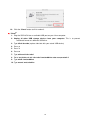
Execute umount /mnt/Storejet to un-mount the device. Then unplug your SSD18C3 from the
USB port.
Formatting the Solid State Drive
WARNING! Formatting the disk will erase all of the data on your SSD18C3.
You must have Administrator Rights to format in Windows.
Windows® XP/7/Vista
1. Plug the SSD18C3 into an available USB port on a Windows® XP/7/Vista computer.
2. Unplug all other USB storage devices from your computer. This is to prevent
accidental format of a different USB drive.
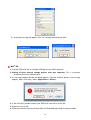
3. Open the “my computer” window, then right-click the drive that represents the SSD18C3
and choose “Format.”
4. Select “Quick Format” or change the volume label, if desired.
11