1
Connecting to a Computer
The SSD18C3 can be connected to your computer using either USB 2.0 or USB 3.0. To get the
best performance results from your SSD, we recommend using the USB 3.0 interface (currently not
supported on Mac computers).
Power
Connector
Micro USB 3.0
Connector
USB 2.0 / 3.0
Connector
USB 3.0 Cable
SSD18C3 Micro USB port
USB 2.0 Port
USB 3.0 Port
1. Plug the micro USB end (1) of the USB cable into the SSD.
2. Plug BOTH large ends (2) and (3) of the USB cable into an available USB 2.0 or USB 3.0 port
on your desktop or notebook computer.
NOTE: Always plug both large ends of the Y-cable into your computer. If only one
USB port is available, please connect the data transfer end (2) of the Y-cable
(compatibility not guaranteed).
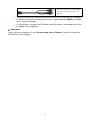
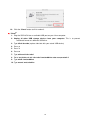
3. When the SSD18C3 is successfully connected to a computer, its LED will light up (USB2.0 and
USB 3.0 have different colors of illumination to indicate connection type). In Windows, a new
Local Disk drive with a newly-assigned drive letter will appear, and a Removable Hardware
6