1
SETUP Menu Setting
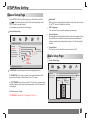
Audio Setup Page
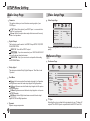
Downmix
This options allows you to set the stereo analog output of your
DVD Player.
Video Setup Page
Video Setup Page
- - VIDEO SETUP PAGE - -
LT/RT :Select this option if your DVD Player is connected to a
Dolby Pro Logic decoder.
Stereo :Select this option when output delivers sound from only
the two front speakers.
Digital Output
The function is used to select the SPDIF Output:SPDIF Off,SPDIF
/RAW,SPDIF/PCM.
SPDIF Off: Turns off the SPDIF output.
SPDIF/RAW: If you have connected your DIGITAL AUDIO OUT
to a multi-channel decoder/receiver.
SPDIF/PCM: Only if your receiver is not capable of decoding
multi-channel audio.
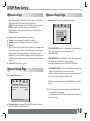
SHARPNESS
BRIGHTNESS
CONTRAST
HUE
SATURATION
MID
00
00
00
00
HIGH
MEDIUM
LOW
GOTO VIDEO SETUP PAGE
Sharpness,Brightness,Contrast,Hue,Saturation:setting the video
quality.
Preference Page
Preference Page
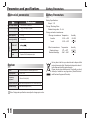
Dolby digital
The options included in Dolby Digital Setup are: 'Dual Mono ' and
'Dynamic '.
Dual Mono
Stereo:Left mono sound will send output signals to Left speaker
and Right mono sound will send output signals to Right speaker.
L-Mono:Left mono sound will send output signals to Left speaker
and Right speaker.
R-Mono:Right mono sound will send output signals to Left speaker
and Right speaker.
Mix-Mono:Left and Right mixed mono sound will send output
signals to Left and Right speakers.
Dynamic
Dynamic range compression.
9
- - PREFERENCE SETUP PAGE - -
TV TYPE
AUDIO
SUBTITLE
DISC MENU
PARENTAL
DEFAULT
PAL
ENG
ENG
ENG
RESET
PAL
1 KID SAF
2G
3 PG
4 PG13
5 PGR
6R
7 NC17
8 ADULT
ENGLISH
FRENCH
GERMAN
SPANISH
DUTCH
POLISH
HUNGARIAN
ENGLISH
FRENCH
GERMAN
SPANISH
DUTCH
POLISH
HUNGARIAN
ENGLISH
AUTO
FRENCH
NTSC
GERMAN
SPANISH
DUTCH
POLISH
HUNGARIAN
OTHERS
OFF
OTHERS
OTHERS
GOTO PREFERENCE PAGE
TV Type
Selecting the colour system that corresponds to your TV when AV
outputs.This DVD Player is compatible with both NTSC and PAL.