1
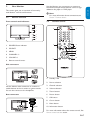
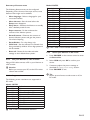
This section gives you an overview of commonlyused Monitor controls and functions.
3.1
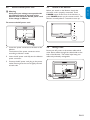
Monitor overview
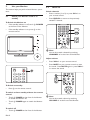
Front controls and indicators
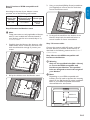
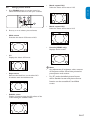
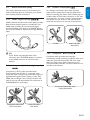
Use the Monitor rear connectors to connect to
the antenna and permanent devices such as a highdefinition disc player or DVD player.
D Note
For more information about connections, see
Section 7 Connect devices.
3.2
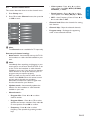
Remote control
5
2
1
4
3
ENGLISH
Your Monitor
FRANÇAISE
3.
4
ESPAÑOL
3
2
1
6
1.
POWER / Power indicator
2.
SOURCE
3.
MENU
4.
CHANNEL +/-
5.
VOLUME +/-
6.
Remote control sensor
5
6
7
8
9
10
Side connectors
HDMI-1
VGA
Y
Pb
Pr
Video
L
R
PC IN
L
AUDIO
R
ȍ$17
CV IN
Video
L
R
AV
OUT
AV IN -1
1.
Standby / ON
2.
Source selection
3.
Channel selection
Use the Monitor side connectors to connect to
mobile devices such as a camera or game console.
You can also connect to the headphone.
4.
Volume selection
5.
Zoom buttons
Rear connectors
6.
Picture button
7.
OK button
8.
Cursor button
9.
Menu button
HDMI-1
VGA
Y
Pb
Pr
Video
L
R
PC IN
L
AUDIO
R
ȍ$17
CV IN
AV IN -1
Video
L
R
AV
OUT
Cable
10. Information button
For more information about the remote control, See
Remote control overview section.
EN-7