1
System Settings
To customize the player settings:
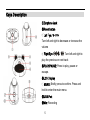
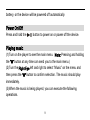
(1) On the main menu, select the “Setting”item and press the “M” button
to enter the system settings mode.
(2) Turn the Right Eye left and right to select a setting item and press the
“M” button to confirm or press the “ ” button to cancel and return.
Backlight
If no button is pressed within the time set, the
backlight will turn off automatically.
Contrast
Set the contrast between the background and
the foreground of the LCD.
Sleep Timer
Set the continuous playback time before the
player is turned off automatically.
LED Light
Turn on or turn off the LED light of the eyes.
Language
Set the language in which onscreen text is
displayed.
17