1
2 Gain entry with the basic electronic lock
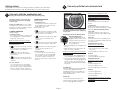
Getting started
Congratulations on your purchase of a Sentry®Safe product. SentrySafe is the world’s leader in
fire/water-resistant and security storage. This guide describes how to easily set up your safe.
NOTE: If your unit is equipped with a waterresistant gasket additional pressure to the left
corner of the door may be required before the
handle can be returned to the horizontal position.
entry with the combination lock
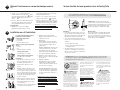
1 Gain
Opening your safe for the first time (keep door open during setup):
The handle should be all of the way UP, in
the horizontal position before attempting
to dial out safe.
Testing your combination: Your safe’s combination is printed on the front of this owner’s manual.
You will have a 3-number or 4-number combination
depending upon the model purchased.
3-NUMBER COMBINATION
4-NUMBER COMBINATION
(Cannot be changed)
1. To unlock and open
Before dialing your combination, simply insert the
key (if equipped) in the lock and turn until the
plunger pops out. Remove key.
A. Point the dial to zero.
B.
(Cannot be changed)
1. To unlock and open
Before dialing your combination, simply insert the
key (if equipped) in the lock and turn until the
plunger pops out. Remove key.
NOTE: The safe will lock if key lock cylinder is
pressed in with or without key.
C.
Turn the dial to the right. Stop the THIRD
time you reach the second number of your
combination.
D.
Turn the dial to the left. Stop the SECOND
time you reach the combination’s third number.
E.
Turn the dial to the right. Stop the FIRST
time you reach the last number of your
combination.
A. Start the dial at zero.
B.
Turn the dial to the left. Make sure ZERO
passes the pointer at least THREE times. Then stop
at the first number of your combination.
C.
Turn the dial to the right. Stop the
SECOND time you reach the second number of
your combination.
D.
Turn the dial to the left. Stop the FIRST
time the pointer reaches the third number of your
combination.
Turn the dial to the left. Make sure ZERO
passes the pointer at least FOUR times. Then stop
at the first number of your combination.
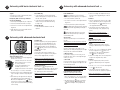
2. To close and lock
You can relock the safe in two ways. With the
door closed, depress the key lock (if equipped)
with your finger, or spin the combination dial
one full turn. For greatest security, do both.
(Make sure the door handle is in the horizontal
position.)
2. To close and lock
You can relock the safe in two ways. With the
door closed, depress the key lock (if equipped)
with your finger, or spin the combination dial one
full turn. For greatest security, do both. (Make
sure the door handle is in the horizontal position.)
The handle should be all of the way UP, in
the horizontal position before attempting
to open safe.
Opening your safe for the first time (keep
door open during setup):
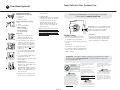
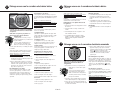
2 1. Remove and discard the screw (if
equipped) at the base of the lock case.
2. Turn the electronic lock case to the
right (clockwise), from 12 o’clock to
1
2 o’clock, and remove.
• Insert 4 new AA batteries (not included) to power
this lock.
• Replace the electronic lock case and turn to the
left (to 12 o’clock) to reassemble.
NOTE: The yellow LED will light when the batteries
need to be replaced.
3. Turn the key (if your safe is equipped with a key
lock) to the right so the lock cylinder pops out.
4. Enter the factory code (printed on the first page
of this guide). When the green light appears, you
have four seconds to turn the handle down to
open. Try this several times before proceeding to
the next step.
To unlock safe:
Enter the 5-digit factory code, a pre-programmed
user code, or a pre-programmed user pin
(programming instructions to follow). When the
green LED lights you have 4 seconds to turn the
handle and open the safe.
To lock safe:
Close the door and return the handle to the
horizontal position. For greatest security, depress
the key lock (if equipped) with your finger.
1-English
Access codes
There are 3 possible ways to unlock and access
the safe:
1. Factory code
(Found on the first page of this guide) You can
always open the safe by entering the pre-set 5-digit
factory code. This code cannot be deleted.
2. User code
If you prefer to employ your own code, you can
program the safe to open using a 5-digit user code
of your choice.
3. User pin
If you wish to give someone else temporary access
to the safe, you can program a 5-digit user pin that
can later be erased.
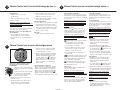
Programming the user code
NOTE: One (1) user code is allowed.
To add:
1. Press the Prog key , then enter the 5-digit
factory code.
2. Enter the 5-digit user code of your choice.
To delete:
1. Press the Prog key.
2. Enter the 5-digit factory code twice.
Programming user pin
NOTE: One (1) user pin is allowed.
To add:
1. Press the Prog key 2 times.
2. Enter your 5-digit user code.
3. Enter the 5-digit user pin of your choice.
To delete:
1. Press the Prog key 2 times.
2. Enter your 5-digit user code.
3. Enter 0, 0, 0, 0, 0.
NOTE: If your safe does not appear to be working,
please check batteries before calling Sentry
Customer Care.