1
2 Gain entry with basic electronic lock cont.
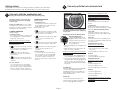
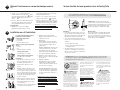
Signals
Your electronic-lock safe communicates by means
of several audio/visual signals.
Red (Error) LED + three beeps indicates
one of the following:
1. You have pressed Program key out of sequence.
2. You have entered an invalid code or user pin.
3. You have let 5 seconds or more elapse between
key presses.
3 Gain entry with advanced electronic lock cont.
Green LED only:
1. Comes ON after you enter a valid code and
remains lit during the 4-second period in which
the safe can be opened.
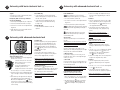
Icon identification
(Error) indicates one of the following:
1. You have pressed Program key out of sequence.
3. Enter a 4 to 8 digit code and press the Prog/
Enter key to finish programming the code into
the unit.
2. You have entered an invalid code.
2. Comes ON in the Programming mode and
remains lit until you have finished entering
a 5-digit code.
3. You have let 5 seconds or more elapse between
key presses.
To delete:
1. Press the Prog/Enter key, then enter the 5-digit
factory code and then press the Prog/Enter key.
4. You have pressed a key while in delay mode.
Yellow LED only:
1. Comes ON when the batteries need to be
replaced.
(Program) Lights after pressing the Program
key and stays lit while programming a manager or
user code.
4. Lights after three consecutive invalid codes are
input (2-minute delay mode).
(Delay Mode) Lights after three consecutive
invalid codes are input and stays lit during the
2-minute delay mode.
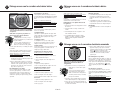
3 Gain entry with advanced electronic lock
Opening your safe for the first time (keep
door open during setup):
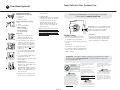
1. Remove and discard the screw (if equipped) at
the base of the lock case.
2. Turn the electronic lock case to the
2
right (clockwise), from 12 o’clock to
2 o’clock, and remove.
• Insert 4 new AA batteries (not
included) to power this lock.
1
• Replace the electronic lock case and
turn to the left (to 12 o’clock) to reassemble.
3. Turn the key (if your safe is equipped with a key
lock) to the right so that the lock cylinder pops
out.
4. Enter the factory code (printed on the first page
of this guide), then press the Prog/Enter key.
) appears,
When the unlocked padlock icon (
you have four seconds to turn the handle down
to open. Try this several times before proceeding
to the next step.
To unlock safe:
Enter the 5-digit factory code, a pre-programmed
manager code, or a pre-programmed user code
(programming instructions to follow), then press
the Prog/Enter key. When the unlocked padlock
) appears, you have four seconds to turn
icon (
the handle down to open.
To lock safe:
Close the door and return the handle to the
horizontal position. For greatest security, depress
the key lock (if equipped) with your finger.
NOTE: If your unit is equipped with a waterresistant gasket. Additional pressure to the left
corner of the door may be required before the
handle can be returned to the horizontal position.
Battery replacement
The battery icon ( ) will light when the
batteries need to be replaced. No codes are erased
when old batteries are removed for replacement.
See “Opening your safe for the first time”.
NOTE: If your safe does not appear to be working,
please check batteries before calling Sentry
Customer Care.
Access codes
There are 3 possible ways to unlock and access
the safe:
NOTE: Maintain a record of the factory code, user,
and manager codes, and store them in a secure
location other than in this safe.
1. Factory code
(Found on the first page of this guide) You can
always open the safe by entering the pre-set 5-digit
factory code. This code cannot be deleted.
3. Press 0, 0, 0, 0, then the Prog/Enter key to
delete the manager code. (0, 0, 0, 0, Prog/
Enter).
NOTE: To return to the beginning when
programming a manager or user code, wait 5
seconds and the lock will time-out. You may then
start over.
Programming user code
NOTE: Six (6) user codes are allowed.
To add:
1. Press the Prog/Enter key 2 times, enter the
manager code and then press the Prog/Enter
key.
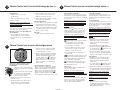
2. Use the << or >> to scroll between the lighted
boxes. An empty box icon ( ) means it is
available for a code entry; a boxed lighted *
icon ( ) means it is being used.
2. Manager code
If you prefer to employ your own code, you can
program the safe to open to a 4-8 digit manager
code of your choice.
3. Enter a 4 to 8 digit code in the selected position
and press the Prog/Enter key to finish.
3. User code
If you wish to give someone else temporary access
to the safe, you can program a 4-8 digit user code
that can later be erased.
To delete:
1. Press the Prog/Enter key 2 times, enter the
manager code and then press the Prog/Enter
key.
NOTE: Remember, once you have decided on your
access codes, open the unit first then test it with
the door open. All zeros is an invalid code.
2. Use the << or >> to scroll to the boxed lighted
* icon ( ) to be removed.
Programming the manager code
NOTE: One (1) manager code is allowed.
To add:
1. Press the Prog/Enter key , then enter the 5-digit
factory code and then press the Prog/Enter key .
2. An empty lit box icon ( ) means no manager
code is programmed. A boxed lighted * icon
( ) means a manager code is programmed.
2-English
2. A boxed lighted * icon ( ) indicates there is a
code programmed and can be deleted.
3. Press 0, 0, 0, 0, then the Prog/Enter key to
delete the selected user. (0, 0, 0, 0, Prog/Enter).
NOTE: To turn the beeper on or off, press the 0
key and then the Prog/Enter key. (0, Prog/Enter).