1
TIME ZONE SETTING
The time zone can be set between the 0 to -12 hour and then
runs from 12 back to 0 in consecutive 1-hour interval. To do
this:
1.
2.
3.
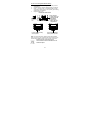
After pressing the SET-Button the current time zone
value starts flashing.
Use the + key to set the time zone. The range runs from
0 to -12 and then runs from 12 back to 0 in consecutive
1-hour interval.
Press and release the SET key to enter the “Language
Setting”.
LANGUAGE SETTING
The weekdays can be displayed in LCD1 with the pre-set
languages: English (US), Spanish (E), French (F), and German
(d). (default language: German):
1.
2.
Set the desired language for the weekday display using
the + key.
Press and release the SET key to enter the mode
“Manual Time Setting”.
MANUAL TIME SETTING
In case the solar wall clock is not able to detect the DCF-signal
(disturbances, transmitting distance, etc.), the time can be
manually set. The clock will then work as a normal Quartz
clock.
1.
2.
3.
4.
5.
The hour digits will start flashing on LCD1.
Set the desired hours by pressing and releasing the +
key followed by pressing the SET key.
Now the minute digits will start flashing.
Set the desired minutes by pressing and releasing the +
key. If the + key is held, the units will increase by 5.
Press and release the SET key to move to the “Year
Setting”.
YEAR SETTING
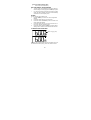
The year can be selected sequentially from 2001 to 2029 and
will then start over again (default setting 2006). The year will
only appear in the manual setting mode.
22