1
Using the AV Playback Function
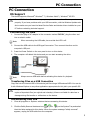
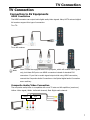
connected to this device.
2.
Browse to the folder containing the media file you want to play (use the cursor buttons
on the remote control to navigate through listed folders; press the
ENTER button
to open a folder or subfolder).
3.
Select a media file and press the
ENTER button to start playback.
Playing Slideshow/Music Slideshow
1.
Select the image file you want to start the slideshow, then press the
ENTER
button. This device will display all photo images in the folder consecutively with the
selected display interval.
2.
To set the display interval for your slideshow, select Setup in the Home Menu to
access the Setup Menu. Select Slideshow → Slideshow Interval, and select the
time you want each photo to display. (page 14)
3.
If you want to play music with slideshow, play music first, and then play the image you
want to start slideshow.
Playing a DVD Folder
A DVD folder contains complete files for a DVD movie. This device can play back a movie
from a DVD folder just like playing back a DVD disc. To create a DVD folder, connect this
device to your computer, insert the DVD disc into the computer's optical drive, and use My
Computer or Windows Explorer to browse the disc. Copy the entire "VIDEO_TS" folder
from the DVD to this device. To play the DVD movie, navigate to the VIDEO_TS folder, select
the VIDEO_TS IFO file and press the
Note:
ENTER button on the remote control.
If the DVD folder is incomplete, you can still play back the VOB files directly.
Functions controlled by the IFO file, such as the selection of subtitles, chapters,
and angles, will be lost.
Some DVD discs cannot be copied because they have been protected with CSS
protection. Always obey copyright and intellectual property rights. Do not copy DVDs
with copyright and do not distribute them to others.
Performing Copy, Paste, or Delete Operation
By pressing the
MENU button on a file in HDD, you can select Copy, Paste, or Delete
to perform these operations. You can only select Copy in USB.
Copy: Copy the selected file.
Paste: Paste the selected file to HDD.
Delete: Delete the selected file in HDD.
11