1
Installation Instructions
MAC790
ASSEMBLY
CAUTION: ALWAYS remove the display(s) BEFORE
adjusting the height of the cart/stand.
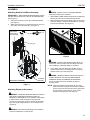
Attaching Head to Cart/Stand Assembly
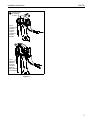
IMPORTANT ! : When attaching head assembly ensure
that the ClickConnect lock is at TOP of head assembly.
(See Figure 1)
1.
Attach PSBU or MSBU interface bracket(s) to the display(s)
following the instructions included with the bracket.
1.
Slide swivel accessory (A) into the cart/stand assembly.
(See Figure 1)
2.
While supporting both sides of display, align four mounting
buttons on display or interface bracket with four mounting
holes in head assembly. (See Figure 2)
2.
Attach swivel accessory to cart/stand using four 5/16-18 x
3/8" button head cap screws (B). (See Figure 1)
5
ClickConnect
lock at TOP of
head assembly
(B) x 4
2
(A)
Figure 2
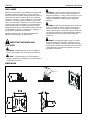
WARNING: DISPLAY MAY WEIGH IN EXCESS OF 40
LBS! Always use two people and proper lifting techniques
when installing or positioning display on cart/stand.
3.
1
Lower display into place listening for audible "click" to
ensure recessed area of mounting buttons are properly
seated in lower area of mounting holes.
WARNING: IMPROPER INSTALLATION CAN LEAD TO
(Back view of cart/stand)
cart/stand
assembly
Figure 1
Attaching Display to Accessory
STAND OR DISPLAY FALLING CAUSING SERIOUS
PERSONAL INJURY OR DAMAGE TO EQUIPMENT!
Ensure mounting buttons are completely engaged in
mounting holes.
NOTE: Holes are provided in the faceplate for use with a
padlock or similar locking device, if desired. In addition,
the pin and nut may be removed from the upper holes
and moved to the lower holes for use as a more
permanent locking device. (See Figure 3)
WARNING: EXCEEDING MAXIMUM WEIGHT CAPACITY
MAY LEAD TO SERIOUS PERSONAL INJURY OR
DAMAGE TO EQUIPMENT! It is the installer’s responsibility
to make sure the combined weight of all components
mounted on the accessory does not exceed 150 lbs (68.04
kg) or the specific weight limit of the cart or stand that it is
mounted to.
WARNING: Before attaching display(s) to the cart/stand
ensure the cart/stand is on level surface.
5