1
MAC790
Installation Instructions
recommended that a bolt (not provided) be placed through
the head assembly (See Figure 4) to lock the display into
the upright position.
Swivelling Display
The display can be swivelled up to 15° either left or right from a
straight upright position.
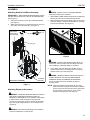
Remove pin
4
and nut and
move to lower holes
1.
Swivel display to the left or right up to 15° until desired
position is reached. (See Figure 5)
2.
If leaving display in straight position, it is recommended that
a bolt (not provided) be placed through the hole on the
swivel device to lock the display into that position. (See
Figure 5)
5
1
A padlock or bolt may
be placed through latch
holes
Figure 3
1
Tilting Display
The display can be tilted up to 15° either backward or forward
from a straight upright position.
1.
Turn knob counterclockwise on back of head assembly to
loosen the tilt. (See Figure 4)
2
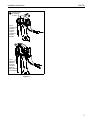
Place optional bolt
(not provided) here
to lock in straight position.
Figure 5
1
3
Removing Display
4
Place optional bolt
(not provided) here
to lock in an upright
position.
1.
Remove bolt or padlock from faceplate (if used).
NOTE: The pin may have been used as a more permanent
locking device. If so, remove nut and pin and move
from the lower holes to the upper holes.
2.
Pull back on flag on upper mounting hole and press pin
down into "Open" position. (See Figure 6)
Figure 4
WARNING: DISPLAY MAY WEIGH IN EXCESS OF 40
2.
Tilt display as desired, to a maximum of 15° either forward
or backward.
3.
Turn knob clockwise to tighten display on head assembly.
(See Figure 4)
CAUTION: Tighten knob on back of head assembly to
prevent damage to the cart/stand.
4.
6
If leaving the display in a straight upright position, it is
LBS! Always use two people and proper lifting techniques
when installing or positioning display on cart/stand.
3.
Carefully lift display from cart/stand.
4.
Lift up on pin and place flag back against faceplate to return
it to "Closed" position. (See Figure 6)