1
C
D
E
F
G
H
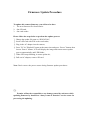
Make the spot test of 10 PCS from each section, trigger to take 30
pictures in forced flash mode and confirm if there is any abnormity,
such as missing flash, hang on, power off automatically etc.
Shift to landscape mode and take a piece of photo towards beyond
(more than 3m) in flash off mode. Then switch to night and red-eye
reduction mode, take a photo facing to the dark place under desk, and
the camera must have flash and the pre-flash and main flash shall have
clear differences before and after.
Shifting to record mode, record symbol is displayed. Press Shutter
button to record more than 5s, using the sound box to catch record.
Connect TV and press playback button to enter into playback mode,
view the pictures. There should not be NG pictures and the pictures
should not have color aberration. Select the Movie document, press
SET button to enter into movie play mode; The voice should not be
abnormal or too low. Press Wide button and LCD displays
nine-thumbnail image; press direction button can select picture up,
down, left and right. All the above operation should e normal. Take out
the abnormal ones to maintain and pull out the TV wire.
Draw out 10 PCS from each section, shift to SETUP mode, select LCD
BRIGHTNESS and press OK button to enter into LCD brightness
adjustment menu. Press left-right button to adjust LCD brightness to
confirm if the LCD brightness changes regularly.
Select format menu to format the internal memory of camera. After
this, set to default to the camera. After all the above are ok, power off
and confirm if the lens can retract. Pull out the power wire; put the OK
products into production line.