1
Motherboard User’s Guide
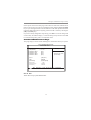
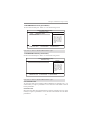
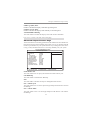
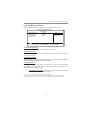
X Onboard Device Setup (Press Enter)
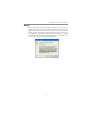
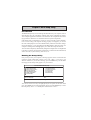
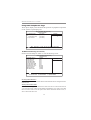
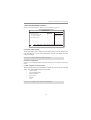
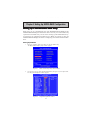
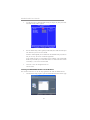
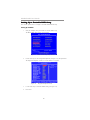
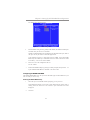
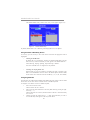
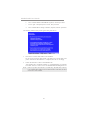
Scroll to this item and press <Enter> to view the following screen:
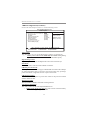
Phonex-AwardBIOS CMOS Setup Utility
Onboard Device Setup
USB 2.0 controller
USB Memory Type
USB Keyboard Support
USB Mouse Support
USB Storage Support
HD Audio
Onboard Lan
Onboard Lan Boot ROM
[Enabled]
[SHADOW]
[Enabled]
[Enabled]
[Enabled]
[Auto]
[Enabled]
[Disabled]
Item Help
Menu Level ff
: Move Enter: Select +/-/: Value F10: Save Esc: Exit F1: General Help
F5: Previous Values F6: Fial-Safe Defaults F7: Optimized Defaults
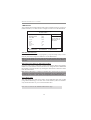
USB 2.0 controller
Enables this item if you want to use USB 2.0.
USB Memory Type
This item indicates the USB memory type.
USB Keyboard Support
Enable this item if you plan to use a keyboard connected through the USB port in
a legacy operating system (such as DOS) that does not support Plug and Play.
USB Mouse Support
Enable this item if you plan to use a mouse connected through the USB port in a
legacy operating system (such as DOS) that does not support Plug and Play.
USB Storage Support
Use this item to enable or disable the USB Storage function.
HD Audio
Enables and disables the onboard audio chip. Disable this item if you are going to
install a PCI audio add-in card.
Onboard Lan
Enables or disables the Onboard Lan.
Onboard Lan Boot ROM
This item enables or disables LAN Boot ROM.
Press <Esc> to return to the Integrated Peripherals page.
30
f