1
DEVICE OPERATION
DEVICE OPERATION
GERÄTEBETRIEB
FONCTIONNEMENT DU PERIPHERIQUE
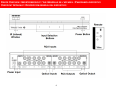
Operating the switch from the IR remote control
Betrieb des Switch mit der IR-Fernbedienung
Step 1
Press POWER to turn on the switch
Step 2
Press 1 – 3 to select desired input device.
Schritt 1
Drücken Sie POWER, um die switch einzuschalten.
Schritt 2
Drücken Sie 1 - 3, um das gewünschte
Eingangsgerät auszuwählen.
Utilisation du commutateur avec la
télécommande IR
Operating the switch from the front panel
Step 1
Press POWER button to turn on the switch
Step 2
Press 1 – 3 on the front of the switch to select
desired input device.
Betrieb des Switch über das Bedienfeld an der
Vorderseite
Schritt 1
Drücken Sie die POWER-Taste, um den Switch
einzuschalten.
Schritt 2
Drücken Sie 1 - 3 an der Vorderseite des Switch, um
das gewünschte Eingangsgerät auszuwählen.
10
Étape 1
Appuyer sur POWER pour allumer la commutateur
Étape 2
Appuyer sur 1 à 3 pour sélectionner le dispositif
souhaité.
Utilisation du commutateur par le panneau
avant
Étape 1
Appuyer sur POWER pour allumer le
commutateur.
Étape 2
Appuyer sur 1 à 3 sur l’avant du commutateur pour
sélectionner l'entrée du dispositif souhaité.