1
Beep Codes
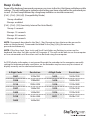
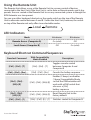
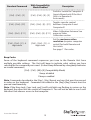
Some of the keyboard command sequences you issue to the Host Unit have multiple possible
settings. The unit will beep to indicate what setting you have selected for the command you
issued. (A short beep followed by a long beep indicates an invalid command.)
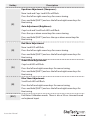
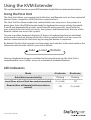
[Ctrl] - [Ctrl] - [Alt]+[E] (Compatibility Mode)
1 beep: disabled
2 beeps: enabled
[Ctrl] - [Ctrl] - [F3] (Inactivity Interval for Auto Mode)
1 beep: 5 seconds
2 beeps: 15 seconds
3 beeps: 30 seconds
4 beeps: 60 seconds
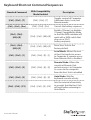
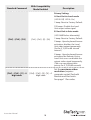
NOTE: Commands described in the [Key] - [Key] format are keys that must be pressed in
order on the keyboard. Commands described in the [Key]+[Key] format must be
pressed simultaneously.
NOTE: If the Num Lock, Caps Lock, and Scroll Lock lights are flashing in unison on the
keyboard, the other Unit has control of Computer A. You will not be able to use the computer
or issue commands until the other unit has finished using the computer.
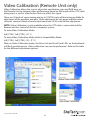
As EDID display information is not passed through the extender to the computer, manually
setting the maximum display resolution on the extender may be necessary for content to
display correctly on the connected monitors.
4-Digit Code
Resolution
4-Digit Code
Resolution
1007
1024x768
1612
1600x1200
1208
1280x800
1610
1680x1050
1210
1280x1024
1910
1920x1080
1307
1360x768
1912
1920x1440
1409
1440x900
1914
1920x1440
1410
1440x1050
2011
2048x1152
1609
1600x900
Instruction Manual
11