1
Playing an MP3/WMA disc
English
Disc Operations
Repeat and Shuffle
You can select and change the various play
modes before or during playback.
1
CD
TITLE
A02 T008
DISPLAY
STANDBY-ON
ECO POWER
RDS/
NEWS
CLOCK
3
OPEN/
CLOSE
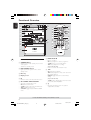
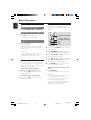
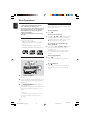
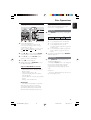
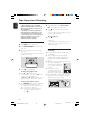
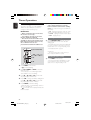
1 Press REPEAT on the remote repeatedly to
MP3-CD / CD-R / CD-RW COMPATIBLE
M I C R O
4
IR
CD
TUNER
TAPE
select :
S Y S T E M
MP3-CD / CD-R / CD-RW COMPATIBLE
Repeat play
AUX /CDR
MASTER VOLUME
PLAY/PAUSE DEMO STOP
REC
BASS •
PROG
PROG
2
TUNING
ALBUM / TITLE
REPEAT
• TREBLE
TRACK
ALBUM / TITLE
REPEAT
DISC
REPEAT
REPEAT
TRACK
ALBUM
OPEN/
CLOSE
VIRTUAL ENVIRONMENT CONTROL
DIGITAL SOUND CONTROL
A02 T001
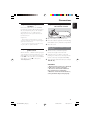
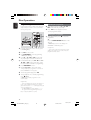
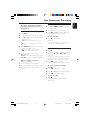
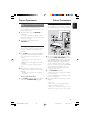
1 Load an MP3/WMA disc.
➜ The disc reading time may exceed 10
seconds due to the large number of songs
compiled into one disc.
➜ "AXX TYYY" is displayed. XX is the current
album number and YYY is the current title
number.
2 Press à á (or press and hold S
T
on the system) to select a desired album.
3 Press í ë (or press S
T
on the
system) to select a desired title.
4 Press ÉÅ to start playback.
● During playback, press DISPLAY to show
the album and title name.
Supported MP3/WMA disc formats:
– ISO9660, Joliet, UDF 1.5
– Maximum title number : 400 (depending on
filename length)
– Maximum album number : 40
– Supported sampling frequencies: 32 kHz,
44.1 kHz, 48 kHz
– Supported Bit-rates : 32~256 (kbps), variable
bitrates
– ID3 tags : V1.1, V2.2, V2.3, V2.4
A
B
C
D
A – to repeat playback of the current track.
B – to repeat playback of the current disc.
C – to repeat playback of the current
programmed track (only if the programme
mode is active)
D – to repeat playback of all the programmed
tracks (only if the programme mode is
active)
2 To resume normal playback, press REPEAT
until " OFF"appears.
Random play
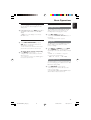
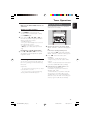
● Press SHUFFLE on the remote to turn
on/off the shuffling mode.
➜ If activated, SHUFFLE shows on the display and
the repeat mode (if any) will be cancelled.
➜ If programme mode is active, only the
programmed tracks will be played in random
order.
Helpful Hint:
– Pressing the OPEN/ CLOSE button will cancel all
repeat and shuffling modes.
IMPORTANT:
– For DRM protected WMA files, use Windows
Media Player 10 (or later) for CD burning/
conversion. Visit www. microsoft.com for details
about Windows Media Player and WM DRM
(Windows Media Digital Rights Management).
15
001-025-MCM9-11_22_Eng
15
3/17/05, 11:20
MCM9/22-1