1
Chapter 2: Using Your 4620SW/4621SW SIP IP
Telephone
Introduction
This chapter describes how to make calls, receive calls, retrieve voice mail messages, and log
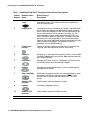
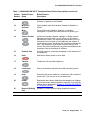
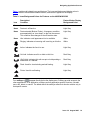
off your 4620SW/4621SW SIP IP Telephone. This chapter also covers the telephone Line/
Feature buttons that assist in call handling.
Session Appearances
What is referred to as a call appearance for an IP telephone is called a “session appearance” for
a SIP IP telephone.
In the Phone Application, a session appearance line, by default, takes up the entire display
width. Administered Feature buttons take up half the display width. When a session appearance
is full width, use the Line/Feature buttons on either side of that row to select that session
appearance. Select any associated messages the same way. With half width session
appearances use only the Line/Feature buttons on the appropriate side of that row to select that
session appearance. For half-width session appearances, call-associated messages show on
the top display line instead of on that row. See Chapter 6: 4620SW/4621SW SIP IP Telephone
Options for information about setting the Line/Feature button width.
Depending on how your telephone is administered, you might have some blank Line/Feature
button labels. Pressing a Line/Feature button associated with a blank label has no effect.
Issue 2.2 August 2005
23