1
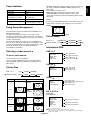
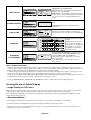
OSM (On-Screen-Manager) Controls
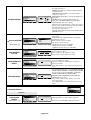
Press MENU button to
open Main menu.
Press UP or DOWN button
to select sub-menu.
Press SET button to
decide.
Press UP or DOWN, and PLUS or
MINUS button to select function, or
control which you like.
Press SET button to decide.
Press MENU or EXIT
button to exit.
Press UP or DOWN
button to select.
Press INPUT button
to decide.
Press UP or DOWN, and PLUS or
MINUS button to select function, or
control which you like.
Press INPUT button to decide.
Press EXIT button
to exit.
Remote Control
Control Panel
UP or DOWN button
MAIN MENU
PICTURE
SCREEN
AUDIO
PIP
CONFIGURATION 1
CONFIGURATION 2
ADVANCED OPTION
OSM screen
:SEL SET :NEXT EXIT :RETURN MENU :EXIT MENU
INPUT button
PLUS and
MINUS button
EXIT button
PICTURE
PICTURE
BRIGHTNESS
BRIGHTNESS
CONTRAST
SHARPNESS
BLACK LEVEL
COLOR CONTROL
COLOR TEMPERATURE
PICTURE RESET
BRIGHTNESS
CONTRAST
SHARPNESS
BLACK LEVEL
COLOR CONTROL
COLOR TEMPERATURE
PICTURE RESET
32
+ -:ADJ
EXIT :RETURN MENU :EXIT MENU
:SEL SET :NEXT EXIT :RETURN MENU :EXIT MENU
:SEL SET :NEXT EXIT :RETURN MENU :EXIT MENU
Denotes an AV unit function.
All AV functions are enabled when the AV unit is installed.
If this product was purchased in Europe the AV unit is preinstalled and all AV functions are available.
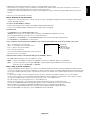
Main-Menu
MAIN MENU
PICTURE
SCREEN
AUDIO
PIP
CONFIGURATION 1
CONFIGURATION 2
ADVANCED OPTION
PICTURE
:SEL SET :NEXT EXIT :RETURN MENU :EXIT MENU
Sub-Menu
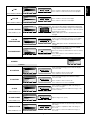
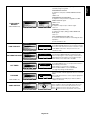
Adjusts the overall image and background screen
brightness.
PICTURE
BRIGHTNESS
BRIGHTNESS
CONTRAST
SHARPNESS
BLACK LEVEL
COLOR CONTROL
COLOR TEMPERATURE
PICTURE RESET
BRIGHTNESS
32
+ -:ADJ
EXIT
:RETURN MENU :EXIT MENU
:SEL SET :NEXT EXIT :RETURN MENU :EXIT MENU
PICTURE
CONTRAST
BRIGHTNESS
CONTRAST
SHARPNESS
BLACK LEVEL
COLOR CONTROL
COLOR TEMPERATURE
PICTURE RESET
CONTRAST
32
+ -:ADJ
EXIT :RETURN MENU :EXIT MENU
:SEL SET :NEXT EXIT :RETURN MENU :EXIT MENU
PICTURE
SHARPNESS
BRIGHTNESS
CONTRAST
SHARPNESS
BLACK LEVEL
COLOR CONTROL
COLOR TEMPERATURE
PICTURE RESET
SHARPNESS
32
+ -:ADJ
EXIT :RETURN MENU :EXIT MENU
:SEL SET :NEXT EXIT :RETURN MENU :EXIT MENU
PICTURE
BLACK LEVEL
BRIGHTNESS
CONTRAST
SHARPNESS
BLACK LEVEL
COLOR CONTROL
COLOR TEMPERATURE
PICTURE RESET
BLACK LEVEL
32
+ -:ADJ
EXIT
:RETURN MENU :EXIT MENU
:SEL SET :NEXT EXIT :RETURN MENU :EXIT MENU
NOISE
REDUCTION
Adjusts the image brightness in relation to the input
signal.
Press + button to increase contrast.
Press - button to decrease contrast.
NOTE: sRGB picture mode is standard and cannot be
changed.
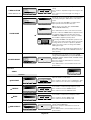
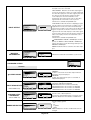
This function is digitally capable of keeping a crisp image
at any timing. It is adjustable to get as distinct an image
or as soft an image as you prefer. It is set independently
for each picture mode.
Press + button to increase sharpness.
Press - button to decrease sharpness.
Adjusts the image brightness in relation to the
background.
Press + button to increase black level.
Press - button to decrease black level.
NOTE: sRGB picture mode is standard and cannot be
changed.
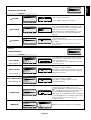
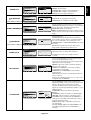
Adjusts the noise reduction level.
PICTURE
BRIGHTNESS
CONTRAST
SHARPNESS
TINT
COLOR
BLACK LEVEL
NOISE REDUCTION
Press + button to increase brightness.
Press - button to decrease brightness.
NOISE REDUCTION
32
+ -:ADJ
EXIT
:RETURN MENU :EXIT MENU
:SEL SET :NEXT EXIT :RETURN MENU :EXIT MENU
*:INPUT VIDEO only
English-20
Press + button to increase reduction level.
Press - button to decrease reduction level.