1
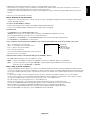
(1) The command from a computer to the LCD monitor will be sent in 400ms.
(2) The LCD monitor will send a return command 400ms* after it has received and encoded. If the command isn’t
received correctly, the LCD monitor will not send the return command.
(3) The personal computer checks the command and confirms if the command, which has been sent, has been executed or not.
(4) This LCD monitor sends various codes other than return code. When having a control sequence by RS-232C, reject other
codes from personal computers side.
*: The sending time of return command may delay depending on the condition (during changing of the input signal, etc.).
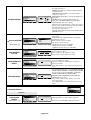
Example: Turn the power ON ( ’ ’ is for ASCII code)
Sending commands
from the PC
Status code from
LCD monitor
30 30 21 0D
’0’ ’0’ ’!’ ’ ’
Meaning
Command for
POWER ON
30 30 21 0D
’0’ ’0’ ’!’ ’ ’
Command received
(Command echoed back)
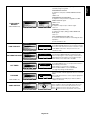
4) Operation commands
The operation commands execute the basic operation setting of this LCD monitor.
It may not operate when changing the signal:
Operation
ASCII
HEX
POWER ON
!
21h
POWER OFF
"
22h
INPUT RGB 1
_r1
5Fh 72h 31h
INPUT RGB 2
_r2
5Fh 72h 32h
INPUT RGB 3
_r3
5Fh 72h 33h
INPUT VIDEO*1
_v1
5Fh 76h 31h
INPUT DVD/HD
_v2
5Fh 76h 32h
INPUT S-VIDEO*2 _v3
5Fh 76h 33h
Denotes an AV unit function.
All AV functions are enabled when the AV unit is installed.
If this product was purchased in Europe the AV unit is preinstalled and all AV functions are available.
•
POWER OFF command should be operated over 1 minute after the power is turned on.
•
POWER ON command should be operated over 1 minute after the power is turned off.
1
* S-VIDEO is enabled by having the “S-VIDEO” cable connected with the “S-VIDEO” signal present and selecting “PRIORITY MODE”.
*2 S-VIDEO is SEPARATE only.
5) Read command
Host computer sends the command without Data-code to monitor.
After receiving this command, the monitor returns the command with Data-code of current status to host computer.
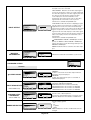
< ex. > When Host computer ask Power status of monitor, the status of monitor is powered-on.
Command from computer
30 30 76 50 0D
Command from Monitor
Detail of command
0''0'v''P'[enter]
Ask about the power status of monitor.
30 30 76 50 31 0D
'0''0''v''P''1'[enter]
Monitor is powered-on.
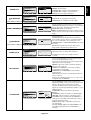
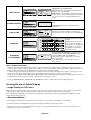
Structure of the Read-command
POWER
Input
Picture mode
Temperature
of Internal
monitor
ON
OFF(stand by)
RGB-1(DVI-D)
RGB-2(D-SUB)
RGB-3(BNC)
Video
DVD/HD
S-VIDEO
HIGHBRIGHT
STANDARD
resolution
Around
0.5˚C
AV board
resolution
1˚C
resolution
Around
0.5˚C
Inverter
resolution
PCB
1˚C
Function
vP
vP
vI
vI
vI
vI
vI
vI
vM
vM
ASCII
Data (Receive)
1
0
r1
r2
r3
v1
v2
v3
p1
p2
tcx1
(ex.) +25.0
tc1
(ex.) +25
tcx2
(ex.) +30.5
tc2
(ex.) +31
Function
76 50
76 50
76 49
76 49
76 49
76 49
76 49
76 49
76 4D
76 4D
74 63 78 31
74 63 31
74 63 78 32
2B 20 33 30 2E 35
74 63 32
2B 20 33 31
NOTE: For complete information please see file “External_Control_LCD5X10.pdf” on the CD-ROM.
English-31
HEX
Data (Receive)
31
30
72 31
72 32
72 33
76 31
76 32
76 33
70 31
70 32
2B 20 32 35
2E 30
2B 20 32 35
English
3) Control sequence