1
Chapter 2
Cisco Nexus 5000 Series Overview
Cisco Nexus 5020 Switch
Send documentation comments to [email protected]
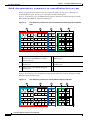
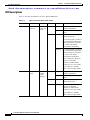
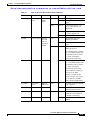
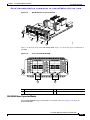
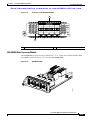
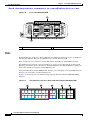
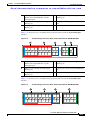
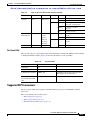
Table 2-3
LEDs for the Cisco Nexus 5020 Switch (continued)
LED
Location
Power supply Power supply
(front)
Function
Color
Status
Description
Power
supply
health
Green
Solid on
Power supply is on and okay.
Off
No AC power to the power
supply.
Solid on
Power supply failures, over
voltage, over current, over
temperature.
Amber
Blinking AC is present, 3.3 VSB on, and
the power supply is off.
Module
Back of chassis Indicator
of a fault
with any
expansion
module
Green
Amber
Off
Operating normally.
On
All diagnostics pass. The
module is operational.
Off
The module is not receiving
power.
Solid on
The module is booting or
running diagnostics.
An overtemperature condition
has occurred. The temperature
threshold has been exceeded
by a small value during
environmental monitoring.
Blinking
An overtemperature condition
has occurred. The temperature
threshold has been exceeded
by a large value during
environmental monitoring.
If the module fails during an
initial reset, the LED
continues to blink and the
module does not come online.
The module has a runtime
failure and is brought offline
Port LED
Back of the
chassis
Indicates
Green
LED status
Amber
Off
The port is not active or the link
is not connected.
Solid on
The port is active. The link is
connected and operational.
Solid on
The module or port is disabled
through the CLI command or
the module is initializing.
Blinking
The port is faulty and has been
disabled.
Cisco Nexus 5000 Series Hardware Installation Guide
OL-15902-01
2-15