1
Chapter 2
Cisco Nexus 5000 Series Overview
Cisco Nexus 5020 Switch
Send documentation comments to [email protected]
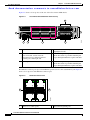
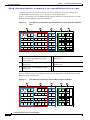
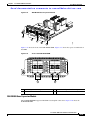
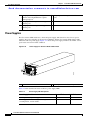
Figure 2-4 shows a close-up view of the rear of the Cisco Nexus 5020 chassis.
Figure 2-4
Cisco Nexus 5020 Switch Rear View Close-up
5
2
3
4
6
186263
7
1
1
System status LED
4
Slot 1, with 40 fixed 10-Gigabit Ethernet ports
(highlighted in red).
2
Ethernet connector with two cross-connect
ports on left side, and two network
management1 (top) and management2
(bottom) ports on the right side
5
Slot 2 for an optional expansion module;
shown here with a 4-port Fibre Channel plus
4-port 10-Gigabit Ethernet expansion module
3
Console port
6
Slot 3 for an optional expansion module;
shown here with a 4-port Fibre Channel plus
4-port 10-Gigabit Ethernet expansion module
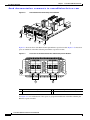
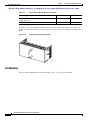
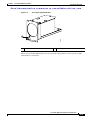
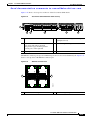
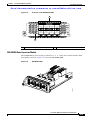
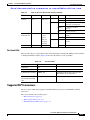
The Ethernet connector port exposes four Ethernet ports that are in a 2x2 stacked RJ-45 jack. Figure 2-5
shows a close-up view of the Ethernet connector port.
Figure 2-5
Ethernet Connector Port
2
186385
1
1
Internal cross connect ports
2
Network management ports
Cisco Nexus 5000 Series Hardware Installation Guide
2-4
OL-15902-01