1
Recommended Use
Cleaning the Panel
• When the panel becomes dusty or dirty, wipe gently
with soft cloth.
• Do not rub the panel with coarse material.
• Do not apply pressure to the surface.
• Do not use OA cleaner. OA cleaner will cause
deterioration or discolor the surface.
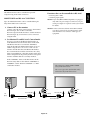
CORRECT PLACEMENT AND ADJUSTMENT OF
THE MONITOR CAN REDUCE EYE, SHOULDER AND
NECK FATIGUE. CHECK THE FOLLOWING WHEN
POSITIONING THE MONITOR:
• For optimum performance, allow 20 minutes for warmup.
• Rest your eyes periodically by focusing on an object at
least 5 feet away. Blink often.
• Position the monitor at a 90 degree angle to windows
and other light sources to minimize glare and
reflections.
• Clean the monitor surface with a lint-free, nonabrasive
cloth. Avoid using any cleaning solution or glass
cleaner.
• Adjust the monitor’s brightness and contrast controls to
enhance readability.
• Get regular eye checkups.
Cleaning the Cabinet
• Unplug the power supply.
• Gently wipe the cabinet with a soft cloth.
• To clean the cabinet, dampen the cloth with a neutral
detergent and water, wipe the cabinet and follow with a
dry cloth.
NOTE:The surface of the cabinet is composed of many
types of plastic.
DO NOT clean with benzene thinner, alkaline
detergent, alcoholic system detergent, glass cleaner,
wax, polish cleaner, soap powder, or insecticide.
Rubber or vinyl should not be in contact with
the cabinet for an extended period of time. These
types of fluids and materials can cause the paint to
deteriorate, crack or peel.
Ergonomics
To realize the maximum ergonomic benefits, we recommend
the following:
• Use the preset Size and Position controls with standard
signals.
• Use the preset Color Setting.
• Do not use primary color blue on a dark background, as
it is difficult to see and may produce eye fatigue due to
insufficient contrast.
• This equipment is not for use at video display work
station according to Bildscharb V.
CLEANING THE VENT HOLES
• Clean plasma ventilation areas using a vacuum cleaner
with a soft brush nozzle attachment.
• To ensure proper ventilation, cleaning the ventilation
areas must be carried out monthly. More frequent
cleaning may be necessary depending on the
environment in which the plasma monitor is installed.
For more detailed information on setting up a healthy work
environment, refer to the following document:
American National Standard for Human Factors
Engineering of Visual Display Terminal Workstations
ANSI-HFS Standard No. 100-1988
Published by:
The Human Factors and Ergonomics Society
P.O. Box 1369, Santa Monica, California 90406.
English-4
English
CAUTION