1
CONNECTING AND OPERATING THE 1:2 VGA HUB
How to Connect the 1:2 VGA Hub to your devices
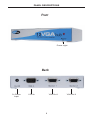
1- Connect the supplied VGA cable from the VGA device into the 1:2 VGA Hub
Input.
2- Connect the cables from your displays (monitor or projector) into the VGA Out
slots in the back of the 1:2 VGA Hub
4- Plug the 5v power supply into the 1:2 VGA Hub.
5- Plug the 5v wall mount power supply into the wall outlet.
NOTE: Display information (EDID) is not sent back to the source. Standard VESA
resolutions should be output by most computers without the need of an EDID.
If using a non-VESA standard resolution or if EDID is needed, an EDID storage
and relay device is necessary. Gefen recommends the use of a DVI Detective
(part# EXT-DVI-EDID, EXT-DVI-EDIDN, or EXT-DVI-EDIDP) with two VGA to DVI
adapters.
4