1
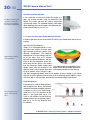
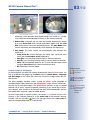
Q2
2M
The HiRes Video Company
I
th
wi
nt
mou
iling
e
n-C
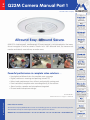
Allround Easy. Allround Secure.
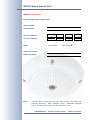
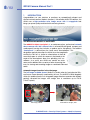
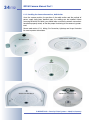
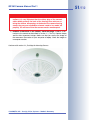
MOBOTIX' ultra-compact, weatherproof IP Dome camera is so inconspicuous that many
do not recognize it to be a camera. Thanks to its 360° allround view, the camera can
monitor and record, event-driven, an entire room.
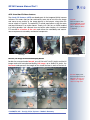
Full Image
Image Correction
Virtual PTZ Features
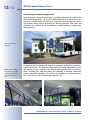
Powerful performance in complete video solutions ...
• Hemispherical allround view for complete room coverage
• Digital, continuous zooming and panning (virtual PTZ)
• Robust and maintenance-free, without mechanically moving parts
• Event-controlled, complete room recording directly in the camera
• Alarm function, speaker and microphone integrated
• Discreet and inconspicuous design
www.mobotix.com
Current PDF File:
www.mobotix.com > Support > Manuals
HiRes Video Innovations
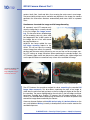
The German company MOBOTIX AG is known as the leading pioneer in network camera technology and its
decentralized concept has made high-resolution video systems cost-efficient.
MOBOTIX AG • D-67657 Kaiserslautern • Tel: +49-631-3033-103 • Fax: +49-631-3033-190 • [email protected]
X
MOBOTIX
.com
EN
Q22M Camera Manual Part 1
Q22M Camera Manual Part 1
MOBOTIX Camera Data
Enter the data of your camera here!
Camera Model:
Camera Name:
Factory IP Address:
.
.
.
Current IP Address:
.
.
.
activated DHCP:
deactivated Admin User Name:
Admin Password:
Note:
MOBOTIX offers inexpensive seminars that include a workshop and
practical excercises: Basic Seminar 3 days, Advanced Seminar
2 days. For more information, see www.mobotix.com
© MOBOTIX AG • Security-Vision-Systems • Made in Germany
www.mobotix.com • [email protected]
1/112
Q22M Camera Manual Part 1
Q22M CAMERA MANUAL PART 1
1
INTRODUCTION
8
1.1
Lens Options, Hardware and Software Features
18
1.2
The MOBOTIX Concept
22
2
MOUNTING
28
2.1
2.1.1
2.1.2
2.1.3
2.1.4
2.1.5
2.1.6
Preparing the Installation
Mounting to a Ceiling or Wall
Mounting Options
Hints for Choosing a Good Mounting Position
Network Connection and Power Supply, UPS
Providing the Camera Connections, Wall Outlets
Directions for Mounting
28
28
29
30
32
34
35
2.2
2.2.1
2.2.2
2.2.3
Q22M: Delivered Parts, Components and Dimensions
Delivered Parts and Camera Components
Camera Housing and Connectors
Q22M: Dimensions Without Mounting Options
36
36
37
38
2.3
2.3.1
2.3.2
2.3.3
2.3.4
2.3.5
Camera Accessories: Delivered Parts, Components and Dimensions
On-Wall Set
In-Ceiling set
Vandalism Set
Wall Mount
Pole Mount
40
40
42
44
46
48
2.4
Mounting the Camera Without Additional Mounting Options
50
2.5
Mounting With the On-Wall Set
52
2.6
Mounting to a Ceiling Using the In-Ceiling Set
54
2.7
Mounting the Vandalism Set
56
2.8
Mounting to a Wall Using the Wall Mount
58
2.9
Finishing the Mounting Process
60
2.10 Operating the MOBOTIX Q22M-Secure With SD Card
2.10.1 Removing an SD Card
2.10.2 Inserting an SD Card
61
61
62
2.11 Notes
2.11.1 Cleaning Instructions
2.11.2 Wiring, Fire Prevention, Lightning and Surge Protection
64
64
64
2.12 Camera Accessories
66
© MOBOTIX AG • Security-Vision-Systems • Made in Germany
www.mobotix.com • [email protected]
2/112
Q22M Camera Manual Part 1
3
OPERATING THE CAMERA
70
3.1
3.1.1
3.1.2
3.1.3
Overview
Connecting the Camera to the Network and to the Power Supply
Setting up the Network Interface of the Camera and the First Image
Configuring the MOBOTIX Q22M
70
70
71
73
3.2
3.2.1
3.2.2
3.2.3
3.2.4
3.2.5
Connecting the Camera to the Network and to the Power Supply
Notes on Cable Lengths and Power Supply
Camera Startup Sequence
Power Supply (MX PoE) Using a Switch
Power Supply (MX PoE) Directly Connected to a Computer
Power Supply (MX PoE) Using a Network Power Rack or Network
Power Box
3.2.6 Power Supply (PoE IEEE 802.3af) Using Power-over-Ethernet Products
74
74
75
76
76
3.3
3.3.1
3.3.2
3.3.3
3.3.4
3.3.5
3.3.6
The First Camera Image and the Most Important Settings
Manually Setting Up the Network Interface of the Camera
The First Image and the Most Important Settings in the Browser
The First Image in MxControlCenter
The First Image in MxEasy
Starting the Camera With an Automatic IP Address (DHCP)
Starting the Camera Using the Factory IP Address
78
78
80
84
89
92
93
3.4
3.4.1
3.4.2
3.4.3
Configuring the Camera in the Browser
Overview
The First Configuration Steps
Additional Configuration Options
94
94
94
96
3.5
3.5.1
3.5.2
3.5.3
3.5.4
3.5.5
3.5.6
3.5.7
3.5.8
SD Card Recording
Introduction
Formatting an SD Card With the MxFFS Format
Activating the Recording on an SD Card
Accessing the Data on an SD Card
Using an SD Card in a Different MOBOTIX Camera
Deactivating SD Card Recording and Removing the Card
Limitations on Warranty When Using Flash Storage Media
Problems Accessing an SD Card
98
98
101
102
102
103
104
104
105
3.6 Important Notes
3.6.1 Weatherproofness
3.6.2 Password for the Administration Menu
3.6.3 Irreversibly Deactivating the Microphone
3.6.4 Starting the Camera Using the Factory IP Address
3.6.5 Resetting the Camera to Factory Defaults
3.6.6 Activating Event Control for Security Applications
3.6.7 Deactivating Text and Logo Options
3.6.8 Deactivating the Automatic Daily Reboot of the Camera
3.6.9 ISDN Compatibility Notes
3.6.10 Using Internet Browsers
3.6.11 Cleaning Instructions
3.6.12 Safety Warnings
3.6.13 Additional Information
77
77
106
106
106
106
107
107
107
107
108
108
108
108
108
109
© MOBOTIX AG • Security-Vision-Systems • Made in Germany
www.mobotix.com • [email protected]
Q22M Camera Manual Part 1
APPENDIX:
IP65 CERTIFICATE, DECLARATION OF CONFORMITY
DRILLING TEMPLATES
Note
Chapters 4 and above are part of the Camera Software Manual (Software Manual in short). The main headings are listed below to give you
an overview of the Software Manual contents.
SOFTWARE MANUAL PART 2
4
CAMERA USER INTERFACE
4.1
The First Image in the Browser
4.2
The First Image in MxControlCenter
4.3
The Live Screen in the Browser
4.4
The Playback Screen in the Browser
4.5
The MultiView Screen in the Browser
4.6
PDA Screen
4.7
Guest Screen
4.8
Browser Settings
4.9
Configuring the Softbuttons
4.10 Fast Video Streaming
4.11 Operating Multiple Cameras
5
GENERAL CAMERA CONFIGURATION
5.1
Overview
5.2
Quick Installation
5.3
Connection Test
5.4
Basic Settings
5.5
Image Controls
5.6
Logos
5.7
Exposure Settings
5.8
Day & Night Modes
5.9
Managing Settings
6
SOFTWARE UPDATES
© MOBOTIX AG • Security-Vision-Systems • Made in Germany
www.mobotix.com • [email protected]
3/112
Download the newest version of this document as a
PDF file from
www.mobotix.com, Support > Manuals
4/112
Q22M Camera Manual Part 1
6.1
Overview
6.2
Preparatory Steps
6.3
Updating the Camera Software
6.4
Update Checklist
7
EVENTS, ACTIONS AND MESSAGES
7.1
Overview
7.2
Functional Overview
7.3
General Procedure
7.4
Screen Display of Event Settings in Live Image
7.5
Arming
7.6
Events
7.7
Actions and Messaging, Action and Messaging Profiles
7.8
Working with Profiles
7.9
Time Tasks
8
RECORDING
8.1
Overview
8.2
Recording Modes
8.3
Recording Types
9
TELEPHONY FEATURES
9.1
Overview
9.2
VoIP Settings for IP Telephony
9.3
Camera Phone (Listen, Speak and Intercom Modes)
9.4
Phone Profiles: Outbound Phone Calls
9.5
Phone Call-In: Inbound Phone Calls
9.6
Remotely Controlling the Camera Using a Phone
9.7
Sample Configurations for IP Telephony via Internet
9.8
Sample Configurations for IP Telephony on a LAN
9.9
Video Telephony
© MOBOTIX AG • Security-Vision-Systems • Made in Germany
www.mobotix.com • [email protected]
Q22M Camera Manual Part 1
10
5/112
MOBOTIX CAMERAS ON THE WEB
10.1 Overview
10.2 Indirectly Accessing MOBOTIX Cameras via the Web
10.3 Directly Accessing MOBOTIX Cameras via the Web
10.4 Configuring the Router
10.5 DynDNS
11
SOFTWARE INTERFACES
11.1
Overview
11.2 Accessing the Camera's Live Image and the Event Images
11.3 Accessing the Camera's Live Image Using the Second Image Channel
11.4 Video Streaming
11.5 The HTTP API
Note
Download the latest version of this document as a PDF file from
www.mobotix.com, Support > Manuals.
Information subject to change without notice!
Copyright © 1999-2008 MOBOTIX AG, Kaiserslautern, Germany.
All rights reserved. MOBOTIX, MxPEG and MxControlCenter are worldwide
trademarks of MOBOTIX AG. Microsoft, Windows and Windows Server are registered trademarks of Microsoft Corporation. Apple, the Apple logo, Mac and
Mac OS X are trademarks of Apple Inc. Linux is a trademark of Linus Torvalds.
All other marks and names mentioned herein may be trademarks or registered
trademarks of the respective owners.
© MOBOTIX AG • Security-Vision-Systems • Made in Germany
www.mobotix.com • [email protected]
More information:
www.mobotix.com
6/112
Q22M Camera Manual Part 1
MOBOTIX Cost Benefits
Overview—MOBOTIX
Cost Benefits
Increased resolution reduces amount of cameras
1536-line, high-resolution sensors give a better overview and allow monitoring an entire room with just one camera from the corner
Reduced installation costs at any distance
Standard Ethernet connection enables the use of common network components such as fiber, copper and wireless (WiFi)
Intelligent recording technology reduces storage
Decentralized recording technology in the camera software puts less strain
on PCs and reduces the amount of storage PCs (DVRs) by 10 times
Event-controlled image rate minimizes storage cost
Event-driven, automatically adjusted recording frame rate based on event or
sensor action reduces amount of data and storage costs
No additional power and no heating required
Anti-fogging without heating allows usage of standard PoE technology to
power the system via network and saves costs of power cabling
Backup power requirement reduced by 8 times
Low power consumption, 3 Watt, enables year-round (no heating required)
PoE with one centralized UPS from installation room via network
Robust and practically maintenance free
Fiberglass-reinforced composite housing with built-in cable protection and
no mechanical moving parts (no autoiris) guarantees longevity
No software and no licence costs
Control and recording software is integrated in the camera and is free of
charge; new functions are available via free software downloads
Unlimited scalability and high return on investment
While in use, more cameras and storage can be added at any time; image
format, frame rate & recording parameters can be camera specific
Additional functions and other extras included
Audio support, lens, wall mount and weatherproof housing (-30° to +60°C,
-22° to +140°F) included; microphone & speaker available in certain models
© MOBOTIX AG • Security-Vision-Systems • Made in Germany
www.mobotix.com • [email protected]
Q22M Camera Manual Part 1
7/112
MOBOTIX Technical Advantages
Progressive-scan instead of half-frame blur
Megapixel sensor and image processing inside the camera with digital
white balance generates sharp and true color images at every scale
Sun and backlight compensation
CMOS sensor without auto iris, digital contrast enhancement and configurable exposure measurement zones guarantee optimum exposure control
Dual camera technology: 2-in-1
Two possible camera views with picture-in-picture technology or 180° panoramic view; one Dual-Fixdome camera with 2.5 megapixel is enough
Long-term, high-performance Terabyte recording incl.
Event detection and ring buffer recording by the camera itself allow recording of 40 smooth video streams on a single PC (1200 VGA images/s)
Simultaneous recording, event search and live viewing
Live video for multiple users, recording and event search simultaneously
possible in seconds from anywhere in the world via network
Very low network load
Efficient MxPEG video codec, motion detection based recording and video
buffering inside camera guarantee a very low network load
Bridging of recording during network failures
Internal camera ring buffer bridges network failures and bandwidth fluctuations of wireless links (WLAN/UMTS) for several minutes
Day & night maintenance free
Unique Day/Night camera technology without moving parts guarantees extreme light sensitivity and ensures long-term reliability
Audio and SIP telephony
Lip-synchronized audio (live & recording); each camera is a video IP telephone based on SIP standard with automatic alarm call and remote control
MxControlCenter included
Dual screen technology with building plans, free camera positioning, event
search, image processing, lens distortion correction and PTZ support
© MOBOTIX AG • Security-Vision-Systems • Made in Germany
www.mobotix.com • [email protected]
Overview—MOBOTIX
Technical Advantages
8/112
Q22M Camera Manual Part 1
1
INTRODUCTION
Congratulations on your decision to purchase an extraordinarily elegant and
discreet network camera "Made in Germany"! Like all other MOBOTIX cameras, the
Q22M uses a high-resolution color image sensor with 3.1 megapixels and
brings you prime quality combined with convincing features.
Just One Camera Monitors an Entire Room
The MOBOTIX Q22M Hemispheric is a maintenance-free, professional network
dome camera with 360° allround view in a beautifully designed, compact and
weatherproof housing that includes a speaker and a microphone. The addition
"hemispheric" is derived from the Greek word "hemisphairion". This
designation perfectly describes the Q22M since the image delivered by the 180° lens is similar to a hemisphere in three-dimensional space in which the camera is positioned at the
center of the hemisphere's base, thus providing 360° surveillance. As a result, one Q22M can monitor an entire
room and in addition offers a variety of other interesting features for viewing and recording images or combined video and
audio.
Automatic Image Correction in the Live Image
The full image in QXGA format (2048x1536 pixels) taken by hemispherical (fisheye) lenses cannot be easily examined by the user. The MOBOTIX Q22M elegantly
solves this problem thanks to its integrated image distortion correction that displays
perfectly corrected live images with straight lines in resolutions up to D1-PAL
(768x576 pixels).
Full Image, QXGA
Corrected live image, VGA
© MOBOTIX AG • Security-Vision-Systems • Made in Germany
www.mobotix.com • [email protected]
9/112
Q22M Camera Manual Part 1
vPTZ: Virtual Pan/Tilt/Zoom Features
The virtual PTZ features (vPTZ) are already part of the integrated Q22M camera
software. This means that you can continuously zoom into or out of the live image
and move to any position in the image directly in the browser using either the
mouse wheel or a joystick. The optional PTZ control panel allows using the zoom
and pan/tilt features in a similar manner. Thanks to its 180° lens, a Q22M installed
in a ceiling provides 360° allround view and all the other features of a standard
PTZ camera at a fraction of the costs and without the unreliability and maintenance requirements caused by mechanical components.
Full Image
Panned live image
Joystick:
Internet Explorer with
activated MxPEG ActiveX
plug-in, MxControlCenter
(V1.8 or higher) or MxEasy required
Zoomed live image
Normal, Full Image and Surround Display Modes
Besides the corrected mode (Normal, up to D1-PAL with 768x576 pixels) and the full
image mode with hemispherical display (Full Image, up to 2048x1536 pixels), the
Surround mode presents the images of four virtual cameras in each of the four di-
Surround display mode
with virtual Quad view offers 360° Allround Surveillance of a complete
room in a single view
North
East
West
South
© MOBOTIX AG • Security-Vision-Systems • Made in Germany
www.mobotix.com • [email protected]
10/112
Q22M Camera Manual Part 1
rections North, East, South and West, thus covering the entire room in one image.
The preset North position can be moved to any direction in the image; the camera
generates the three other directions automatically and stores them as separate
views.
Simultaneous Corrected Live Image and Full Image Recording
All commonly used PTZ cameras only
store the image that is currently viewed
in the live image (live image recording). This has one serious disadvantage
as the recording can only show what
has happened in the "visible" portion of
the image; the rest is lost and cannot
be examined later on.
MOBOTIX has hence added the new
full image recording feature to the
Q22M. This will not store the currently
Stored image of a regular PTZ camera
viewed image that reflects the pan/tilt
position and the zoom setting chosen by the user, but the full sensor image, without vPTZ settings or image correction. When examining the recorded images, the
vPTZ features again come into play as they allow zooming the visible image and
use the pan/tilt features to examine every corner of the recorded full image.
This allows examining the
entire recorded full
image using the integrated vPTZ features!
Stored full image of the Q22M
Examination of the stored full image
The vPTZ features thus provide a method for closer examining the recorded full
image video sequences. This also allows examining the parts of an image or
video after the event that had not been on the live image on display at the time of
the recording. The person highlighted by the red circle in the left image would not
have been recorded by a regular PTZ camera; the full image recording of the
Q22M in this example allows determining the exact time at which the person had
entered the image area recorded by the camera.
A browser (Internet Explorer with MxPEG ActiveX plug-in), MxControlCenter or the
new, multi-platform MxEasy (currently in development) can be used to examine the
recorded sequences.
© MOBOTIX AG • Security-Vision-Systems • Made in Germany
www.mobotix.com • [email protected]
Q22M Camera Manual Part 1
Storing and Loading of Predefined Views
In order to facilitate the work of the users, the Q22M can store a total of 256 views
(virtual camera direction and zoom setting) including the North, East, South and
West standard views that can be loaded again using joystick keys or softbuttons.
Automatic Camera Movements
Besides being able to manually move the virtual camera to specific positions and
zoom settings, the camera can also "move" automatically. The camera can automatically move through the North, East, South and West views or it can move
through the first 15 saved camera views (similar to a tracking shot at a movie production). In addition, the camera can also use its automatic panning features,
which slowly turn the virtual camera to the right or to the left.
11/112
MxControlCenter:
Download free of charge
from www.mobotix.com
MxEasy is currently under
development
Joystick:
Internet Explorer with
activated MxPEG ActiveX
plug-in, MxControlCenter
(V1.8 or higher) or MxEasy required
Internal SD Card Storage of up to 16 GB
The Q22M-Secure models feature integrated SD card storage, which makes the camera fully independent of any external storage media, even for longer periods of
time. When using a 16 GB SD card, for example, the camera can store more than a
quarter million event images in VGA format (640x480). For security reasons,
the camera can even encrypt the stored data.
Power failures are not an issue, as the video and image sequences remain safely stored on the SD card. To access the
stored video sequences, simply open the camera user interface in the browser, MxControlCenter or MxEasy. If you would
like to archive sequences, you can store all of the data or only
certain parts to a computer or a hard disk.
© MOBOTIX AG • Security-Vision-Systems • Made in Germany
www.mobotix.com • [email protected]
Q22M-Secure models
support SD card storage.
A 1 GB SD card is included
in the delivered Secure
models!
12/112
Q22M Camera Manual Part 1
Camera Design Creates New Applications
Some applications scenarios benefit from a surveillance camera that is present, but
without attracting attention. The low-key, elegant appearance of the camera, especially when installed with the In-Ceiling set, makes the Q22M an optimum solution
where decent design and an inconspicuous look are important. Take hotels and
restaurants, for example, but also installations in public buildings, waiting rooms
and showrooms.
Public transportation
application
Q22M-Secure models in
the busses of the public
transportation authority
at Kaiserslautern, Germany
Its integrated DVR functionality with long-term storage on SD card (with optional encryption) also makes the camera an ideal solution for mobile applications since it
only requires a power supply via the network cable (standard PoE) for full eventdriven recording with video and audio, thus delivering a complete stand-alone
product. Application examples in this context are installations in public transportation such as busses, trains, aboard ships, airplanes, etc.
© MOBOTIX AG • Security-Vision-Systems • Made in Germany
www.mobotix.com • [email protected]
Q22M Camera Manual Part 1
13/112
Since the Q22M is just as robust, weatherproof and maintenance-free as all other
MOBOTIX cameras (Q22M-Secure attains IP65), it can be used without limitations in
all mobile and fixed installations, including outdoor applications.
Mobile Q22M application
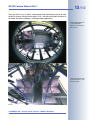
in a bus: Full image
(QXGA, uncorrected) of
the rear exit
Corrected VGA live image
of the same camera, panned and zoomed
© MOBOTIX AG • Security-Vision-Systems • Made in Germany
www.mobotix.com • [email protected]
14/112
*The Q22M with L22
90° lens will be available
at a later point in time
Q22M Camera Manual Part 1
Model Versions
The Q22M is available as Secure and Basic models, which come with different
feature sets. Both models can also be ordered with an L22 Super Wide-Angle
lens* with a horizontal image angle of 90°.
30 Frames Per Second in Uncorrected VGA Format
High resolution: QXGA
format with 2048x1536!
Corrected live image up
to D1-PAL format
768x576!
Like all other MOBOTIX cameras, the Q22M models can generate live video
streams with high frame rates and up to 3.1 megapixels image resolution (QXGA
with 2048x1536 pixels). When showing VGA video (640x480), the camera can deliver up to 30 frames per second. Even Megapixel video (1280x960 pixels) will still
generate up to 12 fps including lip-synchronous live audio from its microphone.
When using the Normal and Surround display modes, the frame rates drop
slightly due to the computing power required for correcting the images.
Robust and Maintenance-Free
PoE even in the winter!
Thanks to its low power consumption of about 3 Watts and the total absence of
mechanically moving parts, the Q22M models feature the highest operating temperature range from –30°C to +60°C (-20°F to +140°F) and are absolutely dustproof and resistant against water jets (Q22M-Secure IP65; Q22M-Basic IP54). Since
the cameras neither fog up nor require heating, power can be supplied all-year
round via the network cabling using standard PoE products.
More Features for Less Money
Everything integrated!
MxControlCenter:
Download free of charge
from www.mobotix.com
Displaying and controlling
MOBOTIX cameras:
- In the Browser
- In MxControlCenter
- In MxEasy
Similar to the other MOBOTIX cameras, the Q22M models outperform by far what
is considered industry standard today. The integrated software brings a whole range of features, such as video motion detection, long-term recording, alarm messaging and video IP telephony to name but a few features (speaker and microphone
are also integrated). Unlike in camera systems from other manufacturers, buying
and installing additional software is
thus unnecessary.
Instead of using a web browser, you
can download and install the free-ofcharge MxControlCenter from the
MOBOTIX website. This program provides fas displaying of multiple cameras on one monitor, provides for
comfortably searching events and
evaluating the alarm video clips and
presents additional alerting features
(including audio).
© MOBOTIX AG • Security-Vision-Systems • Made in Germany
www.mobotix.com • [email protected]
Q22M Camera Manual Part 1
15/112
The new MxEasy is the multi-platform
software for Windows, Macintosh and
Linux systems, which provides for easy
operation of the MOBOTIX system
thanks to its intuitive user interface,
thus creating a new user experience
when
viewing
and
controlling
MOBOTIX cameras.
MxEasy is currently under
development
Universal Accessories for the MOBOTIX Q22M
The camera is not included in the delivery of the
corresponding set!
On-Wall Set (MX-D22-OPT-AP)
The On-Wall set can reliably protect external
cables to the Q22M if the cables cannot be
guided from below the housing but have to
be led above the wall. The weatherproof housing also offers additional space for extra modules (e.g. a rechargeable battery against power failures).
On-Wall set (IP65,
suitable for outdoor applications)
On-Wall Set 10°
This On-Wall set is identical to the regular OnWall set, except that the mounted camera is
inclined by 10 degrees. The incline makes it
possible for the camera to deliver the best
images even in demanding situations.
On-Wall set 10° (IP65,
suitable for outdoor applications; available Q4/
2008)
In-Ceiling Set (MX-D22-OPT-IC)
The In-Ceiling set allows mounting the Q22M
cameras in fake ceilings, for example, thus
providing a secure, yet elegant and unobtrusive installation option.
© MOBOTIX AG • Security-Vision-Systems • Made in Germany
www.mobotix.com • [email protected]
In-Ceiling set (indoor)
16/112
Q22M Camera Manual Part 1
Vandalism Set (MX-Q22-OPT-VANDAL-...)
Vandalism set with mini
dome (IP65, suitable for
outdoor applications)
The Vandalism set reliably protects the Q22M
against mechanical impact. The set consists
of a robust stainless steel cover, a dome
made of polycarbonate and security screws.
A camera equipped with the Vandalism set is
perfectly suited for applications in demanding
environments (such as prisons, social hot
spots, train stations, etc.).
Wall Mount (MX-D22-OPT-WH)
Wall Mount made from
sturdy PBT-30GF (IP65,
suitable for outdoor applications)
This mount is the ideal solution for mounting
the Q22M to walls in indoor and outdoor
applications. The camera is absolutely dustproof and resistant against water jets (IP65).
The Wall Mount also covers RJ45 wall outlets
and has ample space for additional modules
(e.g. WLAN, WiFi).
Pole Mount (MX-D22-OPT-MH)
Pole Mount: Outdoor quality made of 3 mm stainless steel (in conjunction
with Wall Mount)
If you would like to mount the MOBOTIX
Q22M to a pole, you should consider using
the MOBOTIX Pole Mount. This mount can
only be used in conjunction with the wall
mount. The supplied stainless steel straps allow attaching the mount to poles with diameters between 60 and 180 mm (2.4 to 7.1 in).
© MOBOTIX AG • Security-Vision-Systems • Made in Germany
www.mobotix.com • [email protected]
Q22M Camera Manual Part 1
Notes:
© MOBOTIX AG • Security-Vision-Systems • Made in Germany
www.mobotix.com • [email protected]
17/112
Q22M Camera Manual Part 1
1.1
MOBOTIX Q22M cameras come with a standard L11 Fisheye lens that has a horizontal image angle of 180°. If desired, you can order the camera with an L22 Super Wide-Angle lens* (horizontal image angle of 90°). The integrated virtual PTZ
features of the camera software or MxControlCenter/MxEasy properly correct the
lens distortion that is specific to each of the lenses. Both lenses deliver good image
quality even when using maximum digital zoom. Since MOBOTIX cameras are
backlight-proof, they do not require a mechanical auto iris, making them extremely
robust and maintenance-free.
Full Image wih L11 Fisheye 180° in a bus
*The Q22M with L22
90° lens will be available
at a later point in time
Lens Options, Hardware and Software Features
Corrected Normal image with L11 Fisheye 180° in vPTZ mode
18/112
© MOBOTIX AG • Security-Vision-Systems • Made in Germany
www.mobotix.com • [email protected]
19/112
Q22M Camera Manual Part 1
Lens Table
Part Name
L11
L22*
35 mm equivalent
11 mm
22 mm
Actual focal length
1,8 mm
4 mm
Aperture
2.0
2.0
Image angle horizontally
180°
90°
Image angle vertically
160°
67°
Distance 1 m (3 ft)
m
m
• Image width
infinite
2.0
• Image height
11
1.3
Distance 5 m (3 ft)
m
m
• Image width
infinite
10.0
• Image height
55
6.6
Distance 10 m (3 ft)
m
m
• Image width
infinite
20.0
• Image height
110
13.3
Distance 20 m (3 ft)
m
m
• Image width
infinite
40.0
• Image height
220
26.0
Original image
*The Q22M with L22
90° lens will be available
at a later point in time
Note
The focal lengths of MOBOTIX lenses do not reflect the actual focal
length of the lenses, but the focal length (Lxx mm) converted to 35 mm
camera format. For example, the MOBOTIX Super Wide-Angle lens has
an actual focal length of 4 mm. This would be the equivalent of 22 mm
on a 35 mm camera. This lens is thus called L22.
Converting the focal lengths to 35 mm camera as a known format provides for better comparing the image formats and the fields of vision of
the different lenses. Another benefit is that you can easily set a 35 mm
camera (analog or digital) to the same focal length as the MOBOTIX
lens (Lxx) to obtain the same field of vision. This approach greatly facilitates lens selection.
© MOBOTIX AG • Security-Vision-Systems • Made in Germany
www.mobotix.com • [email protected]
Focal lengths of MOBOTIX lenses are always given as compared to a
35 mm camera
To determine the lens you
need, simply use a camera
with zoom lens to find a
matching MOBOTIX lens
Q22Mi-Basic D22
MX-Q22Mi-Basic-D22
Q22M-Secure D11
MX-Q22M-Sec-D11
Q22M-Secure D22
MX-Q22M-Sec-D22
Q22M Camera Manual Part 1
Q22Mi-Basic D11
MX-Q22Mi-Basic-D11
20/112
IP54
IP54
IP65
IP65
E /- / - /-
E /- / - /-
E /- / U*/-
E /- / U*/-
-
-
1
1
Integrated microphone/speaker
-/X
-/X
X/X
X/X
Mono (M) / Dual (D)
M
M
M
M
Color
Color
Color
Color
L11
L22
L11
L22
VGA
VGA
3 Mega
3 Mega
640x480
640x480
2048x1536
2048x1536
16/16/-
16/16/-
30/30/12
30/30/12
1
1
1
1
Sensitivity at 1 second (Lux)
0,05
0,05
0,05
0,05
Automatic night lens switch
-
-
-
-
64
64
128
128
Internal SD card*
-
-
X*
X*
Video ring buffer (MB)
2
2
64
64
CIF images approx.
100
100
4,000
4,000
VGA images approx.
50
50
2,500
2,500
Mega images approx.
-
-
800
800
External audio (Line-In/Out)
-
-
-
-
Signal input pins
-
-
-
-
Signal outputs
-
-
-
-
Concealed cabling
X
X
X
X
In stock
X
-**
X
-**
X
X
X
X
X/X
X/X
X/X
X/X
Additional storable views
X
X
X
X
Full image recording
X
X
X
X
**The Q22M with L22
90° lens will be available
at a later point in time
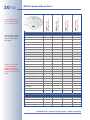
Q22M Hardware Features
*Special adapter cable for
USB required; will be supported in a future software update
Outdoor weatherproof
Ethernet/ISDN/USB/RS232
SD card
Image Sensor
Lens
Image Size
Resolution horizontal x vertical
Max. frame rate CIF/VGA/Mega
Sensitivity at 1/60 second (Lux)
*1 GB SD card is included in the delivered
Q22M-Secure models.
MOBOTIX cameras support SD cards with up to
16 GB.
Storage (MB)
Q22M Software Features
Digital zoom (continuous)
vPTZ mode / Surround view
© MOBOTIX AG • Security-Vision-Systems • Made in Germany
www.mobotix.com • [email protected]
21/112
Basic Models
Web Models
IT Models
Secure Models
Q22M Camera Manual Part 1
Digital zoom (up to 8x, continuous) with panning
X***
X
X
X
Motion JPEG/MxPEG video streaming
X/X
X/X
X/X
X/X
Custom exposure windows
X
X
X
X
Video Motion detection
X
X
X
X
Time and event control (FTP, e-mail, logos)
X
X
X
X
X
X
X
M12
M12
D12
D12
D22M
M22M
D22M
Q22M
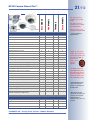
Software Features (All Models)
Weekly schedules/holidays
Web functionality (FTP, e-mail)
X
X
X
X
Quad/MultiView in browser
X
X
X
X
Recording/Playback in browser
X
X
X
X
X
X
X
3
10
50
Terabyte ring buffer (Win/Lin/Mac) via network
X
X
Continuous video/audio recording, 0.2 to 30 fps
X
X
Video/audio recording (event-triggered)
X
X
Event-controlled frame rate with continuous audio
X
X
Logo generator, animated
Single image recording (pre-/post-alarm images)
3
Flexible event logic
X
Master/Slave arming by one camera
X
Scheduled privacy zones, several areas
X
Bidirectional audio (IP) from/to browser
X*
X*
Customized voice messages
X
X
VoIP telephony (Audio/Video, SIP)
X*
X*
Alarm calls to softphones (SIP) e.g. X-Lite
X
X
Remote alarm notification (via TCP/IP, IP Notify)
X
X
RS232 Data Logger/Terminal
X**
X**
Programming interface/HTTP API
X
X
Security features (HTTPS/SSL, IP-level access control,
network authentication IEEE 802.1X)
X
X
X
X
Image size
VGA
3 Mega**
VGA
3 Mega**
Image Sensor
Color
Color
Color/BW
Color/BW
Standard lens for software version
L22*
L22*
L22*
L22*
Audio support (Microphone/Speaker)
-/S*
-/S*
M/S*
M/S*
Model Feature List
© MOBOTIX AG • Security-Vision-Systems • Made in Germany
www.mobotix.com • [email protected]
The Web version is
available only as M12
model
The Basic version is
available only as D22M
and Q22M model
The IT version is not
available as Q22M model
***Only available for
Q22M models!
*D22M IT and Secure
models allow connecting
an external speaker and
microphone. D22M cameras do not
have a microphone or
speaker.
**3 MEGA resolution
with 2048x1536 pixels;
the B/W image sensors
of the Sec-DNight versions have Mega resolution (1280x960 pixels)
**M22M/Q22M models
require the CamIO or
ExtIO; not available for
D22M models
*M12 models are delivered with the lenses specified by the customer;
Q22M models are
available with an L11 or an
L22 lens
22/112
Q22M Camera Manual Part 1
1.2 The MOBOTIX Concept
In addition to the features specific to the MOBOTIX Q22M, this section contains an
overview of the MOBOTIX concept, which brings many more advantages over other
systems.
High-Resolution Live Video With up to 30 Frames/s
The MOBOTIX cameras deliver smooth live video with lip-synchronous live audio,
yet they keep the network load to a minimum. Some analog systems may also be
able to deliver this, but the quality of recording is so much higher with MOBOTIX
since the cameras efficiently store the high, live-image resolution and frame rate
without compromising image quality. The MOBOTIX technology thus provides for simultaneous continuous recording of the video from 30 cameras on one standard PC at 30 frames per second each, including audio.
Low Bandwidth Requirements
MOBOTIX' patent-pending MxPEG streaming format allows fast live video with
audio at extremely low network load (1 to 2 Mbps). Since the MOBOTIX camera itself detects movements in the image (and not the computer), the video sequences
are only transmitted if movements occur.
Voice over IP
Moreover, MxPEG provides for lip-synchronous live audio and two-way communication between the camera and a computer. Room surveillance is possible using a
browser (Internet Explorer), MxControlCenter or MxEasy. Customized alarm notification on your mobile or via Internet telephony is just as easy as event-controlled
voice messages directly from the camera.
Internet Telephony (SIP) and Video SIP
IP Telephony!
Video SIP allows establishing
audio/video connections to
the camera using Windows
Messenger or similar applications (e.g. CounterPath X-Lite/
Eyebeam). This feature also
allows remote-controlling the
camera using the phone keys
and the camera itself can
place phone calls in case of
alarms.
© MOBOTIX AG • Security-Vision-Systems • Made in Germany
www.mobotix.com • [email protected]
Q22M Camera Manual Part 1
23/112
Storage on SD Cards
MOBOTIX cameras support the direct storage on an internal SD card (max.
16 GB). By using this integrated SD card DVR, the camera has these additional applications:
•
Stand-alone use of the camera without file server thanks to recording on
the SD card.
•
High-security application with recording on a file server or NAS/SAN in
which the SD card serves as storage buffer. It can thus bridge longer failures
of the network or the file server without losing any video sequences (supported in a future software version).
•
Event downloads from the SD card for evaluation of the recorded sequences on a computer.
SD cards up to max.
16 GB will be supported
from software version
3.4.2
Long-Term Storage on File Servers Included
MOBOTIX cameras feature an integrated long-term storage system on Linux,
Windows and Mac OS X computers. Every camera manages its own ring buffer
storage on the shared folder. This decentralized MOBOTIX concept is crucial in creating cost-efficient, high-resolution video systems since this approach drastically
reduces the required network bandwidth as well as the number of IT standard
components needed for managing a large number of HiRes cameras.
Event and Time-Controlled
Just like triggering event-controlled recording upon detecting movements in the
image, the camera can also record when the volume detected by the microphone
exceeds a certain trigger value. Using scheduled daily recording, time tasks can
start or stop video recording, upload images to a web site or send e-mails with video/audio clips. Vacation times and holidays can be programmed.
Remote Alerting
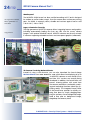
In case of an alarm, MOBOTIX cameras automatically pop up windows or activate
other functions at a remote security control center. The cameras can use network/
wireless, GSM/GPRS/UMTS (3G) or Internet connections for this purpose.
Integrated Power-over-Ethernet
Power is supplied as Power-over-Ethernet via the network cabling using the MOBOTIX Power Adapter set, a Netpower Rack (8 or 20
cameras), a Netpower Box (4 cameras), or by using a PoE-compatible switch (according to PoE standard IEEE 802.3af).
Since the MOBOTIX cameras use very little power (approx. 3 Watts) and its well-insulated plastic housing is anti-fogging, no additional heating is necessary. This is
why MOBOTIX, unlike other manufacturer's cameras, have low power requirements (3 Watts) and PoE can be used every day of the year indoors as well as outdoors for supplying power.
© MOBOTIX AG • Security-Vision-Systems • Made in Germany
www.mobotix.com • [email protected]
No heating required—PoE
is no problem even in the
wintertime!
24/112
Q22M Camera Manual Part 1
Weatherproof
*In conjunction with Wall
Mount; Q22M-Basic reaches IP54
The MOBOTIX Q22M-Secure has been certified according to IP65 and is designed
for outdoor as well as indoor usage*. Since the camera does not have any moving
parts, the Q22M is extremely robust, durable and resistant against heat or cold
(-30 to +60°C; -20 to +140°F).
Logos, Animated or Freestyle
Logo generator
The logo generator of MOBOTIX cameras allows integrating banners and graphics
(including automatically loading files from any URL) into the current camera
images—with optional scheduler control. MOBOTIX cameras are the only network
IP cameras supporting animated and even semi-transparent graphics (watermark).
30 Cameras Live Using MxControlCenter
Instead of using a web browser, you can also download the free-of-charge
MxControlCenter from www.mobotix.com, which allows fast displaying of up to
30 MOBOTIX cameras on one monitor (Linux
and Mac OS X versions are currently being
developed). In addition, MxControlCenter can
process incoming alarms with sound from
the cameras and allows comfortably searching and evaluating the alarm video clips (including audio). The integrated Layout Editor
of MxControlCenter provides for quickly creating floor plans by simply dragging/dropping the cameras onto a background image.
Load a floor plan as background image,
drag&drop the cameras; done.
© MOBOTIX AG • Security-Vision-Systems • Made in Germany
www.mobotix.com • [email protected]
Q22M Camera Manual Part 1
25/112
MxEasy – Intuitive Application for Windows, Macintosh and Linux
The new MOBOTIX MxEasy (currently in development) aims at easily operating the
important camera functions thanks to its intuitive user interface, thus creating a
new user experience when viewing and controlling MOBOTIX cameras. The clear
design allows managing up to 16 cameras and the application can show up to four
cameras at the same time.
MxEasy is currently under
development
Simple usage with MxEasy
All settings changed in MxEasy (e.g. virtual camera position, zoom, brightness, volume, microphone sensitivity, image storage, signal outputs) are usable immediately and are stored instantly in the configuration of the corresponding camera.
The calendar tool comprises
innovative features for scheduled settings of one or more
cameras. For the first time,
this tool not only controls
video and audio recording
based on certain time and
date information, but also allows activating/deactivating
features like video motion detection, image brightness and
the microphone based on a
time schedule.
Once the first version is released, MxEasy will be available for MS Windows, Mac
OS X and Linux/UNIX operating systems and can be downloaded free of charge
from www.mobotix.com.
© MOBOTIX AG • Security-Vision-Systems • Made in Germany
www.mobotix.com • [email protected]
Calendar features in
MxEasy
26/112
Q22M Camera Manual Part 1
More Features
•
True software scaling for easily generating smaller image formats for PDAs
(such as 320x240, 160x120, etc.).
•
Audio video recording with three different recording modes: Event recording
with audio, continuous recording with variable frame rate and audio as well
as event-controlled snapshot recording of JPEG images.
•
Storage failure detection can monitor a file server (or a Flash device) and
can use one or more of the defined messaging options for error notification.
•
Playback of recorded images/video sequences with audio in the integrated
video management system.
•
Multiwatcher screen can display and monitor several cameras via the Internet, with only one camera requiring access from the outside. This "proxy"
camera uses only very little bandwidth, making it an ideal solution for lowbandwidth connections.
•
MultiView screen for displaying multiple cameras or events in one browser
window.
•
Event notification by e-mail, SMS (using a provider), voice notification (Phone
Call-Out), sounds and by visual means (e.g. red frame in live image) using
two separate messaging paths.
•
Object tracing for analyzing the paths of objects that are moving in the image.
•
Time Tables with handling of customized holidays and vacations. The time
tables are used to control the camera's arming, image recording messaging,
logos, the obscure image function as well as other features.
•
Remote signaling for master/slave cameras, with the master camera controlling the arming status of the slave cameras. This allows arming, for example, of all slave cameras by using a key switch that is connected to the
master camera.
•
Transfer profiles for comfortably controlling transmissions via FTP, e-mail,
phone calls and network messages.
•
Speaker phone* with speak, listen and intercom modes using the integrated
microphone and speaker.
•
Phone Call-In* to remotely control the camera using a touchtone telephone
(retrieve camera information, establish an Internet connection, announce the
retrieved IP address, intercom feature, etc.).
•
MxPEG video compression using MOBOTIX MxControlCenter. The ActiveX
plug-in for Internet Explorer users brings all advantages of MxPEG to the
browser-based user interface (including the audio stream to and from the
camera).
•
Routing allows using other network connections besides the standard route.
2048x1536 pixels
*Telephony features using
VoIP connections (Internet telephony)
© MOBOTIX AG • Security-Vision-Systems • Made in Germany
www.mobotix.com • [email protected]
Q22M Camera Manual Part 1
•
DynDNS client for accessing the camera via the Web using a symbolic name
(e.g. mymobotixcam.dyndns.org) although the provider is assigning a
new dynamic IP address every time the camera connects to the Internet.
•
Unerasable backup operating system that is used to restart the camera in
the event that a software update has failed, allowing you to restart the update process.
•
Enhanced startup options for the camera (obtain IP address via DHCP, announcement of IP address and other network data, reset to factory default
settings).
•
Notifications upon errors or when rebooting provide a method for executing one or more notifications (e.g. blinking of the camera LEDs, audio message, FTP, e-mail, phone call, network message).
•
Extended security features protect the pages and features of the camera
and prohibit unauthorized access (IP-level access control, intrusion detection). They also provide SSL-protected transmission of the video sequences
and the data (using SSL encryption and X.509 certificates).
27/112
Free Software Updates
MOBOTIX provides free-of-charge software updates at regular intervals that improve and expand the camera's functionalities. Chapter 6,
Software Update, in the Software Manual provides more information
on the process.
© MOBOTIX AG • Security-Vision-Systems • Made in Germany
www.mobotix.com • [email protected]
Free-of-charge software
updates from
www.mobotix.com
28/112
Q22M Camera Manual Part 1
2
MOUNTING
2.1 Preparing the Installation
Before mounting the MOBOTIX Q22M, the following questions should be
answered:
1) Where will the camera be mounted?
Mounting the camera to a ceiling or wall, see section 2.1.1
2) Which other mounting options are available?
On-wall mounting, in-ceiling mounting, vandalism protection, wall mounting,
pole mounting, see section 2.1.2.
3) How is the camera connected to the network and how is the power supplied?
Network Power Adapter, Netpower Rack/Netpower Box, MxPoE or PoE-components (IEEE 802.3af), see section 2.1.4.
4) How are the connections furnished from the building?
Wall outlets, see section 2.1.5.
5) Which sections of the Mounting Instructions should I read?
In order to mount the Q22M with its optional accessories as quickly and efficiently as possible, you should consult the Directions for Mounting, see section 2.1.6.
The following sections contain a brief overview for all of these questions as well as
references to the relevant sections in this manual, which contain more detailed information. For more information on the MOBOTIX Q22M and the available accessories, please also refer to www.mobotix.com.
2.1.1 Mounting to a Ceiling or Wall
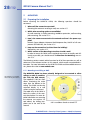
Surveillance of a complete
room with only one camera
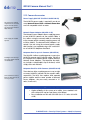
The MOBOTIX Q22M has been primarily designed to be mounted to either
ceilings or walls (in combination with the Wall Mount).
The supplied L11 180° lens then
allows monitoring the entire
room from the bottom to the
ceiling. The Q22M can also be
mounted directly to a wall
without using the wall mount.
The cable entry of the Q22M is
below the center of the camera's back plate. For more detailed information on mounting
the camera, see sections 2.4
and above; the drilling templates are at the end of the
manual.
360° surveillance thanks to virtual PTZ
© MOBOTIX AG • Security-Vision-Systems • Made in Germany
www.mobotix.com • [email protected]
Q22M Camera Manual Part 1
29/112
Note
When mounting the camera to a ceiling or the Wall Mount, the camera
behaves like a ceiling camera (the center of the image is pointing
downwards). When mounting the camera to a wall, it behaves like a
wall camera (the center of the image is pointing horizontally).
2.1.2 Mounting Options
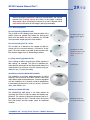
On-wall mounting (D22M-OPT-AP)
The On-Wall set can reliably protect external cables if the
cables cannot be guided from below the housing but
have to be led above the wall. In addition, the On-Wall
mount provides ample space for extra modules.
On-Wall Set (IP65, suitable for outdoor applications)
On-wall mounting with 10° incline
This On-Wall set is identical to the regular On-Wall set,
except that the mounted camera is inclined by 10 degrees. The incline makes it possible for the camera to deliver the best images even in demanding situations.
On-Wall Set 10° (IP65,
suitable for outdoor applications; available Q4/
2008)
In-ceiling mounting (D22M-OPT-IC)
The In-Ceiling set allows mounting the Q22M cameras in
fake ceilings, for example. This type of installation provides optimum protection for the camera and reduces the
visible profile to a minimum since the camera only protrudes 24 mm (1 in) from the ceiling.
In-Ceiling Set
Vandalism protection (Q22M-OPT-VANDAL)
The Vandalism set provides added protection for Q22M
cameras. The set consists of a robust stainless steel cover
and a dome made of polycarbonate. A camera equipped
with the Vandalism set is perfectly suited for applications
in demanding environments (such as prisons, social hot
spots, train stations, etc.).
Vandalism Set (IP65)
Wall Mount (D22M-OPT-WH)
The Q22M/D22M Wall Mount is the ideal solution for
mounting the Q22M to walls for indoor and outdoor applications. The camera is absolutely dustproof and resistant against water jets (IP65). The wall mount also covers
RJ45 wall outlets and has ample space for additional
modules.
© MOBOTIX AG • Security-Vision-Systems • Made in Germany
www.mobotix.com • [email protected]
Wall Mount made from
sturdy PBT-30GF (IP65)
30/112
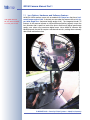
Q22M Camera Manual Part 1
Pole Mount (D22M-OPT-MH)
Pole Mount: Outdoor quality made of 3 mm stainless steel (in conjunction
with Outdoor Wall Mount)
If you would like to mount the MOBOTIX Q22M to a
pole, you should consider using the MOBOTIX Pole
Mount. This mount can only be used in conjunction
with the wall mount. The supplied stainless steel straps
allow attaching the mount to poles with diameters between 60 and 180 mm (2.4 to 7.1 in).
2.1.3 Hints for Choosing a Good Mounting Position
In order to get the most out of the MOBOTIX Q22M, you should follow these mounting hints.
360° Allround Surveillance
Image detail of 360° allround surveillance
Thanks to its hemispherical lens, a single Q22M can monitor an entire room
right into each of the four corners (360°
very good
Allround Surveillance). The camera's
good
ideal position is on the ceiling in the censatisfactory
ter of the room. Due to its inherent
physical and optical properties, the precision of the lens decreases as the distance from the lens grows. This means
that the maximum usable image area The image detail (recognizability) of an
greatly varies with the purpose of the object in the camera image diminishes
camera. Rooms with a square floor area with growing distance to the camera.
of up to approx. 40 m² (48 yd²) in general allow recognizing details even at the borders of the full image. If you would
only like to know if persons enter a room or for monitoring specific objects, rooms
with up to 100 m² (120 yd²) floor area can be monitored using a single Q22M.
Facial Recognition
Facial recognition up to
approx. 5 m (15 ft) distance
If the camera is used to detect persons
and recognize their faces, the camera
should be mounted at heights between
2.8 and 3 m (9.2 to 9.8 ft). Facial recognition up to 1.5 m (5 ft) distance to the
object is very good and up to 3 m
(9.8 ft) is still sufficient. Persons that are
already known can be properly identified up to 5 m (16.4 ft) distance from
the camera.
© MOBOTIX AG • Security-Vision-Systems • Made in Germany
www.mobotix.com • [email protected]
31/112
Q22M Camera Manual Part 1
Non-Square Rooms
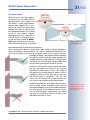
When viewing a 360° (full) image in
the browser, you will notice that the
Optimum orientation
top and bottom of the image is not
fully visible, i.e. some image information has been clipped. This is not a
fault of the camera, but an intended
behavior that aims at achieving the
best possible utilization of the image
sensor by the camera software.
Bearing this in mind, it is advisable to
install a Q22M in rectangular rooms
so that the arrow marked as OBEN /
TOP points towards one of the long
sides of the room as shown in the figure.
Optimum orientation
Properly align the camera
in rectangular rooms!
Lowered Mounting or Mounting on Extensions
When mounting the camera in rooms with a high ceiling, it may be advisable to
mount the camera in a lower position. This reduces the distance between the camera and the objects that are to be monitored, which in turn increases the recognizability of details. One practical solution would be
to install the camera on a base plate attached to a
suitable extension (metal tube) that is hanging from
the ceiling. The network cable can be hidden from
view by running through the interior of the tube.
Similar to such a lowered mounting from the ceiling,
you can also attach the camera to an extension
mounted to a wall to better use the 360° image of
the camera (e.g. outside, above a portal). Such an
installation would use the pole mount accessory
(MX-D22-OPT-MH) in conjunction with the wall
mount (MX-D22-OPT-WH) as a sturdy camera carrier, which is then mounted to the extension pole.
MOBOTIX recommends not to attach the camera directly to metal carriers, especially when mounting
the camera outdoors or when the ambient temperature varies greatly. As an additional measure to protect the camera against condensation, you should
use either the On-Wall set (MX-D22-OPT-AP) or the
Wall Mount (MX-D22-OPT-WH).
© MOBOTIX AG • Security-Vision-Systems • Made in Germany
www.mobotix.com • [email protected]
Never mount the camera
to metal surfaces (condensation may damage
the camera)!
32/112
Q22M Camera Manual Part 1
2.1.4 Network Connection and Power Supply, UPS
Power-over-Ethernet (MxPoE)
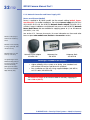
Power is supplied to all Q22M models via the network cabling (MxPoE, Powerover-Ethernet). For smaller installations, the universal power supply (MX-SNT-E/U/
GB/J/AUS01-30-RJ) with the MOBOTIX Network Power Adapter MX-NPA-3-RJ is
sufficient. Larger installations would benefit from one or more MOBOTIX Network
Power Racks/Boxes that are available for supplying power to 4, 8 or 20 cameras
(MX-NPR-4, -8 or -20).
MX-NPA-3-RJ: Easy installation for smaller systems
See section 2.12, Camera Accessories, for more information on these and other
items or open www.mobotix.com (Products > Accessories section).
MX-NPR-4: For mounting
in wiring cupboards; includes DIN rail clip
MX-NPR-8/20: 19" rack
mount (2 rack units)
The Q22M supports the
MOBOTIX PoE products
for power injection into
the network cabling
(MxPoE) and the Powerover-Ethernet standard
IEEE 802.3af (PoE)
Network Power Adapter
MX-NPA-3-RJ
Netpower-Box
MX-NPR-4
Netpower-Rack
MX-NPR-20
Advantages of MOBOTIX PoE Products
•
•
•
Zero maintenance and durable without fans.
Higher reliability of the system as a whole, since standard switches without PoE can be used (lower risk of failure).
Easy installation on DIN rails using supplied adapter (MX-NPR-4)
or in 19" racks (MX-NPR-8/20).
Caution
The maximum length of the network cable for remotely supplying power is 100 m (300 ft).
© MOBOTIX AG • Security-Vision-Systems • Made in Germany
www.mobotix.com • [email protected]
Q22M Camera Manual Part 1
33/112
Power-over-Ethernet (PoE according to IEEE 802.3af)
Besides MOBOTIX MxPoE, the MOBOTIX Q22M also supports the Power-overEthernet standard IEEE 802.3af. You can hence use switches or routers that support the PoE (Power-over-Ethernet) standard IEEE 802.3af.
Note
If you are using Power-over-Ethernet (IEEE 802.3af) network components for supplying power to the MOBOTIX Q22M, make sure that these components do not have a fan. Since the power consumption of
MOBOTIX cameras is very low compared to other products, the reliability of the entire system is increased and the life cycle of the PoE components is expanded.
PoE components without
fans increase overall reliability of the entire system
Sections 3.2 ff contain more information on the possible combinations of connecting the Q22M and power supply options.
Using Uninterruptible Power Supplies (UPS)
In order to maintain a continuous power supply even when utility power fails, you
should install an uninterruptible power supply (UPS). These devices also provide
full protection against electrical surges and voltage fluctuations and thus enhance
the reliability of the system as a whole.
When using a more powerful 19" rack-mounted USP, you can also protect all other
network components (e.g. switches, routers, PoE switches, etc.).
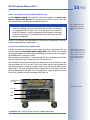
UPS not only protect the
camera against power failures, they also protect all
other connected network
devices against damage
from voltage peaks and
lows
Since MOBOTIX cameras do not require any heating even in the wintertime, the power consumption of 3 W is very low. This in turn means that you can centralize the
USP-protected power supply by injecting power into the network cables (max.
100 m/300 ft). This kind of protected power supply can be used either with MOBOTIX MxPoE products (MX-NPA-3-RJ + external power supply or MX-NPR-4/8/20)
or with PoE-compliant switches according to IEEE 802.3af.
MOBOTIX NPR or
PoE switch
19" system with UPS
PC/Server
RAID
UPS
© MOBOTIX AG • Security-Vision-Systems • Made in Germany
www.mobotix.com • [email protected]
34/112
Q22M Camera Manual Part 1
2.1.5 Providing the Camera Connections, Wall Outlets
Once the camera position, the position of the cable outlets and the method of
power supply have been decided upon, the cabling can be installed. Before
mounting the MOBOTIX Q22M, you should make sure that the network connections
have been properly tested, so that the proper functioning of the camera is guaranteed.
Please read section 2.11.2, Wiring, Fire Prevention, Lightning and Surge Protection
for more important information.
Q22M with In-Ceiling set
On-Wall set 10°
Q22M
Q22M with Wall Mount
Q22M with Vandalism set
© MOBOTIX AG • Security-Vision-Systems • Made in Germany
www.mobotix.com • [email protected]
Q22M Camera Manual Part 1
35/112
2.1.6 Directions for Mounting
Once the type of installation, the camera connections, the power supply and the
mounting options have been decided upon, you should follow the directions listed
below. This ensures that you only have to read the relevant sections of this chapter,
which will speed up installing the Q22M.
Directions for Mounting
Preparatory Tasks
Sections
Q22M
Sections
Type of Installation
Sections
Mounting to a
Ceiling
2.2
2.4
Mounting to
Walls with the
On-Wall Set
2.2 Q22M: Delivered Parts, Components and Dim.
2.3.1 On-Wall Set
2.5 Mounting with the On-Wall Set
Mounting to
Ceilings with the InCeiling Set
2.2 Q22M: Delivered Parts, Components and Dim.
2.3.2 In-Ceiling Set
2.6 Mounting the In-Ceiling Set
Mounting the
Vandalism Set
2.2
2.3.3
2.4
2.7
Mounting to
Walls Using the Wall
Mount
2.2 Q22M: Delivered Parts, Components and Dim.
2.3.4 Wall Mount
2.8 Mounting With the Wall Mount
Mounting to
Poles
2.2
2.3.4
2.3.5
2.8
Final Tasks
Sections
All camera variants
(except Vandalism Set)
2.9
Q22M: Delivered Parts, Components and Dim.
Mounting the Camera Without Add. Options
Q22M: Delivered Parts, Components and Dim.
Vandalism Set
Mounting the Camera Without Add. Options
Mounting the Vandalism Set
Q22M: Delivered Parts, Components and Dim.
Wall Mount
Pole Mount
Mounting With the Wall Mount
Finishing the Mounting Process
© MOBOTIX AG • Security-Vision-Systems • Made in Germany
www.mobotix.com • [email protected]
Additional mounting options
36/112
Q22M Camera Manual Part 1
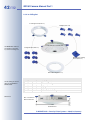
2.2 Q22M: Delivered Parts, Components and Dimensions
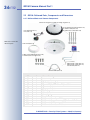
2.2.1 Delivered Parts and Camera Components
Camera housing (item 1.1) with mounting ring (item 1.1)
4 wood screws 4.5x60 mm (item 1.13)
4 dowels 8 mm (item 1.11)
4 washers Ø 5.3 mm (item 1.12)
Lens wrench (item 1.3)
Lens (item 1.2)
Make sure to check the
delivered parts!
∅ 160 mm/6.3 in
Outer shell (item 1.9)
SD card (item 1.4)
4 Allen screws M4x16 mm (item 1.14)
4 washers Ø 4.3 mm (item 1.15)
Allen wrench 3 mm (item 1.6)
Allen wrench 2 mm (item 1.7)
Torx wrench (item 1.8)
Ethernet cable (item 1.5)
Item
1.1
1.2
1.3
1.4
1.5
1.6
1.7
1.8
1.9
1.10
1.11
1.12
1.13
1.14
1.15
Count
1
1
1
1
1
1
1
1
1
1
4
4
4
4
4
Part Name
Camera housing
Lens
Lens wrench
SD Card, pre-installed
Ethernet cable CAT5 0.3 m/20", installed
Allen wrench 3 mm
Allen wrench 2 mm
Toothed wrench
Outer shell
Mounting ring
Dowels 8 mm
Stainless steel washers Ø 5.3 mm
Stainless steel wood screws with Torx head 4.5x60 mm
Stainless steel Allen screws M4x16 mm
Stainless steel washers Ø 4.3 mm
© MOBOTIX AG • Security-Vision-Systems • Made in Germany
www.mobotix.com • [email protected]
Q22M Camera Manual Part 1
37/112
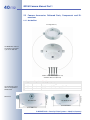
2.2.2 Camera Housing and Connectors
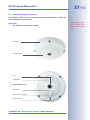
The MOBOTIX Q22M consists of the camera housing (motherboard and lens), the
outer shell and the mounting ring.
Connection
•
NET (Ethernet network/power supply)
Outer shell
Camera housing
Lens
Connection
Loudspeaker
Network cable (hidden)
Microphone
LEDs (1 x green, 1 x red)
Slot for SD card
© MOBOTIX AG • Security-Vision-Systems • Made in Germany
www.mobotix.com • [email protected]
SD cards will be supported from software version 3.4.2 (except Q22MBasic)
38/112
Q22M Camera Manual Part 1
48 mm/1.9 in
2.2.3 Q22M: Dimensions Without Mounting Options
Ø 160 mm/6.3 in
Mobile Q22M application
in a bus: Full image
(QXGA, uncorrected) of
the rear exit
© MOBOTIX AG • Security-Vision-Systems • Made in Germany
www.mobotix.com • [email protected]
39/112
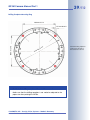
Q22M Camera Manual Part 1
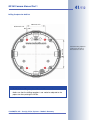
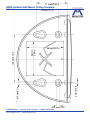
Drilling Template Mounting Ring
100 mm/3.9 in
100 mm/3.9 in
5.5 mm/0.22 in
in
5.6
/
mm
.4
1
4
1
Note
Find the folded drilling template at the end of the manual.
Make sure that the drilling template is not scaled or adjusted to the
paper size when printing the PDF file.
© MOBOTIX AG • Security-Vision-Systems • Made in Germany
www.mobotix.com • [email protected]
Find the drilling templates
(scale 1:1) at the end of
the manual as a fold-out
40/112
Q22M Camera Manual Part 1
2.3 Camera Accessories: Delivered Parts, Components and Dimensions
2.3.1 On-Wall Set
Housing (item 2.1)
The MOBOTIX camera is
not included in the delivery of the On-Wall set!
4 Allen screws M4x35 mm (item 2.2)
4 washers Ø 4.3 mm (item 2.3)
Count
1
4
4
Part Name
On-Wall set housing
Stainless steel Allen screws M4x35 mm
Stainless steel washers Ø 4.3 mm
85 mm/3.3 in
Dimensions
On-Wall set
On-Wall set 10°
∅ 165 mm
74 mm/2.9 in
The On-Wall set can be
used for all Q22M and
D22M models
Item
2.1
2.2
2.3
Ø 166 mm/6.5 in
Ø 160 mm/6.3 in
© MOBOTIX AG • Security-Vision-Systems • Made in Germany
www.mobotix.com • [email protected]
41/112
Q22M Camera Manual Part 1
Drilling Template On-Wall Set
60 mm/2.4 in
100 mm/3.9 in
ø5.8 mm/2.3 in
Note
Find the folded drilling template at the end of the manual.
Make sure that the drilling template is not scaled or adjusted to the
paper size when printing the PDF file.
© MOBOTIX AG • Security-Vision-Systems • Made in Germany
www.mobotix.com • [email protected]
Find the drilling templates
(scale 1:1) at the end of
the manual as a fold-out
42/112
Q22M Camera Manual Part 1
2.3.2 In-Ceiling Set
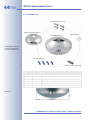
In-Ceiling mount (item 3.1)
5 clamps (item 3.4)
The MOBOTIX camera is
not included in the delivery of the In-Ceiling set!
∅ 150 mm/5.9 in diameter
5 winged cams (item 3.3)
Wrench for In-Ceiling
mount (item 3.5)
Decoration ring (item 3.2)
Dimensions
Count
1
1
5
5
2
Part Name
In-Ceiling set
Decoration ring
Winged cam
Clamps
Wrench for In-Ceiling mount
Min: 6 mm/0.2 in
Max: 22 mm/0.9
∅ 165 mm
24 mm/0.9 in
The In-Ceiling set can be
used for all Q22M and
D22M models
Item
3.1
3.2
3.3
3.4
3.5
Ø 180 mm/7 in
© MOBOTIX AG • Security-Vision-Systems • Made in Germany
www.mobotix.com • [email protected]
Q22M Camera Manual Part 1
43/112
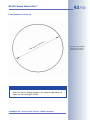
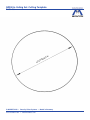
Cutting Template In-Ceiling Set
∅
ter
me
a
i
nd
9i
.
5
/
mm
0
15
Note
Find the folded drilling template at the end of the manual.
Make sure that the drilling template is not scaled or adjusted to the
paper size when printing the PDF file.
© MOBOTIX AG • Security-Vision-Systems • Made in Germany
www.mobotix.com • [email protected]
Find the cutting template
(scale 1:1) at the end of
the manual as a fold-out
44/112
Q22M Camera Manual Part 1
2.3.3 Vandalism Set
4 security screws (item 4.3)
Stainless steel cover (item 4.1)
∅ 160mm/6.3 in
Dome (item 4.5)
The MOBOTIX camera is
not included in the delivery of the Vandalism set!
4 spacers (item 4.2)
Two-hole driver bit (item 4.4)
Count
1
4
4
1
1
1
Part Name
Stainless steel cover 2 mm stainless steel
Spacers for Vandalism set
Security screws M4x16 mm
Two-hole driver bit for security screws
Polycarbonate dome
Dome wrench
Dimensions
∅ 165 mm
53 mm/2.1 in
Item
4.1
4.2
4.3
4.4
4.5
4.6
Ø 160 mm/6.3 in
© MOBOTIX AG • Security-Vision-Systems • Made in Germany
www.mobotix.com • [email protected]
45/112
Q22M Camera Manual Part 1
Variants
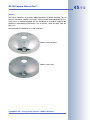
The Q22M Vandalism set provides added protection for Q22M cameras. The set
consists of a robust stainless steel cover, a dome made of polycarbonate and security screws. A camera equipped with the Vandalism set is perfectly suited for applications in demanding environments (such as prisons, social hot spots, train stations, etc.).
You can order the Vandalism set in these variants:
Stainless steel, polished
Stainless steel, matt
© MOBOTIX AG • Security-Vision-Systems • Made in Germany
www.mobotix.com • [email protected]
46/112
Q22M Camera Manual Part 1
2.3.4 Wall Mount
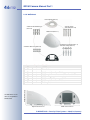
Bottom plate (item 5.8)
4 wood screws
6x50 mm (item 5.4)
8 Allen screws M4x16 mm
(item 5.6)
Wall mount (item 5.1)
4 washers Ø 6.4 mm (item 5.3)
4 dowels 8 mm (item 5.2)
8 washers Ø 4.3 mm (item 5.7)
Wall sealing (item 5.5)
The Wall Mount can be
used for all Q22M and
D22M models
Count
1
4
4
4
1
8
8
1
Part Name
Wall Mount
Dowels 8 mm
Stainless steel washers Ø 6.4 mm
Stainless steel wood screws with hex head 6x50 mm
Wall sealing
Stainless steel Allen screws M4x16 mm
Stainless steel washers Ø 4.3 mm
Bottom plate
Height: 125 mm/4.9 in
Item
5.1
5.2
5.3
5.4
5.5
5.6
5.7
5.8
Depth: 201 mm/7.9 in
Width: 216 mm/8.5 in
© MOBOTIX AG • Security-Vision-Systems • Made in Germany
www.mobotix.com • [email protected]
47/112
Q22M Camera Manual Part 1
15 mm/
0.59 in
75 mm/2.95 in
Drilling Template Wall Mount
160 mm/6.3 in
Note
Find the folded drilling template at the end of the manual.
Make sure that the drilling template is not scaled or adjusted to the
paper size when printing the PDF file.
© MOBOTIX AG • Security-Vision-Systems • Made in Germany
www.mobotix.com • [email protected]
Find the drilling templates
(scale 1:1) at the end of
the manual as a fold-out
48/112
Q22M Camera Manual Part 1
2.3.5 Pole Mount
The Pole Mount can only
be used in conjunction
with the Wall Mount
4 Allen screws M8x30 mm (item 6.2)
Pole mount (item 6.1)
2 steel straps (item 6.5)
4 washers Ø 9 mm
(item 6.3)
4 lock nuts M8 mm (item 6.4)
The Pole Mount can be
used for all Q22M and
Q22M models
Count
1
4
4
4
2
Part Name
Pole Mount, stainless steel 3 mm, white powder-coated
Stainless steel Allen screws M8x30 mm
Stainless steel washers Ø 9 mm
Stainless steel lock nuts M8
Stainless steel straps
Height: 125 mm/4.9 in
Item
6.1
6.2
6.3
6.4
6.5
Width: 201 mm/7.9 in
Depth: 175 mm/6.9 in
© MOBOTIX AG • Security-Vision-Systems • Made in Germany
www.mobotix.com • [email protected]
Q22M Camera Manual Part 1
Notes:
© MOBOTIX AG • Security-Vision-Systems • Made in Germany
www.mobotix.com • [email protected]
49/112
50/112
Q22M Camera Manual Part 1
2.4 Mounting the Camera Without Additional Mounting Options
1) Prepare the network connection: The network cabling is supplied from directly behind the camera in the center of the housing. The cabling is perfectly
protected and cannot be seen or damaged.
Note
Use a flush-mounted (empty) wall outlet for the network cabling. The
camera itself cannot be mounted directly on top of protruding wall outlets.
Find the folded drilling
template for the mounting
ring of the camera at the
end of the manual!
2) Drill the holes: Drill the holes for the supplied dowels. Use the supplied drilling template for the camera mounting ring (fold-out at the end of this manual) to mark the position for drilling the dowel holes and the holes through
which the cables will be led later on.
3) Remove the outer shell: Remove all four Allen screws using the supplied Allen wrench.
Take off the outer shell.
4) Connect the cable: Connect the network cable to the network cable of the camera using
a patch cable connector.
Maximum torque for all
screws is 1 to 1.2 Nm
(0.74 lbf ft)
5) Mount the camera with the mounting ring:
Use the delivered screws to affix the mounting ring and the camera at the designated
position. Make sure that the OBEN / TOP arrow points into the desired direction.
© MOBOTIX AG • Security-Vision-Systems • Made in Germany
www.mobotix.com • [email protected]
Q22M Camera Manual Part 1
Caution
Only use the factory pre-installed network cable of the MOBOTIX
camera. It is very important that the rubber plug of the network
cable reliably protects the back of the housing from moisture entering the camera. All openings at the back of the camera housing
except the pressure equalization element need to be sealed off
properly. This will ensure that the camera remains weatherproof.
6) Establish a connection to the camera, check the image: Establish a connection to the camera as described in section 3.3, The First Camera Image
and the Most Important Settings. Make sure that you see the live image of
the camera on the monitor of your computer or laptop. Check the image on
a computer monitor.
Continue with section 2.9, Finishing the Mounting Process.
© MOBOTIX AG • Security-Vision-Systems • Made in Germany
www.mobotix.com • [email protected]
51/112
52/112
Q22M Camera Manual Part 1
2.5 Mounting With the On-Wall Set
1) Prepare the network connection: You can use any one of the four openings
in the On-Wall set to guide the cabling into the camera. When using the OnWall set, you cannot mount it directly on top of a protruding wall outlet.
Find the folded drilling
template of the On-Wall
set at the end of the manual!
2) Drill the holes: Drill the holes for the supplied dowels. Use the supplied drilling template for the On-Wall set (fold-out at the end of this manual) to mark
the position for drilling the dowel holes and the holes through which the cables will be led later on.
Caution
Note that the On-Wall set can also be used in outdoor scenarios
when mounted to a ceiling (IP65). Make sure that the holes at the
back of the housing are sealed off using silicone.
Note
When mounting the MOBOTIX Q22M to a wall, you should always use
the Wall Mount instead of the On-Wall set.
Seal off the holes at
the back of the camera
with silicone!
Keep the pressure
equalization element
open!!
Maximum torque for all
screws is 1 to 1.2 Nm
(0.74 lbf ft)
3) Apply silicone: Before mounting the set, apply
some silicone around each hole to prevent water from entering the housing. Make sure that
the back of the pressure equalization element is not sealed off by silicone!
Do not
close off!
4) Mount the On-Wall set: Use the delivered screws to mount the On-Wall set
(without the camera) at the designated position.
5) Prepare the cabling: Guide the cable into the inside of the On-Wall set.
6) Remove the outer shell: Remove all four Allen screws using the supplied Allen wrench.
Take off the outer shell.
© MOBOTIX AG • Security-Vision-Systems • Made in Germany
www.mobotix.com • [email protected]
Q22M Camera Manual Part 1
53/112
7) Remove the mounting ring: Disengage the
mounting ring from the housing of the camera. This ring is not required when mounting
the camera to the On-Wall set.
8) Connect the cable: Connect the network cable to the network cable of the camera using
a patch cable connector. Cable that is too
long can be stored easily within the On-Wall
mount.
9) Attach the camera to the mount: Now
press the camera into the guides of the OnWall mount. The tapered guides on the back
of the camera housing fit exactly into the
openings of the On-Wall mount. Make sure
that the OBEN / TOP arrow points into the
desired direction.
Continue with section 2.9, Finishing the Mounting Process.
© MOBOTIX AG • Security-Vision-Systems • Made in Germany
www.mobotix.com • [email protected]
Maximum torque for all
screws is 1 to 1.2 Nm
(0.74 lbf ft)
54/112
Q22M Camera Manual Part 1
2.6 Mounting to a Ceiling Using the In-Ceiling Set
1) Prepare the network connection: Prepare the network connection by guiding the network cable above the ceiling. Make sure that you still have
enough free cable available.
Find the cutting template
at the end of the manual
2) Prepare the camera hole: Cut the hole for the camera. Use the supplied cutting template of the In-Ceiling set at the end of the manual!
3) Remove the outer shell: Remove all four Allen screws using the supplied Allen wrench.
Take off the outer shell.
4) Remove the mounting ring: Disengage the
mounting ring from the housing of the camera. This ring is not required when mounting
the camera to the In-Ceiling set.
5) Attach the camera to the In-Ceiling set: Insert the camera into the In-Ceiling set. The
tapered guides on the back of the camera
housing fit exactly into the openings of the
In-Ceiling set.
6) Connect the cable: Connect the network cable to the network cable of the camera using
a patch cable connector.
© MOBOTIX AG • Security-Vision-Systems • Made in Germany
www.mobotix.com • [email protected]
55/112
Q22M Camera Manual Part 1
7) Insert the camera and the In-Ceiling set into the hole: Make sure that all
winged cams are retracted and push the In-Ceiling set with the camera into
the hole. Make sure that the OBEN / TOP arrow points into the desired direction. Tightening the screws of the In-Ceiling set extends the winged cams,
thus firmly holding the set in place.
Winged cam
The winged cams automatically secure the InCeiling Set in the ceiling
when tightening the
screws (see detail pictures)
Maximum torque for all
screws is 1 to 1.2 Nm
(0.74 lbf ft)
8) Mount the decoration ring: Use the two
wrenches for the In-Ceiling mount, place
the ring on the set as shown in the figure
and turn the ring clockwise until it stops.
Mounting with the In-Ceiling wrenches
Dismounting
1) Use the two wrenches for the In-Ceiling
mount included in the delivery to dismount
the decoration ring. Insert the wrenches as
shown and turn the ring counter-clockwise.
2) Loosen the screws of the In-Ceiling set (this will automatically retract the
winged cams). You can now remove the In-Ceiling set with the attached
camera from the ceiling.
© MOBOTIX AG • Security-Vision-Systems • Made in Germany
www.mobotix.com • [email protected]
Unmounting with the InCeiling wrenches
56/112
Q22M Camera Manual Part 1
2.7 Mounting the Vandalism Set
In order to install the Vandalism set, replace the regular outer shell and the Allen
screws by the stainless steel cover, the security screws and the four spacers of the
Vandalism set.
1) Remove the outer shell: Remove all four Allen screws using the supplied Allen wrench.
Take off the outer shell.
2) Remove the lens gasket: Remove the lens
using the lens wrench and remove the lens
gasket.
3) Insert the lens: Insert the lens and tighten it
using the lens wrench, then adjust image
sharpness while checking the live image on a
computer monitor.
4) Clean the lens: If required, clean the lens gently using a lint-free cotton cloth.
Do not apply excessive pressure onto the glass surface when cleaning the
lens.
5) Mount the dome: Use the supplied wrench
and mount the dome by turning it clockwise.
If required, clean the dome gently using a
lint-free cotton cloth before finishing the installation. Check the focus of the live image
again and re-adjust the focus, if required.
© MOBOTIX AG • Security-Vision-Systems • Made in Germany
www.mobotix.com • [email protected]
Q22M Camera Manual Part 1
57/112
6) Mount the spacers: Now
press the four spacers onto
the mounting ring.
4x
7) Mount the stainless steel cover: Place the
stainless steel cover onto the camera as
shown and use the supplied two-hole driver
bit to firmly tighten the security screws.
Spacers for Vandalism
Set
Maximum torque for all
screws is 1 to 1.2 Nm
(0.74 lbf ft)
Security screw and twohole driver bit
Mounting the Vandalism set has been completed
successfully.
© MOBOTIX AG • Security-Vision-Systems • Made in Germany
www.mobotix.com • [email protected]
58/112
Q22M Camera Manual Part 1
2.8 Mounting to a Wall Using the Wall Mount
1) Prepare the network connection: The network cabling is supplied through
the opening in the back of the wall mount. The cabling is perfectly protected
and cannot be seen or damaged. The Wall Mount can be mounted directly
on top of wall outlets (flush-mounted or above-the-wall types; maximum dimensions of the outlet 88 x 80 mm (3.5 x 3.2 in) width x height).
Find the folded drilling
template for the Wall
Mount of the camera at
the end of the manual!
2) Drill the holes: Drill the holes for the supplied dowels. Use the supplied drilling template for the Wall Mount (fold-out at the end of this manual) to mark
the position for drilling the dowel holes and the holes through which the cables will be led later on.
Caution
Only use the factory pre-installed network cable of the MOBOTIX
camera. It is very important that the rubber plug of the network
cable reliably protects the back of the housing from moisture entering the camera. All openings at the back of the camera housing
except the pressure equalization element need to be sealed off
properly. This will ensure that the camera remains weatherproof.
3) Remove the outer shell: Remove all four Allen screws using the supplied Allen wrench.
Take off the outer shell.
4) Remove the mounting ring: Disengage the
mounting ring from the housing of the camera. This ring is not required when mounting
the camera to the Wall Mount.
Maximum torque for
these screws is 4 Nm
(2.95 lbf ft)
5) Mount the Wall Mount (without camera):
Use the delivered screws to mount the Wall
Mount (without the camera) at the designated
position.
© MOBOTIX AG • Security-Vision-Systems • Made in Germany
www.mobotix.com • [email protected]
Q22M Camera Manual Part 1
59/112
6) Connect the cable: Connect the network cable to the network cable of the camera using
a patch cable connector. Cable that is too
long can be stored easily within the Wall
Mount.
7) Attach the camera to the mount: Now press
the camera into the guides of the Wall Mount.
The tapered guides on the back of the camera housing fit exactly into the openings of the
Wall Mount. Make sure that the OBEN / TOP
arrow points into the desired direction.
Continue with section 2.9, Finishing the Mounting Process.
© MOBOTIX AG • Security-Vision-Systems • Made in Germany
www.mobotix.com • [email protected]
Maximum torque for all
screws is 1 to 1.2 Nm
(0.74 lbf ft)
60/112
Q22M Camera Manual Part 1
2.9 Finishing the Mounting Process
1) Establish a connection to the camera, check the image: Establish a connection to the camera as described in section 3.3, The First Camera Image
and the Most Important Settings. Make sure that you see the live image of
the camera on the monitor of your computer or laptop. Check the image on
a computer monitor.
Maximum torque for all
screws is 1 to 1.2 Nm
(0.74 lbf ft)
2) Attach the outer shell: Place the outer shell
onto the camera and tighten all four Allen
screws using the supplied Allen wrench.
3) Clean the lens: If required, clean the lens gently using a lint-free cotton cloth.
Do not apply excessive pressure onto the glass surface when cleaning the
lens.
© MOBOTIX AG • Security-Vision-Systems • Made in Germany
www.mobotix.com • [email protected]
Q22M Camera Manual Part 1
2.10 Operating the MOBOTIX Q22M-Secure With SD Card
If you would like to remove, insert or exchange the SD card, you need to dismantle
the camera. In order to avoid loss of data, you need to make sure that you deactivate SD card recording and reboot the MOBOTIX camera before removing the card.
Caution
An SD card may only be removed from the camera after you have
deactivated Recording to SD Card and rebooted the camera. Failing to do so may lead to loss of data!
2.10.1 Removing an SD Card
1) Deactivate recording: Make sure that recording on SD card has been deactivated in Admin Menu > Storage on External File Server / Flash Device. If
SD card recording is still active, deactivate the recording and reboot the camera. Section 3.5, SD Card Recording, contains more information on this topic.
2) Remove the outer shell: Remove all four Allen screws using the supplied Allen wrench.
Take off the outer shell.
3) Remove the back plate: Remove the screws
of the back plate using the supplied 2 mm Allen wrench and lift off the back plate. Be careful not to damage the connector inside the
camera housing.
© MOBOTIX AG • Security-Vision-Systems • Made in Germany
www.mobotix.com • [email protected]
61/112
62/112
Only remove the SD card
from the camera after
you have deactivated SD
Card Recording and rebooted the camera!
Q22M Camera Manual Part 1
4) Remove the SD card: Gently push the SD
card into the card slot. The card is released
from the slot and can be removed from the
camera.
Open Admin Menu > Storage on External File
Server / Flash Device to
deactivate the recording
on an SD card
If you would like to use the camera without SD card, continue with step 2 in section 2.10.2, Inserting an SD Card.
2.10.2 Inserting an SD Card
If the camera already contains an SD card, execute steps 2 and 3 in section 2.10.1,
Removing an SD Card, first.
1) Insert the SD card: Insert the SD card as
shown until you feel the card lock in place.
The card is now fully inserted in the card slot.
2) Mount the back plate: Place the back plate
on the housing and make sure that the holes
for the screws align with the thread inserts
and that the network cable runs along the arrow as shown in the figure.
3) Tighten the back plate: Place the four Allen
screws back into the back plate and tighten
the screws using the supplied 2 mm Allen
wrench.
© MOBOTIX AG • Security-Vision-Systems • Made in Germany
www.mobotix.com • [email protected]
Q22M Camera Manual Part 1
4) Attach the outer shell: Place the outer shell
onto the camera and tighten all four Allen
screws using the supplied Allen wrench.
63/112
Maximum torque for all
screws is 1 to 1.2 Nm
(0.74 lbf ft)
5) Activate recording: If you have inserted an SD card that has already been
MxFFS-formatted, you can activate the recording in Admin Menu > Storage
on External File Server / Flash Device. Once the camera has been rebooted, it automatically activates recording.
If you have inserted a new SD card, you need to format it first as described in
section 3.5, SD Card Recording.
Mobile Q22M application
in a bus: Full image storage (QXGA) on 16 GB SD
card
© MOBOTIX AG • Security-Vision-Systems • Made in Germany
www.mobotix.com • [email protected]
64/112
Q22M Camera Manual Part 1
2.11 Notes
2.11.1 Cleaning Instructions
Cleaning the Lens
If the lens is dirty from the installation process, clean the lens using a lint-free cotton cloth. Make sure that the lens is still in focus after cleaning and adjust the lens'
focus if required.
Cleaning the Dome
•
•
•
•
In order to protect the dome from being scratched and from getting dirty,
only handle the dome using a soft cotton cloth or the protective plastic of the
camera's shipping box.
You should clean the dome at regular intervals. Always use a lint-free cotton
cloth for this purpose.
If the dirt is more persistent, add a mild alcohol-free detergent without abrasive particles.
Make sure you instruct cleaning personnel on how to clean the camera.
2.11.2 Wiring, Fire Prevention, Lightning and Surge Protection
When installing the wiring inside or outside of buildings, make sure you always adhere to the relevant regulations on wiring, fire prevention and protection against
lightning.
MOBOTIX recommends having MOBOTIX cameras installed only by certified specialists accustomed to installing network devices and having proper respect for the
applicable regulations regarding lightning protection and fire prevention as well
as the current technology for preventing damages from electrical surges.
More information is available at an institution such as the International Electrotechnical Commission (IEC, www.iec.ch) or at a manufacturer of protection devices
against lightning and electrical surges, such as Dehn (www.dehn.de).
Wiring
When installing the wiring, make sure to follow these guidelines:
Use double-shielded
CAT5-/CAT7 cable!
•
Data cable: Make sure you only use double-shielded
CAT 5/7 cable (S/STP) for Ethernet connections.
•
Outdoors: Installing the camera outdoors requires special precautions and measures regarding the cables as
well as lightning and surge protection (see further below in this section).
•
Wire lengths: The cable segments must not exceed the maximum allowed
cable lengths in order to ensure proper data transfer (see section 3.3, Connecting the Camera, Power Supply).
© MOBOTIX AG • Security-Vision-Systems • Made in Germany
www.mobotix.com • [email protected]
Q22M Camera Manual Part 1
•
65/112
Avoiding induction: When running data cables parallel to existing regular
power lines or high-voltage wires, make sure you observe the minimum distances to the power cables.
Fire Prevention
When installing the power lines to the camera, make sure you always adhere to
the relevant regulations on wiring and fire prevention at the site of the installation.
Lightning and Surge Protection
To prevent damage from lightning and power surges, make sure you follow these
guidelines:
•
Lightning conductors: In areas exposed to lightning (e.g. on roofs), a distance holder (1 m (3 ft) above and away from the camera) and proper lightning
conductors need to be installed in order to prevent lightning strikes into the
camera and to ensure that the energy of a lightning strike is properly led to
the ground.
•
Surge protection: Make sure you have installed proper protection against
electrical surges in order to prevent damage to the camera, the building and
the network infrastructure. This includes surge protectors for 19" racks, adding an uninterruptible power supply (UPS) to the MOBOTIX camera, and installing surge arresters or similar for routers, switches, servers, etc.
© MOBOTIX AG • Security-Vision-Systems • Made in Germany
www.mobotix.com • [email protected]
Make sure to follow these
important instructions!
66/112
Q22M Camera Manual Part 1
2.12 Camera Accessories
Power Supply (MX-SNT-E/U/GB/J/AUS01-30-RJ)
Not required if network
components are used that
support the PoE (Powerover-Ethernet) standard
IEEE 802.3af!
The MOBOTIX power supply is required if you do not
use a Network Power Rack or Network Power Box
or a PoE-compatible switch or router.
Network Power Adapter (MX-NPA-3-RJ)
Power supply for smaller
systems
The Network Power Adapter allows supplying power
to one MOBOTIX camera via the network cable. It
thus allows using the network cable for connecting
to the camera and for remotely supplying power (up
to 100 m (300 ft)). The Network Power Adapter is required if you are using the universal power supply
and if power is not supplied using a PoE switch/router or a MOBOTIX Netpower Box/Rack.
Netpower Box for up to 4 Cameras (MX-NPR-4)
Intelligent and robust power supply thanks to DIN
rail installation
The MX-NPR-4 allows supplying power to up to four
MOBOTIX cameras via the network cable. The NPR-4
thus replaces four separate power supplies and four
Network Power Adapters. The Netpower Box delivery includes a (detachable) clip at the back, which
simply clicks onto DIN rails.
Netpower Rack for 8/20 Cameras (MX-NPR-8/20)
Zero maintenance and reliable as these devices do
not require fans
These devices allow supplying power to up to eight
or twenty MOBOTIX cameras via the network cable,
respectively. The NPRs thus replace 8/20 separate
power supplies and the same number of Network
Power Adapters; they are easily mounted in 19"
racks (2 rack units).
Advantages of MOBOTIX PoE Products
•
•
•
Zero maintenance and durable without fans.
Higher reliability of the system as a whole, since standard switches without PoE can be used (lower risk of failure).
Easy installation on DIN rails (MX-NPR-4) or in 19" racks (MX-NPR8/20).
© MOBOTIX AG • Security-Vision-Systems • Made in Germany
www.mobotix.com • [email protected]
Q22M Camera Manual Part 1
67/112
On-Wall Set (MX-D22-OPT-AP)
This set can reliably protect
external cables if the cables
cannot be guided from below the housing but have to
be led above the wall. In addition, the On-Wall mount
provides ample space for extra modules.
The camera is not included in the delivery of
the corresponding set!
On-Wall Set (IP65, suitable for outdoor applications)
On-Wall Set 10°
This On-Wall set is identical
as the regular On-Wall set,
except that the mounted
camera is inclined by 10 degrees. The incline makes it
possible for the camera to
deliver the best images even
in demanding situations.
On-Wall Set 10° (IP65,
suitable for outdoor applications; available Q4/
2008)
In-Ceiling Set (MX-D22-OPT-IC)
The In-Ceiling set allows
mounting the Q22M cameras in fake ceilings, for example. This type of installation provides optimum protection for the camera and
reduces the visible profile to
a minimum since only the dome is visible.
In-Ceiling Set
Vandalism Set (MX-Q22-OPT-VANDAL)
The Vandalism set provides
added protection for Q22M
cameras. The set consists of
a robust stainless steel cover
and a dome made of polycarbonate.
A
camera
equipped with the Vandalism set is perfectly suited for applications in demanding environments (such as
prisons, social hot spots, train stations, etc.).
© MOBOTIX AG • Security-Vision-Systems • Made in Germany
www.mobotix.com • [email protected]
Vandalism Set (IP65)
68/112
Q22M Camera Manual Part 1
Wall Mount (MX-D22-OPT-WH)
Wall Mount (IP65)
This mount is the ideal solution for mounting the Q22M
to walls in indoor and outdoor applications. The camera is absolutely dustproof
and resistant against water
jets (IP65). The Wall Mount
also covers RJ45 wall outlets and also has ample space for additional modules.
Pole Mount (MX-D22-OPT-MH)
Pole mount made of 3 mm
stainless steel
The Pole Mount can only be used in conjunction with
the Wall Mount. The supplied stainless steel straps
allow attaching the mount to poles with diameters
between 60 and 180 mm (2.4 to 7.1 in).
The Pole Mount is made from 3 mm white powdercoated stainless steel and is just as robust and
maintenance-free as the outdoor Wall Mount.
© MOBOTIX AG • Security-Vision-Systems • Made in Germany
www.mobotix.com • [email protected]
Q22M Camera Manual Part 1
Notes:
© MOBOTIX AG • Security-Vision-Systems • Made in Germany
www.mobotix.com • [email protected]
69/112
70/112
MOBOTIX cameras can
be displayed and configured not only in the
browser. You can also use
MxControlCenter and
MxEasy for this purpose.
Q22M Camera Manual Part 1
3
OPERATING THE CAMERA
3.1 Overview
MOBOTIX cameras do not require any extra software. Thus, you can set up and
operate the MOBOTIX camera using a JavaScript-enabled browser on all common operating systems (such as Windows, Linux, Macintosh, etc.). As an alternative, you can also use the MOBOTIX applications MxControlCenter and MxEasy.
Follow these steps in order to set up the camera:
1) Connect the camera to the network (power can be supplied directly via the
network cabling).
2) Set up the camera's network interface:
• Manually using a web browser (see section 3.3.1)
• Automatically using MxControlCenter or MxEasy (see sections 3.3.3 and
3.3.4)
3) Configure the camera (using the browser-based user interface).
The following three sections contain brief overviews for the tasks connected with
setting up the camera as well as references to the relevant sections in this manual
which contain more detailed information.
3.1.1 Connecting the Camera to the Network and to the Power Supply
a) With Network Power Adapter and external power supply (sections 3.2.3
and 3.2.4):
Suitable for: Connecting one or several cameras to the network or directly to
a computer (without using a switch).
MOBOTIX PoE products
do not require any fans
and are robust and durable!
b) With PoE components using the MOBOTIX Network-Power-Rack, MOBOTIX
Network-Power-Box or PoE components according to IEEE 802.3af (sections 3.2.5 and 3.2.6).
Suitable for: Connecting many MOBOTIX cameras.
© MOBOTIX AG • Security-Vision-Systems • Made in Germany
www.mobotix.com • [email protected]
Q22M Camera Manual Part 1
71/112
3.1.2 Setting up the Network Interface of the Camera and the First Image
Every MOBOTIX camera has its individual factory IP address (e.g. 10.1.0.99). Local
computer networks usually have IP addresses in the 172 or 192 ranges. In order to
access a MOBOTIX camera via the network, the camera needs to get an IP address
in the same address range. You can set up the network interface of the MOBOTIX
camera using one of the following methods:
a) Manually using a computer in the 10.x.x.x IP address range: You can set
up the camera's network interface using a browser and the embedded camera software. To do this, connect the camera to a computer or a network that
is using a 10.x.x.x IP address range (see section 3.3.1, Manually Setting Up
the Network Interface of the Camera). Once this has been completed, you
can enter the factory IP address in the browser address bar (see section 3.3.2, The First Image and the Most Important Settings in the Browser).
Next, click on the Admin Menu button to open the camera's Quick Installation in the browser-based user interface. This is where you can configure the
desired network parameters of the camera. Once you have completed the
Quick Installation, you can connect the camera with its new network
parameters to the target network.
Set the network parameters using either Admin
Menu > Quick Installation or the Admin Menu >
Ethernet Interface dialog.
Advantages
• The camera does not need to be physically accessible, i.e. it can remain
mounted to a pole, for example.
• There is no additional software required.
• You can manually set the network parameters of the camera.
Disadvantages
• The computer or the network need to operate in the 10.x.x.x IP address
range or need to be able to access such a network.
• The setup does not work automatically.
• You need to know the relevant network parameters.
b) Automatically using MxControlCenter or MxEasy: You can set up the camera's network interface using the free-of-charge video management software MxControlCenter or MxEasy (see sections 3.3.3 and 3.3.4). You can
also use one of these applications to automatically configure the network
parameters of MOBOTIX cameras that are not operating on the same IP
address range as the computer.
Advantages
• You can directly connect the camera to the target network.
• The camera does not need to be physically accessible, i.e. it can remain
mounted to a pole, for example.
• The camera can be configured for automatically receiving an IP address
(optional).
• You can manually set the network parameters of the camera (optional).
• You do not need to access the camera user interface.
© MOBOTIX AG • Security-Vision-Systems • Made in Germany
www.mobotix.com • [email protected]
MxEasy is currently under
development
72/112
Free download of MxControlCenter and MxEasy:
www.mobotix.com
Q22M Camera Manual Part 1
Requirement
• The MxControlCenter or MxEasy video management software needs to
be installed on the computer.
MxControlCenter (MxCC)
MxEasy
c) Automatically using DHCP: The camera can automatically obtain its network parameters using DHCP. Note that this requires a running DHCP server
on the network, which can also be a DSL router with activated DHCP server.
The camera needs to be booted using DHCP (see section 3.3.5, Starting the
Camera With an Automatic IP Address (DHCP)). The IP address automatically
assigned by the DHCP sever will be announced on the camera speaker as
soon as the camera has booted successfully.
Advantages
• You can directly connect the camera to the target network.
• Obtaining the network parameters is an automatic process.
• There is no additional software required.
• You do not need to access the camera user interface.
Disadvantages
• The camera needs to be physically accessible since you need to press a
key on the camera housing to boot it using DHCP.
• Requires a running DHCP server on the network.
© MOBOTIX AG • Security-Vision-Systems • Made in Germany
www.mobotix.com • [email protected]
73/112
Q22M Camera Manual Part 1
3.1.3 Configuring the MOBOTIX Q22M
The 180° lens with 360° allround view and the integrated virtual PTZ features
(vPTZ) allows continuously zooming the live image of the MOBOTIX Q22M using the
mouse wheel or a joystick. Likewise, you can move the visible image section to any
position in the live image.
You should, however, start configuring the camera by setting the mounting position of the camera (wall or ceiling) and by setting the North direction for the camera. "North" in this context does not refer to compass North, it refers to the main
direction of the camera, which is used to set the remaining views (East, South and
West) automatically. Setting these four views is especially important for the Surround display mode, as it uses the images of four virtual cameras showing the four
directions in a single view.
Surround display mode
with virtual Quad view offers 360° Allround Surveillance of a complete
room in a single view
North
East
West
South
As these settings are specific to the Q22M, they need to be set up in the browser
interface for the moment. For more information of these important configuration
steps, please see section 3.3.2, The First Image and the Most Important Settings in
the Browser.
© MOBOTIX AG • Security-Vision-Systems • Made in Germany
www.mobotix.com • [email protected]
74/112
Q22M Camera Manual Part 1
3.2 Connecting the Camera to the Network and to the Power Supply
3.2.1 Notes on Cable Lengths and Power Supply
•
The power supply of the camera can only be established using the
10BaseT/NET connector of the camera with the (pre-installed) network cable.
In order to supply power via the network cabling we recommend the
MOBOTIX PoE products (MxPoE, see also section 2.12, Camera Accessories):
• for one camera using the Network Power Adapter (MX-NPA-3-RJ)
• for up to four cameras using the Network Power Box (MX-NPR-4)
• for up to 8 or 20 cameras using the Network Power Rack (MX-NPR-8/20)
•
The maximum length of the network cable for remotely supplying power is
100 m (300 ft).
•
Make sure that you only use switches or routers that support the 10/100
Mbps Ethernet interface of the camera. Check the LED activity of the corresponding port at the switch or router. When operating many cameras, please
also see section 4.11, Operating Many Cameras, in the Software Manual, for
additional hints.
•
It is highly recommended to use uninterruptible power supplies (UPS),
which also protect the cameras and the network components against electrical surges.
•
Advantages of MOBOTIX PoE Products:
• Zero maintenance and durable without fans.
• Higher reliability of the system as a whole, since standard routers/
switches without PoE can be used (lower risk of failure).
• Easy installation on DIN rails (MX-NPR-4) or in 19" racks (MX-NPR-8/20).
•
If you are using IEEE 802.3af Power-over-Ethernet network components
for supplying power to MOBOTIX cameras, make sure that these components do not have a fan. Since the power consumption of MOBOTIX cameras
is very low compared to other products, the reliability of the entire system is
increased, thus extending the life of these components.
Uninterruptible power
supply (UPS) should be installed
PoE components without
fans increase overall reliability of the entire system
Use the MOBOTIX MXNPR-4 for smaller installations
Use the 19" MOBOTIX
Netpower rack-mount
units to supply power to
8/20 cameras (MX-NPR8/20)
© MOBOTIX AG • Security-Vision-Systems • Made in Germany
www.mobotix.com • [email protected]
75/112
Q22M Camera Manual Part 1
3.2.2 Camera Startup Sequence
As soon as the camera's power supply has been established, the two LEDs will
show the progress of the startup sequence (see section 5.4.3, LED Signals and LED
Configuration, in the Software Manual).
•
•
•
Booting: Immediately after connecting the power supply, the red LED lights
up, blinks for two seconds, then stays on permanently. The camera's boot
loader checks the hardware, unpacks and starts the operating system. Next,
the camera checks its operating system for errors. In case of an error, the
camera will start using the backup operating system. After that, both LEDs
light up for four seconds.
Waiting for key pressed: Both LEDs light up for four seconds. If you press the
"R" or "L" key of the camera during this time, the camera will execute the
corresponding function (see sections 3.3.5 and 3.3.6).
Ready: Once the camera software has been started, the green LED is on permanently and the red LED blinks. You can now reach the camera via the network using a browser.
Note
During the startup sequence of the camera, the LEDs will always light
up, even if they have been deactivated in Admin Menu > LED Setup.
"R" key
LEDs (1 x green, 1 x red)
© MOBOTIX AG • Security-Vision-Systems • Made in Germany
www.mobotix.com • [email protected]
"L" key
1) Start
2) Key?
3) Ready
76/112
Q22M Camera Manual Part 1
3.2.3 Power Supply (MxPoE) Using a Switch
MOBOTIX power supply
and Network Power
Adapter required
MOBOTIX power supply
and Network Power
Adapter required
(1) Connect the factory pre-installed cable of the camera to the Camera connector of the Network Power Adapter.
(2) Connect the LAN/Power connector of the NPA to an Ethernet connector of
the switch/router or the Ethernet wall outlet.
(3) Plug the RJ45 connector of the external power unit into the PC/Power connector of the Network Power Adapter.
3.2.4 Power Supply (MxPoE) When Connected Directly to a Computer
(1) Connect the factory pre-installed cable of the camera to the Camera connector of the Network Power Adapter.
(2) Connect the PC/Power connector of the Network Power Adapter to the Ethernet port of the computer.
(3) Plug the RJ45 connector of the external power unit into the LAN/Power connector of the Network Power Adapter.
The Network Power
Adapter replaces the
crossover cable when directly connecting to a
computer
© MOBOTIX AG • Security-Vision-Systems • Made in Germany
www.mobotix.com • [email protected]
Q22M Camera Manual Part 1
3.2.5 Power Supply (MxPoE) Using a Network Power Rack or Network Power
Box
•
•
Connect the factory pre-installed cable of the camera to the CAM connector
of the Network Power Rack (MX-NPR-8/20) or the Network Power Box
(MX-NPR-4).
Connect the LAN connector of the Network Power Rack to an Ethernet connector of the switch/router.
77/112
MOBOTIX Network
Power Rack or Network
Power Box required
Use the 19" MOBOTIX
Netpower rack-mount
units to supply power to
8/20 cameras
Use the MOBOTIX Network Power Box for
smaller installations
Uninterruptible power
supply (UPS) should be installed
A Network Power Box (MX-NPR-4) is connected in the same way.
3.2.6 Power Supply (PoE IEEE 802.3af) Using Power-over-Ethernet Products
Connect the factory pre-installed cable of the camera to the Ethernet connector of
the PoE switch/router. The switch/router needs to support the PoE standard IEEE
802.3af.
PoE IEEE 802.3af!
© MOBOTIX AG • Security-Vision-Systems • Made in Germany
www.mobotix.com • [email protected]
PoE switch/router according to IEEE 802.3af required
78/112
Q22M Camera Manual Part 1
3.3 The First Camera Image and the Most Important Settings
Once the camera has been connected to the network, you need to set up the camera's network interface accordingly. This step involves setting up and checking the
network parameters of the camera.
If your network or your computer is already running on a 10.x.x.x network with a
255.0.0.0 network mask) you do not need to change the camera's network
parameters, which means that you can directly access the camera (see section 3.3.2). If your computer does not use an IP address in the 10.x.x.x network
(e.g. a 192.168.x.x or 172.x.x.x network), you should follow one of the following
methods for changing the camera's network parameters:
•
Manual setup (sections 3.3.1 and 3.3.2)
•
Automatic setup using MxControlCenter or MxEasy (see sections 3.3.3 and
3.3.4)
Note
For the following examples, we will use a camera with the factory IP
address 10.1.0.99. Replace this IP address with the IP address of your
camera. You will find this address on a small sticker on the camera.
Hint: Pressing the "R" key on the camera will let the camera announce
the current IP address of the camera on the loudspeaker.
3.3.1 Manually Setting Up the Network Interface of the Camera
In order to manually set up the network parameters of the MOBOTIX camera, you
need a computer that is using a 10.x.x.x IP address. It is recommended to connect
the camera to the computer or to a switch. If possible, no other network devices
should be connected at the same time.
1) Determine the network parameters of your computer:
Open a command shell (Windows) or a terminal (Linux/UNIX/OS X) and enter
the following command:
Open a Command Prompt
(Windows):
Start > Run, enter "cmd",
then press [Return]
• Windows 2000/XP/Vista: ipconfig
• Linux/UNIX and OS X:
ifconfig
You will find the IP address of your computer behind IP address (Windows
2000/XP/Vista) or behind the eth0 or en0 device (Linux/UNIX and OS X).
2) Change the network parameters of your computer:
• Windows 2000/XP/Vista:
(1) Open the Network Connections and open the Properties of LAN
Connection.
(2) Double-click Internet Protocol (TCP/IP).
(3) On the General tab, activate the Use the following IP address option.
© MOBOTIX AG • Security-Vision-Systems • Made in Germany
www.mobotix.com • [email protected]
Q22M Camera Manual Part 1
(4) Enter an IP address in the 10.x.x.x range in this field (e.g. 10.1.0.11).
Note that this must not be the IP address of the camera or of another
attached network device.
(5) Close all dialogs by
clicking on OK.
The computer now has
the IP address 10.1.0.11,
allowing it to access the
camera with its factory
IP address in the
10.x.x.x
network
(10.1.0.99 in this example).
79/112
Setting up an IP address
on Windows computers
Caution:
Netmask 255.0.0.0
• Linux/UNIX/OS X:
(1) Open a terminal as root user.
(2) Enter the following command:
• Linux/UNIX: ifconfig eth0:1 10.1.0.11
• OS X:
ifconfig en0:1 10.1.0.11
The computer now has the additional IP address 10.1.0.11, allowing it to
access the camera with its factory IP address in the 10.x.x.x network
(10.1.0.99 in this example).
Setting up a second IP address on Linux/UNIX and
OS X computers
3) Set up the target network parameters of the camera:
Setting up the network parameters of the MOBOTIX camera for the first time
is most easily accomplished using the Quick Installation wizard.
(1) Open a web browser on a computer.
(2) Enter the factory IP address of the MOBOTIX camera (e.g. 10.1.0.99) in the
browser address bar and hit the Return key on the keyboard. This will
open the user interface of the MOBOTIX camera.
(3) Click on the Admin Menu button on the user interface of the MOBOTIX
camera (see section 3.3.2). This will automatically open the Quick Installation wizard (see also section 5.2, Quick Installation, in the Software Manual).
(4) Enter the target network parameters of the camera on the appropriate
page of the Quick Installation wizard.
Once you have completed the Quick Installation wizard and rebooted the
camera, it will use the new network parameters and you can connect the
camera to the target network.
© MOBOTIX AG • Security-Vision-Systems • Made in Germany
www.mobotix.com • [email protected]
Admin Menu
User: admin
Password: meinsm
80/112
Q22M Camera Manual Part 1
3.3.2 The First Image and the Most Important Settings in the Browser
Camera access:
http://10.1.0.99 (example
IP)
The factory IP address is
printed on a sticker on
the camera housing
Now that you have successfully started the
camera for the first time, you can access
the camera using your preferred browser
to see the live video stream and the user
interface. Internet Explorer, Firefox, Safari,
Konqueror, Opera, Camino or any other graphical browser with activated JavaScript is suitable. The operating system is of no importance, even PDAs can be used
without any problems.
Admin Menu
Setup Menu
Quick Controls
Camera status
Camera help
Camera screens
Administration menu:
User name: admin
Password: meinsm
Softbuttons
Softbuttons are freely
configurable
Event symbols
Make sure that you use
the IP address of your
camera instead of
10.1.0.99!
Action symbols
After entering the camera's IP address in the browser address bar (e.g. http://
10.1.0.99), you will see the Live screen of the MOBOTIX camera with its user
interface controls, such as softbuttons, buttons for the different camera screens,
pull-down menus (Quick Controls), icons for accessing the online help and the
camera status, as well as status information elements above and below the live
image.
Note
Default access credentials for the Administration Menu
User name:
admin
Password:
meinsm
The most important settings of the Q22M
As the MOBOTIX Q22M has specific virtual PTZ features (vPTZ), you need to set
some important additional parameters:
© MOBOTIX AG • Security-Vision-Systems • Made in Germany
www.mobotix.com • [email protected]
Q22M Camera Manual Part 1
81/112
a) Set the mounting position: A Q22M camera can be installed at the ceiling
or at a wall (Installation Quick Control, Wall or Ceiling option). Note that the
camera has different features that depend on the chosen setting.
b) Set the North direction: If the camera has been mounted to a ceiling, you
should set the North direction. "North" in this context does not refer to compass North, it refers to the main direction of the camera, which is used to set
the remaining views (East, South and West) automatically. This step is especially important if you would you like to use the Surround mode (see the following section).
1) Use the corresponding Quick Controls to set the camera to the proper
mounting position (Ceiling or Wall) and to the Normal display mode (see
section 2.1.1).
2) Rotate the live image to the desired direction by clicking into the live
image using the mouse or by moving a joystick that is attached to the
computer.
• Mouse: Clicking into the image will rotate the image so that the clicked
point moves to the top.
• Joystick: Tilting to the right/left will rotate the image accordingly.
3) Store the desired North direction by using the Installation Quick Control
and the Set North command.
c) Activate recording: To do so, you can either use the Quick Control Recording > Recording on or by clicking on the Arm & Record softbutton. The camera is now ready to record events (alarms) to its factory-installed internal SD
card (only Secure models).
d) Set the image recording method (optional): The camera can either store
the image section currently displayed in the live image (live image recording, default setting) or the full sensor image (Full Image Recording) that is
independent of the vPTZ view currently displayed. Open Setup Menu >
Recording to set the recording method.
1) Full Image Recording Off (live image recording)
Advantages
• The stored video/image data can use a lower resolution, which in turn
reduces the required bandwidth.
• Searching video/image sequences in the stored data is faster and
requires only little bandwidth.
Disadvantages
• When searching video/image sequences, you can only see a smaller
image section and not the full sensor image.
• The event that triggered a video motion (VM) window may not be in
the recorded sequences as it had not been in the live image at the
time.
© MOBOTIX AG • Security-Vision-Systems • Made in Germany
www.mobotix.com • [email protected]
Joystick:
Internet Explorer with
activated MxPEG ActiveX
plug-in, MxControlCenter
(V1.8 or higher) or
MxEasy required
82/112
*Available in a currently
developed software version
Q22M Camera Manual Part 1
2) Full Image Recording On*
Advantages
• The currently displayed image section of the live image does not influence the recorded images or video sequences.
• The events that triggered video motion windows are always visible in
the recorded images or video sequences.
Disadvantages
• The frame rate of the live stream is slightly reduced.
• Image resolution needs to be at least MEGA (1280x960) so that the
image quality of the corrected images is high enough.
• Video search requires slightly higher bandwidths.
Note
When using MxControlCenter or MxEasy, you can examine the
video sequences that had been recorded in full image mode. You
can view the corrected images and use the virtual PTZ features for
the examination. This also allows examining the parts of an image
or video after the event that had not been on the live image on
display at the time of the recording.
e) Further PTZ settings and actions
Joystick:
Internet Explorer with
activated MxPEG ActiveX
plug-in, MxControlCenter
(V1.8 or higher) or
MxEasy required
1) Set the display mode: By default, Q22M models run in virtual PTZ mode
(Normal 640x480 pixels, max. D1-PAL 768x576 pixels). The camera
shows a fully corrected image and you can move and zoom to any position in the full image using the mouse or a joystick:
• Mouse: Clicking into the image moves the center of the virtual camera
to the clicked point, the mouse wheel controls the zoom feature.
• Joystick: Tilting the joystick to right/left turns the virtual camera, tilting
the joystick forward/backward will tilt the camera accordingly; turning
the joystick controls the zoom feature.
Using the Display Method Quick Control, you can choose a different
method for displaying the camera images. You can either view the full
(distorted) sensor image (Full Image, max. 2048x1536 pixels) or a view
with four virtual cameras, which point into the four directions North, East,
South and West (Surround). The Surround Image and Normal Image
Display Mode Normal
Display Mode Surround
© MOBOTIX AG • Security-Vision-Systems • Made in Germany
www.mobotix.com • [email protected]
83/112
Q22M Camera Manual Part 1
Zoomed image section
Display Mode Full Image
softbuttons switch between these display modes (see section 4.9, Configuring Softbuttons and Managing Functions, in the Software Manual).
2) Define views: If desired, you can save the currently displayed live image
as a view (Store View Quick Control) and load it again using the Load
View Quick Control. Once you have defined views, the Auto Mode Quick
Control (see below) can automatically switch between the saved views.
3) Auto Mode: This Quick Control can automatically move between the
saved views.
• Jump N/E/S/W: Switches between the North, East, South and West
views (see the Auto Move on/off softbuttons).
• Pan right: Turns the virtual camera slowly in clockwise direction.
• Pan left: Turns the virtual camera slowly in counter-clockwise direction.
• Views 1-15: Automatically loads the first 15 views that have been stored
using the Store View Quick Control, one after the other.
• Off: Deactivates the Auto Mode.
Browser Screens
Camera Screens in the Browser
Per factory default, the MOBOTIX camera automatically shows the Live screen. You
can set a different start page (e.g. the Guest screen) in Admin Menu > Language
and Start Page as this screen only shows the current live image without any further controls.
The other available standard screens include the Player screen (playback of
recorded images/video sequences) and the MultiView screen (shows several camera with live or recorded images. The Multiwatcher provides a view of several
cameras via a "proxy" camera (especially interesting if you would like to access
your cameras from outside of the network and have limited bandwidth) and the
PDA mode offers a special screen for mobile devices.
For more information on camera screens, see section 4.1.1, Camera Screens in the
Browser, in the Software Manual or in the online help of the camera's browser
interface. Click on the yellow
icon in the top right corner of the Live screen to
open the corresponding page of the online help.
© MOBOTIX AG • Security-Vision-Systems • Made in Germany
www.mobotix.com • [email protected]
Live: Live screen of
the camera
Player: Playback of
recorded image/
video sequences
MultiView: Display
of several cameras
(Live or Player),
management f
features
84/112
Q22M Camera Manual Part 1
3.3.3 The First Image in MxControlCenter
Installing MxControlCenter
If you have an MxControlCenter installation CD, insert it into your computer drive.
Download MxControlCenter free of charge from
www.mobotix.com
If this is not the case or if you would like to update to a newer version, you
can download the latest MSI or ZIP file from the MOBOTIX website. The latest
version is available at www.mobotix.com > Support > Software Downloads in
the MxControlCenter section.
If you are using the installation CD, the installation process starts automatically and
leads you through the necessary steps. In case you have downloaded the Installer,
simply double-click the MSI file to start the installation process.
Automatic installation of
MxControlCenter with
Windows Installer (MSI)
The installer automatically creates shortcuts for the most important programs on
your desktop.
Using MxControlCenter for the First Time
Double-click on the shortcut created by the installer (see the previous section
Installing MxControlCenter) or on the program file itself to start MxControlCenter.
© MOBOTIX AG • Security-Vision-Systems • Made in Germany
www.mobotix.com • [email protected]
85/112
Q22M Camera Manual Part 1
Automated Search for MOBOTIX Cameras
If you start MxControlCenter for the first time or if you have not yet stored a start
layout with the desired video sources (i.e. MOBOTIX cameras), the Open Video
Sources dialog will open and automatically starts scanning the network.
Automatic search for
MOBOTIX cameras!
Video sources list
Legend
Camera preview
After all MOBOTIX cameras have been identified, MxControlCenter performs an
operational test on the cameras to determine their status and then lists them
according to the legend.
Next, MxControlCenter automatically selects all cameras.
Click on OK to add the selected cameras to the Open Video Sources dialog.
© MOBOTIX AG • Security-Vision-Systems • Made in Germany
www.mobotix.com • [email protected]
86/112
Q22M Camera Manual Part 1
Anytime you connect a new camera to the local network, you can initiate the
search in the Open Video Sources dialog again by pushing the
button.
If the desired MOBOTIX cameras are highlighted as OK in the video source list
OK), proceed to the Selecting Video Sources section further below.
(status
Configuring MOBOTIX Cameras for a Different Network
MxControlCenter automatically configures cameras
Using Bonjour, MxControlCenter finds not only cameras on the same subnet (network range) but also MOBOTIX cameras located in other subnets (status
Different subnet). In such a case, you would not be able to establish any connection to
cameras in a different network or subnet (without going into much further detail
about the complicated details of TCP/IP network configurations). This is possible, for
example, when a camera with a factory IP address is connected to a network in
which a DHCP server automatically assigns the IP addresses.
Right-click on a camera, then click on Configure network in the context menu and
MxControlCenter can automatically reconfigure this camera so that it is "integrated" into your existing subnet. However, MxControlCenter first needs some information about the subnet into which the camera will be integrated. You can enter
this information in the Configure
Cameras dialog.
If your computer gets its IP
address automatically from a
DHCP server, then this is certainly the best choice for that
specific camera and most likely
for all other cameras which
have been found in a different
subnet (Apply to all selected
cameras checkbox).
If you have assigned a fixed IP
address to your computer, you will most likely prefer to assign fixed IP addresses
(issued by your system administrator) to every camera. In most cases, you should
enter a similar configuration as the one found for your computer's Network Connections in the Properties of Internet protocol (TCP/IP) dialog.
MxControlCenter changes the network configuration of the current camera and,
after a short time, the camera also appears in the list with a new IP address and in
the same subnet as your computer.
Make sure that the Save configuration permanently on camera checkbox is activated so that the new network settings will be used from now on and not just until
the camera's next reboot.
© MOBOTIX AG • Security-Vision-Systems • Made in Germany
www.mobotix.com • [email protected]
Q22M Camera Manual Part 1
Note
If you have set a different user name and password for administration
than the factory-preset ones (admin, meinsm), you will need to have
these user credentials available and enter them in the appropriate dialog. To open the dialog, click on the Enter password context menu
entry.
Defining Additional Video Sources
Besides automatically detecting MOBOTIX cameras, you can also manually add
other video sources to the list of available video sources in MxControlCenter.
•
Automatic search: Scans the (physical) network.
This scan will find all MOBOTIX cameras, regardless of whether they are in the same subnet as the
computer or in a different one.
•
Add camera manually: Enter a known IP address
or the DNS name of a MOBOTIX camera if this
camera had not been detected during the automatic search in the first place.
•
Add MxPEG clip: Adds an MxPEG video clip previously recorded by a
MOBOTIX camera as a video source.
•
Add file server path: Adds the alarm images previously stored by a
MOBOTIX camera on an external file server as a video source.
Selecting Video Sources
Highlight the desired video sources you would like to manage and display in
MxControlCenter.
Camera Preview
If you select a camera with a status of OK, MxControlCenter automatically displays the live image of
that camera in the preview window. If you are
using [Ctrl]-click to select more than one camera,
the image from the camera selected last is shown in
the preview window. This feature facilitates identifying the cameras you would like to use.
© MOBOTIX AG • Security-Vision-Systems • Made in Germany
www.mobotix.com • [email protected]
87/112
88/112
Q22M Camera Manual Part 1
Editing the Video Source List
This list provides a context menu (right mouse button),
allowing you to select/deselect all video sources at once.
Similarly, you can highlight some or all of the listed video
sources and remove them from the list if they are not to be
displayed or managed in MxControlCenter.
If you interrupt the discovery process (section Configuring MOBOTIX Cameras for a
Different Subnet) or require a password that is different from the factory-preset
password, you can always relaunch the configuration process from the context
menu at a later time and enter the appropriate user name and password.
Using the Selected Video Sources
Clicking on OK instructs MxControlCenter to use the highlighted cameras. Activate
the Show selected video sources in new standard layout checkbox and MxControlCenter automatically generates a layout with the live images of all highlighted
cameras.
© MOBOTIX AG • Security-Vision-Systems • Made in Germany
www.mobotix.com • [email protected]
Q22M Camera Manual Part 1
89/112
3.3.4 The First Image in MxEasy
Installing MxEasy
If you have an MxEasy installation CD, insert it into your computer
drive. The wizard will guide you through the installation process. If this is
not the case or if you would like to update to a newer version, you can
download the latest MxEasy version for your operating system from the
MOBOTIX website. MxEasy will be available from Q4/2008 at www.mobotix.com >
Support > Software Downloads in the MxEasy section.
Using MxEasy for the First Time
Double-click on the shortcut created by the installer (see the previous section
Installing MxEasy) or on the program file itself to start MxEasy.
Automated Search for MOBOTIX Cameras
If you start MxEasy for the first time on a computer, the Camera Selection dialog
will appear, showing all
detected MOBOTIX cameras.
The camera list will be updated
automatically if new cameras
are connected to or removed
from the network.
MxEasy
also
automatically
monitors and displays the operating status of all cameras.
Cameras that are not on the
same subnet as the computer
will get a differently colored icon
than the cameras that are on
the same subnet. Likewise, the cameras that have an unknown password or for
which no user name/password combination has been specified in MxEasy will get
a differently colored icon.
OK in the video source list,
If the desired MOBOTIX cameras are highlighted as
proceed to the Selecting Cameras section further below. Cameras that have an
Different subnet icon can be reconfigured for the "proper" subnet as described in
the following section.
Configuring MOBOTIX Cameras for a Different Network
Using Bonjour, MxEasy finds not only cameras on the same subnet (network
Different
range), but also MOBOTIX cameras located in other subnets (status
subnet). In such a case, you would not be able to establish any connection to cameras in a different network or subnet (without going into much further detail about
the specific details of TCP/IP network configurations). This is possible, for example,
© MOBOTIX AG • Security-Vision-Systems • Made in Germany
www.mobotix.com • [email protected]
MxEasy is currently under
development
90/112
Q22M Camera Manual Part 1
Automatic search for
cameras
when a camera with a factory IP
address is connected to a network
in which a DHCP server automatically assigns the IP addresses.
MxEasy can automatically configure such a camera so that it is
"integrated" into your existing network. To do so, simply highlight the
desired camera in the list.
Click on Next to display a security
prompt; if you click on OK, the dialog for reconfiguring the selected
camera will appear.
Configuration of IP addresses
If your computer gets its IP address
automatically from a DHCP server,
then this is certainly the best choice
for the that specific camera (Automatically obtain an IP address)
and most likely for all other cameras which have been found in a
different subnet (Apply to all
selected cameras checkbox).
If you have assigned a fixed IP address to your computer, you will most likely prefer
to assign fixed IP addresses (issued by your system administrator) to every camera
(Use the following IP address). Here, for the most part, you should enter a similar
configuration as in the network settings of your computer.
Once you click on OK, the selected
cameras will be reconfigured automatically. All reconfigured cameras
are now running in the same subnet
as the computer and are displayed with an
OK status in the camera list.
© MOBOTIX AG • Security-Vision-Systems • Made in Germany
www.mobotix.com • [email protected]
Q22M Camera Manual Part 1
91/112
Selecting Cameras
Highlight the desired cameras
you would like to manage and
display in MxEasy. If you select
OK
one camera with an
status, MxEasy automatically
displays the live image of that
camera in the preview window. If you are using [Ctrl]-click
to select more than one camera,
the image from the camera
selected last is shown in the
preview window.
Select cameras for display
Editing the Camera List
Use the context menu commands (right-click) to add
MOBOTIX cameras to or remove
them from the list. In addition,
you can display further information of a camera and change the
user name/password of a camera. For additional information on this topic, see the MxEasy User Manual.
Using the Selected Cameras
Clicking on Next will prompt
MxEasy to use the selected
cameras and to generate a
screen with the live images of
the four cameras you selected
first.
The panel at the bottom right
corner will always show the last
event image of the camera that
is displayed in the large panel.
Double-click on a small camera
panel to move this camera's live image to the large panel.
If you would like to add
MOBOTIX cameras to MxEasy,
simply click the Add cameras
button (max. 16 cameras in
total).
© MOBOTIX AG • Security-Vision-Systems • Made in Germany
www.mobotix.com • [email protected]
Display of the cameras in
MxEasy
92/112
Q22M Camera Manual Part 1
3.3.5 Starting the Camera With an Automatic IP Address (DHCP)
If your network has a DHCP server, you can start the camera with DHCP support. In
this case, the DHCP server automatically assigns an IP address.
Activate the camera
speaker!
Once startup has been completed, the camera automatically announces its IP
address, its network mask and its MAC address. Note that this announcement
function can be deactivated (Admin Menu > Loudspeaker and Microphone).
Proceed as follows to start the camera using DHCP:
•
•
•
•
If the camera is powered on, disconnect the power supply of the camera by
unplugging the corresponding cable.
Reconnect power to the camera and observe the LEDs.
Wait until both LEDs are lighting up simultaneously for the first time.
Press the camera's "R" key within four seconds. Make sure that you use a
paper clip and avoid using sharp or pointed objects.
Press "R" key
•
•
After about two more seconds, the camera plays a sound ("Boing, Boing").
After about another 15 seconds, the camera will announce its network data,
provided it has audio functionality.
You can now access the camera using the IP address it just announced and
using the list of Bonjour-enabled devices.
Announce IP address:
Press "R" key
Note
If you would like to have a running camera repeat its network settings,
simply press the "R" key once.
Caution
In case of an error, the
camera uses its last IP
address
When starting the camera with DHCP support, make sure that the network has a properly functioning DHCP server. If this is not the case,
the camera cannot obtain a valid IP address and will fall back to its last
IP address.
You should also make sure that the cameras always get the same IP
addresses by mapping the MAC addresses of the cameras to the
desired IP addresses
© MOBOTIX AG • Security-Vision-Systems • Made in Germany
www.mobotix.com • [email protected]
93/112
Q22M Camera Manual Part 1
3.3.6 Starting the Camera Using the Factory IP Address
In certain situations, it may become necessary to start the camera with its factory IP
address. This could be the case, for example, if the IP address has been lost or the
camera does not react to the last known IP address.
Passwords and camera
settings will not be
changed!
Proceed as follows to start the camera using its factory IP address:
•
•
•
•
If the camera is powered on, disconnect the power supply of the camera by
unplugging the corresponding cable.
Reconnect power to the camera and observe the LEDs.
Wait until both LEDs are lighting up simultaneously for the first time.
Press the camera's "L" key within four seconds. Make sure that you use a
paper clip and avoid using sharp or pointed objects.
Press "L" key
•
After about two more seconds, the camera plays a sound ("Boing").
The camera is now accessible again using its factory IP address (see label on
the camera housing).
Note
If you use the camera's "L" key to load the factory network configuration, this configuration is not automatically saved to flash memory.
Upon restarting the camera the next time without using the camera's
"L" key, the last stored network configuration will be used. To permanently store the new network configuration in the camera's flash memory, open Admin Menu > Store ...
Make sure you store the
factory network configuration in the permanent
flash memory!
Caution
As opposed to resetting the camera using Admin Menu > Reset
configuration to factory defaults, the user information will not be
reset if the camera is booted using the factory IP address.
© MOBOTIX AG • Security-Vision-Systems • Made in Germany
www.mobotix.com • [email protected]
Users and passwords will
not be changed!
94/112
Q22M Camera Manual Part 1
3.4 Configuring the Camera in the Browser
3.4.1 Overview
You can set up and operate the MOBOTIX camera using a JavaScript-enabled
browser on all common operating systems (such as Windows, Linux, Macintosh,
etc.). The camera provides an HTML-based user interface for this purpose. The
camera executes the changes you make to the camera configuration via HTTP
commands using programs and scripts of the embedded software. The settings
are stored in the camera's flash memory.
Software Manual Part 2:
www.mobotix.com
This section contains an overview over the first steps for properly configuring the
MOBOTIX camera as well as information on further configuration options. For information on configuration steps specific to the Q22M, see section 3.1.3, Configuring
the MOBOTIX Q22M. Please see the Software Manual Part 2 for more detailed
information on the software features.
3.4.2 The First Configuration Steps
Always use Quick Installation for initial configuration!
•
Run the Quick Installation: After booting the MOBOTIX camera for the first
time, accessing the administration menu (Admin Menu button) will automatically start the Quick Installation wizard. The Quick Installation wizard
helps you in setting the most important parameters of the camera. For security reasons, you should set your own administration password and disable
the public access to the camera (see below).
=> (Software Manual, section 5.2)
•
Disable public access: Guest users are only allowed to access the Guest
screen of the camera without entering a password. If this is not desired, you
should deactivate public access (Quick Installation or Admin Menu > Users
and Passwords).
=> (Software Manual, section 5.4.1)
•
Add users and assign access rights: Similar to a computer operating system you can add users and user groups and assign the desired rights
(Admin Menu > Users and Passwords and Admin Menu > Group Access
Control Lists). This approach allows assigning individual access rights to
camera-specific features based on the user groups.
=> (Software Manual, section 5.4.1)
•
Deactivate the automatic reboot: In its factory state, every MOBOTIX camera will automatically reboot every morning at 3:36 am. If the camera does
not use an external file server, the internal Flash storage or SD cards, but the
internal volatile memory, all recorded images and video sequences will be
deleted when the camera reboots. Make sure that you deactivate the automatic reboot if this is not desired (Admin Menu > Time Tasks).
=> (Software Manual, section 7.9.2)
Admin Menu
User: admin
Password: meinsm
© MOBOTIX AG • Security-Vision-Systems • Made in Germany
www.mobotix.com • [email protected]
Q22M Camera Manual Part 1
•
Optimize the image settings: The factory image settings of MOBOTIX cameras deliver excellent images for most application scenarios and should not
be changed. If you do wish to make changes, your changes should be minor
and gradual. You should, however, set an image program according to the
application scenario of the camera. Image programs provide a quick and
simple method for adjusting the camera to the application scenario as they
perform several configuration steps at once (Image Programs Quick Control).
=> (Software Manual, section 5.5.2)
•
Set the resolution of the live image: By factory default, all MOBOTIX cameras are delivered with an image resolution of 640x480 pixels. You can select
the desired resolution using the Resolution Quick Control.
=> (Software Manual, section 4.3.3)
•
Adjust the exposure: The automatic exposure control of the MOBOTIX camera uses individually configurable windows to determine the best image
exposure. Open the Exposure Windows Quick Control and select a predefined set of exposure windows. If required, you can also define custom exposure windows (Setup Menu > Exposure Settings).
=> (Software Manual, section 5.7)
•
Activate event control and recording: By factory default, the MOBOTIX
camera's event control is disabled. Click on the Arm & Record button to activate event control. This will activate video motion detection and recording.
Cameras with integrated Flash memory (MOBOTIX R models and models
with SD card) will use the Flash memory by default to store the image and
video data (recording target). If desired, you can set additional events and
adjust the settings of the recording and storage parameters (Setup Menu >
Event Settings, Setup Menu > Recording and Admin Menu > Recording
to External File Server / Flash Device).
=> (Software Manual, chapters 7 and 8)
•
Set up actions/messaging: Upon detecting an event, the MOBOTIX camera
can trigger alarms. These alarms can be adjusted to your needs and you
can assign them to one or more events: playing back a sound alarm on the
camera speaker, showing the visual alarm in the camera live image, sending
an e-mail or network message with the alarm image, placing a phone call,
uploading an alarm image to an FTP server, switching a signal output line of
the camera (e.g. for switching on the lights/opening a door). To change the
corresponding settings, please refer to these dialogs: Setup Menu >
Actions, Setup Menu > Messaging and Messaging 2, Setup Menu >
Enhanced Signal Out Options.
=> (Software Manual, chapter 7)
© MOBOTIX AG • Security-Vision-Systems • Made in Germany
www.mobotix.com • [email protected]
95/112
Recommendation: Select
an image program to
quickly adapt the camera
to the current application
scenario
96/112
Q22M Camera Manual Part 1
3.4.3 Additional Configuration Options
•
• Admin Menu: This menu contains the basic configuration dialogs of the
camera (e.g. passwords, interfaces, software update).
Admin Menu
User: admin
Password: meinsm
• Setup Menu: This menu contains the dialogs for configuring the image,
event and recording parameters. Some of these settings can be changed
using the corresponding Quick Controls in the Live screen.
•
Resetting changes: If you would like to reset changes in one dialog without
resetting the complete configuration, you can use the Factory button at the
bottom of the dialog to reset only this dialog's settings to the factory defaults.
If you would like to reset all image settings, you can do so using the Manage
Settings > Restore Image Settings Quick Control above the image on the Live
screen.
•
Storing the configuration permanently: Once you have finished configuring
the camera, you should always store the settings in the camera's permanent memory. You can do so in each dialog (clicking on Set at the bottom of
each dialog will temporarily set the changes; clicking on Close will ask you to
store the complete configuration in the cameras permanent memory) or in
the Configuration section of the administration menu (Admin Menu > Store
current configuration into flash memory). The Configuration section of the
administration menu provides more functions for storing, copying and managing camera settings. For additional information on this topic, see chapter 5, Basic Camera Configuration, in the Software Manual.
•
Time tasks and time synchronization: Apart from a multitude of possibilities
for controlling the camera using time (time tables, holiday and vacation,
scheduled tasks, etc.), the camera can also synchronize its internal clock.
This allows you to keep the camera in synch manually with a computer or
fully automatic using a time server or another MOBOTIX camera. The camera
can use either NTP time servers or Time Protocol servers. For additional information on this topic, see section 5.4.2, Date and Time / Time Zones and Time
Servers, in the Software Manual.
•
The "More" and "Less" buttons: When opening some of the camera dialogs, the camera only shows the most important parameters. These dialogs
have a More button in the bottom right corner; click on it to display additional
options. If all options are displayed, click on the Less button to hide the additional options.
Make sure to permanently
store changed parameters!
Automatic time synchronization using a time server
More: Display advanced
features
Less: Hide advanced features
Administering the camera: You can modify the camera configuration in the
Administration menu (Admin Menu button) or the Setup menu (Setup Menu
button).
© MOBOTIX AG • Security-Vision-Systems • Made in Germany
www.mobotix.com • [email protected]
Q22M Camera Manual Part 1
Notes:
© MOBOTIX AG • Security-Vision-Systems • Made in Germany
www.mobotix.com • [email protected]
97/112
98/112
Q22M Camera Manual Part 1
3.5 SD Card Recording
3.5.1 Introduction
Flash-based storage devices (SD cards, CF cards, USB sticks and solid-state disks)
do not contain any moving parts as compared to the commonly used hard disks.
Flash-based devices are compact, largely resistant to humidity and shock, use very
little energy, do not loose data on power failures and get less expensive all the
time. They are thus ideally suited for the MOBOTIX cameras.
Maximum Data Transfer Rate
Using high-quality Flash devices such as the MOBOTIX R models will allow recording the video sequences of a MOBOTIX camera with the highest possible frame
rate (e.g. continuous recording including audio). When using SD cards, however, it
is imperative to use a high-quality card with a high maximum data transfer rate
(writing speed is most important). For information on recommended SD cards,
please see the MOBOTIX website www.mobotix.com.
Number of Write/Delete Cycles per Flash Storage Cell
The number of write/delete cycles of every storage cell of a Flash device is limited
(e.g. 10,000, 100,000 or more, depending on the quality). The controller of the Flash
device automatically detects Flash cells that do not work properly any more. The
contents of the faulty cell will then be rebuilt using a checksum and will be moved
to a properly working spare cell. The faulty storage cell will be marked as "bad"
and will not be used any more. Note that no data is lost in this process.
In addition, MOBOTIX cameras constantly monitor the wear of activated Flash storage devices. MOBOTIX has developed a technology to test the wear of the Flash
device by logging the number of write/delete cycles (patent pending). Open Admin
Menu > Camera Status to see the Flash Cell Wear parameter. The camera can
also display this information in the status bar at the bottom of the live image.
Conservative Memory Usage Thanks to MOBOTIX MxFFS File System
MxFFS formatting of the SD card means that the MOBOTIX camera software will use
the Flash device as evenly as possible, thus allowing for the maximum possible
number of write/delete cycles. This also means that all storage cells of the Flash
device will be written and deleted with the same frequency, if possible. The
MOBOTIX technology increases the life of the Flash device considerably and also
improves the security and the reliability of the storage process.
© MOBOTIX AG • Security-Vision-Systems • Made in Germany
www.mobotix.com • [email protected]
99/112
Q22M Camera Manual Part 1
Storage Requirements and Life Expectancy of SD Cards
The life expectancy of an SD card increases proportionally to the storage capacity,
since the camera software will execute fewer write/delete cycles on each storage
cell. The first delete operation will start once the SD card has been filled to capacity
(first full cycle).
The following tables contain estimated values for the expected storage requirements in connection with image resolution, frame rate and video codec used (MJPEG or MxPEG) as well as the expected life of two SD cards with different capacities (16 GB and 1 GB).
16 GB SD Card: Storage Requirements and Life Expectancy
6 fps CIF
6 fps VGA
1 fps MEGA
1 fps QXGA
M-JPEG
M-JPEG
MxPEG
M-JPEG
M-JPEG
File size single image
15 kB
45 kB
-
120 kB
240 kB
Storage req. per second
90 kB
270 kB
75 kB
120 kB
240 kB
Storage req. per 24 hrs
7.8 GB
23.5 GB
6.5 GB
10.4 GB
20.8 GB
Time for one full cycle
2 days
16 hours
2.4 days
1.5 days
18 hours
30 years
10 years
36.5 years
23 years
11.5 years
Est. theor. life expectancy
All values are rounded estimates
1 GB SD Card: Storage Requirements and Life Expectancy
6 fps CIF
6 fps VGA
1 fps MEGA
1 fps QXGA
M-JPEG
M-JPEG
MxPEG
M-JPEG
M-JPEG
File size single image
15 kB
45 kB
-
120 kB
240 kB
Storage req. per second
150 kB
270 kB
75 kB
120 kB
240 kB
Storage req. per 24 hrs
7.8 GB
23.5 GB
6.5 GB
10.4 GB
20.8 GB
Time for one full cycle
3 hours
1 hour
3.6 hours
2.3 hours
1.1 hours
Est. theor. life expectancy
1.9 years
7.5 months
2.2 years
1.4 years
8.5 months
Caution
It is recommended to use only high-grade SD cards that are new.
For information on recommended SD cards, please see
www.mobotix.com.
For security applications, it is highly recommended to exchange
the SD card against a new one after one year of operation.
When storing to an SD card, you should limit event recording to
the minimum required frame rate instead of the default Max fps
setting (Setup Menu > Recording).
© MOBOTIX AG • Security-Vision-Systems • Made in Germany
www.mobotix.com • [email protected]
All values are rounded estimates
100/112
Q22M Camera Manual Part 1
Monitoring the Cell Wear of Flash Storage Devices (Patent Pending)
MOBOTIX uses its own technology for this
purpose and has a pending patent. Open
Admin Menu > Camera Status to see the
Flash Cell Wear parameter. The camera
can also display this information in the
status bar at the bottom of the live image. In
addition, the camera can send a warning
message (e.g. via e-mail) if the Flash cell
wear reaches a critical value (Admin Menu >Storage on External File Server /
Flash Device). This leaves enough time to exchange the SD card before the chance
of loosing data gets too high.
MOBOTIX R Models vs. Storage on SD Cards
The Flash memory in MOBOTIX R models (CF card) has been carefully selected by
MOBOTIX and is tested in every camera. This ensures that the requirements for fast
storage of video and image sequences are fulfilled or even exceeded in any case.
The maximum data rate (write speed) of the memory used in MOBOTIX R models is
by far higher than the maximum data output of the MOBOTIX camera even in
extreme situations. This means that there are always ample reserves.
In contrast to the CF memory of R models, the maximum data rate of SD cards that
the user has inserted into the camera is unknown. It is likewise unknown if the SD
card has been used before and how worn out the Flash cells are. MOBOTIX can
thus guarantee the quality of the Flash memory in R models, but not the quality of SD cards.
Advantages of R Models
•
•
•
•
Guaranteed quality of the Flash memory
Guaranteed minimum data throughput rate
Enhanced security thanks to integration into the camera housing
High data security thanks to encryption (optional)
Advantages of SD Card Recording
•
•
•
•
•
Easily accessible
Easily exchangeable
Scalable
Can be read on computers running MxControlCenter (with SD card reader)
High data security thanks to encryption (optional)
© MOBOTIX AG • Security-Vision-Systems • Made in Germany
www.mobotix.com • [email protected]
Q22M Camera Manual Part 1
101/112
3.5.2 Formatting an SD Card With the MxFFS Format
Before a MOBOTIX camera can store image and video sequences on an SD card, it
needs to be formatted as MxFFS (SD cards delivered with MOBOTIX cameras are
already MxFFS-formatted).
Follow these steps to format a storage device (Admin Menu > Storage on External File Server / Flash Device dialog):
Follow these steps to format an SD card in Admin
Menu > Storage on External File Server /
Flash Device
1) Make sure that an SD card is in the
SD card slot of the MOBOTIX camera (see section 2.10.2, Inserting an SD Card).
2) Click on the Options button behind
SD Flash Card.
3) Select the Quick Format option in
the next dialog and click OK.
The Safe Format option will make
sure that the data on the SD card is
overwritten completely so that the data cannot be recovered in any way.
Please note, however, that the formatting process with this option takes
much longer (several hours) than when using the Quick Format option (a few
minutes).
4) Enter the user name and password
of a user of the admins group in the
dialog that opens and click on OK.
The MOBOTIX camera starts formatting the SD card. It usually takes
between 5 to 12 minutes to format
an 8 GB SD card using the Quick
Format option and 3 to 14 hours
using the Safe Format option.
Once the formatting has been completed, you can activate the SD card for recording (see next section).
Caution
Make sure that you always wait until the formatting process has
been completed before accessing the camera again. This usually
takes only several minutes, but it may take several hours when
using the Safe Formatting option! You can only access the SD card
once MxFFS formatting has completed!
© MOBOTIX AG • Security-Vision-Systems • Made in Germany
www.mobotix.com • [email protected]
The Safe Formatting option takes several hours.
You can also use suitable
applications on Windows,
Linux and Mac OS X computers to safely format
the SD card.
102/112
Q22M Camera Manual Part 1
3.5.3 Activating the Recording on an SD Card
Follow these steps to activate the recording to an SD card that has already been
MxFFS-formatted (Admin Menu > Storage on External File Server / Flash
Device):
1) Make sure that an SD card is in the SD card slot of the MOBOTIX camera (see
section 2.10.2, Inserting an SD Card).
2) Make sure that the SD card has been MxFFS-formatted (see section 3.5.2,
Formatting an SD Card With the MxFFS Format).
3) Activate the SD Flash Card option.
4) Click on Set, then on Close and store the configuration to the camera's permanent memory.
5) Reboot the camera (Admin Menu > Reboot Camera).
6) Once the camera has rebooted, make sure that the camera shows the
symbols in the live image. If this is the case, the camera uses the
SD card as recording target. If not, you can activate the recording (see
below).
Follow these steps to activate the recording on an
SD card in Admin Menu >
Storage on External File
Server / Flash Device
MxEasy is currently under
development
Activating the Recording
If the
symbols are not visible in the camera's live image after rebooting,
you need to activate the recording using one of the following methods.
•
In the web browser: Click on the Arm & Record button, then on OK to automatically activate recording.
•
In the web browser: Set the Recording Quick Control to Recording on to
manually activate recording.
•
In the web browser: Open the Setup Menu > Recording dialog to manually
activate recording.
•
MxEasy: You can use the calendar features of MxEasy to activate recording
based on time and date information (see also section 3.3.4, The First Image
in MxEasy).
Activating Encryption and Authentication
If security is an issue, you can opt to store only encrypted video data on the SD
card. If you would like to use encryption, make sure that you activate this option
when formatting the card. Note that you also need to enter an Authentication
password. Switching from encrypted to unencrypted storage (and back) is not possible without reformatting the SD card.
3.5.4 Accessing the Data on an SD Card
To access the stored image and video sequences on the SD card, you can use the
camera's Playback screen. The following options are available:
© MOBOTIX AG • Security-Vision-Systems • Made in Germany
www.mobotix.com • [email protected]
Q22M Camera Manual Part 1
•
In the web browser: Play back the recorded video sequences directly from
the SD card using the Playback screen of the camera. To do so, insert the SD
card into any SD card-enabled MOBOTIX camera.
•
In MxEasy: Play back the recorded video sequences from the SD card via the
MOBOTIX camera.
•
In MxControlCenter:
• Play back the recorded video sequences from the SD card via the
MOBOTIX camera.
• Play back the recorded video sequences directly from the SD card in a
card reader connected to the computer. Access the card by setting the SD
card's drive/volume as a "directory" in MxControlCenter.
If the SD card's contents are encrypted, you need to enter the corresponding password before you can access the recorded video data. In MxControlCenter or
MxEasy, a dialog will automatically prompt you for this purpose.
Caution
When using the SD card from one MOBOTIX camera in another
MOBOTIX camera, you need to make sure that the time on the
original camera is in sync with the new camera. It is recommended to use automatic time synchronization via a time server.
3.5.5 Using an SD Card in a Different MOBOTIX Camera
An SD card containing recorded video data from a MOBOTIX camera can be
inserted into any SD card-enabled MOBOTIX camera. Once SD card recording has
been activated (requires a reboot), the "new" MOBOTIX camera automatically synchronizes with the SD card and resumes recording. Note that no data is lost in this
process. Make sure that you deactivate SD card recording and reboot the
MOBOTIX camera before removing the card!
Caution
An SD card may only be removed from the camera after you have
deactivated Recording to SD Card and rebooted the camera. Failing to do so may lead to loss of data!
Removing connected storage media from the camera without
properly deactivating them will destroy certain areas of the storage device. When using MxFFS-formatted media, this is limited to
4 MB lost data per incident; a FAT storage device may even be
destroyed completely when removing the device without properly
deactivating it first!
© MOBOTIX AG • Security-Vision-Systems • Made in Germany
www.mobotix.com • [email protected]
103/112
MxEasy is currently under
development
104/112
Q22M Camera Manual Part 1
If the SD card's contents are encrypted, you need to enter the corresponding password in the "new" camera in the Admin Menu > Storage on External File
Server / Flash Device dialog. Otherwise, the camera cannot access the SD card.
3.5.6 Deactivating SD Card Recording and Removing the Card
Follow these steps to deactivate the recording to an SD card (Admin Menu > Storage on External File Server / Flash Device):
1)
2)
3)
4)
Activate the None option.
Click on the Set button at the bottom of the dialog, then on Close.
Reboot the camera (Admin Menu > Reboot Camera).
Once the camera has rebooted, make sure that the camera does not show
the
symbol in the bottom right corner of the live image.
5) You can now safely remove the SD card from the camera.
Caution
An SD card may only be removed from the camera after you have
deactivated Recording to SD Card and rebooted the camera. Failing to do so may lead to loss of data!
Removing connected storage media from the camera without
properly deactivating them will destroy certain areas of the storage device. When using MxFFS-formatted media, this is limited to
4 MB lost data per incident; a FAT storage device may even be
destroyed completely when removing the device without properly
deactivating it first!
3.5.7 Limitations on Warranty When Using Flash Storage Media
Caution
MOBOTIX will not assume any responsibility for Flash storage
devices (e.g. SD cards or connected USB storage devices) delivered with or integrated in MOBOTIX cameras. The same applies to
damages to Flash storage media not acquired through MOBOTIX
or by the use of such media.
© MOBOTIX AG • Security-Vision-Systems • Made in Germany
www.mobotix.com • [email protected]
Q22M Camera Manual Part 1
3.5.8 Problems Accessing an SD Card
Caution
Some SD cards cannot be set back reliably by the MOBOTIX camera when rebooting. In rare occasions, the camera cannot access
such an SD card after the camera has executed a soft reboot. If
this should be the case, you need to execute a camera hard
reboot (disconnect the camera from the power supply, then reconnect it, e.g. by disconnecting, then reconnecting the network cable
at a PoE switch). The SD card should be once again accessible in
the usual way.
If you experience this behavior, you should also deactivate the
automatic reboot of the camera in the Admin Menu > Time Tasks
dialog.
Notes:
© MOBOTIX AG • Security-Vision-Systems • Made in Germany
www.mobotix.com • [email protected]
105/112
106/112
Q22M Camera Manual Part 1
3.6 Important Notes
3.6.1 Weatherproofness
The MOBOTIX Q22M Secure models reach protection class IP65 (absolutely dustproof, resistant against water jets) and are an excellent choice for outdoor applications when used with the wall mount. The Basic model of the MOBOTIX Q22M
reaches protection class IP54.
3.6.2 Password for the Administration Menu
Accessing the administration area of the camera (Admin Menu button) is only possible after entering a user name and password.
•
•
Factory default user name is admin
Factory default password is meinsm
The Quick Installation wizard will appear automatically when accessing the
Administration Menu for the first time. It provides an easy method to adjust the
basic camera settings to the current application scenario. For security reasons, it
is highly recommended to change the default administrator password after
the camera has been configured properly.
Enter the user name and password exactly as shown above. Note that all entries
are case-sensitive.
Caution
Make sure that you store information on user names and passwords in a secure place. If you loose the administrator password
and cannot access the Administration menu, the password can
only be reset at the factory. This service is subject to a service
charge!
3.6.3 Irreversibly Deactivating the Microphone
The microphone can be irreversibly deactivated!
Deactivating a camera's microphone may become necessary in order to protect
the privacy of persons at a workplace or for other reasons. You can permanently
and irreversibly deactivate the microphone in the Admin Menu > Loudspeaker
and Microphone dialog.
Caution
This deactivation is permanent and cannot be reversed even by
MOBOTIX engineers. Deactivating the microphone will also deactivate all features that use the camera's microphone.
© MOBOTIX AG • Security-Vision-Systems • Made in Germany
www.mobotix.com • [email protected]
Q22M Camera Manual Part 1
107/112
3.6.4 Starting the Camera Using the Factory IP Address
If the camera's IP address is not known, you can start the camera with its factory IP
address. Section 3.3.6, Starting the Camera Using the Factory IP Address, describes
this procedure in more detail.
3.6.5 Resetting the Camera to Factory Defaults
All settings of the MOBOTIX camera can be reset permanently to the factory default
settings. This makes sense if you have, for example, obtained a camera without
any information or you would like to reset all settings after testing the camera. In
order to perform this procedure, you need to have access to the administration
area of the camera (admins group). Open Admin Menu > Reset … to reset the
camera to factory defaults.
The configuration can also
be reset partially
Note: All defined users will be deleted and the admin password will be reset
to the factory default when you reset the camera using Admin Menu > Reset …
Proceed according to section 3.3.6, Starting the Camera Using the Factory IP
Address, if you would like to maintain existing users.
3.6.6 Activating Event Control for Security Applications
In its default configuration, the camera's event control and video motion detection features are not enabled. In order to activate event-controlled recording,
open Setup Menu > General Event Settings and activate the Arming switch.
Another method to achieve this is to click on the Arm & Record softbutton of the
browser user interface. The camera displays the video motion detection window in
the live image (dotted frame in the center) and the camera automatically stores
images as soon as the video motion window detects movements.
If the dotted rectangle in
the live image is visible,
the camera is armed
3.6.7 Deactivating Text and Logo Options
As the camera arming is deactivated in its default configuration (see preceding
section), the MOBOTIX camera only displays the Text WWW.MOBOTIX.COM, the
time stamp and the MOBOTIX logo at the top of the image. Once the camera arming has been activated, the text at the bottom of the live image (event, action, messaging and recording symbols) will also appear.
You can deactivate the status text at the bottom and the text at the top left corner of
the live image by setting Text Display in the Setup Menu > Text & Display Settings dialog to Off. Setting Text Display to Date & Time will only display the time
stamp in the live image.
In order to hide the logo in the live image, open Admin Menu > Logo Profiles and
set Logo Display to Disable.
© MOBOTIX AG • Security-Vision-Systems • Made in Germany
www.mobotix.com • [email protected]
Text and logos can be also
deactivated or customized
to your liking
108/112
Q22M Camera Manual Part 1
3.6.8 Deactivating the Automatic Daily Reboot of the Camera
Deactivating the camera
reboot
Per factory default, the MOBOTIX camera automatically reboots every morning at
3:36 am. The reason for this is that external influences (e.g. radiation in high locations) can lead to camera malfunctions. The automatic reboot will refresh the camera's memory and will ensure proper operation without requiring any interaction
on the part of the user. If desired, you can deactivate the automatic reboot of the
camera in the Admin Menu > Time Tasks dialog.
3.6.9 ISDN Compatibility Notes
MOBOTIX Q22M, M22M and D22M models do not possess ISDN functionality.
MOBOTIX M12, D12 and V12 cameras are compatible with Euro ISDN standard
TBR3/TBR3 A1. MOBOTIX offers special models for the Japanese market that support the Japanese ISDN standard. For additional information on this topic, see the
Japanese section at www.mobotix.com.
3.6.10 Using Internet Browsers
Current Internet browsers (Internet Explorer, Netscape, Mozilla Firefox, Safari, Konqueror, Opera, …) with enabled JavaScript can show the camera's live images
with their standard settings. Text-based browsers (e.g. lynx) cannot display the
user interface and are not suitable for operating the camera.
Section 4.1.3, Browser Settings, in the Software Manual contains more information
on browser compatibility. For additional information on troubleshooting the camera, see chapter 12, Troubleshooting.
3.6.11 Cleaning Instructions
If a lens is dirty (e.g. from the installation process), you can clean the lens using a
lint-free cotton cloth.
3.6.12 Safety Warnings
Electrical surges can be induced by other electrical appliances, improper wiring,
but also from the outside (e.g. lightning strikes to phone or power lines).
MOBOTIX cameras are protected against the effects of small electrical surges by
numerous measures. These measures, however, cannot prevent the camera from
being damaged when stronger electrical surges occur. Special care should be
taken when installing the camera outside of buildings to ensure proper protection
against lightning, since this also protects the building and the whole network infrastructure.
MOBOTIX recommends having MOBOTIX cameras installed only by specialists
accustomed to installing network devices and having proper respect for the pertinent regulations regarding lightning protection and fire prevention as well as the
current technology for preventing damages from electrical surges.
For more information on wiring and potential dangers, see the section Wiring, Fire
Prevention, Lightning and Surge Protection at the end of chapter 2.
© MOBOTIX AG • Security-Vision-Systems • Made in Germany
www.mobotix.com • [email protected]
Q22M Camera Manual Part 1
109/112
3.6.13 Additional Information
For more information on this topic, see the News and Functional Overview pages
in the online help of the camera's browser interface. Click on the yellow [Objekt]
icon in the top right corner to open the camera's online help.
To get complete information on the camera status and its current configuration,
open the Camera Status dialog. Click on the yellow [Objekt] icon in the top right
corner to open the corresponding camera dialog.
Another source of information on all dialogs and parameters of the MOBOTIX camera is the Reference Manual (PDF), which consists of the camera's online help. You
can download the PDF file from the MOBOTIX website in the Support > Manuals
section. This section also contains the latest version of the Software Manual Part 2.
Camera Help
Camera Status
© MOBOTIX AG • Security-Vision-Systems • Made in Germany
www.mobotix.com • [email protected]
110/112
Q22M Camera Manual Part 1
Declaration of Conformity
© MOBOTIX AG • Security-Vision-Systems • Made in Germany
www.mobotix.com • [email protected]
Q22M Camera Manual Part 1
Notes:
© MOBOTIX AG • Security-Vision-Systems • Made in Germany
www.mobotix.com • [email protected]
111/112
112/112
Q22M Camera Manual Part 1
Notes:
© MOBOTIX AG • Security-Vision-Systems • Made in Germany
www.mobotix.com • [email protected]
Q22M-IT/SECURE: Drilling Template
Scale 1:1
1 00 mm/3.94 in
1 00 mm/3.94 in
ø5.5 mm/
0.22 in
.
41
1
ø
7i
5
.
5
m/
m
4
n
© MOBOTIX AG • Security-Vision-Systems • Made in Germany
www.mobotix.com • [email protected]
Q22M On-Wall Set: Drilling Template
Scale 1:1
60 mm/2.36 in
1 00 mm/3.94 in
ø5.8 mm/0.23 in
© MOBOTIX AG • Security-Vision-Systems • Made in Germany
www.mobotix.com • [email protected]
Q22M In-Ceiling Set: Cutting Template
Scale 1:1
in
9
.
5
m/
m
0
ø1 5
© MOBOTIX AG • Security-Vision-Systems • Made in Germany
www.mobotix.com • [email protected]
71 .5 mm/2.82 in
Q22M Outdoor Wall Mount: Drilling Template
Scale 1:1
50 mm/1 .97 in
3 mm/0.1 2 in
ø7.5 mm/0.3 in
1 20 mm/4.72 in
86 mm/
3.39 in
86 mm/3.39 in
ø7.5 mm/0.3 in
© MOBOTIX AG • Security-Vision-Systems • Made in Germany
www.mobotix.com • [email protected]
MOBOTIX – The HiRes Video Company
To demonstrate our confidence in the quality of our products,
MOBOTIX cameras were used to capture all the images that
appear in this manual.
Manufacturer
Executive Board
MOBOTIX AG
Dr. Ralf Hinkel
Kaiserstrasse
D-67722 Langmeil
Registration Office: Kaiserslautern Local Court
Germany
Registration Number: HRB 3724
Tel : +49 6302 9816-103
Tax Code: 44/676/0700/4
Fax: +49 6302 9816-190
Tax Office: Worms-Kirchheimbolanden, Germany
http://www.mobotix.com
VAT ID:
[email protected]
DE202203501
You can find the latest version of this document
at www.mobotix.com under Support.
Technical specifications subject to change without notice!
© MOBOTIX AG • Security-Vision-Systems • Made in Germany
www.mobotix.com • [email protected]
Q2
2M
The HiRes Video Company
I
th
wi
X
MOBOTIX
.com
EN
Q22M Camera Manual Part 1
nt
mou
iling
e
n-C
Allround Easy. Allround Secure.
MOBOTIX' ultra-compact, weatherproof IP Dome camera is so inconspicuous that many
do not recognize it to be a camera. Thanks to its 360° allround view, the camera can
monitor and record, event-driven, an entire room.
Full Image
Image Correction
Virtual PTZ Features
• Hemispherical allround view for complete room coverage
• Digital, continuous zooming and panning (virtual PTZ)
• Robust and maintenance-free, without mechanically moving parts
• Event-controlled, complete room recording directly in the camera
• Alarm function, speaker and microphone integrated
• Discreet and inconspicuous design
www.mobotix.com
Current PDF File:
www.mobotix.com > Support > Manuals
HiRes Video Innovations
The German company MOBOTIX AG is known as the leading pioneer in network camera technology and its
decentralized concept has made high-resolution video systems cost-efficient.
MOBOTIX AG • D-67657 Kaiserslautern • Tel: +49-631-3033-103 • Fax: +49-631-3033-190 • [email protected]
MX-CM-Q22M-EN-01
Powerful performance in complete video solutions ...