1
C. Charging
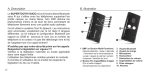
1. Connect the charger’s plug into the Charger Port (9)
of the SUPERTOOTH VOICE. Connect the charger
to an external power source.
Charge Indicator (4) Status:
Steady red: Low Batt
Speech: Low battery
Steady orange: Charging Speech: Charging
Steady green: Full Charge Speech: Fully Charged
2. When fully charged, disconnect
the charger.
D. Power On/Off
Power On: Press MFB (1) for 1 second. The Bluetooth
Indicator (3) will turn blinking blue and a voice will say,
“SUPERTOOTH VOICE ready. Connected to phone
(or if phone not available: No phone detected).”
Note: The first time the SUPERTOOTH VOICE is
switched on, the language selection is automatically activated. In this case, proceed to Section E (Procedure 2).
Power Off: Press and hold MFB (1) for 5 seconds until
a voice announces, “SUPERTOOTH VOICE powering
down.” The Bluetooth Indicator (3) will turn steady
red for 4 seconds and then turns off.
E. Selecting Language and
Pairing to your Bluetooth mobile Phone
There are 6 languages featured in this kit. They are British
English, American English, French, Italian, Spanish and
German.
After selecting your language, pair the SUPERTOOTH
VOICE to your Bluetooth mobile phone to create the link
or audio connection between the two. Pairing should be
done only at the first connection to a phone.
Procedure:
1. From OFF, press and hold MFB (1) for 6 seconds until
the Bluetooth Indicator (3) turns blinking red/blue.
A voice will then announce, “Press green button
to select British English.” Instructions for other
languages will be announced succeedingly.
2. As soon as the preferred language is spoken, press
the green button or MFB (1) to enable it. If British
English is chosen, a voice will announce “British
English selected. From phone’s Bluetooth menu,