1
APPLICATION NOTE - Configuring the CX111 for J Series and Branch SRX Series Devices
interface
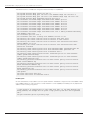
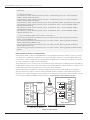
/* Security Zones */
set security zones security-zone
traffic system-services ping
set security zones security-zone
traffic system-services dhcp
set security zones security-zone
set security zones security-zone
system-services dhcp
set security zones security-zone
system-services ping
set security zones security-zone
system-services ssh
untrust interfaces ge-0/0/0.0 host-inbounduntrust interfaces ge-0/0/1.0 host-inboundtrust host-inbound-traffic system-services ping
trust interfaces vlan.1 host-inbound-traffic
trust interfaces vlan.1 host-inbound-traffic
trust interfaces vlan.1 host-inbound-traffic
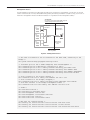
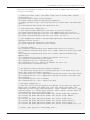
/* Allow outboud traffic from trust to
set security policies from-zone trust
match source-address any
set security policies from-zone trust
match destination-address any
set security policies from-zone trust
match application any
set security policies from-zone trust
permit
untrust */
to-zone untrust policy permit-outbound
to-zone untrust policy permit-outbound
to-zone untrust policy permit-outbound
to-zone untrust policy permit-outbound then
Detecting Network Failures Using RPM Probes
Although quite simple, our previous example presents a major drawback—the primary interface’s status is not always
a good indicator of the network’s connectivity. In some instances, when layer 2 protocols are not able to detect endto-end failures, or when multiple network hops separate the Juniper Networks SRX210 Services Gateway from remote
resources, other means to trigger a failover are desired.
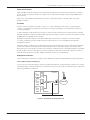
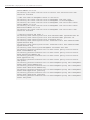
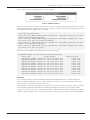
This example shows how to configure a set of watch prefixes which, when they are not present in the routing table, will
enable the dialer interface. Static routes with Bidirectional Forwarding Detection (BFD) monitoring or routing protocols
can be used to dynamically change the status of the routes in the routing table.
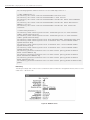
The main advantage of this approach is that real-time performance monitoring (RPM) probes do not require any
special routing protocol support or the use of BFD. RPM probes can be configured to use standard Internet Control
Message Protocol (ICMP) messages, HTTP get requests, or TCP/UDP pings to verify end-to-end connectivity. The RPM
monitor scripts can be downloaded from the following URL: www.juniper.net/support/products/cx/#sw
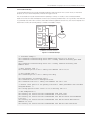
Data
10.0.1.0/24
Trust Zone
Finance
INTERNET
SRX Series Cluster
SRX210
Video
WAN
Apps
OFFICE
DATA CENTER
Default route points to the d10.0 interface
d10.0 monitors the 10/8 prefix
10/8 prefix advertised through OSPF
Figure 5: Prefix watch
10
Copyright © 2010, Juniper Networks, Inc.