1
APPLICATION NOTE - Configuring the CX111 for J Series and Branch SRX Series Devices
Description and Deployment Scenario
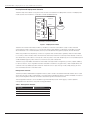
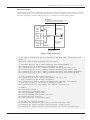
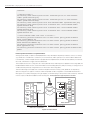
The CX111 ships with a default configuration that should accommodate most deployment scenarios. The deployment
model assumes that the CX111 is connected to a DHCP-enabled interface.
192.168.1.0/24
Trust Zone
SRX210
INTERNET
CX111
OFFICE
ge-0/0/0.0 is connected to the Internet
ge-0/0/1.0 is connected to the CX111
Figure 1: Deployment model
The CX111 will maintain the wireless modem (or modems, if more than one modem is used) in a disconnected
state, triggering a new connection as soon as the SRX Series/J Series requests a new lease. The modem(s) will be
disconnected as soon as the lease expires, and only reconnected when that gateway requires another new lease.
When using the 3G link as the primary connection, long lease times can be used, as generally there won’t be a need
to constantly connect and disconnect the line. On the other hand, if the CX111 is used to provide a backup connection,
short lease times (in the order of a minute) are commonly used so that, when the primary link is active, the backup link
can be disabled, triggering a disconnection, in the worse case, after a lease time.
The CX111 assigns the address received from the wireless service provider to the gateway (normally a public address).
For obvious reasons, only a single device can be connected to the CX111 at any given time, or else multiple devices will
contend for the only address passed to the CX111. The CX111 works in “pass through” mode, simply relaying all traffic
from the wireless network to the DHCP client.
Management Interface
The CX111 provides a web-based management interface, and it can be accessed even when 3G modems are not used.
Since “pass through” mode is used instead of a routed connection bridge that doesn’t do Network Address Translation
(NAT), the management interface cannot be accessed through the normal data channel.
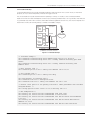
The management interface is still accessible through the Ethernet port, but VLAN tagging is used to separate
management from data traffic using the following parameters
Table 1: Management Network
4
CARD MODEL
WIRELESS TECHNOLOGY
Management subnet
192.168.0.0/24
Management address
192.168.0.1
VLAN ID
3900
Copyright © 2010, Juniper Networks, Inc.