1
Using Your Headset
Pairing Your Headset with a Bluetooth Mobile Phone
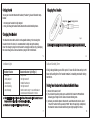
If the pairing cannot be completed within three minutes after the pairing
mode has been activated, the headset’s status indicator will stay green three
seconds and then turns to standby mode. Repeat steps 1 to 3 to pair the
devices again.
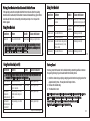
Using Your Headset
Function
Button
Audio
Status Indicator
Power OFF
Press and hold the MFB for 2
seconds
a long beep
Green light for two seconds
and then the light goes off
Quick flashing green light
Incoming call
Ringtone on
earphone
Function
Button
Audio
Status Indicator
Answer a call
Press the MFB once
Flashing green light
Power ON
Press and hold the MFB
a short beep
Flash green light 3 times
End a call
Adjust Volume
Press the MFB once
Press the Volume Key once to
increase/decrease by 1 step
(Total 6 level)
Press the MFB once
a short beep
Flashing green light
Flashing green light
When you turn on your headset for the first time, the headset proceeds
into pairing mode, i.e. the status indicator blinks green, so that you can
immediately pair it with your mobile phone.
Voice Dialing*
Flashing green light
9
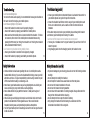
Using Your Headset (cont'd)
Function
Button
Factory Reset
Audio
Status Indicator
You may reset the headset to its default settings. Resetting will also remove
the pairing history of your headset with the mobile phone.
Say the voice tag as soon as you hear the short beep and you must have
recorded the voice tag into your mobile phone.
Last no. Redial* Double click the MFB
Press and hold the Volume
Reject a call*
Key for 2 seconds
While speaking, press and
Call Transfer
hold the volume Key for 2
(headset to
mobile phone)* seconds
While speaking, press MFB
Call Transfer
(mobile phone once
to headset)*
10
a short beep
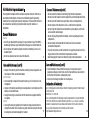
1. Hold the volume key and plug charging cable into the charging socket for
approximately 10sec. The earpiece will beep 2 times.
2. Release the volume key.
3. The headset is reset.
Flashing green light
Flashing green light
Flashing green light
i.Tech Bluetooth headset is designed to work with Bluetooth devices. Due to
large variability between different Bluetooth devices from different
manufacturers, interoperability between the headset and all
Bluetooth-enabled products is not guaranteed.
Flashing green light
* Subject to mobile support
11
12