1
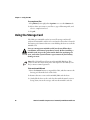
CN3
Mobile Computer
For Windows Mobile 5.0
CN3, CN3e
User’s Manual
Intermec Technologies Corporation
Worldwide Headquarters
6001 36th Ave.W.
Everett, WA 98203
U.S.A.
www.intermec.com
The information contained herein is provided solely for the purpose of allowing customers to
operate and service Intermec-manufactured equipment and is not to be released, reproduced, or
used for any other purpose without written permission of Intermec Technologies Corporation.
Information and specifications contained in this document are subject to change without prior
notice and do not represent a commitment on the part of Intermec Technologies Corporation.
© 2008-2011 by Intermec Technologies Corporation. All rights reserved.
The word Intermec, the Intermec logo, Norand, ArciTech, Beverage Routebook, CrossBar,
dcBrowser, Duratherm, EasyADC, EasyCoder, EasySet, Fingerprint, i-gistics, INCA (under license),
Intellitag, Intellitag Gen2, JANUS, LabelShop, MobileLAN, Picolink, Ready-to-Work, RoutePower,
Sabre, ScanPlus, ShopScan, Smart Mobile Computing, SmartSystems, TE 2000, Trakker Antares,
and Vista Powered are either trademarks or registered trademarks of Intermec Technologies
Corporation.
There are U.S. and foreign patents as well as U.S. and foreign patents pending.
Wi-Fi is a registered certification mark of the Wi-Fi Alliance.
Microsoft, Windows, and the Windows logo are registered trademarks of Microsoft Corporation
in the United States and/or other countries.
Bluetooth is a trademark of Bluetooth SIG, Inc., U.S.A.
This product includes software developed by the OpenSSL Project for use in the OpenSSL Toolkit
(www.openssl.org).
This product includes cryptographic software written by Eric Young ([email protected]).
This product uses Regex++, Index software during its operational phases. The owner of Regex++
has granted use of the software to anyone provided such use is accompanied by the following
copyright and permission notice:
Regex++, Index. (Version 3.31, 16th Dec 2001)
Copyright © 1998-2001 Dr John Maddock
Permission to use, copy, modify, distribute and sell this software and its documentation for any
purpose is hereby granted without fee, provided that the above copyright notice appear in all
copies and that both that copyright notice and this permission notice appear in supporting
documentation. Dr John Maddock makes no representations about the suitability of this software
for any purpose. It is provided "as is" without express or implied warranty.
ii
CN3 Series Mobile Computer User’s Manual for Windows Mobile 5.0
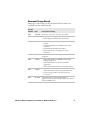
Document Change Record
This page records changes to this document. The document was
originally released as Revision 001.
Version
Number
Date
008
10/2011 Revised to correct the clean boot procedure.
007
4/2009
• Added default configuration information.
• Added keypad and keystroke information.
006
1/2008
• Added information on CN3e alphanumeric
Description of Change
keypad.
• Updated information on CDMA carriers and
activation.
• Updated Power Profiler information.
• Revised the section on keypads to reduce
repetition.
005
10/2007 Added information on the larger key CN3e Mobile
Computer.
004
7/2007
• Added information on GPSID and the iGPS
Settings application.
• Added information on the Power Profiler
application.
• Added undocumented keys to the keypad tables.
003
4/2007
• Added information about GPS.
• Added information about using the FTP server.
• Created an appendix for specifications and
accessories.
002
01/2007 Added information about the InstallSelect
application, the clean boot method, the color camera,
and the CDMA radios.
CN3 Series Mobile Computer User’s Manual for Windows Mobile 5.0
iii
iv
CN3 Series Mobile Computer User’s Manual for Windows Mobile 5.0
Contents
Contents
Before You Begin. . . . . . . . . . . . . . . . . . . . . . . . . . . . . . . . . . . . . . . . . . . . . . . . . . . . . . . . . . . . . . . . . ix
Safety Information . . . . . . . . . . . . . . . . . . . . . . . . . . . . . . . . . . . . . . . . . . . . . . . . . . . . . . . ix
Global Services and Support . . . . . . . . . . . . . . . . . . . . . . . . . . . . . . . . . . . . . . . . . . . . . . ix
Warranty Information. . . . . . . . . . . . . . . . . . . . . . . . . . . . . . . . . . . . . . . . . . . . ix
Web Support . . . . . . . . . . . . . . . . . . . . . . . . . . . . . . . . . . . . . . . . . . . . . . . . . . . . . x
Send Feedback. . . . . . . . . . . . . . . . . . . . . . . . . . . . . . . . . . . . . . . . . . . . . . . . . . . . x
Telephone Support . . . . . . . . . . . . . . . . . . . . . . . . . . . . . . . . . . . . . . . . . . . . . . . x
Service Location Support . . . . . . . . . . . . . . . . . . . . . . . . . . . . . . . . . . . . . . . . . . x
Who Should Read This Manual . . . . . . . . . . . . . . . . . . . . . . . . . . . . . . . . . . . . . . . . . . . xi
Related Documents . . . . . . . . . . . . . . . . . . . . . . . . . . . . . . . . . . . . . . . . . . . . . . . . . . . . . . xi
Patent Information . . . . . . . . . . . . . . . . . . . . . . . . . . . . . . . . . . . . . . . . . . . . . . . . . . . . . . xii
1 Using the CN3
............................................................ 1
Introducing the CN3 Mobile Computer. . . . . . . . . . . . . . . . . . . . . . . . . . . . . . . . . . . . . . . . . . . . . 2
Finding the Software Build Versions . . . . . . . . . . . . . . . . . . . . . . . . . . . . . . . . . . . . . . . . 3
Using the Battery . . . . . . . . . . . . . . . . . . . . . . . . . . . . . . . . . . . . . . . . . . . . . . . . . . . . . . . . . . . . . . . . . 4
Charging the Battery . . . . . . . . . . . . . . . . . . . . . . . . . . . . . . . . . . . . . . . . . . . . . . . . . . . . . . 5
Removing and Installing the Battery. . . . . . . . . . . . . . . . . . . . . . . . . . . . . . . . . . . . . . . . 5
Maximizing Battery Life . . . . . . . . . . . . . . . . . . . . . . . . . . . . . . . . . . . . . . . . . . . . . . . . . . . 7
Checking the Battery Status . . . . . . . . . . . . . . . . . . . . . . . . . . . . . . . . . . . . . . . . . . . . . . . 8
Managing Power on the CN3 . . . . . . . . . . . . . . . . . . . . . . . . . . . . . . . . . . . . . . . . . . . . . . 9
Using the Keypad . . . . . . . . . . . . . . . . . . . . . . . . . . . . . . . . . . . . . . . . . . . . . . . . . . . . . . . . . . . . . . . . 11
Using the Color-Coded Keys . . . . . . . . . . . . . . . . . . . . . . . . . . . . . . . . . . . . . . . . . . . . . . 13
Capitalizing Characters. . . . . . . . . . . . . . . . . . . . . . . . . . . . . . . . . . . . . . . . . . . . . . . . . . . 13
Entering Characters on the QWERTY Keypad . . . . . . . . . . . . . . . . . . . . . . . . . . . . . . 14
Entering Characters on the Numeric Keypads . . . . . . . . . . . . . . . . . . . . . . . . . . . . . . 14
Using the Power Button . . . . . . . . . . . . . . . . . . . . . . . . . . . . . . . . . . . . . . . . . . . . . . . . . . 15
Configuring the Backlight Settings . . . . . . . . . . . . . . . . . . . . . . . . . . . . . . . . . . . . . . . . 15
Understanding the Audio Features . . . . . . . . . . . . . . . . . . . . . . . . . . . . . . . . . . . . . . . . . . . . . . . . 16
Using the CN3 as a Cell Phone . . . . . . . . . . . . . . . . . . . . . . . . . . . . . . . . . . . . . . . . . . . . 16
Adjusting the Volume of the Rear Speaker. . . . . . . . . . . . . . . . . . . . . . . . . . . . . . . . . . 17
Using the Screen . . . . . . . . . . . . . . . . . . . . . . . . . . . . . . . . . . . . . . . . . . . . . . . . . . . . . . . . . . . . . . . . . 19
Using the Stylus . . . . . . . . . . . . . . . . . . . . . . . . . . . . . . . . . . . . . . . . . . . . . . . . . . . . . . . . . 20
Understanding the Screen Icons. . . . . . . . . . . . . . . . . . . . . . . . . . . . . . . . . . . . . . . . . . . 21
Aligning the Touch Screen . . . . . . . . . . . . . . . . . . . . . . . . . . . . . . . . . . . . . . . . . . . . . . . . 21
Understanding the Status LEDs . . . . . . . . . . . . . . . . . . . . . . . . . . . . . . . . . . . . . . . . . . . . . . . . . . . 23
CN3 Series Mobile Computer User’s Manual for Windows Mobile 5.0
v
Contents
Scanning Bar Codes . . . . . . . . . . . . . . . . . . . . . . . . . . . . . . . . . . . . . . . . . . . . . . . . . . . . . . . . . . . . . . 24
Scanning with the Area Imager . . . . . . . . . . . . . . . . . . . . . . . . . . . . . . . . . . . . . . . . . . . . 24
Improving the Performance of the Area Imager . . . . . . . . . . . . . . . . . . . . . . . . . . . . . 25
Using the Color Camera . . . . . . . . . . . . . . . . . . . . . . . . . . . . . . . . . . . . . . . . . . . . . . . . . . . . . . . . . . 26
Using the Storage Card . . . . . . . . . . . . . . . . . . . . . . . . . . . . . . . . . . . . . . . . . . . . . . . . . . . . . . . . . . . 28
Setting Up GPS on Your CN3 . . . . . . . . . . . . . . . . . . . . . . . . . . . . . . . . . . . . . . . . . . . . . . . . . . . . . 29
Using the GPSID Installed on the CN3 . . . . . . . . . . . . . . . . . . . . . . . . . . . . . . . . . . . . 30
Learning About Additional GPS Options for the CN3 . . . . . . . . . . . . . . . . . . . . . . . 32
2 Connecting and Configuring the CN3
. . . . . . . . . . . . . . . . . . . . . . . . . . . . . . . . 33
Connecting to a PC . . . . . . . . . . . . . . . . . . . . . . . . . . . . . . . . . . . . . . . . . . . . . . . . . . . . . . . . . . . . . . 34
Configuring the CN3 Parameters. . . . . . . . . . . . . . . . . . . . . . . . . . . . . . . . . . . . . . . . . . . . . . . . . . 35
Configuring the CN3 With Intermec Settings . . . . . . . . . . . . . . . . . . . . . . . . . . . . . . 35
Configuring the CN3 Remotely With SmartSystems Foundation . . . . . . . . . . . . 36
Configuring Local Area Networks . . . . . . . . . . . . . . . . . . . . . . . . . . . . . . . . . . . . . . . . . . . . . . . . . 37
Configuring 802.11b/g Radio Communications . . . . . . . . . . . . . . . . . . . . . . . . . . . . 37
Configuring Bluetooth Communications . . . . . . . . . . . . . . . . . . . . . . . . . . . . . . . . . . 38
Connecting to a Bluetooth Scanner. . . . . . . . . . . . . . . . . . . . . . . . . . . . . . . . 39
Configuring Bluetooth Communications for Wireless Printing . . . . . . 40
Configuring Ethernet Communications . . . . . . . . . . . . . . . . . . . . . . . . . . . . . . . . . . . 41
Using Serial and USB Communications. . . . . . . . . . . . . . . . . . . . . . . . . . . . . . . . . . . . 42
Checking the Status of Your Wireless Connection . . . . . . . . . . . . . . . . . . . . . . . . . . 43
Viewing Detailed 802.11 Radio Connection Information . . . . . . . . . . . . . . . . . . . . 43
Configuring the Phone . . . . . . . . . . . . . . . . . . . . . . . . . . . . . . . . . . . . . . . . . . . . . . . . . . . . . . . . . . . 48
Turning On the Phone Using the Wireless Manager . . . . . . . . . . . . . . . . . . . . . . . . . 48
Activating the CDMA Phone . . . . . . . . . . . . . . . . . . . . . . . . . . . . . . . . . . . . . . . . . . . . . . 49
Activating the GSM/EDGE Phone. . . . . . . . . . . . . . . . . . . . . . . . . . . . . . . . . . . . . . . . . 52
Making a Phone Call . . . . . . . . . . . . . . . . . . . . . . . . . . . . . . . . . . . . . . . . . . . . . . . . . . . . . 52
Connecting to an ISP. . . . . . . . . . . . . . . . . . . . . . . . . . . . . . . . . . . . . . . . . . . . . . . . . . . . . . . . . . . . . 52
Connecting to a Network With a RAS Account . . . . . . . . . . . . . . . . . . . . . . . . . . . . . . . . . . . . . 54
Connecting to a Network with a VPN Server. . . . . . . . . . . . . . . . . . . . . . . . . . . . . . . . . . . . . . . . 56
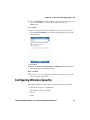
Configuring Wireless Security. . . . . . . . . . . . . . . . . . . . . . . . . . . . . . . . . . . . . . . . . . . . . . . . . . . . . 57
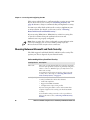
Choosing Between Microsoft and Funk Security . . . . . . . . . . . . . . . . . . . . . . . . . . . . 58
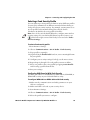
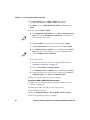
Selecting a Funk Security Profile . . . . . . . . . . . . . . . . . . . . . . . . . . . . . . . . . . 59
vi
CN3 Series Mobile Computer User’s Manual for Windows Mobile 5.0
Contents
Selecting Microsoft as Your Security Choice. . . . . . . . . . . . . . . . . . . . . . . . 63
Loading a Certificate . . . . . . . . . . . . . . . . . . . . . . . . . . . . . . . . . . . . . . . . . . . . . . . . . . . . . 67
Disabling Security . . . . . . . . . . . . . . . . . . . . . . . . . . . . . . . . . . . . . . . . . . . . . . . . . . . . . . . 68
3 Developing and Installing Applications
. . . . . . . . . . . . . . . . . . . . . . . . . . . . . 69
Developing Applications for the CN3 . . . . . . . . . . . . . . . . . . . . . . . . . . . . . . . . . . . . . . . . . . . . . . 70
Installing Applications on the CN3 . . . . . . . . . . . . . . . . . . . . . . . . . . . . . . . . . . . . . . . . . . . . . . . . 70
Installing Applications Using SmartSystems Foundation. . . . . . . . . . . . . . . . . . . . 72
Installing Applications Using Microsoft ActiveSync . . . . . . . . . . . . . . . . . . . . . . . . . 72
Installing Applications Using a Storage Card . . . . . . . . . . . . . . . . . . . . . . . . . . . . . . . 74
Installing Applications Using the FTP Server . . . . . . . . . . . . . . . . . . . . . . . . . . . . . . . 74
Installing Applications Using Wavelink Avalanche . . . . . . . . . . . . . . . . . . . . . . . . . . 75
Freeing Up Virtual Memory for Applications . . . . . . . . . . . . . . . . . . . . . . . . . . . . . . . . . . . . . . . 75
Launching An Application Automatically . . . . . . . . . . . . . . . . . . . . . . . . . . . . . . . . . . . . . . . . . . 77
Upgrading the System Software . . . . . . . . . . . . . . . . . . . . . . . . . . . . . . . . . . . . . . . . . . . . . . . . . . . 78
Upgrading the CN3 Using a miniSD Card. . . . . . . . . . . . . . . . . . . . . . . . . . . . . . . . . . 79
Upgrading the CN3 Using SmartSystems Foundation. . . . . . . . . . . . . . . . . . . . . . . 81
Downloading the Upgrade Files . . . . . . . . . . . . . . . . . . . . . . . . . . . . . . . . . . . 81
4 Troubleshooting and Maintaining the CN3
. . . . . . . . . . . . . . . . . . . . . . . . . 85
Calling Product Support. . . . . . . . . . . . . . . . . . . . . . . . . . . . . . . . . . . . . . . . . . . . . . . . . . . . . . . . . . 86
Troubleshooting the CN3 . . . . . . . . . . . . . . . . . . . . . . . . . . . . . . . . . . . . . . . . . . . . . . . . . . . . . . . . 87
Resetting the CN3 . . . . . . . . . . . . . . . . . . . . . . . . . . . . . . . . . . . . . . . . . . . . . . . . . . . . . . . . . . . . . . . 92
Warm Booting the CN3 . . . . . . . . . . . . . . . . . . . . . . . . . . . . . . . . . . . . . . . . . . . . . . . . . . 92
Cold Booting the CN3. . . . . . . . . . . . . . . . . . . . . . . . . . . . . . . . . . . . . . . . . . . . . . . . . . . . 93
Clean Booting the CN3 . . . . . . . . . . . . . . . . . . . . . . . . . . . . . . . . . . . . . . . . . . . . . . . . . . . 94
Cleaning the CN3 . . . . . . . . . . . . . . . . . . . . . . . . . . . . . . . . . . . . . . . . . . . . . . . . . . . . . . . . . . . . . . . . 95
A Specifications
. . . . . . . . . . . . . . . . . . . . . . . . . . . . . . . . . . . . . . . . . . . . . . . . . . . . . . . . . 97
Physical and Environmental Specifications . . . . . . . . . . . . . . . . . . . . . . . . . . . . . . . . . . . . . . . . . 98
Accessories . . . . . . . . . . . . . . . . . . . . . . . . . . . . . . . . . . . . . . . . . . . . . . . . . . . . . . . . . . . . . . . . . . . . .101
CN3 Series Mobile Computer User’s Manual for Windows Mobile 5.0
vii
Contents
B Default Settings
. . . . . . . . . . . . . . . . . . . . . . . . . . . . . . . . . . . . . . . . . . . . . . . . . . . . . . 105
Default Configuration . . . . . . . . . . . . . . . . . . . . . . . . . . . . . . . . . . . . . . . . . . . . . . . . . . . . . . . . . .106
C Keypads and Keystrokes
. . . . . . . . . . . . . . . . . . . . . . . . . . . . . . . . . . . . . . . . . . . . . 117
Standard Characters . . . . . . . . . . . . . . . . . . . . . . . . . . . . . . . . . . . . . . . . . . . . . . . . . . . . . . . . . . . .118
I Index
viii
. . . . . . . . . . . . . . . . . . . . . . . . . . . . . . . . . . . . . . . . . . . . . . . . . . . . . . . . . . . . . . . . . . . . 123
CN3 Series Mobile Computer User’s Manual for Windows Mobile 5.0
Before You Begin
Before You Begin
This section provides you with safety information, technical support
information, and sources for additional product information.
Safety Information
Your safety is extremely important. Read and follow all warnings and
cautions in this document before handling and operating Intermec
equipment. You can be seriously injured, and equipment and data can
be damaged if you do not follow the safety warnings and cautions.
This section explains how to identify and understand dangers,
warnings, cautions, and notes that are in this document.
A warning alerts you of an operating procedure, practice,
condition, or statement that must be strictly observed to avoid
death or serious injury to the persons working on the equipment.
A caution alerts you to an operating procedure, practice,
condition, or statement that must be strictly observed to prevent
equipment damage or destruction, or corruption or loss of data.
Note: Notes either provide extra information about a topic or contain
special instructions for handling a particular condition or set of
circumstances.
Global Services and Support
Warranty Information
To understand the warranty for your Intermec product, visit the
Intermec website at www.intermec.com and click Support >
Returns and Repairs > Warranty.
Disclaimer of warranties: The sample code included in this document
is presented for reference only. The code does not necessarily
represent complete, tested programs. The code is provided “as is with
all faults.” All warranties are expressly disclaimed, including the
implied warranties of merchantability and fitness for a particular
purpose.
CN3 Series Mobile Computer User’s Manual for Windows Mobile 5.0
ix
Before You Begin
Web Support
Visit the Intermec website at www.intermec.com to download our
current manuals (in PDF). To order printed versions of the Intermec
manuals, contact your local Intermec representative or distributor.
Visit the Intermec technical knowledge base (Knowledge Central) at
www.intermec.com and click Support > Knowledge Central to
review technical information or to request technical support for your
Intermec product.
Send Feedback
Your feedback is crucial to the continual improvement of our
documentation. To provide feedback about this manual, please
contact the Intermec Technical Communications department directly
at [email protected].
Telephone Support
In the U.S.A. and Canada, call 1-800-755-5505.
Outside the U.S.A. and Canada, contact your local Intermec
representative. To search for your local representative, from the
Intermec website, click About Us > Contact Us.
Service Location Support
For the most current listing of service locations, go to
www.intermec.com and click Support >Returns and Repairs >
Repair Locations.
For technical support in South Korea, use the after service locations
listed below:
AWOO Systems
102-1304 SK Ventium
522 Dangjung-dong
Gunpo-si, Gyeonggi-do Korea, South 435-776
Contact: Mr. Sinbum Kang
Telephone: +82-31-436-1191
Email: [email protected]
x
CN3 Series Mobile Computer User’s Manual for Windows Mobile 5.0
Before You Begin
IN Information System PTD LTD
6th Floor
Daegu Venture Center Bldg 95
Shinchun 3 Dong
Donggu, Daegu City, Korea
Email: [email protected] or [email protected]
Who Should Read This Manual
This manual is written for the person who is responsible for
installing, configuring, and maintaining the CN3 and CN3e Mobile
Computer.
This manual provides you with information about the features of the
CN3 and CN3e, and how to install, configure, operate, maintain, and
troubleshoot it.
Before you work with the CN3 or CN3e, you should be familiar with
your network and general networking terms, such as IP address.
Related Documents
This list contains a list of related Intermec documents.
•
Intermec Settings Command Reference Manual
•
TE 2000 Terminal Emulation Programmer’s Guide
•
Intermec Developer Library (IDL) Resource Kit Developer’s Guide
The Intermec website at www.intermec.com contains our documents
(as PDF files) that you can download for free.
To download documents
1 Visit the Intermec website at www.intermec.com.
2 Click Support > Manuals.
3 Use the Product Category field, the Product Family field, and
the Product field to help you locate the product whose
documentation you want to download.
CN3 Series Mobile Computer User’s Manual for Windows Mobile 5.0
xi
Before You Begin
Patent Information
Product is covered by one or more of the following patents:
4882476; 4894523; 4953113; 4961043; 4970379; 4988852; 5019699;
5021642; 5038024; 5081343; 5095197; 5144119; 5144121; 5182441;
5187355; 5187356; 5195183; 5216233; 5216550; 5195183; 5195183;
5218191; 5227614; 5233172; 5241488; 5243602; 5258606; 5278487;
5288985; 5308966; 5322991; 5331136; 5331580; 5342210; 5349678;
5359185; 5371858; 5373478; 5389770; 5397885; 5410141; 5414251;
5416463; 5442167; 5464972; 5468947; 5468950; 5477044; 5486689;
5488575; 5500516; 5502297; 5504367; 5508599; 5514858; 5530619;
5534684; 5536924; 5539191; 5541419; 5548108; 5550362; 5550364;
5565669; 5567925; 5568645; 5572007; 5576529; 5592512; 5594230;
5598007; 5608578; 5616909; 5619027; 5627360; 5640001; 5657317;
5659431; 5671436; 5672860; 5684290; 5719678; 5729003; 5742041;
5761219; 5764798; 5777308; 5777309; 5777310; 5786583; 5793604;
5798509; 5798513; 5804805; 5805807; 5811776; 5811777; 5818027;
5821523; 5828052; 5831819; 5834753; 5834749; 5837987; 5841121;
5842070; 5844222; 5854478; 5862267; 5869840; 5873070; 5877486;
5878395; 5883492; 5883493; 5886338; 5889386; 5892971; 5895906;
5898162; 5902987; 5902988; 5912452; 5923022; 5936224; 5949056;
5969321; 5969326; 5969328; 5979768; 5986435; 5987192; 5987499;
5992750; 6003775; 6012640; 6016960; 6018597; 6024289; 6034379;
6036093; 6039252; 6064763; 6075340; 6095422; 6097839; 6102289;
6102295; 6109528; 6119941; 6128414; 6138915; 6149061; 6149063;
6152370; 6155490; 6158661; 6164542; 6164545; 6173893; 6195053;
6234393; 6234395; 6244512; 6249008; 6328214; 6330975; 6345765;
6356949; 6367699; 6375075; 6375076; 6375344; 6431451; 6435411;
6484944; 6488209; 6497368; 6532152; 6538413; 6539422; 6621942;
6641046; 6681994; 6687403; 6688523; 6732930
There may be other U.S. and foreign patents pending.
xii
CN3 Series Mobile Computer User’s Manual for Windows Mobile 5.0
1
Using the CN3
This chapter introduces the CN3 and CN3e Mobile
Computers with Windows® Mobile® 5.0. It also contains
hardware and software configuration information to assist
you in getting the most out of your computer. This chapter
contains these topics:
•
Introducing the CN3 Mobile Computer
•
Using the Battery
•
Using the Keypad
•
Understanding the Audio Features
•
Using the Screen
•
Understanding the Status LEDs
•
Scanning Bar Codes
•
Using the Color Camera
•
Using the Storage Card
•
Setting Up GPS on Your CN3
1
Chapter 1 — Using the CN3
Introducing the CN3 Mobile Computer
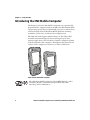
The Intermec CN3 and CN3e Mobile Computers are ergonomically
designed mobile computers built on the Microsoft Windows Mobile®
5.0 operating system. They are lightweight, easy-to-use, and run most
software developed for the Windows Mobile platform, including
standalone, client-server, and browser-based applications.
The CN3 and CN3e support similar feature sets. The CN3e offers
extended environmental specifications and larger keys for data
intensive applications. The CN3 Series of mobile computers includes
both the CN3 and CN3e computers. Throughout this manual, both
versions of the computer are referred to as CN3 or CN3 Series.
CN3e and the CN3 Mobile Computer
The CN3 Series Mobile Computer with an IEEE 802.11b/g radio
installed is Wi-Fi® certified for interoperability with other
802.11b/g wireless LAN devices.
2
CN3 Series Mobile Computer User’s Manual for Windows Mobile 5.0
Chapter 1 — Using the CN3
The CN3 and CN3e are available with the following features:
•
802.11b/g radio standard
Note: The radio also supports the 802.11d standard. The 802.11d
standard adds the requirements and definitions for 802.11 WLAN
equipment to operate in markets not served by the current standard.
For 802.11d support, you need to order the 802.11d version of the
CN3. For help, contact your local Intermec representative.
•
Bluetooth® radio standard
•
128 MB RAM
•
QWERTY or numeric keypads
•
Imaging Options:
•
•
EA11 Standard Area Imager
•
Color Camera
Wireless Wide Area Network Options:
•
GSM/GPRS/EDGE
•
CDMA/1xRTT/EV-DO
Use this manual to understand how to use the features and options
available on the CN3 and CN3e.
Note: Refer to the online help for information about the Windows
Mobile 5.0 applications installed on the CN3 and Intermec
Knowledge Central at www.intermec.com for additional information
about using Windows Mobile 5.0 on the CN3.
Finding the Software Build Versions
You can easily check to see what version of the operating system and
the SmartSystems Platform Bundle (SSPB) are loaded on your CN3.
CN3 Series Mobile Computer User’s Manual for Windows Mobile 5.0
3
Chapter 1 — Using the CN3
To find your operating system version
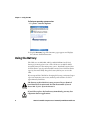
1 Tap Start > Internet Explorer.
2 Tap the Intermec logo. The Intermec page appears and displays
the software build information.
Using the Battery
The CN3 uses an AB8, AB9, AB15, or AB16 Lithium-ion (Li-ion)
battery as its main power source. The CN3e uses an AB9 or AB16
extended battery for the main power source. Standard batteries have
8.1 Watt hours capacity and extended batteries have 14.8 Watt hours
capacity. You must fully charge the battery before you can use the
CN3.
If you suspend the CN3 before changing the battery, an internal super
capacitor maintains your status, memory, and real-time clock for
approximately 5 minutes.
The battery used in this device may present a fire or chemical
burn hazard if it is mistreated. Do not disassemble it, heat it
above 100 °C (212 °F) or incinerate it.
If you fail to replace the low battery immediately, you may lose
important data or applications.
4
CN3 Series Mobile Computer User’s Manual for Windows Mobile 5.0
Chapter 1 — Using the CN3
Note: If the CN3 is not on external power and you remove the battery
pack, it goes into Suspend mode.
Dispose of used batteries promptly. Keep away from children. Contact
your Intermec representative for replacement batteries.
Several factors determine the life of your battery such as extreme
temperatures, input devices, and your usage.
Charging the Battery
The battery pack should be fully charged before you use the CN3 for
the first time. If battery temperatures are within the battery charging
range of 0 °C to 40 °C (32 °F to 104 °F), the standard battery pack
takes up to four hours to charge; the extended battery pack takes up
to five hours.
The battery is fully charged when the battery status LED shows a
steady green.
To charge the battery
•
Insert the battery into a quad battery charger, a single dock, or
attach external power to the CN3 with the battery installed. For
information on these accessories, see “Accessories” on page 101.
Use the next table to understand how long it will take to charge your
batteries in some of the CN3 charging accessories.
Charging Times for CN3 Batteries
Charging Accessory
Model
Charging Time
CN3 Quad Battery Charger
AC14
5 hours or less
CN3 Single Dock
AD10
5 hours or less
Removing and Installing the Battery
To maximize the time allowed to replace the main battery pack, put
the CN3 in a suspend mode before removing the battery pack.
To remove and install the battery
1 Press and release the Power button to suspend the CN3.
CN3 Series Mobile Computer User’s Manual for Windows Mobile 5.0
5
Chapter 1 — Using the CN3
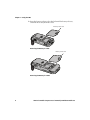
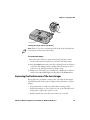
2 Press the battery release tab to the left until the battery releases,
and then lift it away from the CN3.
Battery release tab
Removing the Battery in a CN3
Battery release tab
Removing the Battery in a CN3e
6
CN3 Series Mobile Computer User’s Manual for Windows Mobile 5.0
Chapter 1 — Using the CN3
3 Align the battery contacts and insert the battery.
4 Press down on the battery until it clicks into place.
Maximizing Battery Life
Batteries are chemical devices. If the batteries are left sitting on a shelf
for long periods of time outside the CN3, the batteries slowly
discharge, eventually to zero if left uncharged. The battery chemistry
resists normal degradation if you store the battery in a charger as
opposed to leaving the battery in a discharged state. See the following
table for tips you can do to maximize the life of your battery.
Battery Conservation Tips
When You Want To:
Do This to Save Battery Power:
Operate the CN3 and the
Low Battery status icon
appears or the Battery light
comes on.
Press the power button to turn off the CN3.
Remove the battery and insert another fully
charged battery within five minutes or you may
lose data. Or, you can connect the CN3 to an
external power source.
Stop using the CN3 for five Make sure the low battery icon is not on the
minutes or longer.
screen and that the Battery light is not turned
on. Press the power button to turn off the CN3.
Store the CN3 for more
than a day.
If you are storing the CN3 for a few days, like
over the weekend, install the charged battery or
attach the CN3 to a power source.
If you are storing the CN3 for longer, remove
and charge the battery, then store both the
battery and the CN3 in a cool location.
If the battery in storage is not used in several
months, you should recharge the battery to
keep it at its performance peak.
CN3 Series Mobile Computer User’s Manual for Windows Mobile 5.0
7
Chapter 1 — Using the CN3
Battery Conservation Tips (continued)
When You Want To:
Do This to Save Battery Power:
Store the battery outside
the CN3.
Store the batteries in a charger.
Checking the Battery Status
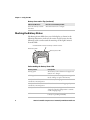
The Battery Status LED above your CN3 display, as shown in the
following illustration, indicates the status of your battery. See the
following table to understand the meanings of the lights emitted
from the LED.
Good Read LED and Intermec Ready-to-Work indicator
Notification LED
Battery status LED
Understanding the Battery Status LED
Battery Status
Description
Steady green
The battery is more than 95% charged and
CN3 is on a charger.
Blinking red
The battery is low. CN3 goes into Suspend
mode. Charge or replace the battery.
Steady red and the CN3 is
attached to external power.
The battery is charging.
Steady red and the CN3 is not The software is not working properly.
attached to external power.
8
Steady amber
The battery is missing or is unable to
charge because the temperature is outside
of the charging range.
Off
The CN3 is not on external power and the
battery is operating normally.
CN3 Series Mobile Computer User’s Manual for Windows Mobile 5.0
Chapter 1 — Using the CN3
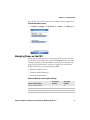
You can also check the battery status by using the Power application.
To check the battery status
•
Tap Start > Settings > the Systems tab > Power > the Battery tab.
Managing Power on the CN3
By default, the CN3 goes into a lower power mode or turns off after
two minutes of inactivity. You can press the Power button to resume
activity at any time. If you would like to manage power based on the
usage of your CN3, Intermec provides an application called Power
Profiler with three power management profiles:
•
Windows Mobile Classic
•
Windows Mobile Standard
•
Windows Mobile Phone
Understanding the Power Profiler Settings
Power Profiler Setting
Screen Off
Enabled
Windows Mobile Classic
Device Off
Enabled
X
Windows Mobile Standard (default)
X
Windows Mobile Phone
X
CN3 Series Mobile Computer User’s Manual for Windows Mobile 5.0
X
9
Chapter 1 — Using the CN3
Use the Windows Mobile Classic profile for systems that batch data
and upload it several times a day. This profile does not support
constant data connections over WAN, LAN, or Bluetooth. It can only
maintain data connections when the CN3 is on and all peripherals are
enabled. If the screen is off, you do not have any WAN, LAN, or
Bluetooth connections, but the CN3 will still receive incoming phone
calls. To wake up the CN3 and restore network connections, you need
to press Power or Scan button.
Use the Windows Mobile Standard profile for applications such as
inventory management or terminal emulation applications that
power off infrequently. The Windows Mobile Standard profile adds
the ability for the system to maintain data connections in a low power
state. If the CN3 does not have any activity, the screen will turn off. If
there continues to be no activity, the CN3 will eventually turn off the
WAN, LAN, or Bluetooth radio connections and enter the Windows
Mobile Classic power management profile.
Use the Windows Mobile Phone profile when you have a system that
requires network wake-up or you need the CN3 to always be
connected to the network. Although the connections are maintained
at a low power mode, this setting typically consumes the most power.
If the screen turns off, the radios continue to maintain the network
connections.
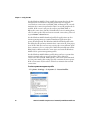
To select a power management profile
1 Tap Start > Settings > the System tab > Power Profiler.
10
CN3 Series Mobile Computer User’s Manual for Windows Mobile 5.0
Chapter 1 — Using the CN3
2 From the drop-down list, select Windows Mobile Classic,
Windows Mobile Standard, or Windows Mobile Phone.
3 Tap ok in the upper right corner to save your changes and close
Power Profiler.
Power Profiler also provides advanced settings that allow you to
fine-tune the power usage of the CN3. You can choose to have the
Power button turn off the screen or turn off the device.
Note: You can also configure all of the settings in Power Profiler
using Intermec Settings.
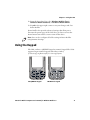
Using the Keypad
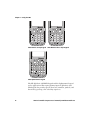
The CN3 can have a QWERTY keypad or numeric keypad. The CN3e
supports larger numeric keypads with either a 10-key
(7-8-9 on top) or phone style (1-2-3 on top) layout.
CN3
+
%
Q
E
W
:
&
A
S
‘
Z
R
X
*
2
1
4
F
G
C
V
Space
O
P
N
1
K
L
M
.
4
3
JKL
MNO
6
5
PQRS
Esc
Es
DEF
ABC
2
GHI
9
8
B
sym
5
J
H
7
Caps
I
6
5
End
Send
3
U
Y
T
/
D
’
CN3
End
Send
7
Esc
WXYZ
WX
YZ
TUV
+
#
9
8
Space
0
0
Enter
CN3 QWERTY Keypad
.
Enter
CN3 Numeric Keypad
CN3 Series Mobile Computer User’s Manual for Windows Mobile 5.0
11
Chapter 1 — Using the CN3
End
Send
Caps
ABC
7
+
JKL
4
Esc
sym
#
4
*
WXYZ
3
Space
0
Esc
Enter
CN3e Numeric 10-Key Keypad
MNO
6
5
TUV
PQRS
7
.
DEF
3
JKL
sym
#
WXYZ
9
8
Space
0
Enter
CN3e Numeric Phone Style Keypad
.
Esc
End
Send
A
=
H
S
,
O
T
U
E
5
P
L
6
R
Q
8
7
F
3
K
J
4
N
#
sym
2
1
I
+
/
M
C * D
B
&
G
‘
GHI
6
TUV
2
ABC
2
1
+
MNO
5
PQRS
1
.
Caps
9
8
GHI
*
End
Send
DEF
V
9
W
X
Z
Enter
0
Y
CN3e Alphanumeric Keypad
The full alphabetic QWERTY keypad and the alphanumeric keypad
are for applications that require primary input of alphabetic data.
This keypad also provides special characters, numbers, symbols, and
functions by pressing color-coded key sequences.
12
CN3 Series Mobile Computer User’s Manual for Windows Mobile 5.0
Chapter 1 — Using the CN3
The large numeric keypads are for applications that require mainly
numeric data. These keypads also lets you enter special characters,
including the alphabet, by pressing color-coded key sequences. The
CN3e provides larger input keys better suited for blind entry or glove
usage.
Using the Color-Coded Keys
Each keypad available for the CN3 provides color-coded keys to let
you access additional characters, symbols, and functions printed on
the keypad overlay. Once you understand how to use the color-coded
keys and key sequences, you can access all of the additional features
printed on the keypad overlay. There are two color-coded modifier
keys on the numeric keypad: the orange B key and the green C key.
The QWERTY and alphanumeric keypads have only the orange B
color-coded modifier key.
Using the Color-Coded Keys
You Want To:
Press:
Use an orange character
or function printed
above a key.
B key (LED illuminates) and
Example
On the CN3 Qwerty keypad, press B
then the key with the character and then Q to type the @ character.
or function printed above it
(LED turns off).
On the CN3 numeric keypad, press C
Use a green character or C key (LED illuminates) and
function printed above a then the key with the character and then 2 to type a lowercase a.
or function printed above it
key.
(LED turns off).
Lock the orange or green B or C twice.
key to stay on.
On the CN3e numeric keypad, press
C twice and the green LED
illuminates and stays on.
Unlock a green or orange B or C once.
key.
Press the B or C once to unlock the
key and turn off the LED.
Capitalizing Characters
To capitalize a single character on QWERTY keypads, press the shift
key, and then the character. To type all alphanumeric characters as
uppercase letters, you can enable the Caps Lock feature on the CN3
keypad.
CN3 Series Mobile Computer User’s Manual for Windows Mobile 5.0
13
Chapter 1 — Using the CN3
To enable Caps Lock
•
On the QWERTY keypad, press B, then the Shift key. Press the
same key sequence to disable the Caps Lock.
•
On the CN3 numeric keypad, press C 1.
•
On the CN3e keypads, press C C 1.
The Caps Lock LED lights up green to show that the CN3 is in the
Caps Lock mode.
To exit Caps Lock
•
On the CN3 keypads, press the color modifier key again.
•
On the CN3e keypads, press 1.
Entering Characters on the QWERTY Keypad
There are a few hidden characters on the QWERTY keypad that
require using the color-coded keys and the Shift key to access. Use the
following table to understand how to access these hidden characters
on the keypad.
QWERTY Keypad Hidden Characters
To Enter
Press
“
Shift B Z
>
Shift B .
<
Shift B X
Entering Characters on the Numeric Keypads
Above most of the number keys, there is a grouping of three or four
characters of the alphabet. For example, above the 2 key there are the
letters “ABC.” To access each letter above the key, you press the key
one to four times depending on the placement of the letter.
For example, to type the letter “c” you need to:
•
Press C 2 2 2.
To type a letter on the same key as the last letter entered, wait two
seconds, then enter the correct series of keystrokes to create the next
letter.
14
CN3 Series Mobile Computer User’s Manual for Windows Mobile 5.0
Chapter 1 — Using the CN3
Using the Power Button
When you press the Power ( ) button, you put the CN3 into a lower
power mode. In this lower power mode, the CN3 continues to supply
power to all memory, but turns off power to most hardware such as
the display. This power-saving feature is designed to prolong battery
life.
Note: If you do not have a SIM card installed, it may take up
to 30 seconds for the CN3 to suspend.
Configuring the Backlight Settings
By default, the CN3 goes into Screen Off mode when there is no
activity on the computer. Screen Off mode turns off the backlight and
display. Press a key or tap the screen to resume activity.
It is possible to override the backlight settings by changing the power
management settings. For more information on configuring power
management, see the next section, “Managing Power on the CN3.”
To configure the backlight
1 Tap Start > Settings > the System tab > the Backlight icon > the
Battery Power tab.
2 With Turn off backlight if device is not used for checked, select
the timeout value (10 seconds, 30 seconds, or 1 to 5 minutes).
CN3 Series Mobile Computer User’s Manual for Windows Mobile 5.0
15
Chapter 1 — Using the CN3
You can also use Intermec Settings to configure the backlight
settings. For help, see “Configuring the CN3 With Intermec
Settings” on page 35.
Understanding the Audio Features
There are several audio features available on the CN3. There are two
speakers, a microphone, an external volume control, and multiple
software tools for configuring the volume of sounds.
Using the CN3 as a Cell Phone
If your version of the CN3 has a phone, you can use the microphone
and a front speaker for talking on the phone. For help configuring
your CN3 as a cell phone, see “Configuring the Phone” on page 48.
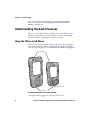
Front speaker
(located on end)
Microphone
To adjust the volume of the front speaker
1 Tap the Volume (
16
) icon at the top of the screen.
CN3 Series Mobile Computer User’s Manual for Windows Mobile 5.0
Chapter 1 — Using the CN3
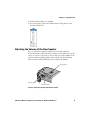
2 In the Volume adjust box, tap On.
3 Use your stylus to move the volume slider for the phone to the
desired volume level.
Adjusting the Volume of the Rear Speaker
You can adjust the computer volume for your needs and your
environment. The volume includes sounds you hear when you tap the
screen or scan bar codes with a scanner. You can set the volume to off,
very low medium (default), high, and very high. Use the following
table to understand the different ways to adjust the volume.
Rear speaker
Volume up
Volume down
Location of the Rear Speaker and Volume Control
CN3 Series Mobile Computer User’s Manual for Windows Mobile 5.0
17
Chapter 1 — Using the CN3
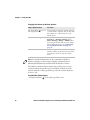
Changing the Volume of the Rear Speaker
Way to Adjust Volume
Procedure
Tap the Volume ( ) icon in
the navigation bar.
Use the stylus to move the volume slider up
or down for the computer. You can also turn
the volume on or off and choose to use
Vibrate mode.
Use Intermec Settings.
From the Start menu, choose Settings > the
System tab > Intermec Settings. Go to
Device Settings > Beeper > Volume. Select
the setting you prefer and save your changes
before exiting. For help, see “Configuring
the CN3 With Intermec Settings” on
page 35.
Press the side volume control. Press the top of the side volume control to
turn the volume up. Press the bottom of the
side volume control to turn the volume
down.
Note: For detailed information on the commands available in
Intermec Settings, see the Intermec Computer Command Reference
Manual (P/N 073529-xxx) available from the Intermec website.
The CN3 has a built-in vibrate feature that enables you to receive
scanner feedback despite the noise level. When enabled, the CN3
vibrates when the scanner performs a good read or when the phone
receives a call.
To enable the vibrate feature
1 Tap the Volume (
18
) icon at the top of the screen.
CN3 Series Mobile Computer User’s Manual for Windows Mobile 5.0
Chapter 1 — Using the CN3
2 In the Volume adjust box, tap Vibrate.
Note: The Volume icon in the Navigation bar changes to look like a
vibrating CN3 ( ) when the computer is in Vibrate mode.
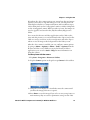
Using the Screen
The CN3 has a 3.5" diagonal, 240x320 pixel (QVGA) transflective
TFT-LCD 64K color display.
•
The Navigation bar displays the Start flag, the Connectivity icon,
the Volume icon, and the time and next appointment.
•
The Today screen displays shortcuts to some of the applications
installed on the CN3 and important information for the day.
•
The Command bar displays the onscreen keyboard icon, Windows
Mobile 5.0 links, and icons to any applications that are running,
but are hidden from view.
CN3 Series Mobile Computer User’s Manual for Windows Mobile 5.0
19
Chapter 1 — Using the CN3
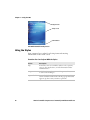
Navigation bar
Today screen
Command bar
The Windows Mobile Today Screen
Using the Stylus
Your computer has a stylus for selecting items and entering
information on the touch screen.
Functions You Can Perform With the Stylus
20
Action
Description
Tap
Touch the screen once with the stylus to select options,
open or close applications, or launch menus from the
Command bar.
Drag
Hold the stylus on the screen and drag across the screen
to select text and images.
Tap and hold
Tap and hold the stylus on an item to see a menu of
actions available for that item. On the pop-up menu that
appears, tap the action you want to perform.
CN3 Series Mobile Computer User’s Manual for Windows Mobile 5.0
Chapter 1 — Using the CN3
Understanding the Screen Icons
Use the screen icons on the Navigation bar and the Command bar to
see the battery status, network connections, and so on. Some standard
Microsoft icons are included in this table.
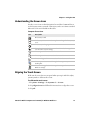
Computer Screen Icons
Icon
Description
The battery is full.
The battery is low. You need to replace or charge the battery very
soon.
The battery is charging.
The volume is turned off. To turn the volume back on, tap this
icon and choose your setting.
The computer is connected to the network.
The computer is not connected to the network.
The 802.11b/g radio is connected to the wireless network.
The computer is connected through the USB port to your
desktop PC.
The iConnect application icon. Tap it to set up Ethernet or
Wireless settings.
Aligning the Touch Screen
If the touch screen does not respond when you tap it with the stylus,
you may need to calibrate the screen.
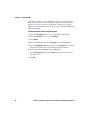
To calibrate the touch screen
1 Tap Start > Settings > the Systems tab > Screen.
2 Tap Align Screen and follow the instructions to align the screen.
3 Tap ok.
CN3 Series Mobile Computer User’s Manual for Windows Mobile 5.0
21
Chapter 1 — Using the CN3
If the touch screen is so out of alignment that you cannot open the
Start menu, you may need to align the screen menu using only the
keypad or as a last resort you can perform a clean boot. For more
information about performing a clean boot, see “Clean Booting the
CN3” on page 94.
To align the touch screen using the keypad
1 Press the Windows button on the upper left of the keypad.
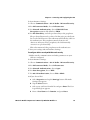
2 Press the Down button to select Settings.
3 Press Enter.
4 Press the Tab button until the Settings tabs are highlighted.
5 Press the Right Arrow button to select the System tab (on some
keypads this will be the orange button and down button).
6 Press tab until the Screen icon is highlighted.
7 Tab to Align Screen and press Enter follow the instructions to
align the screen.
8 Tap ok.
22
CN3 Series Mobile Computer User’s Manual for Windows Mobile 5.0
Chapter 1 — Using the CN3
Understanding the Status LEDs
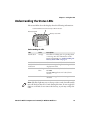
The status LEDs above the display show the following information:
Good Read LED and Intermec Ready-to-Work indicator
Notification LED
Battery status LED
.
Understanding the LEDs
LED
Color
Description
Notification
Orange
The CN3 is notifying you of a pending alarm
or message. For more information on the
Battery Status LED, see “Understanding the
Battery Status LED” on page 8.
Good Read
Green
The CN3 has successfully decoded a bar code.
Ready-to-Work Blue
indicator™
The CN3 is suspending or resuming with the
display turned off.
Blinking
blue
You have successfully loaded and activated
TE 2000.
The TE 2000 application is loaded, but is
inactive.
Off
The TE 2000 application is missing or
disabled.
Note: The blue light may stay on for up to 30 seconds, but will usually
turn off after less than 10 seconds. During this time, do not toggle the
CN3 on or off and do not remove the battery, or you may corrupt the
CN3.
CN3 Series Mobile Computer User’s Manual for Windows Mobile 5.0
23
Chapter 1 — Using the CN3
The Ready-to-Work indicator (blue light) is for the SmartSystems
Foundation application that is part of a wireless network using all
Intermec devices. For more information, see “Configuring the CN3
Remotely With SmartSystems Foundation” on page 36 or contact
your Intermec representative. Selected application software programs
may also use the blue light, either steady or flashing, for other
purposes.
Scanning Bar Codes
Use the area imager to scan and enter bar code data. If your CN3 has
an area imager, you cannot have the color camera option too. The
CN3 supports reading 1D and 2D images, composite and postal
codes. These bar code symbologies are enabled by default on the CN3:
Code 39, Code 128/GS1-128, UPC-A, UPC-E, EAN-8, EAN-13,
PDF417, and DataMatrix.
If you are using bar code labels that are encoded in a different
symbology, you need to enable the symbology on the computer. Use
Intermec Settings to enable and disable symbologies. For help, see
“Configuring the CN3 With Intermec Settings” on page 35.
Scanning with the Area Imager
The CN3 has an area imager that can scan 1D and 2D bar code
symbologies, composite, and postal codes. It also supports
omni-directional (360°) scanning where you can position the CN3 in
any orientation to scan a bar code label. Using the 2D imager is like
taking a picture with a digital camera.
24
CN3 Series Mobile Computer User’s Manual for Windows Mobile 5.0
Chapter 1 — Using the CN3
Imager
Scan button
Locating the Imager and the Scan Button
Note: There is also one scan button on the front of the CN3 and two
scan buttons on the front of the CN3e.
To use the area imager
1 Press the power button to turn on the CN3, point the scanner
window a few inches from the bar code label, and hold steady.
2 Press the Scan button and center the red aiming beam over the bar
code label. The aiming beam is smaller when the imager is closer
to the bar code and larger when it is further away.
3 When a bar code label is successfully read, a high beep is emitted
and the Good Read LED lights briefly. Release the Scan button.
Improving the Performance of the Area Imager
If you experience problems scanning a bar code with the 2D imager,
try following some of these tips to improve the performance of your
imager.
•
Keep your hand as steady as possible while scanning a label.
•
Position the imager as close to the bar code as possible while still
being able to capture the entire bar code.
•
Enable only the bar codes that you need to use every day.
CN3 Series Mobile Computer User’s Manual for Windows Mobile 5.0
25
Chapter 1 — Using the CN3
•
Choose a Predefined mode in Intermec Settings:
a Tap Start > Settings > the System tab > Intermec Settings.
b Tap Data Collection > Internal Scanner > Imager Settings >
Predefined Modes and then select one of these options:
Predefined Mode
Select if You Are Scanning:
1D
Only 1D labels.
1D and 2D Standard All types of bar code labels.
1D and 2D Bright
Environment
In high ambient light, such as outdoors in
the sunshine.
1D and 2D Reflective Glossy labels.
Surface
Custom
In conditions that require customized
settings. For more information about these
settings, commands, and parameters, see the
Intermec Computer Command Reference Manual
available from the Intermec website at
www.intermec.com.
Using the Color Camera
The color camera with flash is an optional feature that is
factory-installed into the upper back of the CN3, as shown in the
following illustration.
Color camera
Flash
Color Camera and Flash
26
CN3 Series Mobile Computer User’s Manual for Windows Mobile 5.0
Chapter 1 — Using the CN3
If you have the color camera option, you cannot have the area imager
option because they occupy the same space. You can take photos in
either high-resolution or compressed format, with resolutions up to
1280 x 1024 pixels on the 1.3 megapixel camera or 1600 x 1200 pixels
on the 2.0 megapixel camera. When you take a picture, the images are
saved as .jpg files and stored in the /My Documents/My pictures
folder.
You can use the Pictures & Videos application on the CN3 to take,
view, and edit pictures or record and launch video clips stored on the
CN3 or a storage card. You can also send pictures and video clips to
others or save an image as the background on the Today screen.
After the color camera is enabled, you can configure camera options
by going to Menu > Options or Menu > Tools > Options from the
Pictures & Video screen. While you are in the Pictures & Videos
application, you can select Start > Help for more information on
using the camera.
To take a picture with the camera
1 Tap Start > Programs > Pictures & Videos.
2 Tap the Camera option in the grid or tap Camera in the taskbar.
3 Using the screen display as a viewfinder, move the camera until
you have the image you want to capture.
4 Press Enter to save the image. If you select to save your pictures to
main memory, they are saved to permanent storage on the CN3.
CN3 Series Mobile Computer User’s Manual for Windows Mobile 5.0
27
Chapter 1 — Using the CN3
To save picture files
1 Tap Menu (lower right) then Options to access the Camera tab.
2 Select where you want to save files to, type a filename prefix, and
select a compression level.
3 Tap ok.
Using the Storage Card
The CN3 uses a miniSD card to increase file storage and install
software. The miniSD card slot is located under a door that is beneath
the battery pack. Remove the two screws holding the door to reach the
miniSD card.
You can corrupt your miniSD card if you do not follow these
installation and removal procedures exactly. Before installing a
miniSD card, inspect the gasket on the door for any damage or
wear, and contact your Intermec representative if you find any
damage or wear.
Note: The CN3 will reset if you open the miniSD/SIM door. The
screws to this door must be in place and torqued to 0.11 Nm (1.0 inlbs) to ensure normal operation.
To insert the miniSD card
1 Press the Power button to suspend the CN3, and then remove the
battery pack from the back of the CN3.
2 Remove the two screws on the miniSD/SIM card slot door.
3 Gently lift the door to the card slot, then with the metal contacts
facing down, insert the storage card into the miniSD card slot.
28
CN3 Series Mobile Computer User’s Manual for Windows Mobile 5.0
Chapter 1 — Using the CN3
miniSD card slot
4 Close the miniSD/SIM card slot door and insert the two screws.
Do not over-torque the two screws that secure the card slot
door. You can damage the door.
5 Replace the battery pack and then press the Power button.
Once the door to the miniSD is opened and closed (for changing,
installing, or removing the SIM or miniSD card), the CN3 performs a
cold boot.
Setting Up GPS on Your CN3
If your CN3 comes equipped with an integrated Global Positioning
System (GPS) receiver, it can deliver standards-based National Marine
Electronics Association (NMEA) data strings to GPS applications.
However, Intermec recommends that you use the GPS Intermediate
Driver (GPSID) instead of directly accessing the GPS hardware. The
GPSID is a Microsoft software component that interacts between
applications and the GPS hardware.
Using the GPSID allows Intermec support for Extended Ephemeris,
which enhances GPS performance by:
•
reducing the amount of time it takes your GPS receiver to acquire
a fix.
•
eliminating the need to obtain precise satellite data information
from the GPS satellites.
CN3 Series Mobile Computer User’s Manual for Windows Mobile 5.0
29
Chapter 1 — Using the CN3
As a Microsoft software component, the GPSID also provides these
benefits:
•
It allows multiple applications to simultaneously access the GPS
data stream.
•
It provides access to GPS data without requiring applications to
recognize and parse NMEA syntax.
Using the GPSID Installed on the CN3
To use the GPSID installed on your CN3, you need to configure the
GPSID settings.
To configure your GPSID settings
1 Tap Start > Settings > the System tab.
2 Tap GPS. The GPS Settings screen appears.
3 On the Programs tab, select the COM port that you want your
programs to use to get GPS data from your CN3.
Note: COM1 and COM3 are reserved.
30
CN3 Series Mobile Computer User’s Manual for Windows Mobile 5.0
Chapter 1 — Using the CN3
4 Tap the Hardware tab, and select these settings.
•
GPS hardware port: COM3
•
Baud rate: 57600
Note: If the GPS is connected through Bluetooth, select these
settings.
•
GPS hardware port: COM6
•
Baud rate: 19200
5 Tap the Access tab and select the Manage GPS automatically
check box.
6 Tap ok.
CN3 Series Mobile Computer User’s Manual for Windows Mobile 5.0
31
Chapter 1 — Using the CN3
To enable extended ephemeris
1 Tap Start > Settings > the System tab.
2 Tap iGPS settings. The iGPS Settings screen appears.
3 Tap the Advanced tab.
4 Select the Enable extended ephemeris check box.
5 Tap ok.
Learning About Additional GPS Options for the CN3
Intermec provides enhanced feature support for the Extended
Ephemeris data capability. For the latest Extended Ephemeris data
files and other CN3 downloads, visit the CN3 downloads page on the
Intermec website at www.intermec.com. For more information
about programming for Extended Ephemeris GPS, visit the Intermec
Developer Library at www.intermec.com/idl.
32
CN3 Series Mobile Computer User’s Manual for Windows Mobile 5.0
2
Connecting and Configuring the CN3
Use this chapter to understand how to configure the CN3 to
communicate in your network. This chapter contains these
topics:
•
Connecting to a PC
•
Configuring the CN3 Parameters
•
Configuring Local Area Networks
•
Configuring the Phone
•
Connecting to an ISP
•
Connecting to a Network With a RAS Account
•
Connecting to a Network with a VPN Server
•
Configuring Wireless Security
33
Chapter 2 — Connecting and Configuring the CN3
Connecting to a PC
You can use Microsoft ActiveSync to establish a connection between
your CN3 and PC. ActiveSync lets you transfer files, synchronize files,
remotely debug, and perform other device management activities.
ActiveSync is a free application available from the Microsoft website.
To establish an ActiveSync partnership between your CN3 and PC,
you need to physically connect your CN3 to your PC using one of
these methods:
•
AD10 single dock and USB to mini-USB cable
•
AA18 USB adapter and USB cable
To establish an ActiveSync partnership
1 Download ActiveSync from the Microsoft website and install
ActiveSync on your PC. When installation is complete, the Get
Connected dialog box appears.
2 Follow the onscreen instructions to establish a partnership.
34
CN3 Series Mobile Computer User’s Manual for Windows Mobile 5.0
Chapter 2 — Connecting and Configuring the CN3
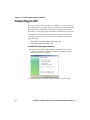
When the partnership is established, the Microsoft ActiveSync
screen appears on your PC.
Configuring the CN3 Parameters
You can configure many parameters on the CN3 such as the bar code
symbologies it decodes or the network settings. These characteristics
are controlled by configuration parameters. The values you set for
these configuration parameters determine how the CN3 operates.
Configuring the CN3 With Intermec Settings
Use Intermec Settings to configure the CN3 and view system
information.
CN3 Series Mobile Computer User’s Manual for Windows Mobile 5.0
35
Chapter 2 — Connecting and Configuring the CN3
To open Intermec Settings
•
Tap Start > Settings > the System tab > Intermec Settings.
For detailed information about each command available in
Intermec Settings, see the Intermec Computer Command Reference
Manual (P/N 073529-xxx).
Navigating in Intermec Settings
To Perform This Action
Do This
Select a command.
Tap the command or press
or
Expand a command.
Tap the command or press
or
.
.
Select text in a text box. Tap in the text box and drag the stylus over the
text.
Save your settings.
Tap File > Save Settings or tap
.
Configuring the CN3 Remotely With SmartSystems
Foundation
Intermec’s SmartSystems™ Foundation is a software platform
that lets you manage all of your SmartSystems-enabled devices
simultaneously from a central server. The SmartSystems console
displays all of the computers in your network.
36
CN3 Series Mobile Computer User’s Manual for Windows Mobile 5.0
Chapter 2 — Connecting and Configuring the CN3
Your CN3 is SmartSystems-enabled, which lets you open Intermec
Settings from the SmartSystems console to remotely configure all of
your CN3 computers.
To open Intermec Settings from the SmartSystems console
1 In the SmartSystems console, right-click a CN3.
2 Select Intermec Settings.
For more information about SmartSystems Foundation, go to the
Intermec website at www.intermec.com/SmartSystems.
Configuring Local Area Networks
The CN3 is a versatile mobile computer that you can easily add to
your wireless or wired data collection network. You can connect your
CN3 using:
•
802.11b/g radio communications.
•
Bluetooth communications.
•
Ethernet communications
•
USB and serial communications.
Configuring 802.11b/g Radio Communications
Make sure all components with antennas are at least 30 cm (1 ft)
apart when power is applied. Failure to comply could result in
equipment damage.
Your CN3 has an 802.11b/g radio to transfer data using wireless
communications and supports the TCP/IP network protocols. This
section of the manual assumes that your wireless network is set up,
including your access points.
The CN3 communicates directly with a host computer using TCP/IP.
The access point acts as a bridge allowing communications between
the wired and wireless networks.
CN3 Series Mobile Computer User’s Manual for Windows Mobile 5.0
37
Chapter 2 — Connecting and Configuring the CN3
To use wireless communications in a TCP/IP network
1 Configure these parameters on each CN3 in the network:
•
Network name (SSID)
•
IP settings (if not using DHCP)
2 Make sure your CN3 is talking to the network and that the
network can see your CN3.
3 Configure security. For help, see “Configuring Wireless
Security” on page 57.
Configuring Bluetooth Communications
Your CN3 is Bluetooth™ enabled, which lets you connect to other
Bluetooth devices, such as scanners or printers.
You need to turn on the Bluetooth radio before you can discover and
connect to other Bluetooth devices. By default, the radio is turned off.
To turn on the Bluetooth radio
1 Tap Start > Settings > the Connections tab > Bluetooth > the
Mode tab.
2 Tap Turn on Bluetooth.
3 (Optional) If you want your CN3 to be visible to other Bluetooth
devices, tap Make this device visible to other devices.
4 Tap ok.
38
CN3 Series Mobile Computer User’s Manual for Windows Mobile 5.0
Chapter 2 — Connecting and Configuring the CN3
The Bluetooth radio maintains its state through a warm or cold boot
and maintains virtual COM ports. But, if you clean boot your CN3
you need to re-connect to devices.
You can also use Intermec Settings to turn on the radio and enable
Bluetooth settings. Use this table to understand the settings you see
in the Bluetooth menu in Intermec Settings.
Bluetooth Settings
Setting
Description
Power
Set and view whether the Bluetooth radio is on or off.
Discoverable Allows other Bluetooth devices to be able to discover
the computer during a device discovery.
Connectable Allows other Bluetooth devices to connect to your
computer.
Class of
Determines how the device appears to other devices
Device
during discovery.
IBT
Displays the Intermec Bluetooth Library version.
Radio
Displays the Bluetooth Radio Hardware version.
Device
Displays the Bluetooth address of your computer.
Address
Connecting to a Bluetooth Scanner
You can connect to an Intermec Bluetooth scanner, such as the SF51
or SR61, using one of these methods:
•
Scan the association bar code label that ships with the CN3
•
Run the Wireless Scanning Wizard
To connect to a Bluetooth scanner with the association label
1 Make sure that the Bluetooth radio on your CN3 is enabled and
that your CN3 is discoverable and connectable.
2 Make sure that your Bluetooth scanner is on.
3 When prompted, enter the passcode for your scanner. The default
passcode for Intermec Bluetooth scanners is 0000.
4 Tap Finish.
CN3 Series Mobile Computer User’s Manual for Windows Mobile 5.0
39
Chapter 2 — Connecting and Configuring the CN3
To connect to a Bluetooth scanner with the Bluetooth Scanner Wizard
1 Select Start > Settings > the System tab > Wireless Scanning.
2 Follow the onscreen instructions to connect to a wireless scanner.
Configuring Bluetooth Communications for Wireless
Printing
To configure your CN3 for Bluetooth wireless printing, you need to:
40
•
make sure Bluetooth power is on. For help, see the procedure in
“Configuring Bluetooth Communications” on page 38.
•
create an application that opens the wireless printing COM port
on your CN3. For help, see the Bluetooth Resource Kit, part of the
Intermec Developer Library (IDL), available from the Intermec
website at www.intermec.com/idl.
•
select the current wireless printer on the CN3. For help, see the
next procedure.
CN3 Series Mobile Computer User’s Manual for Windows Mobile 5.0
Chapter 2 — Connecting and Configuring the CN3
To select the current wireless printer
1 Select Start > Settings > the System tab > Wireless Printing.
2 Tap Search to find a printer, or tap Manual to enter a device
address. Follow the onscreen instructions to select the current
wireless printer.
3 (Optional) Tap Print Test Page. The printer prints out the test
page.
Note: You can also print wirelessly using Microsoft APIs with
Bluetooth extensions for Winsock and Bluetooth virtual COM ports.
For help, see the IDL Resource Kit Developer’s Guide (P/N 934-006-xxx).
Configuring Ethernet Communications
You connect your CN3 to your Ethernet network with an Ethernet
cable and one of these accessories:
•
AD10 single dock with an Ethernet/modem (AA12/AA13) adapter
•
AD11 Ethernet multidock
CN3 Series Mobile Computer User’s Manual for Windows Mobile 5.0
41
Chapter 2 — Connecting and Configuring the CN3
To use your CN3 in an Ethernet network
1 Tap the iConnect icon ( ) in the lower right corner of the Today
screen. The iConnect pop-up menu appears:
2 Configure these network parameters:
•
If you have a DHCP server, enable DHCP.
•
If you do not have a DHCP server, set these parameters:
a IP address
b Subnet mask
c
Default router
3 If necessary, set these parameters:
•
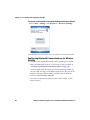
Primary and secondary DNS servers
•
Primary and secondary WINS servers
4 Make sure that your CN3 is communicating with the network and
that the network can see your CN3.
Using Serial and USB Communications
You can use these CN3 accessories to transmit data to and receive data
from another device through serial or USB communications:
•
AD10 single dock
•
AV10 vehicle dock
•
AD11 multidock
•
AA24 USB adapter
•
AA17 RS-232 adapter
For more information about these accessories and how to order them,
see “Accessories” on page 101.
42
CN3 Series Mobile Computer User’s Manual for Windows Mobile 5.0
Chapter 2 — Connecting and Configuring the CN3
Checking the Status of Your Wireless Connection
After you configure your wireless settings, you can use iConnect to
check the status of your connection. You can also use iConnect to
configure the network settings and test the connection of your CN3
against the network.
To check the status of your wireless connection
1 Tap the iConnect icon (
screen.
) in the lower right corner of the Today
2 From the iConnect menu, select Status > Wireless. The Wireless
Status screen appears and checks the connection.
To configure the network settings
•
From the iConnect menu, tap Tools > Wireless Settings.
To test the connection of your CN3 against your network
•
From the iConnect menu, select Tools > Ping Test.
Viewing Detailed 802.11 Radio Connection Information
Use the ISpyWiFi utility to view detailed information for your 802.11
radio connection. You can also use ISpyWiFi to scan for access points
in your network and ping for detailed information.
You start the ISpyWiFi utility using the iConnect application.
CN3 Series Mobile Computer User’s Manual for Windows Mobile 5.0
43
Chapter 2 — Connecting and Configuring the CN3
To start the ISpyWiFi utility
1 Tap the iConnect icon > Status > Wireless. The Wireless Status
Screen appears.
2 Tap the Advanced button. The ISpyWiFi utility starts.
To view the ISpyWiFi tab
•
Tap the ISpyWiFi tab.
The ISpyWiFi tab contains network interface, configuration, access
point, and radio frequency information.
44
CN3 Series Mobile Computer User’s Manual for Windows Mobile 5.0
Chapter 2 — Connecting and Configuring the CN3
Use the following table to understand the ISpyWiFi information.
Understanding the ISpyWiFi Tab
Setting
Description
BCMCFI
A WLAN adapter and its associated driver version.
MAC
The client radio MAC address.
IP (DHCP)
The IP address of the client radio, if using DHCP.
IP (static)
The IP address of the client radio, if using a static IP
address.
Status
Shows whether the radio is associated with the access
point.
Channel
The channel on which the radio is communicating with
the access point.
ESSID
The text SSID for your network.
BSSID
The MAC address of the access point that the client radio
is communicating with.
Association
Shows the type of association: Open, WPA, WPA-PSK,
WPA2, or Network EAP
Encrypt
Shows potential encryption for the association.
Power
CAM (Constantly Awake Mode) or FAST PSP (Power Save
Poll)
Antenna
Diversity (multiple antennas, Primary (one antenna)
TX Power
Transmit power level in milliwatts (mW).
RSSI
The Received Signal Strength Indicator. The closer to
zero, the better for this indicator.
Link
The data rate at which the radios are communicating.
Use the WiFi Scan tab to scan your network and bring back
information about any access points with which you can
communicate.
To use the WiFi Scan tab
1 Tap the WiFi Scan tab.
2 Tap the Scan button.
3 Tap any of the columns to sort in ascending or descending order.
CN3 Series Mobile Computer User’s Manual for Windows Mobile 5.0
45
Chapter 2 — Connecting and Configuring the CN3
Use the Supplicant tab to view information on security and
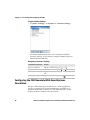
authentication settings that you have configured on the CN3.
The Supplicant Tab
To use the Supplicant tab
46
•
Tap Configure Profile to launch the Profile Wizard and
configure 802.11 options.
•
Tap Reconnect to disassociate the radio, momentarily dropping
its connection. The radio then reassociates and reauthenticates,
but does not do anything with the driver.
•
Tap Clear Events to remove the information shown in the
Supplicant Event box.
CN3 Series Mobile Computer User’s Manual for Windows Mobile 5.0
Chapter 2 — Connecting and Configuring the CN3
Use the Ping tab to contact with any host in your network for
information.
The Ping Tab
To ping a host
1 From the Host drop-down list, select an IP address for the host
you want to ping. Enter a new IP address using the input panel or
the keypad. Select Clear List to remove all the IP addresses from
the drop-down list.
2 From the Repetitions drop-down list, select the number of times
to ping the selected host. These repetitions are done once per
second.
3 Tap Ping to initiate contact with the selected host.
CN3 Series Mobile Computer User’s Manual for Windows Mobile 5.0
47
Chapter 2 — Connecting and Configuring the CN3
4 Depending on how the screen is set up, you can toggle between a
graph and a list of ping results:
•
Tap Graph to toggle to the graphical view of 25 of the most
recent pings and their response results, like in the following
sample graph:
•
Tap List to toggle to detailed information showing what ping
touched what host and the RTT (Round Trip Time).
Configuring the Phone
The CN3 supports two types of cellular phone technology:
•
CDMA EV-DO Rev 0
•
GSM/EDGE
With a radio module installed in the CN3, you can send and receive
telephone calls as well as transmit data through wide-area (WAN)
cellular networks.
The CN3 provides a phone speaker, microphone, and speakerphone.
It also supports the use of a Bluetooth headset or hands-free kit. The
factory default setting for the phone is disabled.
After you have turned on the phone and activated it, you can
customize the features of the phone and network settings. For help,
refer to the online help on your CN3.
Turning On the Phone Using the Wireless Manager
You can use the Wireless Manager application to turn on the phone if
Microsoft Zero Configuration is enabled. If you have Intermec
Security enabled, you cannot access the Wireless Manager. For
information on enabling and configuring Microsoft security, see
“Selecting Microsoft as Your Security Choice” on page 63.
48
CN3 Series Mobile Computer User’s Manual for Windows Mobile 5.0
Chapter 2 — Connecting and Configuring the CN3
You can use the Wireless Manager to enable and disable Bluetooth,
Wi-Fi, and the phone if it is built into your CN3.
To turn on the phone using the wireless manager
1 Tap Start > Settings > the Connections tab > Wireless Manager.
2 In the Wireless Manager, tap Phone. The phone turns on.
3 Tap Menu > Phone Settings to configure the phone. For help, see
the next procedure, “Activating the CDMA Phone.”
4 Tap Done to close the Wireless Manager.
Activating the CDMA Phone
The CDMA WAN radio module is installed at the factory. To activate
your CDMA CN3 device, you need to contact the carrier you have
chosen and set up accounts for each device. Use the following table to
view the carriers that Intermec currently supports. If your carrier is
not listed in the table, please contact Intermec product support to see
if it is now supported.
CN3 Series Mobile Computer User’s Manual for Windows Mobile 5.0
49
Chapter 2 — Connecting and Configuring the CN3
Currently Supported Carriers
Country
Carrier
United States
Alltel, Sprint, Verizon
Canada
Bell Mobility, Telus
New Zealand
Telecom New Zealand
The carrier will require the Electronic Serial Number (ESN) to start
the activation process. You can find the ESN:
•
on a label located in the upper right corner of the battery
compartment.
•
on the outside of the CN3 shipping box.
The activation process is slightly different for each CDMA carrier.
Your carrier sales contact and an Intermec representative can guide
you through the process.
After you supply the ESN to your carrier, they will respond with values
that you must enter using the Windows Mobile Activation Wizard (if
required). Some of the supported carriers do not require you to enter
any values. The following table shows the carriers, the correct
activation method to use, and the values that you need to activate
your phone.
Values Required for CDMA Phone
Carrier
Activation Method
Activation Values You Need
Alltel
Dial *22899
None - all parameters are automatically
transferred wirelessl.y
The Activation Wizard is disabled for Alltel.
50
CN3 Series Mobile Computer User’s Manual for Windows Mobile 5.0
Chapter 2 — Connecting and Configuring the CN3
Values Required for CDMA Phone (continued)
Carrier
Activation Method
Activation Values You Need
Bell Mobility
Activation Wizard
Service Programming Code (SPC), also called
the activation code
Mobile Directory Number (MDN)
Mobile Station Identification Number (MSIN)
System ID (SID)
Network ID (NID)
Mobile Country Code (MCC)
Mobile Network Code (MNC)
Username
Password
Sprint
Activation Wizard
Master Subsidy Lock (MSL), also called the
activation code
MDN
Mobile Station Identifier (MSID)
Telecom New Zealand Activation Wizard
SPC
SID
NID
Telus
Dial *22803
None - all parameters are automatically
transferred wirelessly.
Verizon
Dial *22899
None - all parameters are automatically
transferred wirelessly.
You can also use the Activation Wizard with
Verizon.
After you complete the activation process, the settings you enter are
permanently stored in the CDMA module. Changing the OS or SSPB
loads will not affect any of the settings or activation parameters
stored in the WAN modem.
To start the Activation Wizard
1 Tap Start > Phone from the Today screen.
2 In the Phone application, tap Menu > Activation Wizard from
the bottom of the screen.
CN3 Series Mobile Computer User’s Manual for Windows Mobile 5.0
51
Chapter 2 — Connecting and Configuring the CN3
Activating the GSM/EDGE Phone
You use a SIM card to activate the GSM/EDGE phone on the CN3.
You can purchase the SIM card from your network provider. You
insert the SIM card in the miniSD/SIM door in the back of the CN3.
For more information, please contact your local Intermec
representative.
To insert the SIM card
1 Press the Power button to suspend the CN3, and then remove the
battery pack from the back of the CN3.
2 Remove the two screws from the miniSD/SIM door.
3 Lift the door and insert the SIM card into the card slot with the
metal contacts facing outward.
4 Close the miniSD/SIM door and insert the two screws. Tighten
the screws to 1.5 in-lbs torque.
5 Replace the battery pack.
The CN3 cold boots and you can start using your phone.
Making a Phone Call
After you activate your phone, you are ready to start making phone
calls.
To make a phone call
1 Tap Start > Phone.
2 Tap the keys to enter the telephone number you want to call.
3 Tap the Talk button.
Connecting to an ISP
You can connect to your Internet Service Provider (ISP), and use the
connection to send and receive email messages and view web pages.
Get an ISP dial-up access telephone number, a user name, and a
password from your ISP.
Tap the Help icon at any time to view additional information for the
wizard or the settings.
52
CN3 Series Mobile Computer User’s Manual for Windows Mobile 5.0
Chapter 2 — Connecting and Configuring the CN3
Once the CN3 is connected, you can:
•
send and receive messages using Messaging (Outlook Email).
•
visit web pages using Internet Explorer Mobile.
To connect to an Internet service provider
1 Tap Start > Settings > Connections.
2 Under My ISP, tap Add a new modem connection.
3 Enter a name for the connection, such as “ISP Connection.”
4 If using an external modem connected to your CN3 with a cable,
select Hayes Compatible on COM1 from the Select a modem
drop-down list.
5 Tap Next.
6 Enter the access phone number and then tap Next.
7 Enter the User name, Password, and Domain (if provided by an
ISP or your network administrator).
8 Tap Finish.
CN3 Series Mobile Computer User’s Manual for Windows Mobile 5.0
53
Chapter 2 — Connecting and Configuring the CN3
9 Tap the Advanced tab from the Connections screen and then tap
Dialing Rules.
10 Select Use dialing rules, tap OK at the dialog box, and then tap
Edit.
11 Specify your current phone type and then tap ok until you exit
and return to the Settings page.
Connecting to a Network With a RAS Account
If you have access to a network at work, you can send email messages,
view intranet pages, synchronize your CN3, and possibly access the
Internet. Create a modem connection through a RAS (Remote Access
Server) account. Before you can create this modem connection, your
network administrator needs to set up a RAS account for you. Your
network administrator may also give you Virtual Private Network
(VPN) settings.
Tap the Help icon at any time to view additional information for the
wizard or the settings.
To connect to a private network
1 Tap Start > Settings > Connections.
54
CN3 Series Mobile Computer User’s Manual for Windows Mobile 5.0
Chapter 2 — Connecting and Configuring the CN3
2 Under My Work Network, tap Add a new modem connection.
3 Enter a name for the connection, such as “Company Connection.”
4 Select your modem type.
•
If using an external modem connected to your CN3 with a
cable, select Hayes Compatible on COM1 from the Select a
modem drop-down list.
•
If using any type of external modem, select the modem by
name. If a listing does not exist for your modem, select Hayes
Compatible on COM1.
5 Tap Next.
6 Enter the access phone number and then tap Next. Use these
guidelines when entering a phone number:
•
Enter the phone number exactly as you want it dialed. For
example, if you call from a business complex or hotel that
requires a nine before dialing out, enter 9 in front of the phone
number.
•
Enter the access point name (APN) provided by your mobile
phone service provider.
•
If you want to use dialing rules, see the online help for
information.
7 Enter the User name, Password, and Domain (if provided by an
ISP or your network administrator).
CN3 Series Mobile Computer User’s Manual for Windows Mobile 5.0
55
Chapter 2 — Connecting and Configuring the CN3
8 Tap Finish.
Connecting to a Network with a VPN Server
A VPN connection helps you to securely connect to servers, such as a
corporate network, through the Internet. Before you can make a VPN
connection, you will need the following items from your network
administrator:
•
User name
•
Password
•
Domain name
•
TCP/IP settings
•
Host name or IP address of the VPN server
To create a VPN server connection to work
1 Tap Start > Settings > Connections.
2 Under My Work Network, tap Add a new VPN connection.
3 In the Name field, enter a name for the connection, such as your
company name.
4 In the Host name / IP field, enter the VPN server name or IP
address.
56
CN3 Series Mobile Computer User’s Manual for Windows Mobile 5.0
Chapter 2 — Connecting and Configuring the CN3
5 Select the VPN type of authentication to use with your CN3. If you are
not sure which option to choose, check with your network
administrator.
6 Tap Next.
7 Select a way for the CN3 to authenticate the connection. If you
select A pre-shared key, enter the key provided by your network
administrator.
8 Tap Next.
9 Enter the User name, Password, and Domain (if provided by an
ISP or your network administrator).
10 Tap Finish.
11 Insert the necessary equipment, such as a network card, into the
CN3 and begin connecting.
Configuring Wireless Security
The CN3 provides four types of security for your wireless network:
•
Wi-Fi Protected Access 2 (WPA2™)
•
Wi-Fi Protected Access (WPA)
•
802.1x
•
WEP
CN3 Series Mobile Computer User’s Manual for Windows Mobile 5.0
57
Chapter 2 — Connecting and Configuring the CN3
This section explains how to configure wireless security on your CN3.
If you choose not to use security, see “Disabling Security” on
page 68. Intermec always recommends that you implement security.
You must use either Funk or Microsoft security to implement your
security solution. For details, see the next section, “Choosing
Between Microsoft and Funk Security.”
If you are using WPA-802.1x, WPA2-802.1x, or 802.1x security, this
section also assumes that your authentication server and
authenticators are properly configured.
Note: Your security choice does not depend on your authentication
server. For example, you can choose Funk security if you use
Microsoft Active Directory® to issue certificates.
Choosing Between Microsoft and Funk Security
The CN3 supports both Funk (default) and Microsoft security. The
options you choose depends on your network needs.
Understanding Microsoft and Funk Security
58
Security Choice
Description
Microsoft
Microsoft security dynamically selects wireless networks
based on your preferences. If you are primarily using the C
CN3 to connect to WiFi hotspots, you may want to use
Microsoft security.
To use Microsoft security, you need to select it as your
security choice. For help, see “Selecting Microsoft as
Your Security Choice” on page 63.
Funk (default)
Funk security offers features that are similar to Microsoft
security, but Funk also offers these features:
• CCX v2.0 compliance
• Support for LEAP and TTLS
• Configuration of up to four profiles
If you are using the CK3 in a static environment that
requires a high level of security, you should use Funk
security.
To use Funk security, you need to select a profile. For
help, see the next section, “Selecting a Funk Security
Profile.”
CN3 Series Mobile Computer User’s Manual for Windows Mobile 5.0
Chapter 2 — Connecting and Configuring the CN3
Selecting a Funk Security Profile
You can define up to four profiles for Funk security. Different profiles
let your CN3 communicate in different networks without having to
change all of your security settings. For example, you may want to set
up one profile for the manufacturing floor and one for the
warehouse. By default, the active profile is Profile 1.
Note: You can also use the Profile Wizard to configure most wireless
security settings. To start the Profile Wizard, tap the iConnect icon
( ) in the lower right corner of the Today screen and select Tools >
Wireless Settings.
To select a Funk security profile
1 Start Intermec Settings.
2 Choose Communications > 802.11 Radio > Funk Security.
3 Tap a profile to expand it.
4 (Optional) In the Profile Label text box, enter a meaningful name
for your profile.
5 Configure your security settings. For help, see the next sections.
6 Repeat Steps 3 through 5 for each profile you want to define.
7 Select one profile as the active profile by tapping Active Profile
and choosing a profile from the list.
8 Save your settings.
Configuring WPA Security With Funk Security
Use these procedures to set WPA-802.1x, WPA2-802.1x, WPA-PSK, or
WPA2-PSK security on your CN3 with Funk security.
To configure WPA-802.1x or WPA2-802.1x with Funk security
1 Make sure the communications and radio parameters on your
CN3 are configured.
2 Make sure Funk is selected as your security choice.
3 Start Intermec Settings.
4 Choose Communications > 802.11 Radio > Funk Security.
5 Select the profile you want to configure.
CN3 Series Mobile Computer User’s Manual for Windows Mobile 5.0
59
Chapter 2 — Connecting and Configuring the CN3
6 For Association, choose WPA or WPA2. Encryption
automatically defaults to TKIP or AES, respectively.
7 For 8021x, choose TTLS, PEAP, EAP-FAST, or TLS and press
Enter.
8 If you choose TTLS or PEAP:
a For Prompt for Credentials, choose Enter credentials now.
Note: You can use Prompt for Credentials to troubleshoot
your network connection.
b Tap User Name, enter your user name, and press Enter.
c
Tap User Password, enter your password, and press Enter.
d For Validate Server Certificate, choose Yes and press Enter.
Note: The correct date must be set on your CN3 when you
enable Validate Server Certificate.
If you choose TLS:
a Load a user and root certificate on your CN3 For help, see
“Loading a Certificate” on page 67.
b Enter a User Name and Subject Name.
c
For Validate Server Certificate, choose Yes and press Enter.
d (Optional) To increase your level of security, enter a Server 1
Common name and a Server 2 Common name.
9 Save your settings and exit Intermec Settings.
To configure WPA or WPA2 with Funk security
1 Make sure the communications and radio parameters on your
CN3 are configured.
2 Make sure Funk is selected as your security choice.
3 Start Intermec Settings.
4 Choose Communications > 802.11 Radio > Funk Security.
5 Select the profile you want to configure.
60
CN3 Series Mobile Computer User’s Manual for Windows Mobile 5.0
Chapter 2 — Connecting and Configuring the CN3
6 For Association, choose WPA or WPA2 and press Enter.
7 For 8021x, choose None and press Enter.
8 For Pre-Shared Key, enter the pre-shared key or passphrase.
The pre-shared key must be a value of 32 hex pairs preceded by 0x
for a total of 66 characters. The value must match the key value on
the access point. The passphrase must be from 8 to 63 characters.
After you enter a passphrase, the CN3 internally converts it to a
pre-shared key.
This value must match the passphrase on the authenticator.
9 Save your settings and exit Intermec Settings.
To configure 802.1x Security With Funk Security
1 Make sure the communications and radio parameters on your
CN3 are configured.
2 Make sure Funk is selected as your security choice.
3 Start Intermec Settings.
4 Choose Communications > 802.11 Radio > Funk Security.
5 Select the profile you want to configure.
6 For Association, choose Open and press Enter.
7 For Encryption, choose WEP and press Enter.
8 For Authentication, choose TTLS, PEAP, or TLS and press
Enter.
9 If you choose EAP-FAST, TTLS, or PEAP:
a Tap User Name, enter your user name, and press Enter.
b Tap Password prompt, choose Enter password now, and
press Enter.
Note: You can use Password prompt to troubleshoot your
network connection.
c
Tap User Password, enter your password, and press Enter.
d For Validate Server Certificate, choose Yes and press Enter.
CN3 Series Mobile Computer User’s Manual for Windows Mobile 5.0
61
Chapter 2 — Connecting and Configuring the CN3
If you choose TLS:
a Load a user and root certificate on your CN3 For help, see
“Loading a Certificate” on page 67.
b For Validate Server Certificate, choose Yes and press Enter.
c
Enter a User Name and Subject Name.
d (Optional) To increase your level of security, enter a Server 1
Common name and a Server 2 Common name.
10 Save your settings and exit Intermec Settings.
To configure LEAP Security on Your CN3
1 Make sure the communications and radio parameters on your
CN3 are configured.
2 Make sure Funk is selected as your security choice.
3 Start Intermec Settings.
4 Choose Communications > 802.11 Radio > Funk Security.
5 Select the profile you want to configure.
6 For 8021x, choose LEAP and press Enter.
7 For Association, choose Open, WPA, WPA2, or Network EAP
and press Enter. Encryption automatically defaults to TKIP if you
choose WPA, AES if you choose WPA2, and WEP if you choose
Open or Network EAP.
8 For Prompt for Credentials, choose Enter credentials now.
9 Tap User Name, enter your user name, and press Enter.
10 Tap User Password, enter your password, and press Enter.
11 Save your settings and exit Intermec Settings.
To configure Static WEP Security With Funk Security
1 Make sure the communications and radio parameters on your
CN3 are configured.
2 Make sure Funk is selected as your security choice.
3 Start Intermec Settings.
4 Choose Communications > 802.11 Radio > Funk Security.
5 Select the profile you want to configure.
62
CN3 Series Mobile Computer User’s Manual for Windows Mobile 5.0
Chapter 2 — Connecting and Configuring the CN3
6 For Association, choose Open and press Enter.
7 For Encryption, choose WEP and press Enter.
8 For 8021x, choose None.
9 Define a value for the keys you want to use. You can define up to
four keys (Key 1 through Key 4).
Enter an ASCII key or a hex key that is either 5 bytes or 13 bytes
long depending on the capability of the radio. Set a 5- byte value
for 64-bit WEP or a 13-byte value for 128-bit WEP. Hex keys must
be preceded by 0x and contain 5 or 13 hex pairs.
10 For Transmit key, choose the key you want to use for
transmitting data.
11 Save your settings and exit Intermec Settings.
Selecting Microsoft as Your Security Choice
The default security setting is Funk. If you want to use Microsoft
security, you need to select it as your security choice. After you select
Microsoft as your security choice, you will be prompted to save your
settings and reset your CN3 for your change to take effect.
With Microsoft as your security choice, you can configure:
•
WPA
•
802.1x
•
Static WEP
To select Microsoft security as your security choice
1 Select Start > Settings > the System tab > Intermec Settings. The
Intermec Settings application appears.
2 Select Communications > 802.11 Radio > Security Choice.
3 From the Security Choice list, select Microsoft Security and save
your settings. An alert box appears telling you that you must save
your settings and warm boot the CN3 for the new security choice
to take effect.
4 Tap Yes. The CN3 resets and starts with Microsoft Security as the
Security Choice.
CN3 Series Mobile Computer User’s Manual for Windows Mobile 5.0
63
Chapter 2 — Connecting and Configuring the CN3
Configuring WPA Security With Microsoft Security
Use these procedures to set WPA-802.1x and WPA-PSK security on
your CN3 with Microsoft security.
To enable WPA-802.1x with Microsoft security
1 Make sure the communications and radio parameters on your
CN3 are configured.
2 Start Intermec Settings.
3 Choose Communications > 802.11 Radio > Microsoft Security.
4 For Infrastructure Mode, choose Infrastructure.
5 For Network Authentication, choose WPA. Data Encryption
automatically defaults to TKIP.
6 For 802.1x Authentication, choose either MD5, TLS, or PEAP.
7 If you choose TLS:
a Select Properties and tap the Run App button. The Auth.
Settings dialog box appears.
b Tap the Select button.
c
Select your certificate from the list and press Enter. The User
Logon dialog box appears.
d Enter a User Name and Domain and press Enter.
If you choose PEAP:
a Select Properties and tap the Run App button. The Auth.
Settings box appears.
b Select Validate Server and press Enter. When the radio starts
to authenticate, the Network Password dialog box appears.
c
Enter a User Name and Password and select Save Password.
d (Optional) In the Domain field, enter the Active Directory
domain associated with the user account.
e Press Enter.
8 Save your settings and exit Intermec Settings.
To enable WPA-PSK with Microsoft security
1 Make sure the communications and radio parameters on your
CN3 are configured.
64
CN3 Series Mobile Computer User’s Manual for Windows Mobile 5.0
Chapter 2 — Connecting and Configuring the CN3
2 Start Intermec Settings.
3 Choose Communications > 802.11 Radio > Microsoft Security.
4 For Infrastructure Mode, choose Infrastructure.
5 For Network Authentication, choose WPA-PSK. Data
Encryption automatically defaults to TKIP.
6 For Pre-Shared Key, enter the pre-shared key or the passphrase.
The pre-shared key must be a value of 32 hex pairs preceded by 0x
for a total of 66 characters. The value must match the key value on
the authenticator. The passphrase must be from 8 to 63
characters. After you enter a passphrase, the CN3 internally
converts it to a pre-shared key.
This value must match the passphrase on the authenticator.
7 Save your settings and exit Intermec Settings.
To configure 802.1x security with Microsoft security
1 Make sure the communications and radio parameters on your
CN3 are configured.
2 Start Intermec Settings.
3 Choose Communications > 802.11 Radio > Microsoft Security.
4 For Infrastructure Mode, choose Infrastructure.
5 For Network Authentication, choose Open.
6 For Data Encryption, choose WEP.
7 For 802.1X Authentication, choose TLS or PEAP.
8 If you choose TLS:
a Select Properties and tap the Run App button. The Auth.
Settings box appears.
b Tap the Select button.
c
Select your certificate from the list and press Enter. The User
Logon dialog box appears.
d Enter a User Name and a Domain. and press Enter.
CN3 Series Mobile Computer User’s Manual for Windows Mobile 5.0
65
Chapter 2 — Connecting and Configuring the CN3
If you choose PEAP:
a Select Properties and tap the Run App button. The Auth.
Settings box appears.
b Select Validate Server and press Enter. When the radio starts
to authenticate, the Network Password dialog box appears.
c
Enter a User Name and Password and select Save Password.
d (Optional) In the Domain field, enter the domain.
e Press Enter.
9 For Network Key Setting, choose Automatic.
10 Save your settings and exit Intermec Settings.
To configure static WEP security with Microsoft security
1 Make sure the communications and radio parameters on your
CN3 are configured.
2 Start Intermec Settings.
3 Choose Communications > 802.11 Radio > Microsoft Security.
4 For Network Authentication, choose Open.
5 For Data Encryption, choose WEP.
6 For Network Key Setting, choose Enter Key and Index.
7 For Network Key Value, enter an ASCII key or a hex key that is
either 5 bytes or 13 bytes long depending on the capability of the
radio.
Set a 5-byte value for 64-bit WEP or a 13-byte value for 128-bit
WEP. Hex keys must be preceded by 0x and contain 5 or 13 hex
pairs.
8 For Network Key Index, select the key you want to use for data
transmission.
9 Save your settings and exit Intermec Settings.
66
CN3 Series Mobile Computer User’s Manual for Windows Mobile 5.0
Chapter 2 — Connecting and Configuring the CN3
Loading a Certificate
If you choose to use transport layer security (TLS) with WPA or 802.1x
security, you need a unique client certificate on the CN3 and a trusted
root certificate authority (CA) certificate. Certificates are pieces of
cryptographic data that guarantee a public key is associated with a
private key. They contain a public key and the entity name that owns
the key. Each certificate is issued by a certificate authority.
To import a root certificate
1 Tap the iConnect icon ( ) in the lower right corner of the Today
screen. The iConnect pop-up menu appears.
2 Select Tools > Wireless Settings. The Profile Wizard appears.
3 Tap Edit Selected Profile > the Security tab > Get Certificates.
4 To import a root certificate:
a Tap the <<< button next to the Import Root Certificate field
to select the root certificate (DER-encoded .cer file) to import.
b Tap Import Root Cert to install the selected certificate.
5 To import a user certificate:
a Tap the <<< button next to the Certificate Path field to select
the user certificate (DER-encoded .cer file without the private
key) to import.
CN3 Series Mobile Computer User’s Manual for Windows Mobile 5.0
67
Chapter 2 — Connecting and Configuring the CN3
b Tap the <<< button next to the Key Path field to select the
private key (.pvk file) which corresponds to the user certificate
you selected.
To import a certificate from an IAS server:
a Tap Web Enrollment.
b Enter the User, Password, and Server (IP address) to log into
the server.
c
Tap OK. A dialog box appears asking if you want to load the
root certificate.
d Tap OK. The Enrollment Tool message box appears telling you
that the certificate has been added.
e Tap OK to close the message box.
Disabling Security
If you choose not to use security with your wireless network, you can
disable it on the CN3. Intermec recommends that you always set
security in your network.
To disable security
1 Open Intermec Settings.
2 Choose Communications > 802.11 Radio > Microsoft Security.
3 For Network Authentication, choose Open.
4 For Data Encryption, choose Disabled.
5 Close Intermec Settings.
68
CN3 Series Mobile Computer User’s Manual for Windows Mobile 5.0
3
Developing and Installing Applications
Use this chapter to understand the guidelines for developing
applications for use on the CN3. This chapter contains these
sections:
•
Developing Applications for the CN3
•
Installing Applications on the CN3
•
Freeing Up Virtual Memory for Applications
•
Launching An Application Automatically
•
Upgrading the System Software
69
Chapter 3 — Developing and Installing Applications
Developing Applications for the CN3
The CN3 runs applications programmed in Microsoft Visual Studio
2005. You can also use Microsoft eMbedded Visual C++ 4.0 to
program applications, but some features may not be available. Use
this section to understand the hardware and software you need to
develop a new application for the computer.
Use the Intermec resource kits to develop new applications to run on
the CN3. The Intermec resource kits are a library of C++ and .NET
components grouped by functionality that you can use to create
applications for the computer. The resource kits are part of the
Intermec Developer Library (IDL), and can be downloaded from the
Intermec website at www.intermec.com/idl.
You need the following hardware and software components to use the
resource kits:
•
Pentium desktop, 400 MHz or higher
•
Windows 2000 (Service Pack 2 or later) or Windows XP (Home,
Professional, or Server)
•
For native and managed development, Microsoft Visual Studio
2005
•
128 MB RAM (196 MB recommended)
•
360 MB hard drive space for minimum installation (720 MB for
complete)
•
CD-ROM drive compatible with multimedia desktop specification
•
VGA or higher-resolution monitor (Super VGA recommended)
•
Microsoft Mouse or compatible pointing device
Installing Applications on the CN3
There are several ways you can install applications on your mobile
computer:
70
•
You can package your application as a cabinet (.cab) file.
•
If you have a simple application, you may only need to deliver the
.exe file.
CN3 Series Mobile Computer User’s Manual for Windows Mobile 5.0
Chapter 3 — Developing and Installing Applications
•
You can copy a directory structure that contains the application,
supporting files, DLLs, images, and data files.
Intermec recommends using .cab files to install your applications.
The mobile computer uses standard Windows Mobile .cab files and
will install third-party .cab files. You can have your .cab files place
your application in any of these memory locations on the mobile
computer:
•
The Object Store or the Flash File Store. The Object Store is a
DiskOnChip® flash that looks like a disk. The Flash File Store is
an area of storage which is embedded in a section of the system
flash memory. This storage is not erased during a reset, although it
might be erased during the reflashing process. In addition to
storing applications and data files, you have the option to store
persistent registry information to the Flash File Store region.
•
The optional miniSD card. If you are using a miniSD card, this
should be the primary location to place application installation
files. The miniSD card creates the Storage Card folder on the CN3.
•
The non-volatile Flash File Store region of the storage. Use the
small non-volatile Flash File Store region to hold .cab files that
rebuild the system at clean boot or install applications from a .cab
file into the Flash File Store so that they are “ready-to-run” when
you perform clean boot. Since the flash in the system has a limited
number of write cycles, do not use the Flash File Store for excessive
writing.
Files copied to any of these locations are safe when you cold boot the
computer as long as the AutoRun system is installed in the
appropriate location. You can find information about this system in
the Intermec Developer’s Library (IDL) Resource Kit Developer’s Guide
which is available from www.intermec.com/idl. When you copy a
.cab file to the \CabFiles folder, the folder automatically extracts that
.cab file on every cold boot.
There are several ways you can install files and applications on the
computer:
•
SmartSystems Foundation
•
ActiveSync
•
miniSD card
CN3 Series Mobile Computer User’s Manual for Windows Mobile 5.0
71
Chapter 3 — Developing and Installing Applications
•
FTP server
•
Wavelink Avalanche
The following sections explain how to use each one of these processes
to install your application on the computer.
Installing Applications Using SmartSystems Foundation
You can use the SmartSystems console to drag-and-drop Intermec
applications onto your mobile computers. The computer ships with
the SmartSystems client, which means it is SmartSystems-enabled.
The console is part of SmartSystems Foundation. For more
information about SmartSystems Foundation, go to the Intermec
website at www.intermec.com/SmartSystems. For help using the
console, see the online help.
To use SmartSystems console to install an application
1 Download your application file from the Intermec website and
unzip it on your desktop PC.
2 Double-click the application file to install it. The application file
should appear in the Software Vault.
3 From the SmartSystems console in the Software Vault, drag-anddrop the application onto each mobile computer in your network
or drop the application on a group of mobile computers contained
in a folder.
Installing Applications Using Microsoft ActiveSync
You can use Microsoft ActiveSync to establish a connection between
your PC and the computer. ActiveSync transfers files, synchronizes
files, performs remote debugging, and other device management
activities. For more information on installing and using ActiveSync,
see “Connecting to a PC” on page 34.
You can have a serial or USB ActiveSync connection to the mobile
computer. When you only have a few computers to update, you can
copy files using Windows Explorer on a PC.
This procedure assumes that Microsoft ActiveSync is installed on
your PC and is up and running.
72
CN3 Series Mobile Computer User’s Manual for Windows Mobile 5.0
Chapter 3 — Developing and Installing Applications
To install an application on the computer using ActiveSync
1 Connect the CN3 to a PC using a USB cable. You may have to
disconnect and then connect the cable to “wake” the connection.
2 Wait for a “Connected” message to appear in the Microsoft
ActiveSync application to signal a connection to the mobile
computer. If necessary, select File > Connection Settings >
Connect to initiate a connection.
3 Click Explore to open the Mobile Device window that shows the
files and folders on the CN3.
4 On your desktop PC, locate the .cab file you want to download to
the mobile computer and copy it.
5 From the Mobile Device window, open the My Windows
Mobile-Based Device folder and navigate to the folder where you
want to paste the .cab file.
6 Paste the .cab file into the desired folder.
7 When you are done copying files, warm boot or cold boot the
mobile computer.
8 After the mobile computer is done booting, tap Start >
Programs > File Explorer to locate the newly copied files.
9 Tap the .cab files to install them.
CN3 Series Mobile Computer User’s Manual for Windows Mobile 5.0
73
Chapter 3 — Developing and Installing Applications
Installing Applications Using a Storage Card
If you have a miniSD card for your CN3, it is the best place for you to
install applications.
To install applications using the storage card
1 Suspend the CN3 and remove the miniSD card.
2 Insert the miniSD card into a miniSD adapter card and then place
it in the storage card reader connected to your PC.
3 Copy your application file to the miniSD card.
4 Remove the miniSD card from the adapter card and insert it into
the CN3.
5 On your CN3, navigate to the storage card folder and run your
application.
Installing Applications Using the FTP Server
The CN3 has a built-in FTP server that connects to a network through
Ethernet, 802.11 b/g, or WAN (Wireless Access Network). You can use
the server to transfer your application file to the computer. Another
benefit of using the FTP server is that you can create FTP scripts to
automate the process of copying your files to the computer. This
option is useful when you need to send files to a large number of
computers.
The easiest way to manage the FTP server is to enable the FTP menu
within iConnect.
To enable the FTP menu
•
Create this DWORD registry key and set it to a value of 1:
HKEY_CURRENT_USER\Software\iConnect2\IConnect\Settings\ShowFTPMenu
The iFTP menu is available the next time your start iConnect.
To manage the state of the FTP server
• Modify these existing registry keys:
HKEY_CURRENT_USER\Software\iConnect2\IConnect\Settings\FtpAutoStart
HKEY_CURRENT_USER\Software\iConnect2\IConnect\Settings\FtpHeartbeat
Where 1 = enable and 0 = disable.
74
CN3 Series Mobile Computer User’s Manual for Windows Mobile 5.0
Chapter 3 — Developing and Installing Applications
Installing Applications Using Wavelink Avalanche
You can use the Wavelink Avalanche device management system to
install applications on all of your wireless CN3s. Use InstallSelect to
load Avalanche Enabler on your CN3. Tap File Explorer >
Windows > InstallSelect to launch the InstallSelect applet.
Each time the Avalanche Enabler is activated (typically on a reset), the
CN3 attempts to connect to the Avalanche Agent. When the CN3
connects to the agent, the agent determines whether an update is
available and immediately starts the software upgrade, file transfer, or
configuration update.
Note: If you manually activate the Avalanche Enabler on the CN3,
you may be prompted for a password when you exit the Avalanche
Enabler. The default password is leave.
To use Avalanche to remotely manage the CN3
1 Install software packages and updates for the CN3 using the
Avalanche Administrative console.
2 Schedule the CN3 updates or manually initiate an update using
the Avalanche Administrative console.
For more information on using Wavelink Avalanche, contact your
local Intermec representative or visit the Wavelink website at
www.wavelink.com.
Freeing Up Virtual Memory for Applications
You can use the InstallSelect application to reduce the amount of
virtual memory used by portions of the SmartSystems Platform
Bundle (SSPB). Freeing up virtual memory provides you with more
space to load and run custom applications. In technical terms, virtual
memory allows software to run in a memory address space whose size
and addressing are not necessarily tied to the physical memory of the
computer.
Note: InstallSelect is designed for use only by administrators,
developers, integrators, or Intermec service representatives.
CN3 Series Mobile Computer User’s Manual for Windows Mobile 5.0
75
Chapter 3 — Developing and Installing Applications
Note: Do not run InstallSelect while using any other applications.
InstallSelect manages the installation of value-added software
features of the computer. Removing software features may result in
loss of computer functionality or the ability to manage device
settings.
To free up virtual memory, select items from the InstallSelect list that
you do not want to install. When you perform a clean boot, the items
you selected are not installed. However, you can reinstall any of these
SSPB components at any time with InstallSelect. Be sure to back up
any related files that you want before you use the InstallSelect
application. The InstallSelect application is part of the SSPB and is
installed at the factory.
For more information on SSPB, see “Upgrading the System
Software” on page 78.
To free up virtual memory
1 Go to Start > Programs > File Explorer.
2 Tap the Windows folder.
3 Scroll down to the InstallSelect application and tap the icon (
The InstallSelect application appears on the display with a
Caution dialog box.
).
4 Tap ok to close the Caution dialog box.
76
CN3 Series Mobile Computer User’s Manual for Windows Mobile 5.0
Chapter 3 — Developing and Installing Applications
5 Clear the check box of any components you do not want installed
after a clean boot.
By default, components already installed on the computer are
automatically checked to be installed again after you perform a
clean boot.
6 Tap Apply to initiate the clean boot and install only the files that
are selected.
7 Tap Yes to continue with the clean boot. The computer performs a
clean boot and restarts with all of the checked components
installed.
Understanding the InstallSelect Software Components
Component Name
Description
Data Collection &
Intermec Settings
Data collection and Intermec Settings. Also includes on-unit SDK
libraries.
If you disable this .cab file, you cannot scan or collect data on the
device and you cannot use Intermec Settings.
Funk Wireless Security
Intermec security supplicant that provides a wireless security solution
with several features that are not supported by Microsoft.
Printer Support
Provides Intermec printer driver support.
Intermec DHCP Client
Provides the Intermec DHCP client application.
Bluetooth
Provides the Intermec Bluetooth application support.
Avalanche Enabler
Enables the client to the Wavelink Device Management solution.
You will see other components available from the InstallSelect
application based on the options you selected for your CN3.
Launching An Application Automatically
There are two ways to automatically launch your application when
you perform a reset on the computer:
•
Make sure your .cab file places a shortcut to your application in
the \Windows\StartUp folder.
•
Configure the AutoRun program to launch your application.
CN3 Series Mobile Computer User’s Manual for Windows Mobile 5.0
77
Chapter 3 — Developing and Installing Applications
The computer contains a program called AutoRun.exe which
automates operations such as launching other processes. You can
configure AutoRun.exe through the AutoRun data file, AutoRun.dat.
For compatibility with other Intermec computers, you can place a
copy of AutoRun.exe in the same folder as your AutoRun.dat file but
it is not required.
To create and install the AutoRun.dat file on your computer
1 Create a folder called System on your CN3.
2 Open the Notepad application on your PC.
3 Write commands for AutoRun.dat using the supported AutoRun
script commands.
4 Save the Notepad file as AutoRun.dat.
5 Copy the AutoRun.dat file to the System folder on the CN3.
During every boot, the system scans for AutoRun.dat in the
System folder.
AutoRun supports the following script commands in AutoRun.dat:
AutoRun Script Commands
Command
Description
EXEC
Launches a specified program and waits for it to finish
(up to 10 minutes).
CALL
Processes a specified file of commands and returns.
CHAIN
Processes a specified file of commands and does not
return.
RUN
Loads a specified program and executes it.
LOAD
Loads a specified program and executes it.
AutoRun handles quoted file names for the first parameter, which
allows you to specify path names or file names that contain white
spaces. AutoRun only supports one set of quotes per command.
Upgrading the System Software
When you upgrade your computer, you are updating the operating
system (OS) and the SmartSystems Platform Bundle (SSPB) files.
78
CN3 Series Mobile Computer User’s Manual for Windows Mobile 5.0
Chapter 3 — Developing and Installing Applications
The SSPB files are stored on the DiskOnChip and deliver Intermec
Value Add (IVA) functionality such as data collection, configuration,
the Intermec wireless security suite, and the SmartSystems™
Foundation. As new features are added to these components, you can
upgrade your SSPB files without needing to upgrade the operating
system. Alternately, you can choose to upgrade only the operating
system if you need new functionality. If you upgrade the operating
system, you will need to reinstall SSPB files.
There are two ways to upgrade your computer:
•
You can upgrade your computer using an storage card. For help,
see the next section, “Upgrading the CN3 Using a miniSD
Card.”
•
You can upgrade your computer using the SmartSystems Console.
For help, see “Upgrading the CN3 Using SmartSystems
Foundation” on page 81.
You need to download the latest upgrade files from the Intermec
website to your desktop PC.
To download the upgrade files
1 Start your web browser and go to the Intermec website at
www.intermec.com.
2 Go to Support > Downloads.
a In the Product Category list, choose Computers.
b In the Product Family list, choose Handheld Computers.
c
In the Product list, choose CN3 Mobile Computer.
3 Click Submit. A list of downloadable software appears.
4 Look for the appropriate upgrade files in the OS/Firmware/
Drivers list, and click a filename to download it.
Upgrading the CN3 Using a miniSD Card
To use a miniSD card to upgrade the computer, you need an SD card
reader and a miniSD adapter card formatted as FAT16.
To upgrade the operating system using a miniSD card
1 Insert a miniSD card into a miniSD adapter card and then place it
in the storage card reader connected to your PC.
CN3 Series Mobile Computer User’s Manual for Windows Mobile 5.0
79
Chapter 3 — Developing and Installing Applications
2 Copy all required OS upgrade files to the miniSD card.
3 Remove the miniSD card from the adapter card and insert it into
the CN3.
4 Place the CN3 in a dock connected to external power and press the
Reset button (using a stylus) located in the battery cavity on the
back of the CN3. For help, see “Cold Booting the CN3” on
page 93.
5 Remove the miniSD card when the Installation Complete menu
appears.
6 Remove the CN3 from the dock and replace the battery.
To upgrade the SSPB using a miniSD card
1 Insert a miniSD card into a miniSD adapter card and then place it
in the storage card reader connected to your PC.
2 Copy all required SSPB upgrade files to the miniSD card.
3 Remove the miniSD card from the adapter card and insert it into
the CN3.
4 Using the stylus, press the Reset button in the battery cavity on
the back of the CN3.
5 Press and hold the Power button as you insert the battery back
into the CN3.
6 Continue to hold the Power button until a Warning message
appears on the display.
7 Release the Power button, read the message, and press either
button on the right side to continue. Wait for the CN3 to load files
from the miniSD card.
8 When the progress is complete, the CN3 warm boots to reset the
configuration.
9 If you wish, you can now remove the miniSD card or delete the
files on the miniSD card. The information for the SSPB now
resides in the Flash File Store.
10 Set the date, time, and network communication parameters to
reestablish communications with the other devices in the wireless
network.
80
CN3 Series Mobile Computer User’s Manual for Windows Mobile 5.0
Chapter 3 — Developing and Installing Applications
Upgrading the CN3 Using SmartSystems Foundation
You can use the SmartSystems™ Foundation application from
Intermec to perform operating system upgrades on your CN3.
SmartSystems client is installed on your CN3, which means it is
SmartSystems-enabled. The console is part of SmartSystems
Foundation, which you can download from www.intermec.com/
SmartSystems.
When you upgrade the operating system, you erase the current
configuration and replace it with the new default configuration. You
will need to reset the network parameters on the CN3 to reestablish
communications with other devices in the network. In other words, if
you upgrade the operating system and the default registry from the
operating system has changed, the registry is rolled back to the new
default.
When you upgrade your CN3, you are updating the operating system
(OS) and the SmartSystems Platform Bundle (SSPB) files.
The SSPB files are stored on the Flash File Store, and deliver Intermec
Value Add (IVA) functionality such as data collection, configuration,
and wireless security. As new features are added to these components,
you can upgrade your SSPB files without needing to upgrade the
operating system. Similarly, features added to the operating system do
not affect the functionality of the SSPB, and you can choose to
upgrade only the operating system. If you choose to update only the
operating system, the SSPB will need to be re-installed.
If you are upgrading the OS and SSPB files, you first install the OS
upgrade and then you install the SSPB upgrade. The installation
process is very similar for both type of upgrade but the way the files
install is different.
Downloading the Upgrade Files
You need to download the latest upgrade files from the Intermec
website to your desktop computer.
To download the upgrade files
1 Start your web browser and go to the Intermec website at
www.intermec.com.
2 Go to Support > Downloads.
CN3 Series Mobile Computer User’s Manual for Windows Mobile 5.0
81
Chapter 3 — Developing and Installing Applications
3 Select Computers: CN3 Mobile Computer from the list.
4 Select the download you need. Make sure the download you select
is for the CN3 computer and that it contains the upgrade you
want: operating system only, SSPB only, or operating system and
SSPB.
5 Download the .zip file to your desktop computer.
6 Use the SmartSystems server to upgrade the CN3. \
Note: You cannot install the files for the OS and the SSPB bundle at
the same time. You need to install one and then install the other or
install only the bundle that you need to upgrade.
To upgrade the operating system
1 Connect your the CN3 to your network that has the SmartSystems
Server installed.
2 Install SmartSystems Foundation on your desktop or laptop
computer, then double-click the icon on your toolbar to start the
SmartSystems Console.
3 Double-click the SmartSystems icon on your taskbar to start the
SmartSystems Console.
The SmartSystems Console screen has three sections:
•
Keypad Computers (devices you are using)
•
SmartSystems Applications (used to upgrade)
•
Software Vault (where your upgrades are stored)
4 Click the Discover icon on the SmartSystems Console.
5 Click and drag the OS bundle from the Software Vault and drag to
the CN3 icon. Release the OS bundle on the device icon and the a
confirmation message appears.
6 Click the Yes button and SmartSystems Server will start
transferring files to the CN3. A white screen with text on it will
appear on the CN3 icon as the files are being downloaded.
Make sure that the CN3 does not suspend during the download
or errors could occur.
82
CN3 Series Mobile Computer User’s Manual for Windows Mobile 5.0
Chapter 3 — Developing and Installing Applications
When the file download is complete, the CN3 performs a warm boot
and starts to install the upgrade files. After the OS file installation is
completed, the CN3 warm boots again and the Windows Mobile
welcome screen appears. You will need to recalibrate the screen at this
time.
To upgrade the SSPB
1 Make sure the CN3 is discovered and available in the
SmartSystems console.
2 Click and drag the SSPB bundle from the Software Vault and drag
to the CN3 icon. Release the SSPB bundle on the device icon.
3 Click the Yes button when the SmartSystems message appears.
The SmartSystems Server will start transferring files to the CN3. A
white screen with text on it will appear on the CN3 icon as the files
are being downloaded.
Make sure that the CN3 does not suspend during the
download or errors could occur.
When the file download is complete, the CN3 performs a warm boot
and starts to install the upgrade files. When the Today screen appears,
SSPB file installation begins. After all files are installed, you will need
to reconnect the CN3 to your network.
CN3 Series Mobile Computer User’s Manual for Windows Mobile 5.0
83
Chapter 3 — Developing and Installing Applications
84
CN3 Series Mobile Computer User’s Manual for Windows Mobile 5.0
4
Troubleshooting and Maintaining the
CN3
If you encounter any problems while using the mobile
computer, look in this chapter to find a possible solution. You
will also find information on routine maintenance. This
chapter contains these sections:
•
Calling Product Support
•
Troubleshooting the CN3
•
Resetting the CN3
•
Cleaning the CN3
85
Chapter 4 — Troubleshooting and Maintaining the CN3
Calling Product Support
If you cannot find the answer to your problem in the
Troubleshooting the CN3 section, you can visit the Intermec
technical knowledge base (Knowledge Central) at
intermec.custhelp.com to review technical information or to request
technical support. If you still need help after visiting Knowledge
Central, you may need to call Product Support.
To talk to an Intermec Product Support representative, call:
1-800-755-5505
Before you call Intermec Product Support, make sure you have the
following information ready:
•
Configuration number
•
Operating system version
•
SmartSystems Platform Bundle (SSPB) version
•
If you are using security, know the type (Funk or Microsoft) and
the full set of parameters
•
Power management settings
•
If you are using terminal emulation (TE), know the version and
protocol
•
If you are not using TE, know the language your custom
application was written in and the tools you used to create it
You can find most of the information listed above in Intermec
Settings. Consult your application developer for information on your
custom application.
To find your configuration number
•
86
Look at the label on the back of the computer.
CN3 Series Mobile Computer User’s Manual for Windows Mobile 5.0
Chapter 4 — Troubleshooting and Maintaining the CN3
To find your operating system or SSPB version
1 Tap Start > Internet Explorer.
2 Tap the Intermec logo. The Intermec page appears and displays
the software build information.
Troubleshooting the CN3
If you send the CN3 in for service, it is your responsibility to save the
computer data and configuration. Intermec is responsible only for
ensuring that the hardware matches the original configuration when
repairing or replacing the computer.
Problems While Configuring the CN3
Problem
Solution
You scan a configuration command,
such as Beeper Volume, and you hear
three low beeps.
If you are working in Intermec Settings, you cannot scan
configuration commands. Exit the application to scan
configuration commands.
You scan or enter an option for the
Scanner Model configuration
command and you hear three low
beeps.
You may have scanned or entered a Scanner Model
command that does not apply to the type of scanner that
you have installed. Try scanning or entering the Scanner
Model command again and select an option for the type
of device you are using.
CN3 Series Mobile Computer User’s Manual for Windows Mobile 5.0
87
Chapter 4 — Troubleshooting and Maintaining the CN3
Problems While Configuring the CN3 (continued)
Problem
Solution
You cannot type a character on the
You may have locked a modifier key on the keypad.Press
keypad or you can only type uppercase the necessary key sequence to unlock the key. For help,
or lowercase letters.
see “Using the Keypad” on page 11.
Problems While Operating the CN3
Problem
Solution
You press the Power button and
nothing happens.
• Make sure the backlight is on.
• Make sure you have a charged battery that is installed
correctly. For help, see “Charging the Battery” on
page 5.
• The battery may be discharged. Replace the battery
with a spare charged battery, or charge the battery.
• Perform a warm boot or a cold boot.
The Battery status LED is on.
The battery status LED indicates the following states:
• If the battery status LED is a steady green, the battery
is more than 95% charged and computer is on a
charger.
• If the battery status LED is blinking red, then the
battery is low. Replace or charge the battery.
• If the battery status LED is a steady red, the main
battery is on charge.
• If the battery status LED is amber, the CN3 is on
charge and either the battery temperature is outside
of the charging range, or the battery is defective.
The computer appears to be locked up • Press the power key to turn off the computer, then
and you cannot enter data.
press the power key again to turn it on.
• Press and hold the power key ten seconds to warm
boot the computer.
• Try reloading the firmware. See “Upgrading the
System Software” on page 78 .
• If the computer does not boot or reset, contact your
Intermec representative for help.
You tap the screen and nothing
happens.
88
Align your screen. For help, see “Aligning the Touch
Screen” on page 21.
CN3 Series Mobile Computer User’s Manual for Windows Mobile 5.0
Chapter 4 — Troubleshooting and Maintaining the CN3
Problems With Wireless Connectivity
Problem
Solution
When you turn on the computer after it
was suspended for a while (10 to 15
minutes or longer), it can no longer
send or receive messages over the
network.
Host may have deactivated or lost current terminal
emulation session. In a TCP/IP direct connect network,
turn off the “Keep Alive” message from host to maintain
the TCP session while the computer is suspended.
The CN3 is connected to the network
and you move to a new site to collect
data. Your CN3 now shows you are not
connected to the network.
Move closer to an access point or to a different location
to reestablish communications until you reconnect with
the network. Any data collected while out of range is
transmitted over the network.
The CN3 appears to be connected to
the network, but you cannot establish a
terminal emulation session with the
host computer.
There may be a problem with the host computer, with
the connection between the Intermec Application Server
and the host computer, or with the connection between
the access point and the host computer. Check with
network administrator to make sure the host is running
and allowing users to login to the system.
The CN3 appears to be connected to
the network, but the host computer is
not receiving any information from the
CN3.
In a TCP/IP network, there may be a problem with the
connection between the access point and the host
computer. Check with network administrator or use
your access point user’s manual.
Problems While Configuring 802.1x Security
Problem
Solution
The CN3 indicates that it is
authenticated, but it does not
communicate with the host.
Make sure the CN3 IP address, host IP address, subnet
mask, default router are configured for network.
The CN3 does not appear to be
authenticating and a network
connection icon does not appear on the
toolbar.
The CN3 may not be communicating with the access
point. Make sure the CN3 network name matches the
access point network name (SSID).
802.1x security network may not be active. Make sure the
server software is properly loaded and configured on the
server PC. See server software documentation for help.
CN3 Series Mobile Computer User’s Manual for Windows Mobile 5.0
89
Chapter 4 — Troubleshooting and Maintaining the CN3
Problems While Configuring 802.1x Security (continued)
Problem
Solution
A network connection icon appears in
the toolbar, but then disappears.
The CN3 may not be communicating with the intended
access point. Make sure the CN3 network name matches
the access point network name. Default network name is
“INTERMEC.”
Access point may not be communicating with server.
Ensure the access point is turned on, properly
configured, and has 802.1x security enabled
You are setting up multiple access
points in a network, with different
SSIDs, and the connection fails.
CN3 does not save WEP key values when changing the
SSID. Reenter the WEP key values and apply the network
settings. You should now be able to connect.
You are setting up multiple access
points in a network, with different
SSIDs, and the connection fails.
The CN3 does not save WEP key values when changing
the SSID. Reenter the WEP key value after changing the
SSID and save your changes. You should now be able to
connect to the different access points.
The CN3 indicates it is not
authenticated.
Make sure that:
• the User Name and Password parameters on the CN3
must match the user name and password on
authentication server. You may need to reenter the
password on both the CN3, authentication server.
• on your authentication server, the user and group are
allowed and the group policy is allowed to log into the
server. For help, see the documentation that shipped
with your authentication server software.
• the IP address and secret key for access point must
match the IP address and secret key on the
authentication server. You may need to reenter the IP
address and secret key on both your access point and
authentication server.
• the authentication server software is running on the
server PC.
You receive a message saying “The
server certificate has expired or your
system date is incorrect” after you
perform a clean boot on the CN3.
90
Date and time are not saved when you perform a clean
boot. Reenter the date and time, and then save your
changes.
CN3 Series Mobile Computer User’s Manual for Windows Mobile 5.0
Chapter 4 — Troubleshooting and Maintaining the CN3
Problems Scanning Bar Codes
Problem
Solution
You cannot see a red beam of light from • You may be too far away from the bar code label. Try
the scanner when you press the Scan
moving closer to the bar code label and scan it again.
button and aim the scanner at a bar
• You may be scanning the bar code label “straight on.”
code label.
Change the scanning angle and try again.
• The scanner hardware trigger might be disabled in
Intermec Settings. To check the setting go to Start >
Settings > System Tab > Data Collection > Scanner
Settings. Hardware trigger should be checked.
The input device attached to the
computer does not work well or read
bar code labels very quickly.
Set the Scanner Model command to the specific attached
input device. Check enabled bar code symbologies and
enable only the symbologies being used.
When you release a Scan button or
handle trigger, the Good Read light
does not turn off.
The Good Read light will remain on if you configure the
computer to use continuous/edge triggering. If you
configure the computer for level triggering and the
Good Read light remains on, there may be a problem.
Press one of the Scan buttons or pull the trigger again
without scanning a bar code label. If the light is still on,
contact your local Intermec representative.
The scanner will not read the bar code
label.
• Aim the scanner beam to cross entire bar code label in
one pass. Vary the scanning angle.
• Check the quality of the bar code label, Scan a bar
code label that you know will scan. Compare the two
bar code labels to see if the bar code quality is too low.
You may need to replace the label that you cannot
scan.
• Make sure the bar code symbology is enabled and
configured correctly. Use Intermec Settings to check
the symbologies. Expand Data Collection >
Symbologies beneath devices listed (scanner, virtual
wedge) to check and enable symbologies, then scan
the bar code label again.
• Make sure the computer application is expecting
input from a bar code. You may need to type this
information instead.
The scanner does not read the bar code The scanner window may be dirty. Clean the window
labels quickly, or the scanning beam
with a solution of ammonia and water. Wipe dry. Do not
seems to be faint or obscured.
allow abrasive material to touch the window.
CN3 Series Mobile Computer User’s Manual for Windows Mobile 5.0
91
Chapter 4 — Troubleshooting and Maintaining the CN3
Problems Scanning Bar Codes (continued)
Problem
Solution
You scan a valid bar code label to enter
data for your application. The data
decoded by the scan module does not
match the data encoded in the bar code
label.
The computer may have decoded the bar code label in a
symbology other than the label’s actual symbology. Try
scanning the bar code label again. Make sure you scan
the entire label.
Resetting the CN3
You rarely need to reset the computer. If the computer does not
resume after pressing the Power button, or if the computer or an
application lock up, you may need to reset the CN3. The CN3 uses the
configuration currently saved in flash memory during the boot
process. There are three ways to reset the CN3:
•
Warm booting the CN3
•
Cold booting the CN3
•
Clean booting the CN3
Warm Booting the CN3
You may need to perform a warm boot to correct conditions where an
application stops responding to the system.
To warm boot the computer
•
Press and hold the Power button for 10 seconds or right-click on
the CN3 via the SmartSystems Console and select Intermec
Power Tools > Warm Boot Device.
The computer systematically shuts down, restarts, and goes through
the initialization process.
92
CN3 Series Mobile Computer User’s Manual for Windows Mobile 5.0
Chapter 4 — Troubleshooting and Maintaining the CN3
Cold Booting the CN3
In some cases where the computer completely stops responding, it
may be necessary to perform a cold boot. Because cold booting may
result in data loss, only use this method if all other recovery methods
have failed.
Note: Cold booting the CN3 does not guarantee that cached disk
data will be saved, so transactional data may be lost during the reset.
All other data is preserved.
To cold boot your CN3
1 Press the Power button to suspend the CN3.
2 Remove the battery pack from the CN3.
3 Press the Reset button on the back of the CN3.
Reset button
Locating the Reset Button on the CN3
CN3 Series Mobile Computer User’s Manual for Windows Mobile 5.0
93
Chapter 4 — Troubleshooting and Maintaining the CN3
Reset button
Locating the Reset Button on the CN3e
Clean Booting the CN3
When you clean boot the CN3, it loads only those files and programs
that are absolutely required by the operating system. Use the clean
boot to troubleshoot the CN3 by getting it up and running so that
you can perform diagnostic tests to determine which elements of the
normal boot process are causing problems.
The clean boot process will erase the memory in the mobile
computer, including all applications and data files found in the
object store.
A clean boot will load files from the Flash File Store if an SSPB
files are not on a miniSD card. If SSPB files are on a miniSD card,
they will overwrite the files in the Flash File Store.
To clean boot the computer
1 Press the Power button to suspend the CN3.
2 Remove the battery pack from the back of the CN3.
3 With a stylus, press the Reset button on the battery cavity.
4 Insert the battery pack into the CN3 and immediately press and
hold the Power button and both buttons on the left side.
94
CN3 Series Mobile Computer User’s Manual for Windows Mobile 5.0
Chapter 4 — Troubleshooting and Maintaining the CN3
5 Continue to hold the Power button and both buttons on the left
side until a Warning message appears on the display.
6 Release the Power button and both buttons on the left side, read
the message, and press either button on the right side to continue.
7 Wait for the CN3 to load files from the miniSD card.
Note: You can also clean boot the CN3 using the SmartSystems
console. To clean boot the CN3 using the SmartSystems Console,
right-click on the CN3 and select Intermec Power Tools > Clean
Boot Device.
Cleaning the CN3
To keep the CN3 in good working order, you may need to clean the
imager window, color camera window, and the touch screen. Clean
the windows and the touch screen as often as needed for the
environment in which you are using the CN3. To clean the CN3, use a
solution of ammonia and water.
There are no user-serviceable parts inside the CN3. Opening the
CN3 will void the warranty and may cause damage to the internal
components.
To clean the imager window, camera window, and touch screen
1 Press the Power button to suspend the CN3.
2 Dip a clean cloth towel in the ammonia solution and wring out
the excess.
3 Wipe off the imager window, camera lens, and flash area. Do not
allow any abrasive material to touch these surfaces.
4 Wipe dry.
CN3 Series Mobile Computer User’s Manual for Windows Mobile 5.0
95
Chapter 4 — Troubleshooting and Maintaining the CN3
96
CN3 Series Mobile Computer User’s Manual for Windows Mobile 5.0
A
Specifications
97
Appendix A — Specifications
Physical and Environmental Specifications
CN3 Physical Dimensions (excluding overmold)
Length:
Width:
Height:
Weight:
16.0 cm (6.3 in)
8.1 cm (3.2 in)
3.3 cm (1.3 in) with standard battery
Non-WAN units: 0.40 kg (14 oz)
WAN units w/standard battery: 0.43 to 0.45 kg
(15 to 16 oz)
WAN units w/extended battery: 0.45 to 0.48 kg
(16 to 17 oz)
CN3e Physical Dimensions (excluding overmold)
Length:
Width:
Height:
Weight:
19.5 cm (7.7 in)
8.1 cm (3.2 in)
3.3 cm (1.3 in) with extended battery
Non-WAN units: 0.48 to 0.51 kg (17 to 18 oz)
WAN units w/extended battery: 0.51 to 0.54 kg
(18 to 19 oz)
Hardware
Microprocessor:
Application processor:
Memory:
Persistent storage:
Removable storage:
Keypad:
Scanner options:
Bluetooth QD ID:
Intel XScale PXA270
520 MHz RAM
128 MB RAM
128 MB NAND flash, provides
onboard non-volatile storage
miniSD card slot, user-accessible
numeric, QWERTY, CN3e 10-key,
CN3e numeric
EA11, EA11HD scan engine, color
camera
B013037
Operating System
Microsoft Windows Mobile 5.0
Standard Communications
Ethernet, Serial, IRDA, USB host, USB client, Bluetooth, 802.11 b/g,
802.11 d, GPRS, CDMA (CN3 only), GPS
98
CN3 Series Mobile Computer User’s Manual for Windows Mobile 5.0
Appendix A — Specifications
Touch Screen Specifications
Transflective TFT; QVGA color with touch panel; 240 x 320 pixels; 8.9
cm (3.5 in) diagonal active area; 5-level LED backlight control with
settings
Electrical Specifications
External charge power: 5 V +/- 5% @3.5 A max (18 W max)
Environmental
Operating temperature: -10 °C to 50 °C (14 °F to 122 °F) (CN3)
-20 °C to 60 °C (-4 °F to 140 °F) (CN3e)
Storage temperature: -20 °C to 70 °C (-4 °F to 158 °F)
Humidity:
5% to 95% non-condensing
Rain and dust
resistance:
IP54 compliant
Drop specifications:
Multiple 1.5 m (5 ft) drops to steel or
concrete
Power Specifications
Battery type:
Rechargeable Lithium-Ion (Li-ion)
batteries:
AB8: 3.7 VDC, 2.2 Ah
AB9: 3.7 VDC, 4.0 Ah
Recharge time:
5 hours or less
Recharge temperature: 0 °C to 40 °C (32 °F to 104 °F)
Battery capacity:
AB8, AB15: 8.1 Watt-hours
AB9, AB16, AB28: 14.8 Watt-hours
Backup battery:
Super capacitor supplies 5 minutes
bridge time
Wireless LAN
Standards compliant:
Data rates:
Radio power output:
Security:
Certifications:
IEEE 802.11g (2.4 GHz, OFDM)
IEEE 802.11 b (2.4 GHz, DSSS)
Up to 54 Mbps for 802.11g
Up to 11 Mbps for 802.11b
100 mW
WEP, WPA, 802.11i, 802.1x (EAPTLS, TTLS, LEAP, PEAP, EAP-FAST)
Wi-Fi, WPA, WPA2, Cisco Compatible
Extensions
CN3 Series Mobile Computer User’s Manual for Windows Mobile 5.0
99
Appendix A — Specifications
Regulatory Approvals
UL and cUL Listed, UL60950 and UL 1604 and CSA 22.2 No. 157,
FCC Part 15, TUV, CE mark
Scanner Reading Distances
Typical reading distances are done in an office environment using
office lights (4 lux). Minimum distances are measured in the dark
(0 lux). Both reading distances are provided in respective scan engine
integration guides. Contact your local Intermec representative for
more information.
Below are minimum standard reading distances for the CN3 and
CN3e built with integrated scan engines. When correctly mounted,
and exit window reduces reading distances by about 4% for all scan
engines.
EA11 Standard Minimum Reading Distances
Symbology
Density
Minimum Distance
Maximum Distance
Code 39
0.125 mm (5 mil)
0.20 mm (8 mil)
0.25 mm (10 mil)
0.50 mm (20 mil)
7.26 cm (2.86 in)
3.96 cm (1.56 in)
3.45 cm (1.36 in)
4.98 cm (1.96 in)
12.09 cm (4.76 in)
20.98 cm (8.26 in)
25.04 cm (9.86 in)
40.28 cm (15.86 in)
UPC/EAN
0.33 mm (13 mils)
4.98 cm (1.96 in)
29.62 cm (11.66 in)
Data Matrix
0.191 mm (7.5 mils)
0.254 mm (10 mils)
0.381 mm (15 mils)
3.71 cm (2.46 in)
5.98 cm (2.35 in)
*
16.41 cm (6.46 in)
20.73 cm (8.16 in)
27.58 cm (10.86 in)
PDF417
0.168 mm (6.6 mils)
0.254 mm (10 mils)
0.381 mm (15 mils)
6.25 cm (2.46 in)
4.47 cm (1.76 in)
4.98 cm (1.96 in)
13.87 cm (5.46 in)
21.74 cm (8.56 in)
33.43 cm (13.16 in)
* Minimum distance depends on symbology length and scan angle
100
CN3 Series Mobile Computer User’s Manual for Windows Mobile 5.0
Appendix A — Specifications
0"
in
"
10"
"
"
4"
8"
12"
16"
in
25
8"
Data Matrix 7.5 mils
Data Matrix 7.5 mils
20
6"
15
10
" 2"
5
" 0"
0
" 2"
5
" 4"
10
"
2
PDF417
PDF4176.6
6.6mils
mils
" 4"
"
2
0.125mm / 5mils
0.125mm / 5mils
6"
15
0.25 mm / 10 mils
0.25 mm / 10 mils
8"
20
100% contrast UPC EAN
100% contrast UPC EAN
10"
"
25
0.5 mm / 20 mils
0.5 mm / 20 mils
0
10
20
2
2
cm
cm
30
40
50
EA11 Standard Minimum Reading Distances With 0.04 Inch Setbacks
Accessories
All of the accessories listed below work for both the CN3 and CN3e
models unless otherwise noted.
AA12 Ethernet Adapter (P/N 871-025-101)
Use the Ethernet adapter with the AD10 single dock to convert USB
host to Ethernet connection.
AA13 Modem Adapter (P/N 871-026-001)
Use the modem adapter with the AD10 single dock to convert USB
host to a landline modem connection.
AA15 Audio Adapter (P/N 850-561-001)
Use the audio adapter to connect your audio headset to the CN3.
CN3 Series Mobile Computer User’s Manual for Windows Mobile 5.0
101
Appendix A — Specifications
AA16 Ethernet Adapter (P/N 850-560-001)
Connect this accessory to the CN3 for an Ethernet connection.
AA17 RS-232/DEX Adapter (P/N 850-558-001)
Connect this accessory to the CN3 so that you can you can receive
serial communications.
AA18 USB Adapter (P/N 850-559-001).
Connect this accessory to the CN3 for USB communications.
AC14 Quad Battery Charger (P/N 852-065-001)
Use the quad battery charger to charge up to four CN3 battery packs.
AD10 Single Dock (P/N 871-025-001)
Use the single dock to hold a CN3 with its battery installed, charge a
spare battery pack, charge the main battery pack, and provide power
to the CN3. The dock has USB host and client connectors. Optional
modules are available to convert the USB host to Ethernet or to a
landline modem.
AD11 Multidock (P/N 871-026-001)
Use the multidock to hold up to four CN3s with batteries installed.
The multidock charges the batteries and provides power and Ethernet
connections to each CN3.
AD12 Charge-Only Multidock (P/N 875-026-002)
Use the charge-only multidock to hold up to four CN3s with batteries
installed, charge batteries, and provide power to CN3s.
AV6 Vehicle Dock (P/N 871-027-001)
Use the vehicle dock to hold and charge the CN3 while using it on a
vehicle.
AV9 Vehicle Dock (P/N 871-027-101)
Use the vehicle dock to hold and charge the CN3e while using it on a
vehicle.
AR1 Magnetic Card Reader (P/N 850-557-001)
The magnetic card reader provides magnetic stripe reading capability
to the CN3.
102
CN3 Series Mobile Computer User’s Manual for Windows Mobile 5.0
Appendix A — Specifications
CN3 Scan Handle (P/N 203-839-001)
Use the scan handle to provide better ergonomics for higher-volume
scanning applications.
CN3 Vehicle Battery Adapter (P/N 852-066-001)
Use this accessory o charge your CN3 in your vehicle.
CN3 Series Mobile Computer User’s Manual for Windows Mobile 5.0
103
Appendix A — Specifications
104
CN3 Series Mobile Computer User’s Manual for Windows Mobile 5.0
B
Default Settings
105
Appendix B — Default Settings
Default Configuration
The following tables list the default values of the configuration
commands supported on the CN3. If you restore the CN3 to factory
default settings, the CN3 uses these values.
The commands are grouped by function and reflect the organization
of Intermec Settings. For detailed information on most of the
commands, see the Intermec Computer Command Reference Manual
(P/N 073529), available from the Intermec website at
www.intermec.com.
Data Collection
Data Collection Settings
Data Collection Setting
Default Value
Enable scanner port
Enable
Enable scanner auto-detect
Enable
Symbology Settings
106
Symbology
Default Value
AustraliaPost
Disable
Aztec
Disable
BPO
Disable
CanadaPost
Disable
ChinaPost
Disable
Codabar
Disable
Codablock A
Disable
Codablock F
Disable
Code 11
Disable
Code 39
Enable
Code 93
Disable
Code 128/GS1-128
Enable
DataMatrix
Enable
CN3 Series Mobile Computer User’s Manual for Windows Mobile 5.0
Appendix B — Default Settings
Symbology Settings (continued)
Symbology (continued)
Default Value
DutchPost
Disable
EAN/UPC
Enable UPC A, UPC E,
EAN 8, EAN 13
EAN.UCC Composite
Disable
GS1 DataBar Expanded
Disable
GS1 DataBar Limited
Disable
GS1 DataBar Omni-Directional
Disable
Interleaved 2 of 5
Disable
JapanPost
Disable
Matrix 2 of 5
Disable
Maxicode
Disable
Micro PDF417
Disable
MSI
Disable
PDF417
Enable
Planet
Disable
Plessey
Disable
Postnet
Disable
QR Code
Disable
Standard 2 of 5
Disable
Telepen
Disable
TLC 39
Disable
CN3 Series Mobile Computer User’s Manual for Windows Mobile 5.0
107
Appendix B — Default Settings
Symbology Option Settings
Symbology Option
Default Value
Preamble
None (disabled)
Postamble
None (disabled)
Global Symbology ID
Disable
Scanner Settings
Scanner Setting
Default Value
Hardware Trigger
Enable
Turn Off After Good Read
Enable/One-shot
Trigger mode (area imagers only)
Level
Imager Settings
Imager Setting
Default Value
Predefined Modes
1D and 2D Standard
Sticky aimer LED duration
0 (disabled)
Signature Image Capture
Disable
Decode Security Settings
Decode Security Setting
108
Default Value
Consecutive Data Validation
0
Identical Consecutive Timeout
300 ms
Different Consecutive Timeout
0
Center Decoding
Disable
Center Decoding Tolerance
Disable
CN3 Series Mobile Computer User’s Manual for Windows Mobile 5.0
Appendix B — Default Settings
Virtual Wedge Settings
Virtual Wedge Setting
Default Value
Virtual Wedge
Enable
Grid
Null
Magstripe Reader Settings
Magstripe reader
Default Value
Magstripe Readere
Disable
RFID
RFID Settings
RFID Setting
Default Value
RFID Service
Enable
Application Connection Settings
Application Connection Setting
Default Value
Allow External BRI Connections
Enable
BRI TCP Port
2189
BRI Heartbeat
Disable
Trigger Management
Disable
Enable Logging
Disable
CN3 Series Mobile Computer User’s Manual for Windows Mobile 5.0
109
Appendix B — Default Settings
Reader 1 Settings
Reader 1 Setting
Default Value
Enable Reader
Disable
Connected
Disable
Reader Model
IP30
Trigger Management
Disable
Enable Logging
Disable
RFID Module Settings
110
RFID Module Setting
Default Value
Tag Type
EPC Class 1 Gen2
Dense Reader Mode
Disable
LBT Channel
5
LBT Scan Enable
Enable
Field Separator
Space ()
ID Report
Enable
No Tag Report
Disable
Report Timeout
0 ms
Timeout Mode
Disable
ID Timeout
100 ms
Antenna Timeout
50 ms
ID Tries
3
Antenna Tries
3
Read Tries
3
Write Tries
3
Initialization Tries
1
Lock Tries
3
Select Tries
1
Unselect Tries
1
Initial Q
4
Field Strength dB
30
CN3 Series Mobile Computer User’s Manual for Windows Mobile 5.0
Appendix B — Default Settings
RFID Module Settings (continued)
RFID Module Setting
Default Value
Session
2
Enable Antenna Port 1
Enable
Enable Antenna Port 2
Disable
Enable Antenna Port 3
Disable
Enable Antenna Port 4
Disable
Communications
Communications Settings
Communications Setting
Default Value
Device Name
CN3
Bluetooth Settings
Bluetooth Setting
Default Value
Bluetooth Power
Off
Bluetooth Discoverable
Disable
Bluetooth Connectable
Disable
802.11 Radio Settings
802.11 Radio Setting
Default Value
Security Choice
Funk Security
Allow Security Changes
Enable
Radio Measurement
0
Radio Enabled
Enable
Funk Security Settings
Funk Security Setting
Default Value
Active Profile
1
Profile Label
Profile_1
CN3 Series Mobile Computer User’s Manual for Windows Mobile 5.0
111
Appendix B — Default Settings
Funk Security Settings (continued)
112
Funk Security Setting
Default Value
Network Type
Infrastructure
Channel
3
SSID
INTERMEC
Power Mode
Enabled (Fast PSP)
8021x
None
Association
Open
Encryption
None
Pre-Shared Key
Null
Transmit Key
Key1
Prompt for Credentials
Enable
User Name
anonymous
User Password
anonymous
Inner Authentication-TTLS
MS-Chapv2
Anonymous name
anonymous
Inner EAP
EAP/MDS
Inner Authentication-PEAP
EAP/MS-Chapv2
Subject Name
Null
Validate Server Certificate
No
Server 1 Common Name
Null
Server 2 Common Name
Null
Mixed Cell
Off
CCKM
Off
Automatic PAC Provisioning
Off
Provisioning PAC Prompt
Off
Reprovisioning PAC Prompt
Off
PACManager
Null
Logging
Off
Radio Measurement
0
Radio Enabled
Enable
CN3 Series Mobile Computer User’s Manual for Windows Mobile 5.0
Appendix B — Default Settings
Ethernet Adapter Settings
IP Settings
Default Value
DHCP
Enable
DHCP Client Identifier
Null
Primary DNS
0.0.0.0
Secondary DNS
0.0.0.0
Primary WINS
0.0.0.0
Secondary WINS
0.0.0.0
Certificates Settings
Certificates Setting
Default Value
Import Root Certificates
False
Import User Certificates
False
Import Pac Files
False
Ethernet Adapter IP Settings
Ethernet Adapter IP Setting
Default Value
DHCP
Enable
DHCP Client Identifier
Null
Primary DNS
Null
Secondary DNS
Null
Primary WINS
Null
Secondary WINS
Null
PSK Settings
PSK Setting
Default Value
Remote Connection
Host IP
Host Port
0.0.0.0
5555
CN3 Series Mobile Computer User’s Manual for Windows Mobile 5.0
113
Appendix B — Default Settings
PSK Settings (continued)
PSK Setting
Default Value
Serial Port
Baud
Parity
Data Bits
Stop Bits
Flow Control
Protocol
EOM1
EOM2
SOM
Reader Command
LRC
Handshake
115200
Even
7 Data Bits
1 Stop Bit
No Flow Control
Configurable
\x03
\xFFFFFFFF
\x02
Enable w/o TMF
Disable
Disable
Device Settings
Device Settings
Device Setting
Default Value
Date
Null
Time
Null
Adjust for Daylight Time
Disable
Good Read Beep
One Beep
Good Read LED
On
Beeper Volume
Medium
Display Settings
114
Display Setting
Default Value
Backlight on Battery Power
Backlight Turns Off After
Backlight On Tap
30 s
Enable
Backlight on External Power
Backlight Turns Off After
Backlight On Tap
1 min
Enable
Backlight Level
High
CN3 Series Mobile Computer User’s Manual for Windows Mobile 5.0
Appendix B — Default Settings
Power Management Settings
Power Management Setting
Default Value
Battery Power
Device Turns Off After
Screen Turns Off After
2 min
1 min
External Power
Device Turns Off After
Screen Turns Off After
Disable
Disable
Device Monitor
Device Monitor Settings
Device Monitor Setting
Default Value
Poll Period
1 min
Threshold Values
Backup Battery Charge Remaining
Main Battery Charge Remaining
Storage Load
Memory Load
10
10
90
90
Core Messaging Service
Core Messaging Service Settings
Core Messaging Service Setting
Default Value
Associated Server IP
Null
Server Name
INTERMEC
Keep Alive Ping Interval
30 s
CN3 Series Mobile Computer User’s Manual for Windows Mobile 5.0
115
Appendix B — Default Settings
116
CN3 Series Mobile Computer User’s Manual for Windows Mobile 5.0
C
Keypads and Keystrokes
117
Appendix C — Keypads and Keystrokes
Standard Characters
Use the following tables to learn how to enter standard and other
available characters and functions with the keypad. If there is no
sequence of keystrokes for a particular character or function, it is only
available through the soft input panel (SIP), which can be accessed by
tapping the keyboard icon on the touch screen.
CN3 Alphanumeric Characters
To Enter
Numeric Keypad
Alphanumeric Keypad
a
C [2]
C [2] [2]
C [2] [2] [2]
C [3]
C [3] [3]
C [3] [3] [3]
C [4]
C [4] [4]
C [4] [4] [4]
C [5]
C [5] [5]
C [5] [5] [5]
C [6]
C [6] [6]
C [6] [6] [6]
C [7]
C [7] [7]
C [7] [7] [7]
C [7] [7] [7] [7]
C [8]
C [8] [8]
C [8] [8] [8]
C [9]
C [9] [9]
[A]
b
c
d
e
f
g
h
i
j
k
l
m
n
o
p
q
r
s
t
u
v
w
x
118
[B]
[C]
[D]
[E]
[F]
[G]
[H]
[I]
[J]
[K]
[L]
[M]
[N]
[O]
[P]
[Q]
[R]
[S]
[T]
[U]
[V]
[W]
[X]
CN3 Series Mobile Computer User’s Manual for Windows Mobile 5.0
Appendix C — Keypads and Keystrokes
CN3 Alphanumeric Characters (continued)
To Enter
Numeric Keypad
Alphanumeric Keypad
y
[Y]
Z
C [9] [9] [9]
C [9] [9] [9] [9]
C [1] [2]
C [1] [2] [2]
C [1] [2] [2] [2]
C [1] [3]
C [1] [3] [3]
C [1] [3] [3] [3]
C [1] [4]
C [1] [4] [4]
C [1] [4] [4] [4]
C [1] [5]
C [1] [5] [5]
C [1] [5] [5] [5]
C [1] [6]
C [1] [6] [6]
C [1] [6] [6] [6]
C [1] [7]
C [1] [7] [7]
C [1] [7] [7] [7]
C [1] [7] [7] [7] [7]
C [1] [8]
C [1] [8] [8]
C [1] [8] [8] [8]
C [1] [9]
C [1] [9] [9]
C [1] [9] [9] [9]
C [1] [9] [9] [9] [9]
0
[0]
1
[1]
2
[2]
3
[3[
B [backlight]
B [Y]
B [U]
B [I]
z
A
B
C
D
E
F
G
H
I
J
K
L
M
N
O
P
Q
R
S
T
U
V
W
X
Y
[Z]
[Shift] [A]
[Shift] [B]
[Shift] [C]
[Shift] [D]
[Shift] [E]
[Shift] [F]
[Shift] [G]
[Shift] [H]
[Shift] [I]
[Shift] [J]
[Shift] [K]
[Shift] [L]
[Shift] [M]
[Shift] [N]
[Shift] [O]
[Shift] [P]
[Shift] [Q]
[Shift] [R]
[Shift] [S]
[Shift] [T]
[Shift] [U]
[Shift] [V]
[Shift] [W]
[Shift] [X]
[Shift] [Y]
[Shift] [Z]
CN3 Series Mobile Computer User’s Manual for Windows Mobile 5.0
119
Appendix C — Keypads and Keystrokes
CN3 Alphanumeric Characters (continued)
To Enter
Numeric Keypad
Alphanumeric Keypad
4
[4]
5
[5]
6
[6]
7
[7]
8
[8]
9
[9]
B [H]
B [J]
B [K]
B [B]
B [N]
B [M]
Symbols
Symbol key or [Shift} plus corresponding key.
CN3 Auxiliary Keys and Special Characters
120
To Enter
Numeric Keypad
Alphanumeric Keypad
^
N/A
N/A
@
N/A
&
N/A
*
N/A
:
N/A
,
N/A
$
N/A
B [Q]
B [S]
B [C]
B [D]
B [X]
B [E]
"
N/A
N/A
!
N/A
N/A
`
N/A
B [Z]
>
N/A
N/A
-
B [*]
B [G]
[
N/A
N/A
{
N/A
N/A
(
N/A
N/A
<
N/A
N/A
%
N/A
B [R]
.
[.]
[.]
+
B [#]
B [T]
CN3 Series Mobile Computer User’s Manual for Windows Mobile 5.0
Appendix C — Keypads and Keystrokes
CN3 Auxiliary Keys and Special Characters (continued)
To Enter
Numeric Keypad
Alphanumeric Keypad
#
N/A
?
N/A
B [V]
B [A]
]
N/A
N/A
}
N/A
N/A
)
N/A
N/A
;
N/A
N/A
`
N/A
B [Z]
~
N/A
N/A
_
N/A
N/A
B [→| ]
CapsLock C [1]
B [→| ]
B [Shift]
Enter
[Enter]
[Enter]
Frown
B [3]
B [Esc]
C
B [1]
C [0]
B [O]
B [P]
BackTab
OK
Shift
Smiley
Space
[Shift]
B [W]
[Space]
CN3 Series Mobile Computer User’s Manual for Windows Mobile 5.0
121
Appendix C — Keypads and Keystrokes
122
CN3 Series Mobile Computer User’s Manual for Windows Mobile 5.0
I
Index
123
Index
Numerics
2D imager, using to scan bar codes
24
802.1x security, troubleshooting 89
A
AC14
quad battery charger accessory,
described 102
accessories, described 101
activating CDMA phone 49
Activation Wizard, starting 50
ActiveSync, using to install
applications 72
AD10, single dock accessory,
described 102
AD11 multidock accessory,
described 102
AD12 charge-only multidock
accessory, described 102
aligning screen 21
amber battery LED, understanding
8
application
developing for CN3 70
installing
using ActiveSync 72
using SmartSystems Console
81
using SmartSystems
Foundation 72
using the FTP server 74
using the SD card 74
with Wavelink Avalanche 75
launching automatically 77
stops responding,
troubleshooting 92
AR1 magnetic card reader
accessory, described 102
area imager
improving performance 25
using to scan bar codes 24
audio features of CN3 16
authentication, troubleshooting
802.1x 89
AutoRun.dat 77
AutoRun.exe 77
AV6 vehicle dock accessory,
described 102
AV9 vehicle dock accessory,
described 102
124
Avalanche
Enabler, InstallSelect
component 77
using to remotely manage the
CN3 75
B
backlight settings, configuring 15
battery
charging 5
description 4
icons, illustrated 21
installing 5
internal backup 5
maximizing life 7
specifications 99
status LED 8
status, checking 9
troubleshooting status LED 88
beeps
three low, troubleshooting 87
blue LED, understanding 23
Bluetooth
device addres 39
InstallSelect component 77
QD ID 98
Radio Hardware version 39
boot
clean, performing 94
cold, performing 92
warm, performing 92
C
cab file, using to install
applications 70
calibrating screen 21
calling product support 86
camera
cleaning window 95
using 26
capacitor, internal super 5
Caps Lock,enabling 14
card, SD, using to install
applications 74
carriers, supported 49
CDMA
activation values table 49
carriers, supported 49
phone, activating 50
cell phone, using CN3 16
charge-only multidock accessory,
described 102
CN3 Series Mobile Computer User’s Manual for Windows Mobile 5.0
Index
Class of Device, Bluetooth setting
39
clean boot
performing 94
storing files to rebuild system 71
cleaning computer 95
CN3 features 3
cold boot, performing 92
color-coded keys
locking and unlocking 13
using 13
communications
standard 98
configuration
default settings 106–115
configuration commands,
troubleshooting 87
configuration number, finding on
your computer 86
configuring backlight settings 15
Connectable, Bluetooth setting 39
D
Data Collection & Intermec
Settings, InstallSelect
component 77
data collection settings, default 106
decode security settings, default
108
default
configuration 106–115
default settings 106
data collection 106
decode security 108
imager 108
magstripe reader 109
RFID 109
scanner 108
symbology 106
symbology option 108
virtual wedge 109
Device address, Bluetooth setting
39
diagnostic tests, running to
troubleshoot 94
dimensions, physical 98
Discoverable, Bluetooth setting 39
DiskOnChip, storing applications
71
display, specifications 19
drag-and-drop, using
SmartSystems Console 81
drop specification 99
E
EA11, reading distances,
illustration 101
electrical specifications 99
Electronic Serial Number (ESN),
locating 49
environmental specifications 98
extended ephemeris
benefits 29
enabling 32
F
features of CN3 3
Flash File Store, using to install
applications 71
front speaker, adjusting volume 16
FTP server, using to install
applications 74
Funk Wireless Security,
InstallSelect component 77
G
Good Read LED
troubleshooting 91
understanding 23
GPSID (GPS Intermediate Driver)
configuring settings 30
overview 29
green battery LED, understanding
8
green key, using 13
green LED, understanding 23
H
hardware specifications 98
hardware, required for developing
70
hat 89
hidden characters on QWERTY
keypad 14
humidity 99
I
iConnect, using to enable FTP
server 74
icons, understanding screen 21
IDL (Intermec Developer Library)
70
CN3 Series Mobile Computer User’s Manual for Windows Mobile 5.0
125
Index
IDL website, using to download
smartsystems foundation 81
iGPS settings 32
imager settings, default 108
imager, cleaning window 95
installing
applications
using SmartSystems Console
81
battery 5
portions of SSPB to free up
memory 75
using the SD card 74
InstallSelect, using to free up
memory 75
Intermec Bluetooth Library (IBT)
version 39
Intermec DHCP Client,
InstallSelect component 77
Internet Explorer, using to find OS
version 4, 87
ISP (Internet Service Provider)
connecting to CN3 51
IVA functionality, description 79
K
keypads
illustrated 11
troubleshooting keys 88
using color-coded keys 13
Knowledge Central website 86
L
launching applications
automatically 77
LED
battery status 8
understanding status 23
locked computer, troubleshooting
88
lower power mode 15
M
magnetic card reader accessory,
described 102
magstripe reader settings, default
109
Master Subsidy Lock (MSL) 50
memory
freeing up virtual for
applications 75
installing applications in 71
126
microphone, locating 16
miniSD card
inserting 28
using to increase storage 28
using to upgrade computer 79
Mobile Country Code (MCC) 50
Mobile Directory Number (MDN)
49
Mobile Network Code (MNC) 50
Mobile Station Identification
Number (MSIN) 50
Mobile Station Identifier (MSID)
50
modem, connecting through RAS
53
multidock accessory, described 102
N
network connection icon 21
Network ID (NID) 50
Notification LED, understanding
23
numeric keypad
entering letters and symbols 14
illustrated 11
O
Object Store, storing applications
71
operating system
finding version 4, 87
how to upgrade 78
specification 98
operating temperature 99
orange key, using 13
orange LED, understanding 23
P
persistent storage manager, how to
upgrade 78
phone
activating CDMA values 49
configuring 47
enhabling vibrate 18
making a call 51
turning on 48
using the features 16
physical specifications 98
pictures (.jpg), storage location 27
Pictures & Videos, using to take
pictures 27
CN3 Series Mobile Computer User’s Manual for Windows Mobile 5.0
Index
Power application, using to check
battery status 9
Power button, understanding how
to use 15
Power Profiler
understanding 9
using 10
power specifications 99
Power, Bluetooth setting 39
power, managing 9
Predefined mode, Intermec Settings
25
Printer Support, InstallSelect
component 77
private network, connecting to with
VPN server 55
problems, troubleshooting 87–92
product support
calling 86
Knowledge Central website 86
Q
quad battery charger accessory 102
QWERTY keypad
hidden characters 14
illustrated 11
R
rain and dust resistance 99
RAM, amount on CN3 3
RAS (Remote Access Server)
account, creating a model
connection 53
reading distances, scanner 100
Ready-to-Work indicator LED,
understanding 23
rear speaker, locating 17
red battery LED, understanding 8
regulatory approvals 100
reset, performing 92
resource kits
required software and hardware
70
smartsystems foundation 81
RFID settings, default 109
S
scanner settings
default 108
scanner, reading distances 100
scanning, troubleshooting 91–92
screen
aligning touch 21
cleaning 95
entering information with stylus
20
icons, understanding 21
no response, troubleshooting 88
specifications 19, 99
Windows Mobile Today 19
Screen Off mode 15
SD card
using to copy and install files 74
using to install applications 74
Service Programming Code (SPC)
49
settings
default 106–115
SIM card, inserting 51
single dock accessory 102
SmartSystems
upgrading computer 81
SmartSystems Console
using to install applications 72,
81
SmartSystems Platform Bundle
(SSPB), finding version 3
software version, finding 3
software, required for developing
70
speakers, locating 16
specifications
Bluetooth QD ID 98
CN3 physical dimensions 98
CN3e physical dimensions 98
electrical 99
environmental 99
hardware 98
power 99
regulatory approvals 100
scanner reading distance 100
standard communications 98
touch screen 99
wireless LAN 99
specifications, physical and
environmental 98
SSPB
finding version 3
upgrading with miniSD card 80
storage temperature 99
stylus, using 20
support, calling product 86
CN3 Series Mobile Computer User’s Manual for Windows Mobile 5.0
127
Index
symbologies, enabled by default 24
symbology options, default 108
symbology, default settings 106
System ID (SID) 50
system software updates 81
T
terminal emulation,
troubleshooting connection
89
touch screen, aligning 21
troubleshooting, guide to finding
solutions 87
turning on CN3, troubleshooting
88
U
updating the system software 81
upgrade files, downloading 79
upgrading
downloading files 81
operating system 82
operating system, overview 78
persistent storage manager,
overview 78
SSPB 83
using a miniSD card 79
Upgrading the operating system 81
uppercase letters, typing 14
128
V
vehicle dock accessories, described
102
version, finding software 3
vibrate, enabling 18
virtual memory, freeing up 75
virtual wedge settings, default 109
volume
adjusting front speaker 16
icon 21
VPN connection, creating 55
W
warm boot, performing 92
Wavelink Avalanche, using to
install applications 75
WEP security, troubleshooting 90
Windows Mobile Classic setting 9
Windows Mobile Phone setting 9
Windows Mobile Standard setting
9
Windows Mobile Today screen,
illustrated 19
wireless
connectivity, troubleshooting
89
LAN, specifications 99
manager application, using to
turn on phone 48
www.intermec.com/idl 70
CN3 Series Mobile Computer User’s Manual for Windows Mobile 5.0
Worldwide Headquarters
6001 36th Avenue West
Everett, Washington 98203
U.S.A.
tel 425.348.2600
fax 425.355.9551
www.intermec.com
© 2011 Intermec Technologies
Corporation. All rights reserved.
CN3 Mobile Computer User’s Manual for Windows Mobile 5.0
*935-003-008*
P/N 935-003-008