1
Introduction To The Data Locker
1.
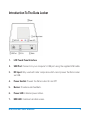
LCD Touch Panel Interface
2.
USB Port: Connects to your computer’s USB port using the supplied USB cable.
3.
DC Input: Only used with older computers which cannot power the Data Locker
via USB.
4.
Power Switch: Powers the Data Locker On and Off.
5.
Buzzer: Provides audio feedback.
6.
Power LED: Indicates power status.
7.
HDD LED: Indicates hard disk access.
Data Locker User Manual
3