1
i1iSis Optical Brightener Compensation (OBC) Module - User Guide
Where to Find Profile Target Files
Special profiling targets are provided in the OBC Module’s “OBC 1.0/OBC Profiling Targets” folder.
In the “CMYK Profiling Charts” folder are A3, A4, Letter and Tabloid size targets. The A4 and Letter
sizes are laid out as multiple pages. You will need to print all of the pages for these sizes.
In the “RGB Profiling Charts” folder are A4 and letter size targets. During the profiling process, a
unique “Gray Evaluation Chart” will be created. The Gray Evaluation Chart is intended to be use only
once during the OBC correction process and then discarded.
Optical Brightener Compensation Standards
The OBC Module comes with two sets of OBC Gray Standards, each containing four different gray
levels. Depending on the surface properties of the substrate, the glossy or the matt set of Gray Standards should be used.
The user should first print the “Gray Evaluation Chart” on the same printer using the same substrate
and same printer driver settings as were used for the printing of the profiling test charts earlier (either
CMYK or RGB) in the process. Individual patches of the Gray Evaluation Chart are to be compared
visually against the OBC Gray Standards in the typical viewing condition used for hardcopy proof
evaluation (e.g. in a viewing booth or at the control panel of a printing press).
4. Printing Test Charts
Printing an RGB Test Chart from Adobe Photoshop
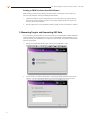
When profiling a printer through a print driver, you will need to select an RGB target. We recommend
printing the target files through Adobe Photoshop.
7
1.
Open Adobe Photoshop
2.
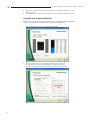
Open desired profiling target for RGB printer.
3.
Select “Leave as is (don’t color manage)”.