1
Overview of your
PhotoFrame
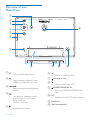
a
b
c
l
d
e
f
g
h
a
•
Turn on/off the PhotoFrame
•
Toggle between slideshow mode,
thumbnail mode, and main menu
b
c
j
k
f
•
g
Slot for a USB flash drive
Kensington lock
h
•
Slot for a USB cable to PC
/ / /
• Select the previous/next/right/left
option
i
•
j DC
• Socket for the AC-DC power adaptor
d
•
•
Play photos in slideshow mode,
browse mode, or clock mode
Pause slideshow
Confirm a selection
•
Enter/Exit photo menu
e
6
i
EN
SD/MMC/xD/MS/MS Pro
• Slot for an SD/MMC/xD/MS/MS Pro
card
k Stand hole
l Wall mounting hole