1
5 Intercom and
conference calls
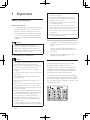
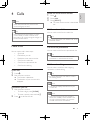
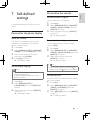
An intercom call is a call to another handset
that shares the same base station. A conference
call involves a conversation among you, another
handset user and the outside callers.
Make a call to another handset
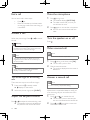
Toggle between calls
Press int to switch between the outside call
and the intercom call.
Transfer a call
1
2
3
Note
•• If the base station only has 2 registered
handsets, press int to make a call to another
handset.
1
2
3
4
Press int. The handsets available for
intercom are displayed.
Select or enter a handset number, then
press [SELECT] to confirm.
»» The selected handset rings.
Press
on the selected handset.
»» The intercom is established.
Press
to cancel or end the
intercom call.
Note
•• If the selected handset is occupied in a call, you
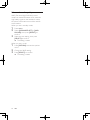
1
2
14
Press int.
»» The current caller is put on hold.
Select or enter a handset number, then
press [SELECT] to confirm.
»» Wait for the other side to answer your
call.
EN
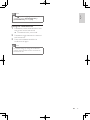
Press
when the other side answers
your call.
»» The call is now transferred to the
selected handset.
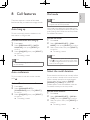
A 3-way conference call is a call between you,
another handset user and the outside callers.
It requires two handsets to share the same
base station.
During an external call
1
2
3
You can go from one handset to another
during a call:
Select or enter the handset number, then
press [SELECT] to confirm.
Make a conference call
hear a busy tone.
While you are on the phone
Press int during a call.
4
5
Press int to initiate an internal call.
»» The handsets available for intercom are
displayed.
»» The external caller is put on hold.
Select or enter a handset number, then
press [SELECT] to confirm.
»» The selected handset rings.
Press
on the selected handset.
»» The intercom is established.
Press and hold int on your handset.
»» You are now on a 3-way conference
call with the external call and the
selected handset.
Press
to end the conference call.