1
Controls and functions
Projector and remote control
12
1
5
18
14
10
15
11
16
13
6
2
3
9
4
5
6
7
8
10
8
11
6
12
6
17
19
13
1.
2.
3.
4.
8
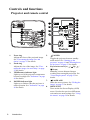
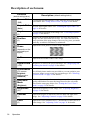
Focus ring
Adjusts the focus of the projected image.
See "Fine-tuning the image size and
clarity" on page 25 for details.
Zoom ring
Adjusts the size of the image. See "Finetuning the image size and clarity" on page
25 for details.
TEMPerature indicator light
Lights up red if the projector's temperature
becomes too high. See "Indicators" on page
46 for details.
POWER indicator light
Lights up or flashes when the projector is
under operation. See "Indicators" on page
46 for details.
Introduction
5.
6.
7.
8.
I
I
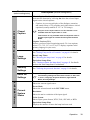
POWER
Toggles the projector between standby
mode and on. See "Starting up the
projector" on page 19 and "Shutting down
the projector" on page 33 for details.
Keystone/Arrow keys ( / Up,
/
Down)
Manually corrects distorted images
resulting from an angled projection. See
"Correcting keystone" on page 25 for
details.
Left/BLANK
Hides the screen picture. See "Hiding the
image" on page 31 for details.
MENU/EXIT
Turns on the On-Screen Display (OSD)
menu. Goes back to previous OSD menu,
exits and saves menu settings. See "Using
the menus" on page 20 for details.