1
Feel Design
User Guide
MEDIADISK NRX Series
USER GUIDE
1. SAFETY AND OTHER INSTRUCTIONS
1
2. REMOTE CONTROL
2
3. NETWORK BASED DATA SHARING WITH PC
4
4. MENU INTERFACE
8
5. BROWSER MENU
9
6. RECORDING FUNCTION
12
7. FILE COPY MENU
14
8. SETUP MENU
15
9. SPECIFICATIONS
19
10. TROUBLESHOOTING
21
Mediadisk NRX Series is a Home Media Center, with a built-in 3.5“ HDD, can record and play media files
(movies, audios and photos) through TV and when connected to PC, can also copy and play shared files
via network.
SAFETY AND OTHER INSTRUCTIONS
Please use NRX carefully and read following instructions.
>>> Copyright
Software, audio, video or any intellectual
properties are protected by copyright and
international laws.
It is user’s responsibility when reproducing or
distributing content(s).
>>> Codec Check
This product may not support some media formats.
Please check available codec types.
>>> Data Backup
Please backup datas stored in this product in a
safe place. We are not responsible for any data
loss or damage.
>>> Drop / Shock
Do not give shock or drop the NRX. This may
damage it.
>>> Foreign Substance
Do not insert any metal or inflammable foreign
substances into player. This may damage it.
>>> Disassembly / Modification
Do not attempt to disassemble or modify any part
of NRX. This may damage it.
Any product modification may void the warranty.
>>> Load
Do not place any heavy object on the top of the
NRX. This may damage it.
>>> Chemicals
Do not clean product using chemicals cleaners.
This may damage the NRX.
-1-
>>> Water / Moisture
Do not contact the NRX with water or liquid.
This may cause fire or electric shock. If any
conductive liquid enters, turn off the NRX and
disconnect power adapter immediately.
>>> Magnet or Magnetic Properties
Do not place the NRX near a magnetic field. This
may cause a malfunction or damage stored data.
>>> Heat
Do not place the NRX under direct sunlight or near
a heat source. Do not keep it for long time in high
temperature. This may damage it.
>>> Vision / Hearing
Do not watch TV or hear loud sound for long time.
This may cause vision or hearing problem.
>>> Fire
During NRX use, if you detect smoke or unusual
smell, turn off product, disconnect adapter
immediately, and call the aftersales department if
required.
>>> Children
Do not let children touch the NRX. They may
damage it.
>>> Power
Do not use many electronic products with single
outlet.
Firmly insert power plug. When working, do not
unplug.
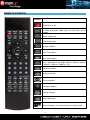
REMOTE CONTROL
Function
Buttons
POWER on or off.
Display media file information.
In video and photo mode, press to view time, title or
chapter.
Select audio track.
View Guide menu.
Activate subtitles.
Enter Timer Menu.
Mute audio output.
Record or resume when paused.
Press repeatedly to set length: 30mins / 60mins / 90mins
/ 120mins / 180mins / 240mins / Off.
Decrease volume.
Increase volume.
Press to confirm.
Navigation buttons
Change settings.
Select option bar.
Numeric buttons: To select channel or numeric input.
-2-
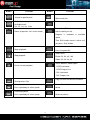
Button
Function
Function
Button
Jump to a specific point.
Skip to next title.
SLOW button: play in slow motion.
Available levels:
3/4, 1/2, 1/4, 1/8, 1/16x
Browse music, photo and movie files.
Pause live TV and resume program
Return to previous list in menu mode.
from the point you left.
Program
is
recorded in available
space.
Time Shift mode remains active until
you press “Play” button.
Begin playback.
Press to repeat title.
Zoom levels:
Stop playback.
Photo: 2X, 4X, 8X, 16X
Video: 2X, 3X, 4X, 8X
Switch between video output:
Pause current playback.
- NTSC Interlaced
- NTSC Progressive
- PAL Interlaced
- PAL Progressive.
Copy file from one device to another.
Go to previous title.
Rewind playback.
Select file or folder to rename or to
Press repeatedly to select speed.
delete.
Forward playback.
Press repeatedly to select speed.
Select to confirm.
-3-
NETWORK BASED DATA SHARING WITH PC
Network-based Data Sharing with PC
After LAN cable is connected, according to your system environment, set up windows network as
follows.
To establish network communication between NRX and your computer, two requirements should be
satisfied:
1)
Folder sharing and security setup
2)
Using same IP address band and Subnet Mask
Data sharing Setup for Windows XP
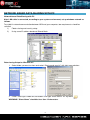
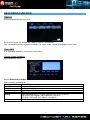
1. Select folder you want to share and select “Sharing and security” with right mouse button.
2. Check “Sharing this folder on the network” and type “Share Name”. Ex: My Movie
WARNING! “Share Name” should be less than 12 characters.
-4-
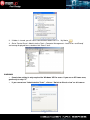
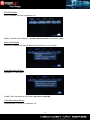
3. If folder is shared, you will see a hand mark on folder icon. Ex: My Movie
4. Go to “Control Panel –Administrative Tools –Computer Management –Local Users and Group”
and among displayed items, double–click “Guest” item.
WARNING!
• Permission setting is only required for Windows XP Pro users. If you are an XP home user,
go directly to step “6”.
• If you cannot see “Administrative Tools”, click on “Switch to Classic view” on left corner.
-5-
5. After checking “User cannot change password” and “Password never expires”, keep the other
checkboxes unchecked.
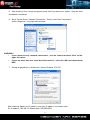
6. Go to “Control Panel—Network Connections”. Select “Local Area Connections”.
Select “Properties” using right mouse button.
WARNING !
•
If you cannot see any “Network connections”, click on “Switch to Classic View” on the
upper left corner
•
If there are more than two “Local Area Connections”, select the LAN card connected to
NRX.
7. Among displayed items, double-click “Internet Protocol (TCP/IP)”.
After checking “Specify an IP address” enter your IP address and subnet mask.
Ex: IP address: 192.168.1.3 Subnet Mask: 255.255.255.0.
-6-
WARNING!
If your PC already has “Obtain IP address automatically” checked and IP automatically assigned
from an Internet router or DHCP server, you may not need this setup.
If you want a manual IP setup, please obtain an available IP address and subnet mask from the
router manufacturer or network administrator.
If “Internet Connection Firewall” option is checked, cancel this option.
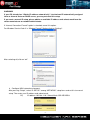
For Windows Service Pack 2 in “Window Firewall” Section click on “Settings”.
After selecting off, click on “ok”.
8. Configure NRX network environment.
After pressing “Setup”, select “IP SETUP” among “NETWORK” setup items and set this to manual
setup. Then enter your IP address and subnet mask.
Ex)
IP address:192.168.1.10 / Subnet Mask: 255.255.255.0.
-7-
MENU INTERFACE
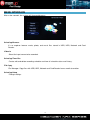
After a few seconds, the system will show guide menu.
Selecting Browser
It’s an explorer: browse movie, photo, and music files stored in USB, HDD, Network and Card
Reader.
Video In
Select the input source to be recorded.
Selecting Timer Rec
Create, edit and delete recording schedule and view all schedule status and history.
File Copy
File Manager: Copy files with USB, HDD, Network and Card Reader from a media to another.
Selecting Setup
Change settings.
-8-
BROWSER MENU
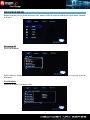
Browse and play music, photo and movie files stored in NRX or external USB device, card reader, Network
or Playlist.
Browsing All
Select All in menu.
Select folder(s) containing all files (Music ,Photo and Movie). Select file you want to view and it will be
displayed.
File Edit Menu
Select file or folder, and display Edit.
-9-
Return
Select to go to main screen.
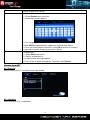
Rename
To rename file:
1. Select Rename from menu bar.
2. Name entry screen appears.
Delete
3. Use navigation arrows to select letters and numbers.
Select CAPS to toggle between uppercase and lowercase letters.
4. Once you have entered new name, select OK to confirm all changes.
If you want to cancel changing name, press Return
To delete title:
1. Select Delete from menu.
2. Confirm and delete file.
3. A confirmation message appears.
4. Press Enter to delete selected file. To cancel, select Return.
Browse from NET
My_Short Cut
Reach directly the PC, no need to access by network.
My_Neighbors
Enter directly to PC’s shared folder.
- 10 -
Browse Music
Select folder containing your audio files. A thumbnail strip will appear at the screen bottom, with song
information.
NRX supports Mp3, WMA, AAC, OGG format.
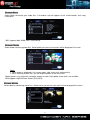
Browse Photos
Select folder containing photo files. Select photo you want to view and it will be displayed full screen.
Note:
1. When photo is displayed in full screen mode, slide show starts automatically.
2. While listening to MP3 files, you can browse photos at the same time.
Rotate photo in any angle with navigation arrows or zoom in/out photo, three levels are available.
NRX supports High Definition Photo (JPG,JPEG).
Browse Movies
Select folder(s) containing movie files. Select movie you want to view and it will be displayed full screen.
- 11 -
RECORDING FUNCTION
Video in
Select to record directly from AV in.
System will create “My Recordings” folder at HDD or USB device.
Your recorded file will be saved at this folder. File name will be named according to system time.
Timer REC
Plan recording schedules, view status and history.
Create a New Schedule
Select Edit from menu.
Select Add a New Schedule and confirm.
Adjust settings according to:
Source
Video / YCbCr
Start Time
Enter recording date and time.
Length
Enter recording length
Repeat
Program a record schedule.
Device
USB or HDD support
Quality
Select recording quality. Choose from HQ, SLP, EP, LP and SP.
High quality level requires more space on hard drive.
Left screen HDD/USB Free Space is for details.
Preview
Show selected channel current program.
- 12 -
Edit Schedules
Select schedule you want to edit from list.
Modify schedule as described in “Create a New Schedule” on previous page.
Delete Schedules
Select the schedule you want to delete and confirm one, all or cancel.
View Schedule Status
Schedule list is displayed.
Enable Timer according to your needs: by User or stand by.
View Recording History
View complete history of all recordings set.
- 13 -
FILE COPY MENU
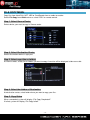
Copy files from Hard Disk, NET, USB or Card Reader from a media to another.
Select File Copy from Guide menu or select COPY on remote control.
Step 1. Select Source Device
Select device your want to copy in Source sector.
Step 2. Select Destination Device
Select Destination device in right part.
Step 3. Select copy files or folders
At Source sector, select files or folders you want to copy. A mention will be displayed aside name side.
Step 4. Select the folders of Destination
At destination sector, select folder where you want to copy your files.
Step 5. Copy Status
When succeeded, system will display “File Copy Completed!”.
If failed, system will display “File Copy failed!”
- 14 -
SETUP MENU
Configure video, record and system settings.
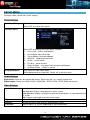
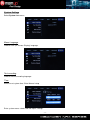
Photo Settings
Slide Show Timing
Set slide show time.
Select OFF or interval you require.
Transition Effect
Background Music
Select OFF or following transition effects required:
1) Cross Fade – fade in and fade out
2) Left to Right- from left to right
3) Top to Bottom- from top to bottom
4) Waterfall - steep descent of water
5) Snake – snake motion
6) Dissolve – water dissolve
7) Strip Left Down – strip cover from left top to right bottom
8) All Effect Shuffle – shuffle in and out
Play music file under same folder.
Select background music position. Select “off” to close function.
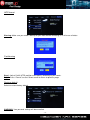
Audio Settings
Night mode: Sound will be reduced but clearer. Select from off / on / comfort and confirm.
Digital output: Select from HDMI LPCM / HDMI RAW / SPDIF LPCM / SPDIF RAW and confirm.
Video Settings
Aspect Ratio
Brightness
Contrast
TV System
Select from: Pan Scan 4:3 / Letter Box 4:3 / 16:9 and confirm.
Pan Scan 4:3: Display a wide picture on entire screen.
Letter Box 4:3: Display a wide picture with two black borders on top and bottom of
4:3 screen
16:9: Compressed image to convert whole image.
Set brightness levels. New setting is previewed on screen.
Set contrast levels. New setting is previewed on screen.
Select to adjust TV system, depending on your preferences.
- 15 -
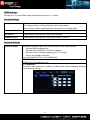
HDMI Settings
Change your TV-set to HDMI output to be displayed on your TV screen.
Record Settings
Quality
Select to set default recording quality setting.
The highest quality is HQ and requires more storage space.
Other settings reduce recording quality and require less storage space.
Permanent Timeshift
Select to set Permanent Timeshift on or off.
REC Device
Choose device (hard drive or USB) to be recorded.
Timeshift Device
Choose device (hard drive or USB) to be used for Timeshift.
Network Settings
Wired Lan Setup
Set Network Settings. Before use these functions, check following items:
1) Connect NRX to Network first.
2) Please enable NetBIOS of TCP/IP on computer.
3) Please turn off or configure properly your PC’s firewall.
4) Please share folders to browse.
Then select DHCP(AUTO) or FIX IP(MANUAL).
DHCP IP(AUTO)
Set DNS server IP address by auto.
FIX IP (MANUAL)
You have to enter followings: IP address, Subnet Mask, Default Gateway according
to your domestic settings.
- 16 -
System Settings
Select System from menu.
Menu Language
Choose OSD (On Screen Display) language.
Text encoding
Choose the text encoding language.
Time
Select to set system time. Enter Manual setup
Enter system menu: select field and adjust settings.
- 17 -
HDD format
Warning: Make sure you made a backup of your datas before formatting as it will erase all datas.
Partitionning
Step 1: Adjust Fat32, NTFS partition and capacity according to your needs.
Step 2: Press “Format” to start. Select cancel to return to previous page.
Restore default
Select to restore factory default.
WARNING: Your personal settings will be cancelled.
- 18 -
SPECIFICATIONS
CONTENT FORMAT SUPPORTED:
Video: AVI / MPG / MPEG / MP4 / DAT / VOB
Photos: JPEG / JPG
Maximum pictures recognizable: 9999 files
Audio: MP3 / WAV / WMA / ACC / OGG
Maximum files recognizable: 9999 files
Compression rate: between 32 kbps and 320 kbps
RECORDABLE MEDIA SUPPORTED:
Built in HDD
Built in USB
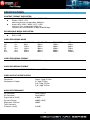
VIDEO RECORDING MODE
Mode
HQ
SP
LP
EP
SLP
DVD
1hr
2hrs
3hrs
4hrs
6hrs
320 GB HDD
64hrs
128hrs
192hrs
256hrs
384hrs
500 GB HDD
100hrs
200hrs
300hrs
400hrs
600hrs
750 GBHDD
150hrs
300hrs
450hrs
600hrs
900hrs
VIDEO RECORDING FORMAT
MPEG2: DVD+VR (HQ/SP/LP/EP/S-LP mode)
AUDIO RECORDING FORMAT
DVD+VR (HQ/SP/LP/EP/SLP mode): MPEG2 2-chanel
VIDEO OUTPUT SPECIFICATION
Composite
Components Output
Output 1 Vpp 75 Ohm
Y:1 Vpp 75 Ohm
Cb:0.7 Vpp 75 Ohm
Cr:0.7 Vpp 75 Ohm
AUDIO PERFORMANCE
DA Converter
AD Converter
Signal-Noise (1kHZ)
Dynamic Range
Separation Channel
Total Harmonic
Distortion (1kHZ)
24-bit/192kHZ
24-bit/96kHZ
95dB
90dB (1kHZ)
95dB
-85dB
- 19 -
1TB
240hrs
480hrs
720hrs
940hrs
1440hrs
CONNECTIONS
Video Input
RCA Connector (yellow) x 1
Audio L/R Input
RCA Connector (white/red) x 1
IEEE 1394 Input
Mini Jack x 1
USB
USB Port x 1
HDD
Atapi port x 1
Video Output
RCA Connector (yellow) x 1
Audio L/R
RCA Connector (white/red) x 1
Video Input
RCA Connector (yellow) x 1
Audio L/R
RCA Connector (white/red) x 1
S-Video Input
4-pin
Component / Progressive
YPbPr
GENERAL
Power Supply
AC 100~240V - 50~60Hz
Power
Approx. 35 W
Operating
+5°C to +40°C (+36°F to +104°F)
Operating Humidity
5% to 80% RH
Dimensions (W/H/D)
430 x 66 x 316 mm
Net Weigh
Approx. 2300 grs
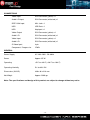
Note: The specifications and design of this product are subject to change without any notice
- 20 -
TROUBLESHOOTING
For detailed troubleshooting information, please visit www.memup.com and consult FAQ
1. When power is on, nothing appears or screen is shaking:
Video output mode is not properly set, press [TV SYSTEM] on remote control to change output mode
until it is properly set.
2. While playing movie file, subtitle is not shown.
Make sure movie file name matches to subtitle file name.
3. While playing movie, there is no audio output.
In SETUP menu, check if audio output mode is properly set.
Check volume level.
Check if [MUTE] is activated.
Display different TV output to check if none are available
4. I can’t connect NRX to network.
Please refer to Network settings part and follow step by step
It could depend on your Operating system, for other OS, please check our FAQ in www.memup.com
Make sure your personal firewall is deactivated or correctly set to function with NRX
Make sure your network cable is correctly plugged
Shared files must be activated in your domestic network
5. I can’t see what I’m recording
Make sure you’re in Video in part
Check if you are correctly plug through AV in input
6. The NRX can’t read my files (h.264, mkv, rmvb, png, bmp …).
NRX chipset can’t read some files, even some firmware couldn’t correct, reading files are mentioned
on giftbox and in “specifications” part. Some will be added and available in www.memup.com
7. Some Remote control buttons have no functions.
Some functions will be added and will be available thanks to firmware in www.memup.com
- 21 -