1
6
Use more of your
phone
6.1
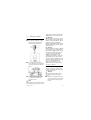
Switch the handset on/off
Press and hold e key for more than 5
seconds to switch on/off the handset in
idle mode.
6.2
Keypad lock/unlock
Press and hold * key for 1 second to
lock/unlock the keypad in idle mode.
6.3
Text or number entry
When you select a field in which you can
enter text, you can enter the letters that
are printed on the keys by pressing the
relevant key once or several times. For
example, to enter the name “PAUL”:
1 Press 7 once: P
2 Press 2 once: PA
3 Press 8 twice: PAU
4 Press 5 three times: PAUL
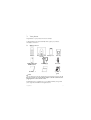
The table below gives you the character
assignment during text or number entry:
Keys
1
2
3
4
5
6
7
Assigned characters
space 1 _ < > *
8
9
0
#
*
TUV8?
WXYZ9
0-/\#+
#
*
Tip
Press cBACK to delete the last digit or
character entered.
6.4
Call in progress
Some options are available to you during a
call. The available options are:
6.4.1 Adjust earpiece volume
During a call, press : to select from
VOLUME 1 to VOLUME 3.
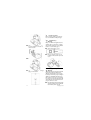
6.4.2 Mute/unmute microphone
When the microphone is muted, your
correspondent cannot hear you.
1 During a call, press M key to turn
off the microphone.
2 Press M key again to turn on the
microphone.
ABC2
6.4.3
DEF3
Danger
Handsfree activation can suddenly
increase the volume in the earpiece to a
very high level. Make sure the handset is
not too close to your ear.
GHI4
JKL5
Activate/deactivate
loudspeaker mode
MNO6
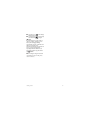
1 During a call, press v key to
PQRS7
2 Press v key again to return to
activate the loudspeaker mode.
normal mode.
20
Use more of your phone