1
RESTORE DEFAULT
DEFAULT VALUES
RESTORE DEFAULT
USB-KBD DEFAULT SETTINGS
USA keyboard, FIFO enabled, inter-character and inter-code delays disabled,
control character emulation = ctrl+shift+key.
DATA FORMAT:
code identifier disabled, no field adjustment, code length not
transmitted, no header, terminator = ENTER, character replacement disabled.
KEYBOARD NATIONALITY
USING TOUCH™ LIGHT SERIES READERS
USB-KBD and Wedge users should select one of the following wedge keyboard
nationality codes according to your keyboard.
Ì$+$*oÎ
Belge
To change the defaults refer to the HHD II Software Configuration Manual, part
number 90ACC1877, or to the DL Sm@rtSet™ Configuration program, both
downloadable from the website.
Ì$+FJ7$-8Î
scanning line
RS232 Standard DEFAULT SETTINGS
9600 baud, no parity, 8 data bits, 1 stop bit, no handshaking, delay disabled, rx
timeout 5 sec., ack/nack disabled, FIFO enabled, serial trigger lock disabled.
DATA FORMAT:
code identifier disabled, no field adjustment, code length not
transmitted, no header, terminator = CR-LF, character replacement disabled.
WEDGE DEFAULT SETTINGS
USA keyboard, caps lock off, caps lock auto-recognition enabled, num lock
unchanged, inter-character and inter-code delays disabled, control character
emulation = ctrl+shift+key.
DATA FORMAT:
code identifier disabled, no field adjustment, code length not
transmitted, no header, terminator = ENTER, character replacement disable.
Deutsch
Select one of the interface codes according to your application.
USB INTERFACE SELECTION
•
•
Ì$+FJ6$-3Î
Ì$+UA03$-:Î
Ì$+UA04$-@Î
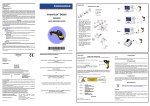
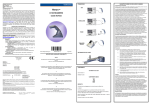
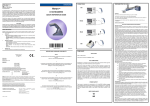
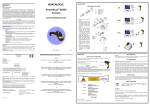
Touch™ Light readers scan barcodes on contact. All models have a hardware
trigger button which by default must be pressed to read a code. After configuring
the reader interface type, the software trigger parameter (available in this manual)
can be selected so that the reader operates like a model without trigger.
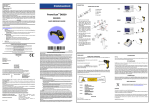
Code scanning is performed along an imaginary line passing across the reading
window. This imaginary line must pass through the entire code.
Successful scanning is obtained by keeping the handle of the reader parallel with
respect to the code surface, see the figure above.
Français
CODE SELECTION
Enabled codes
•
Ì$+FJ4$-)Î
Español
USB-KBD - ALT-mode
trigger button
English
USB-KBD
PEN DEFAULT SETTINGS
interpret mode, conversion to code 39 disabled, output level normal, idle level
normal, minimum output pulse 600 μs, overflow medium, inter-block delay disabled.
•
Ì$+FJ3$-$Î
INTERFACE SELECTION
Ì$+FJ2$-ÊÎ
Italiano
EAN 8/EAN 13 / UPC A/UPC E without ADD ON
check digit transmitted, no conversions
Ì$+FJ1$-ÅÎ
USB-COM *
Interleaved 2/5
check digit control and transmission, variable length code; 4-99 characters
Standard Code 39
Ì$+UA02$-4Î
Japanese
Ì$+FJ8$-=Î
no check digit control, variable length code; 1-99 characters
Code 128
variable length code; 1-99 characters
USB-IBM-Hand Held
EAN 128, ISBT128, Code 93, Codabar, pharmaceutical codes, MSI,
Plessey, Telepen, Delta IBM, Code 11, Code 16K, Code 49, RSS Codes
* When configuring USB-COM, the relevant files and drivers must be installed
from the USB Device Installation software, which can be downloaded from the
web site http://www.scanning.datalogic.com.
RS232 INTERFACE SELECTION
TECHNICAL FEATURES
RS232 Standard
Electrical Features
Ì$+CP0$-$Î
Power Supply
RS232 interface
Consumption:
Maximum
Operating
Sleep mode &
USB Suspend Mode
150 mA @ 5 Vdc
100 mA @ 5 Vdc
< 500 μA @ 5 Vdc
Ì$+CM2EC0$->Î
Fujitsu
USA (Default)
Ì$+FJ0$-|Î
DATA FORMAT TERMINATORS
TRIGGER SELECTION
For your convenience, some common Terminators are given below. For other
Header/Terminator selections, Data Format and Advanced Data Format
parameters, see the HHD II Software Configuration Manual.
After configuring the reader interface type, the software trigger parameter can be
selected so that the reader operates like a model without trigger.
CR-LF
Ì$+EA120D0A$-ÃÎ
Software Trigger
Ì$+CM1$-ÈÎ
256 scans/sec
Reading Indicators
Ì$+FJ5$-.Î
Nixdorf Mode A
5 Vdc ± 5%
Max. Scan Rate
Svenskt
Ì$+UA01$-.Î
Disabled codes
ICL Mode
Enter
Ì$+CM0$-ÃÎ
LED, Beeper
Ì$+EA1183$-0Î
Optical Features
Touch™ 65 Light
Sensor
Reading Field
Touch™ 90 Light
CCD solid state (2088 pixels)
63 mm typical
80 mm typical
Max. Resolution
0.10 mm
(4 mils)
0.13 mm
(5 mils)
PCS
min. 25% (Datalogic Test Chart)
WEDGE INTERFACE SELECTION
Ì$+BK1$-yÎ
Ì$+EA1184$-8Î
Ì$+CP500$-aÎ
PC Notebook
Ì$+CP505$-ÈÎ
0° to +55 °C / 32° to 131 °F
Storage Temperature
-20° to +70 °C / -4° to 158 °F
Humidity
♦ Hardware Trigger
Tab
Wedge IBM AT or PS/2 PCs
Environmental Features
Working Temperature
90% non condensing
Drop Resistance
1.2 m (3 ft 9 in)
ESD Protection
16 KV
Protection Class
IP30
None
Ì$+EA10$-dÎ
PC Notebook - ALT mode
Ì$+CP508$-2Î
IBM AT - ALT mode
Ì$+CP507$-+Î
OPERATING TEST
Read the TEST code below.
Mechanical Features
Weight (without cable)
Cable Length
about 160 g (5.6 oz)
about 195 g (6.8 oz)
2 m (6 ft 6 in)
Ì$+BK0$-tÎ
Many other interfaces are supported and can be selected from the HHD II
Software Configuration Manual available online at www.scanning.datalogic.com.
Other supported interfaces:
Code 128
USB: USB-IBM-Table Top; USB-KBD-APPLE
WEDGE: IBM XT; IBM SURE1; IBM Terminal 3153; IBM Terminals 31xx, 32xx,
34xx, 37xx; Wyse Terminals ANSI – PC –ASCII – VT220 style Keyboards; Digital
Terminal VT2xx/VT3xx/VT4xx; APPLE ADB Bus
t
e
s
t