1
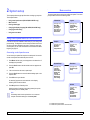
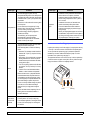
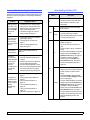
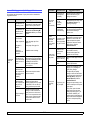
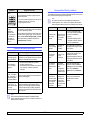
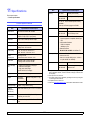
System Setup menu
Item
Use the System Setup menu to configure a variety of printer features.
Item
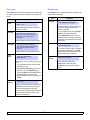
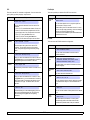
Language
Job Timeout
Explanation
Values: English, FRANCAIS, Espanol,
I. Portuguese, B. Portugues, Deutsch,
Italiano,...
Maintenance
This item allows you to maintain your printer.
• Clean Drum: Cleans the OPC drum of the
cartridge and produces a cleaning sheet with
toner debris on it.
• Clean Fuser: Cleans the fuser unit inside of the
printer and produces a cleaning sheet with
toner debris on it.
• CLR Empty Msg.: Prevents the Toner Low
Replace Toner message from appearing on the
display. Once you have selected On, this
setting will be permanently written to the
memory of the toner cartridge, and this menu
will be disappeared from the Maintenance
menu.
• Supplies Life: This item allows you to check how
many pages are printed and how much toner
are left in the cartridge.
Clear Setting
This menu item allows you to restore the printer’s
factory default settings.
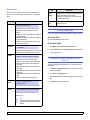
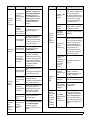
Values: [ 5] Min, [ 10 ] Min, [ 15 ] Min,
[ 30 ] Min, [ 60 ] Min, [ 120 ] Min
When the printer does not receive data for an
extended period of time, power consumption is
automatically lowered. You can set how long the
printer waits before going to power save mode.
Auto
Continue
Values: Off, On
This item determines whether or not the printer
continues printing when it detects the paper
unmatched to your paper setting.
• Off: If a paper mismatch occurs, the message
will remain on the display and the printer will
remain off-line until you insert the correct paper.
• On: If the paper is mismatched occurs, an error
message will display. The printer will go offline
for 30 seconds, then automatically clear the
message and continue printing.
Altitude Adj.
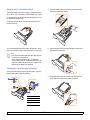
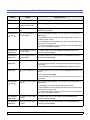
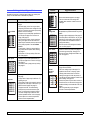
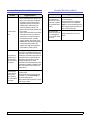
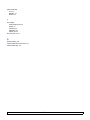
Emulation menu
Use the Emulation menu to configure printer language emulation.
Values: Plain, High
Item
You can optimize print quality according to your
altitude.
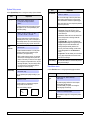
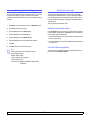
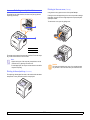
Auto CR
Values: 0 ~ 1800 sec
You can set the length of time the printer waits
before printing the last page of a print job that
does not end with a command to print the page.
When a print time-out occurs, the printer prints the
page in the print buffer.
This setting determines the language of the text
that appears on the control panel display and
information printing.
Power Save
Explanation
Emulation
Type
Values: LF, LF+CR
AA
BB
CC
LF
LF+CR
Values: Auto, PCL, EPSON, PostScript,
IBM ProPrint
The printer language defines how the computer
communicates with the printer.
If you select Auto, your printer can change the
printer language automatically.
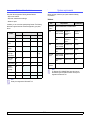
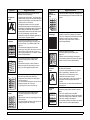
This item allows you to append the required
carriage return to each line feed.
Refer to the following samples:
AA
BB
CC
Explanation
Setup
Values: PCL, PostScript, EPSON
See the tables on page 2.5 to configure the printer
language.
2.4
<System setup>