1
4
Turn on projector and source
1
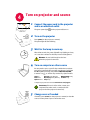
Connect the power cord to the projector
and to an electrical outlet
The green power light
2
on the projector will turn on.
Turn on the projector
Press power (on the projector or remote).
The power light will start blinking.
3
Wait for the lamp to warm up
After a few seconds, the power light will stop blinking and stay
on. It can take a minute for the lamp to reach full brightness.
5-10 sec.
Warning: Do not look directly into the lens
when the projector is turned on.
4
Turn on computer or other source
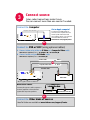
You may need to press a specific key combination to activate
your laptop’s external video port. On most laptops, hold down
the Fn key while pressing a key labeled CRT/LCD, LCD/VGA,
a monitor icon , or similar. Key combos for popular models:
Gateway Fn+F3 or Fn+F4
Apple F7
HP/Compaq Fn+F4 or Fn+F5
Dell Fn+F8
Fujitsu Fn+F10 Sony Fn+F7
IBM ThinkPad Fn+F7
Toshiba Fn+F5
Complete laptop activation chart at www.infocus.com/support
i
5
Important: If there is still no video, restart your
computer (first make sure it’s connected to the
projector and the projector is turned on).
Change source if needed
If needed, press source (on the projector or remote) to view the
source. You may have to press it more than once.