1
6
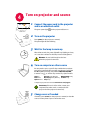
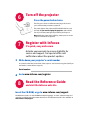
Turn off the projector
Press the power button twice
The first press shows a confirmation message; the second
press confirms that you want to power off.
The power light on the projector will blink while the fan cools
the lamp. If you need to unplug the projector, wait until the
fan stops and the power light stops blinking and stays on.
Note: While the power light is blinking, button presses on the
projector and remote are ignored.
7
Register with InFocus
It’s quick, easy and secure
Activate your warranty to ensure eligibility for
service and support. Get special offers and
notifications about free product updates.
1
Write down your projector’s serial number
It’s printed on the label on the back of the projector. You’ll need it to register (and if you
ever need to contact InFocus support).
Serial number:
2
Go to www.infocus.com/register
8
Read the Reference Guide
and visit the InFocus web site
Insert the CD-ROM, or go to www.infocus.com/support
The Reference Guide is on the CD-ROM in multiple languages. It covers advanced setup and
operation, including lamp replacement instructions. The Reference Guide is also available at
www.infocus.com/support