1
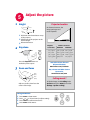
Adjust the picture
5
1
Height
Projector location
1
2
As distance increases, the
image gets larger and
moves upwards.
1 Hold down the release button on top
of the projector.
2 Lift the front of the projector to the
desired height.
Lens center line
3 Release the button.
Diagonal
2
Keystone
Screen Size
60” / 1.5 m
7’11” / 2.4 m
80” / 2 m
10’6” / 3.2 m 11’2” / 3.4 m
92” / 2.3 m
12’2” / 3.7 m
12’10” / 3.9 m
150” / 3.8 m
19’8 / 6 m
21’ / 6.4 m
Press the keystone buttons to
make the picture square.
3
Zoom and focus
Zoom
(rear)
Buy a Screen and Other Custom
Accessories
www.infocus.com/store
Ceiling mount?
To flip the image, enable Ceiling in the
System menu (press menu, then select
Settings > System > Ceiling).
Using the menus
1
2
3
4
8’2” / 2.5 m
Interactive Screen Size and
Distance Calculator
www.infocus.com/calculator
focus
(front)
Adjust zoom first, then focus the
center of the image.
Distance to Screen
Minimum
Maximum
Press menu to show menus
Press or to choose items (or adjust setting)
Press select to confirm menu choice
Press menu to hide menus