1
Intelligent Network Transmitter
2. Connection via Dial-up Modem
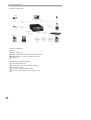
When a local network connection is not available, you can connect the INT100 through telephone
line at a remote. The INT100 can be connected via LAN and modem at the same time.
2.1 Cable
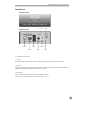
Connect an external modem (Hayse compatible, 33.6kbps or higher) to the MINIDIN-8 connector
of the RS232 port on the back panel. For this connection, MINIDIN-8/DB-9 converter is required.
The modem should be connected with a telephone line. In addition, a camera, a sensor, and/or an
audio cable to the appropriate port(s). In case of using LAN and modem at the same time, connect
a LAN cable to the network port on the back panel, and refer to the "Connection via LAN" section
in the previous chapter for the instructions on network setup.
2.2 Power
First connect the power cable to the installed modem, and then supply the power to the INT100
using a provided adapter (12VDC, 1A). The INT100 has been booted normally if POWER LED
blinks once within 10 seconds. Right after this, the INT100 executes a modem initialization
command and makes the modem ready to receive a call.
2.3 Installing a Browser for Modem Connection
Another modem should be installed in a local PC which will be connected via modem to the
INT100 at a remote site. (From now on, this particular PC will be referred to as "PC.") Insert a
supplied installation diskette to the PC, and install the INTBase100 by running "setup.exe." If
installation is successful, the folder "C:/INTBase100" has been created, and you can find a
shortcut icon on the desktop screen.
2.4 Connecting (Login)
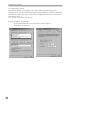
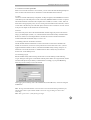
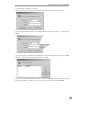
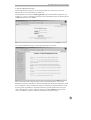
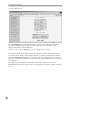
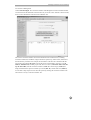
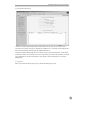
Run the INTBase100 by double clicking the shortcut icon on the desktop, and the following
"Login" dialog box will appear. Fill the blanks with the phone number of a target INT100, and the
user ID and the password provided by an administrator accordingly. If you press OK, dialing
starts and you can remotely access to the INT100.
After logging in successfully, refer to the "INTBase100 (INT100 Browser)" section for using the
INTBase100.
Note: The target INT100 should be connected with an external modem through its RS232 port,
and the phone number of the modem should be entered in "Login" dialog box above when
connecting.
Note: Enter "guest" and " " (null) for the guest login.
11