1
INSTALL HARD DISK
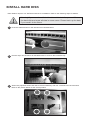
Rack Station requires 3.5” SATA hard drives for installation. Refer to the following steps for details:
Warning! If you use a hard disk with data on it to install, system will format
the hard disk and erase all data in some cases. Please back up the data
if you need it in the future.
1
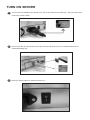
Push the release button in the direction as indicated below.
2
Pull the clip in the direction as indicated below to remove the hard disk tray.
3
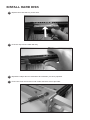
Attach the prepared SATA hard disk to the hard disk tray and use 4 screws to fix the hard disk.
Refer to the picture below for the screw position