1
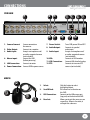
BUTTONS AND CONNECTIONS
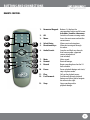
REMOTE CONTROL
1
2
3
5
6
8
9
10
4
7
11
12
13
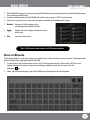
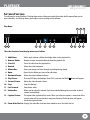
1. Numerical Keypad: Buttons 1-8 displays the corresponding camera on full screen.
0 disables / enables the mouse.
2. All:
Switch to all camera viewing mode.
3. Menu:
Access the main menu and exit the current menu.
4. Select/Enter:
Allows you to select options.
5. Directional Keys:
Allow you to navigate through
the menu.
6. Audio/Search:
Searches and finds any channels that have an audio-supported camera attached to it (not included).
7. Mute:
Mutes sound.
8. Rewind:
Rewinds footage.
9. Record:
Begins recording based on the 24 hour schedule.
10. Pause:
Pauses playback footage and starts/ stops sequence mode.
11. Play:
Calls up the playback menu.
12. Fast Forward: Fast forwards through playback footage and allows you to navigate the menu to the right.
13. Stop:
Stops recording and/or
playback footage.
9