1
6. Modifying the mIP parameters
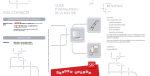
The “mIP” tab accesses the list of registered mIPs (see Fig 7). Operations that can be
executed with the selected mIP are “Update” and “Delete”. Updating a mIP parameter is
carried out by selecting the required mIP from the list and changing the necessary parameter
value. Subsequently click on the “Update” button as indicated in Fig 3 so the change is saved
in the VisorALARM and transmitted to the mIP. The updating operation can be executed if
the mIP is connected to the VisorALARM. Deregistering a mIP in the VisorALARM is done
by selecting the mIP from the mIP list and clicking on the “Delete” button. A mIP connected
to a VisorALARM and deleted immediately, loses connectivity.
Figure 7
The next table explains briefly each mIP parameter:
Parameter
Account identifier
Serial number (Read Only)
Description
This is the mIP/IPDACT device account. It must match the
Control Panel Account number
mIP/IPDACT serial number
VisorALARM Manager – Quick Guide
8
Doc. DM380-I
Rev. 3.0