1
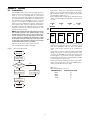
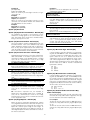
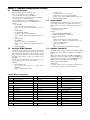
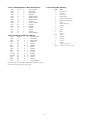
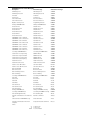
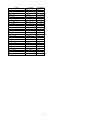
Defaults:
Option
40
41
42
43
44
45
46
47
48
49
4A
4B
4C
4D
4E
4F
Value
41
41
41
41
41
41
41
41
41
52
41
4F
43
5C
52
54
Code
A
A
A
A
A
A
A
A
A
R
A
O
C
/
R
T
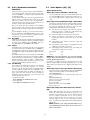
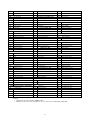
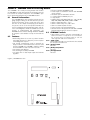
Defaults:
Value
41
41
41
41
41
41
41
41
41
52
41
43
4F
42
54
5C
Code
A
A
A
A
A
A
A
A
A
R
A
C
O
B
T
/
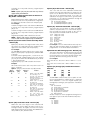
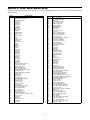
Option [71]: Library Select - Default [04]
Determines how to use Printer Words Options.
00 No printer words.
01 Printer words options used for 1-digit reporting code formats only; other will use pre-defined library.
02 Printer words options used for 2-digit reporting code
formats only; other will use pre-defined library.
03 Printer words options used for 3-digit reporting code
formats only; other will use pre-defined library.
04 Printer words options used for 1-digit and 2-digit reporting code formats only; other will use pre-defined library.
05 Printer words options used for 1-digit, 2-digit and 3-digit
reporting code formats.
NOTE: Option [71] is ignored when using SIA, ITI,
Contact-ID, ACRON, MODEM II, MODEM IIE,
MODEM IIIa², FBI SuperFast, BFSK, ADEMCO Super
Fast and SK FSK1, 2 formats.
Options [60] - [6F]: Printer Words.
The English Printer Library is provided and can be
selected by programming the event codes to the corresponding word.
For example, if the words 'exit fault' are required when
the alarm code 1 is received in 3/1 (or 4/1 formats),
Option [61] must be programmed as '87'.
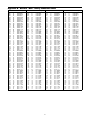
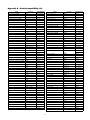
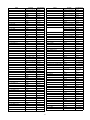
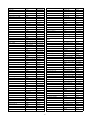
Refer to Appendix D for a list of available words.
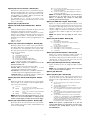
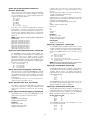
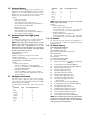
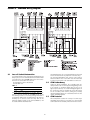
Defaults:
Option
60
61
62
66
64
65
66
67
68
69
6A
6B
Value
F2
OA
14
1E
63
62
E5
00
E4
61
F2
C6
Words
GROUP OPENING
ZONE BYPASS
SYSTEM TROUBLE
CANCEL
Some central station software packages are unable to
process an alarm using the event codes listed in the
DRL2000 Decoding Library. Where a central station
monitors thousands of accounts belonging to different
companies, the same reporting codes may have different
meanings for different companies. Because of this, the
individual event codes in Options [30] through [5F] cannot accurately represent the alarm condition. To overcome this, Option [70] may be programmed as indicated
below:
Program Operation:
00 - Use individual event codes to computer.
20, 30-39 & 41-5A - Use common event codes (space,
0-9, A-Z). When using common event codes, DSC recommends that either hexadecimal code '5A' (ASCII 'Z')
or hexadecimal code '41' (ASCII 'A') be used. The
'Space' character (Hex 20) can be used as the common
event code with certain automation software packages
to avoid account code database changes when switching over from other brand receivers to the Sur-Gard
receiver.
NOTE: Option [70] is ignored when using SIA, ITI,
Contact-ID, ACRON, MODEM II, MODEM IIE,
MODEM IIIa², FBI Super Fast, BFSK, ADEMCO Super
Fast and SK FSK1, 2 formats.
The DRL2000 will use the fifth digit of data received in 4/3
formats to determine the message and event code. The
event code will then be transmitted to the central station
computer. Refer to the DRL2000 Decoding Library for the
complete set of messages and event codes used by the
DRL2000. In Sections [50] through [5F], program ASCII
codes according to the Decoding Library. Do NOT use
values other than 20-5C (ASCII).
NOTE: The old value programmed in each Option
will not be changed until a command with valid
data is received
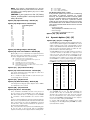
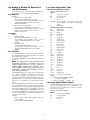
Option
50
51
52
55
54
55
56
57
58
59
5A
5B
5C
5D
5E
5F
Value
C7
E6
50
A6
Option [70]: Automation Common Event Code Default [00]
Options [50] - [5F]: 4/3 Digit 0-F
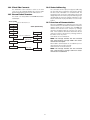
Defaults:
Option
6C
6D
6E
6F
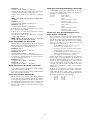
Option [72]: SIA Option - Default [00]
When this option is set to 01 the receiver will decode
SIA Alarms sent without zone numbers and add 00 as
the zone number to the automation output.
Example 1:
[#1234|Nri1BA]
Output: [#1234|Nri1BA00]
Example 2:
[#1234|Nri1BA01/RP]
Output: [#1234|Nri1BA01/RP00]
Example 3:
[#1234|Nri1BA/RP]
Output: [#1234|Nri1BA00/RP00]
When this option is set to 00 alarms sent without zone
numbers will not be modified by the receiver.
Words
PERIODIC TEST REPORT
FIRE ALARM
PANIC ALARM
BURGLARY
CLOSING
OPENING
SERVICE
MEDICAL
MESSAGE
RESTORE
PERIODIC TEST REPORT
GROUP CLOSING
17